The best AI diagram generator is the one that returns an artifact you can check and maintain. A model can write Mermaid or PlantUML; an integrated editor can produce its own diagram objects; a presentation tool can create a visual for a report. Those outputs solve different tasks.
Compare the seven workflows below by branch accuracy, source ownership, the next edit and export. Model usage, editor capacity and collaboration permissions are separate costs.
What to Look For in an AI Diagram Generator
Start with what the output is. Code-based generators return Mermaid or PlantUML text — editable, diffable, and re-renderable, but not something you reshape by dragging. Canvas-based generators return editable shapes, which is better when a diagram needs ongoing tweaks or collaboration.
Accuracy matters differently across diagram types. Flowcharts and sequence diagrams are easy for models to get right. ERDs and cloud architecture diagrams are harder, and unusual layouts often need manual fixes. Whatever the tool, plan to iterate: the strongest workflow is to treat the first generation as a draft.
Cost and environment round out the picture. Free tiers vary widely, and some tools only make sense if you already live in a particular ecosystem — an AI whiteboard is more useful when your team is already on that platform.
Prompt Quality Matters More Than the Brand
The easiest mistake with AI diagram generators is treating the tool name as the whole story. In practice, the prompt often matters more than the product. A vague prompt like “make an architecture diagram” usually produces a generic cloud picture. A useful prompt names the actors, the flow, the boundaries, and the level of detail.
For flowcharts, specify the start event, decision points, failure paths, and final states. For ERDs, list entities, keys, and relationships. For architecture diagrams, name the trust boundaries, data stores, external services, and traffic direction. For timelines, give milestones and date granularity. This is why editable output matters: even a good first draft needs local judgment.
So the best AI diagram generators in 2026 are not just the ones that draw from text. They are the ones that let you correct the diagram after generation without restarting the whole process.
1. Mermaid + Claude or ChatGPT
Free tier: Open source (cost of the LLM)
Style: Code-rendered, clean
Best for: Versioned diagrams that live in your repo
Mermaid is a text-based diagram language that renders flowcharts, sequence diagrams, ERDs, Gantt charts, and more from simple markup. It's not AI by itself, but pair it with an LLM and you get one of the most practical diagram generators available: tell Claude or ChatGPT what you want, and it writes the Mermaid.
The advantages are real. Diagrams become text, so they live in Git, diff cleanly in pull requests, and render in GitHub, Notion, and many documentation tools without any extra service. For engineering teams, that's a workflow that fits how code already moves.
There are real limits on the flip side. You're constrained by what Mermaid supports — complex layouts and custom styling get awkward fast. And the output is a rendering, not editable shapes. If someone needs to move a box by hand, they edit markup instead.
Best for: Engineers who want free, versionable diagrams inside their existing documentation workflow.
2. Claude or ChatGPT + PlantUML
Free tier: Open source (cost of the LLM)
Style: Code-rendered, formal
Best for: UML-heavy documentation
PlantUML is the older, more formal cousin of Mermaid. It's especially strong at UML — sequence diagrams, class diagrams, state diagrams, activity diagrams — and it renders from text in much the same way. Ask an LLM to "draw a UML sequence diagram for a login flow" and you'll get markup back that renders to a precise, formal diagram.
Where PlantUML stands out is its depth. For software design documentation that needs to be exact, its UML coverage beats Mermaid. It also integrates with tools like Confluence and VS Code through plugins, so it slots into established technical documentation stacks.
The trade-offs are the same shape as Mermaid's. The markup language has a learning curve for manual edits, the rendering is formal rather than friendly, and it's not a canvas you can rearrange. If you're documenting class structures or API interactions, it's a strong choice. If you want loose brainstorming visuals, it's the wrong direction.
Best for: Software teams producing formal UML documentation from text.
3. CodePic
Free tier: Unlimited
Style: Hand-drawn
Best for: Editable diagrams generated from Claude or Cursor
CodePic is a free, hand-drawn alternative with MCP AI integration. It's an infinite whiteboard — sticky notes, freehand, connectors — but it also has a broad shape library and templates for flowcharts, sequence diagrams, system architecture, ERDs, and more. The AI angle is the interesting part.
Because CodePic speaks MCP, you can describe a diagram in plain language to Claude or Cursor and get editable shapes placed directly on the canvas. "Draw a sequence diagram showing a user logging in through an API gateway" produces actual boxes, arrows, and labels you can move and restyle by hand. That combination — AI generation plus a real canvas to edit on — is what separates it from code-based generators.
Collaboration is currently read-only link sharing, so it suits sharing and feedback more than simultaneous editing. And the hand-drawn aesthetic won't suit formal corporate deliverables. For solo work and technical teams already using AI tools, it's a genuinely different option at no cost.
Best for: Developers who want AI-generated diagrams they can still edit by hand, on a free whiteboard.
Check the generated draft against a manual flow
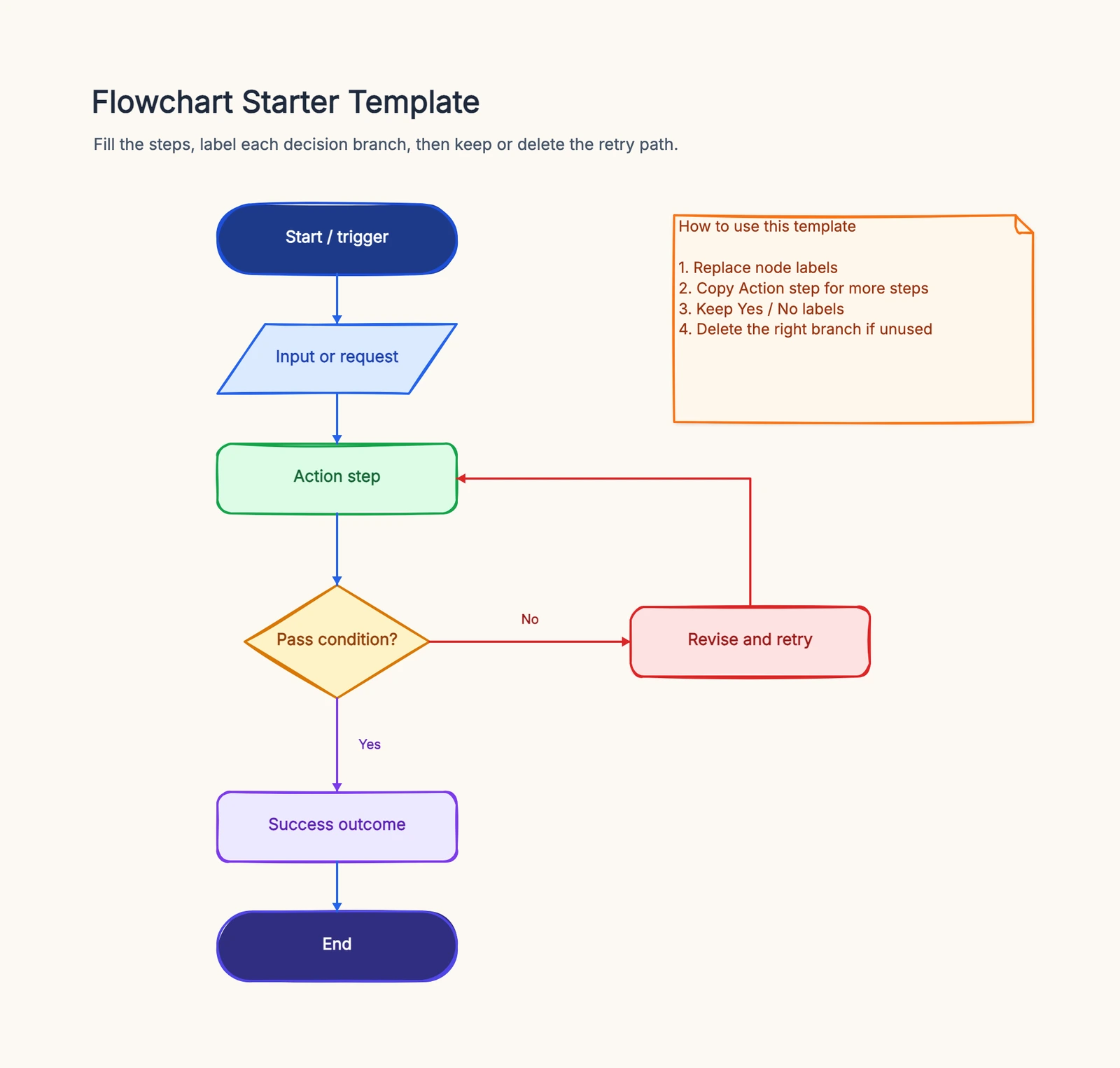
Use a return request with eligibility, approval and missing-information branches. Start from the manual template if you need a reference, then give the same requirements to a candidate generator. Add one exception in a second request and inspect the saved source. A correct-looking PNG does not prove editable nodes or valid branches.
4. Eraser.io
Free tier: 3 files
Style: Clean, technical
Best for: Engineering docs and diagram-as-code
Eraser.io is built for engineering teams. Its AI can generate diagrams from a sentence or two, and its markdown-flavored format means diagrams-as-code that live alongside documentation. It's particularly well known for cloud architecture diagrams and API flows, which makes sense for a tool aimed at developers.
The workflow is comfortable if you're technical: write in a document, describe what you want, and the diagram renders inline. Output stays editable and reviewable in a way that pure image generation doesn't offer.
Its limits are the niche itself. It's oriented around technical documentation rather than general whiteboarding, so freeform brainstorming or team workshops aren't its strengths. The free tier allows a small number of files, and paid plans are per-seat when teams need more capacity and private workspace features. If your need is formal engineering documentation, it's a solid choice.
Best for: Engineering teams that want AI-generated diagrams tightly coupled to technical docs.
5. Lucidchart AI
Free tier: 3 documents
Style: Clean, professional
Best for: Formal diagrams inside a professional tool
Lucidchart is a mature professional diagramming platform, and its AI features generate and refine diagrams within that context. Describe a process, and it proposes a flowchart you can then adjust with the full shape library, connectors, and data-linking behind it.
The strength is the environment. Unlike code-based tools, the AI output lands in a real diagram editor with auto-layout, collaboration, and enterprise integrations. For teams that already use Lucidchart, the AI is a productivity boost rather than a new tool to learn.
Cost and focus are the constraints. The free tier caps at three documents, paid plans start around $9 per user per month, and the tool is built around formal diagrams rather than loose whiteboarding. It's a professional option for teams producing structured deliverables.
Best for: Teams using Lucidchart for formal diagrams who want AI generation inside that workflow.
6. Miro AI
Free tier: 3 boards
Style: Clean
Best for: Generating diagrams inside a collaboration platform
Miro AI lives inside the broadest collaboration whiteboard on the market. It can generate diagrams from prompts, cluster sticky notes, summarize content, and even draft ideas from scratch. For teams that already run workshops and planning sessions in Miro, the AI is a natural extension.
The strength is context. Sticky notes from a brainstorming session can be clustered automatically, and a generated diagram appears on the same canvas where the conversation is happening. That's a different use case from producing a formal diagram in isolation.
Limits follow from that breadth. Diagram generation is capable but not the deepest on this list, and the real value depends on your team already being in Miro. The free tier allows three boards, and per-seat pricing climbs across a large organization.
Best for: Teams running collaborative workshops who want AI assistance on their existing whiteboard.
7. Napkin AI
Free tier: Weekly credits; branding and export rules apply
Style: Polished, visual
Best for: Turning text into presentation-ready visuals
Napkin AI takes a different approach: paste a sentence or a paragraph, and it turns the text into a visual — a flow, a comparison, a diagram-like graphic — designed to be dropped into a slide deck or document. The output is polished and heavily styled, aimed at making text scannable rather than modeling a process precisely.
That's the appeal. If you need to explain a concept in a presentation and want something that looks designed without hiring a designer, Napkin AI is fast and the free tier is generous.
The trade-off is precision and editability. The visuals are more illustration than structured diagram — connectors and shapes don't behave like a real diagram editor, and fine-grained control is limited. If you need a precise, editable diagram, you'd want CodePic, Lucidchart, or a code-based tool instead.
Best for: Making prose visually scannable in presentations and documents, quickly.
Quick Comparison
| Tool | Output | Editable Shapes | Diagram-as-Code | Free Tier | Best For |
|---|---|---|---|---|---|
| Mermaid + LLM | Rendered markup | No | Yes | Open source | Versioned docs |
| Claude/ChatGPT + PlantUML | Rendered markup | No | Yes | Open source | UML documentation |
| CodePic | Canvas shapes | Yes | JSON via MCP | Canvas and model access differ | Editable AI sketches |
| Eraser.io | Doc + diagram | Yes | Yes | Limited files | Engineering docs |
| Lucidchart AI | Editor shapes | Yes | No | 3 docs | Formal professional diagrams |
| Miro AI | Canvas shapes | Yes | No | 3 boards | Collaborative workshops |
| Napkin AI | Styled visual | Editing in Napkin | No | Weekly credits; branding | Presentation visuals |
Use one prompt, then request a change
Try this hypothetical task: “Draw a return process. A customer submits a request, support checks eligibility, an eligible request goes to refund review, and a rejected request receives a reason. An incomplete request returns for more information. Label every decision outcome.”
First count the required relationships, not attractive boxes. Is the incomplete loop present? Does rejection lead to an explanation? Has the model invented a refund policy or a deadline you never supplied? Correct those issues before judging layout.
Next ask for a second change: “Add an exchange option after eligibility.” The output should preserve the existing reject and incomplete paths. Check whether you can edit an individual label without regenerating the whole diagram, and whether the exported source can be reopened.
Record the artifact type and the generation allowance separately. Eraser’s pricing page lists three free files and three AI credits; Napkin lists weekly free credits, editing and export rules, including branding. These are different limits. Open-source Mermaid rendering says nothing about the price or privacy terms of the model writing the source.
For a manual logic check, use the flowchart tutorial before comparing visual styles.
How to Choose
If your diagrams live in a repository or wiki and need to change with your code, Mermaid or PlantUML generated through Claude or ChatGPT is the free, durable choice. The text format keeps diagrams reviewable and versioned.
For editable shapes you can drag around, CodePic's MCP flow generates directly onto a free hand-drawn canvas, and Lucidchart AI or Miro AI do the same inside their platforms. Pick based on whether you're already paying for or using those tools.
When your need is engineering documentation, Eraser.io pairs AI generation with a doc-centric workflow. If your need is presentation polish, Napkin AI turns text into designed visuals faster than anything else here.
The common thread: all of these tools produce a draft, not a final artifact. The teams that get the most out of them treat the first generation as a starting point and refine from there. For more on the whiteboard side of AI diagramming, our Excalidraw vs tldraw comparison covers the hand-drawn canvas options, and our Best Free Online Whiteboard Tools in 2026 is a broader look at free canvases.
Related Reading
- Excalidraw vs tldraw: Which Hand-Drawn Whiteboard Is Better? — For the hand-drawn canvas options that host your diagrams.
- Excalidraw Alternatives: Hand-Drawn Whiteboard Tools Compared — A broader look at the sketching category.
- Best Free Online Whiteboard Tools in 2026 — Free canvases where AI-generated diagrams can live.
- tldraw Alternatives in 2026: Hand-Drawn Whiteboards Compared — The canvas category from the tldraw side.
- Miro vs FigJam: Which Whiteboard Tool Fits Your Team? — For the collaboration platforms with built-in AI.