The right Eraser.io alternative depends on what you want to keep: diagrams written as code, an AI-assisted technical editor, or a whiteboard for discussion. Start with Mermaid or PlantUML for repository-owned source, draw.io for visual technical diagrams, and Excalidraw or tldraw for sketching. CodePic, Miro and Lucidchart address different combinations of canvas editing, AI and team handoff.
Before moving, name the restriction you actually hit. Eraser's pricing page currently lists a three-file free plan with limited AI usage. Reaching that limit is a reason to compare plans; it does not mean you need to replace its entire workflow. A team maintaining architecture notes has different requirements from someone making a single diagram for a pull request.
Eraser.io Alternatives at a Glance
| Alternative | Main workflow | Free scope or cost boundary | Main trade-off |
|---|---|---|---|
| Mermaid | Text diagrams inside Markdown and docs | Open-source renderer; hosted services are separate | Layout follows source and renderer rules |
| PlantUML | Detailed UML and technical notation | Open-source renderer; local setup or rendering service needed | More notation to learn |
| Excalidraw | Hand-drawn sketches and discussion | Free editor; Plus adds hosted features | Not a text-source documentation system |
| tldraw | Browser whiteboarding or custom canvas apps | Free public app; production SDK licensing is separate | Using a board and shipping an SDK are different decisions |
| CodePic | Editable hand-drawn whiteboard drafts | Browser editing and PNG export; external AI costs separate | Read-only sharing rather than live co-editing |
| Miro | Workshops and shared team boards | Free plan has three editable boards | Board access, permissions and AI limits need checking |
| draw.io | Formal diagrams, cloud icons and visual editing | Free web and desktop editors; integrations can be paid | Storage and integration determine collaboration |
| Lucidchart | Shared business and technical diagrams | Limited free tier; paid plans expand capacity | Check document and object limits before migration |
These are eight alternatives, not a ranking of eight interchangeable products. Use the table to narrow the choice to two workflows before spending time rebuilding diagrams.
What Should Replace Eraser: Source, Canvas or Workspace?
Keep the text source when diagrams must change alongside code. A reviewer should be able to understand that a service was added or a message moved without comparing screenshots. Mermaid and PlantUML fit that requirement. Commit the source and decide where rendering happens: in your documentation platform, your editor, or CI.
Keep the editable canvas when the next change is likely to be visual: moving a component, circling an assumption, or drawing a second option during a call. A shape-based editor makes those changes direct. Its saved document can still live with a project, but that does not automatically make its diffs readable.
Keep the shared workspace when ownership, comments, permissions and long-term retrieval matter more than the diagram syntax. Evaluate the entire review loop, including what guests can open and who can edit after the original author leaves. A free drawing tool can be sufficient for an individual and insufficient for that team process.
For a deeper comparison of text-source workflows, see Mermaid vs PlantUML vs D2. If you want to explore options beyond Mermaid, the Mermaid alternatives guide separates renderers from visual editors.
1. Mermaid: For Diagrams That Belong in Markdown
Mermaid is a good starting point when the diagram's home is a README, wiki or technical document. You describe nodes and relationships in text, then render the visual. That source can be reviewed alongside the prose explaining the system.
The practical advantage is maintenance. If a request now passes through a queue, change the relationship in the source instead of manually adjusting a screenshot. A teammate who already edits Markdown can participate without adopting another shared workspace. Check that your destination supports the diagram type and Mermaid version you need.
The limitation is visual control. Source changes and renderer updates can alter layout, and a diagram that is readable alone may be too dense inside a narrow documentation column. Keep one diagram focused on one question. Use Mermaid when reviewable relationships matter more than precise manual positioning; use a visual editor when the presentation itself needs repeated adjustment.
2. PlantUML: For Detailed UML and Technical Notation
PlantUML is worth evaluating when sequence, class or other technical notation drives the choice. Its text-source approach supports a repeatable documentation workflow, with rendering handled locally or by a service rather than by a dedicated SaaS workspace.
Choose a representative diagram before committing. Include the detail your team really uses: alternative branches, participants, notes and labels. Check both how easy the source is to review and how legible the rendered result remains. Being able to express a feature is different from being able to maintain the resulting diagram comfortably.
PlantUML asks more of occasional contributors than a drag-and-drop canvas. Document the rendering setup and keep a small example in the repository so the next person can reproduce the output. If your team only needs a few boxes and arrows in a README, Mermaid may require less notation. Our PlantUML alternatives comparison covers that boundary.
3. Excalidraw: For Technical Sketches You Discuss Together
Excalidraw is a free, MIT-licensed editor with a hand-drawn appearance, image export and real-time collaboration in the hosted app. It is useful when the diagram is a conversation aid: a rough service map, an incident explanation, or an early architecture option.
The free editor and Excalidraw+ are different offerings. Do not choose based on the old assumption that Excalidraw has no AI: its current pricing page lists generative AI in the free tier and additional hosted capabilities in Plus. Mermaid import is another route into the canvas; inspect whether your diagram becomes editable shapes or an image.
For migration, keep a native editable file as well as the PNG or SVG you paste into documentation. A screenshot may communicate the design, but it cannot replace the source when someone needs to add a component next month. Compare everyday drawing and embedding needs in Excalidraw vs tldraw.
4. tldraw: For Whiteboarding and Custom Canvas Products
Evaluate the public tldraw whiteboard if your main task is sketching, arranging ideas and discussing a board. Evaluate the tldraw SDK separately if you are building a canvas inside your own application. Those decisions have different costs and responsibilities.
The SDK is source-available under its own license. Production use requires an appropriate trial, commercial or hobby license; seeing the code on GitHub does not make it MIT-licensed. Read the current terms before choosing it as an application's foundation.
For an Eraser user, the main question is whether a general canvas replaces the documentation workflow you need. Try adding a note, revising a relationship and returning to the saved work. If text-first review is essential, retain Mermaid or PlantUML for the maintained diagram and use the whiteboard for discussion. The tldraw alternatives guide explores other canvas options.
5. CodePic: For Editable Drafts Through an MCP Client
CodePic is a hand-drawn infinite whiteboard. You can begin with shapes or a template and export a PNG without registering. Its MCP integration gives a compatible AI client a way to create and change editable canvas elements.
For a request/response example, use the sequence diagram below as a separate CodePic trial. Rename a participant, add an error response and check whether the message order remains clear. This does not import an Eraser file.
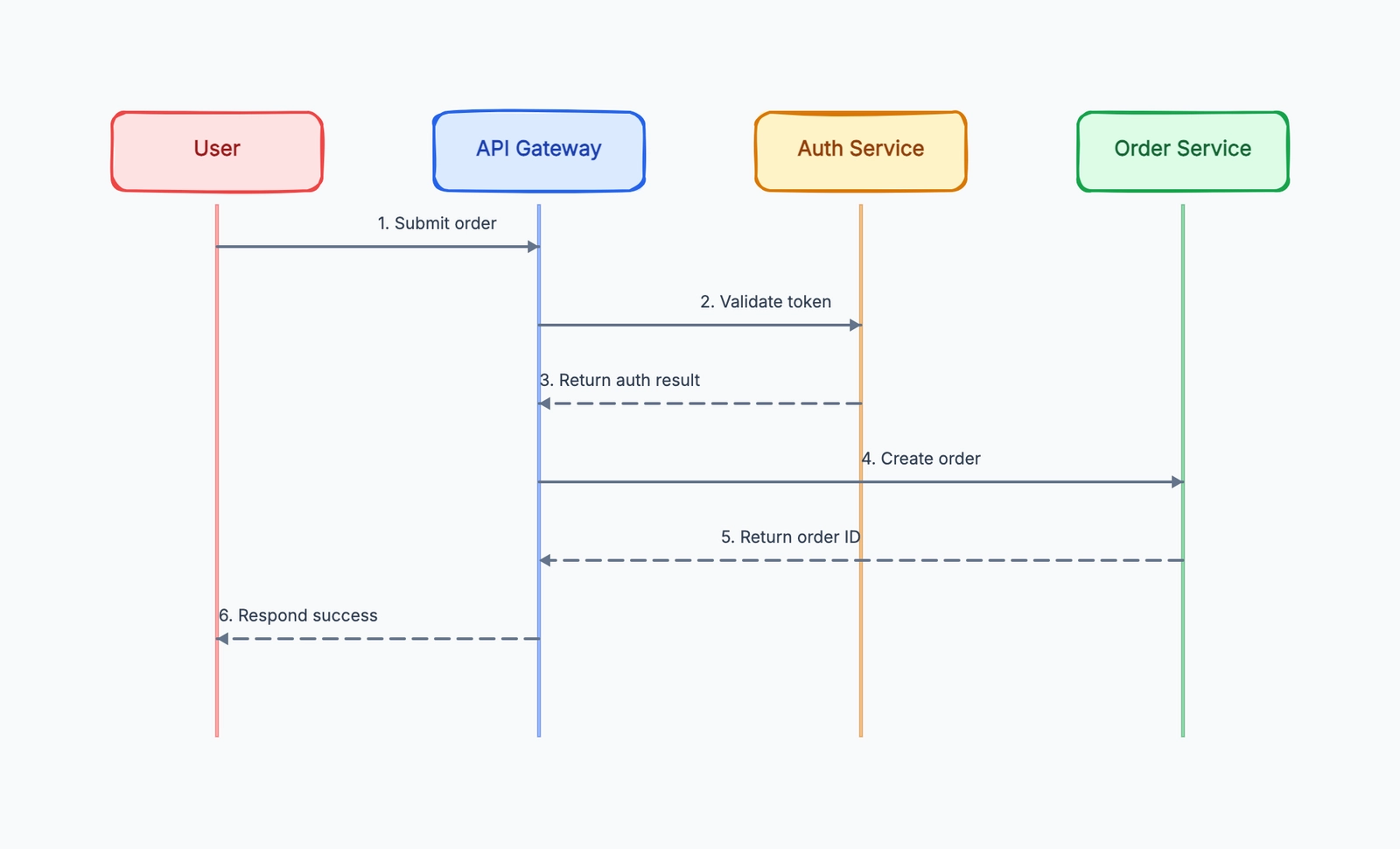
That is useful if you already work in Claude or Cursor and want to turn a description into a draft you can rearrange. It is not the same as retaining a Mermaid or PlantUML source file. Keep the assumptions and relationships in your project notes so the drawing remains understandable after the conversation ends.
For a small evaluation task, sketch browser → API → database, then add a queue and worker. Rename the services, add a failure path and check the exported labels at the size used in your wiki. If your system is larger, the system design template provides a starting structure you can simplify.
CodePic's sharing is read-only rather than simultaneous co-editing. External AI clients or model providers may charge separately, so a free canvas does not imply free AI usage. See the MCP setup guide before choosing this route for an engineering workflow.
6. Miro: For Workshops Around the Diagram
Miro fits a session that includes diagrams, sticky notes, decisions and follow-up discussion on the same board. The free plan's three editable boards can support evaluation, but check who will own the board and what collaborators can access before using it for recurring team work.
For an architecture workshop, test how a second person adds an alternative design and how the group distinguishes a proposal from an accepted decision. For an incident review, test whether the board still makes sense when someone reads it later without the facilitator.
Miro is a broader workspace choice than a text-diagram renderer. Check the current plan for permissions, AI allowances and export needs rather than assuming all features in the product are free. Excalidraw vs Miro helps distinguish a sketching task from a team workshop.
7. draw.io: For Visual Technical Diagrams and Cloud Icons
The free draw.io web and desktop editors suit architecture, network and other formal diagrams where the shapes and layout matter. Keep the native .drawio file for subsequent edits, even if the deliverable is an exported image.
Several common comparisons are out of date: draw.io documents Mermaid import, AI diagram generation, sketch styling and real-time collaboration through supported storage integrations such as Google Drive and OneDrive. Check which features exist in your chosen deployment, especially when comparing the desktop editor with an online integration.
Mermaid import offers a text-to-visual route; native XML stores the diagram document. Neither means Eraser syntax will import without changes. Test the edit you expect to make later, not just whether the initial picture opens. See Mermaid vs draw.io for the source-versus-canvas decision.
8. Lucidchart: For Shared Technical and Business Diagrams
Lucidchart is worth shortlisting when multiple people maintain diagrams alongside organizational workflows. Its visual editing, collaboration and integrations address a broader task than rendering text into a diagram.
Use the free tier to test the workflow with a realistic document. A tiny sample can hide document or object limits that matter when you rebuild a system map. Check the current plan for the specific integration, sharing and data-linking features you need; avoid estimating the full team cost from a single advertised starting price.
The useful comparison is often Lucidchart versus draw.io: both can serve formal diagrams, while their hosting, collaboration and procurement models differ. Our draw.io vs Lucidchart comparison covers that choice in more detail.
Before Migrating: Run One Complete Handoff
- Save the original source and notes. Preserve the editable Eraser material as well as an exported reference; an image alone is a weak migration archive.
- Recreate one representative diagram. Include a real branch, note or cloud component rather than testing only two boxes and an arrow.
- Make a second revision. Add a queue, rename a service and update the explanation. Check which source or object remains editable.
- Test the recipient's access. Ask whether they need to view, comment or edit. Those are different requirements and can land on different plans.
- Reopen and export. Check labels at wiki or slide size and confirm someone else knows where the maintained source lives.
Avoid converting every diagram at once. Keep Eraser if its integrated notes and diagram workflow already solves the job and the paid plan costs less than maintaining a replacement. Choose a different tool when it improves a specific part of the handoff you have actually tested.
Related Reading
- Mermaid alternatives — Compare text renderers and visual editors.
- PlantUML alternatives — Choose notation and maintenance workflow.
- Excalidraw vs tldraw — Compare sketching and product embedding.
- draw.io vs Lucidchart — Evaluate formal visual diagramming.