The average habit tracker gets used for about two weeks. You start January 1 with a neat grid and grand ambitions, check it diligently for the first ten days, miss one, feel guilty, miss two, and quietly stop opening the app. The problem is rarely your willpower. Most habit trackers are designed to fail: too many habits, no visible reward, and no way to recover from a missed day.
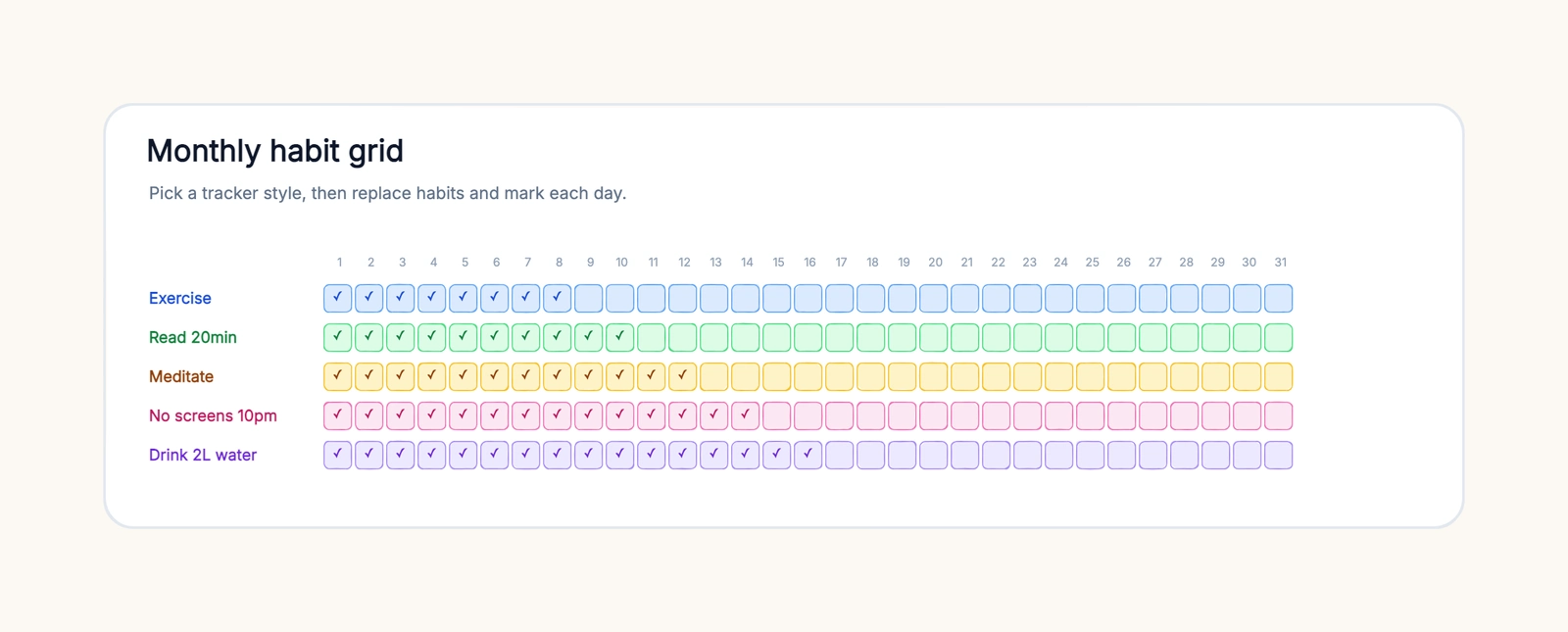
A habit tracker that survives is a different animal. It tracks three to five habits, not fifteen. It gives you a satisfying visual signal every time you complete something. And it treats a missed day as a fact of life rather than a moral failure. This guide covers the tracker designs that hold up, how to set one up in twenty minutes, real examples for different goals, and the psychology that explains why filling in a box keeps you going. The free habit tracker template in CodePic gives you a monthly grid you can draw once and fill in daily.
Why Most Habit Trackers Are Abandoned
Trackers die for predictable reasons, and naming them is the first step to building one that survives.
Too ambitious. Fifteen habits is the classic first mistake. Every uncompleted row stares back at you, and a chart that is mostly empty by day three feels like a report card of failure. Your willpower for new habits is a limited resource — spending it on fifteen things means none of them get the attention they need. The research on habit formation keeps landing on the same advice: start small, start narrow, and stack wins.
Not visible enough. If your tracker lives inside an app you have to open, it is fighting an extra battle. The most effective trackers are the ones you can see without trying — a wall calendar, a whiteboard, a fridge-magnet grid. Visibility is a cue. Every time you walk past the tracker, you are reminded of the habit and your streak. An invisible tracker cannot do that.
No reward signal. Filling a box feels good for about a week. After that you need a longer signal — a streak, a full monthly grid, a small reward at a milestone. Trackers that only record data (2,401 steps!) without any emotional payoff miss the point. The box you fill is not data; it is proof of progress.
Habit Tracker Designs That Actually Work
Four designs cover most goals. Pick the one that matches how you think about the habit you are building.
Monthly grid (the classic). One row per habit, one column per day. Each cell gets filled when you complete the habit. A month of cells gives you the two things a tracker needs: a run (your current streak) and a row (your completion rate). The monthly grid is the default for a reason — it is one glance, all month.
Weekly focus cards. Instead of tracking seven habits daily, give each week one or two focus cards with their own mini-grids. Use this when your habits change from week to week — training weeks, exam weeks, project sprints. A card per focus keeps the board from turning into a graveyard of half-finished rows.
Chain or streak counter. One habit, one big number: current streak in days. "Don't break the chain" is the oldest habit trick in the book, and it works because streaks are self-reinforcing — losing a 14-day chain hurts more than skipping the habit feels good. A dedicated streak board is best for a single priority habit like writing, exercising, or meditating.
Category-based board. Group habits by life area — body, mind, work, home — with each category getting its own grid or card. This is the design for people tracking several areas at once (fitness, reading, finances, tidying). Seeing the whole board at a glance shows you which area is slipping before it becomes a pattern.
Choosing the Right Design for Your Goal
The four designs above are not interchangeable — each fits a different kind of goal. Match the design to the habit and the tracker will feel effortless.
One priority habit → chain or streak counter. Writing every day, quitting something, building a single skill. A streak gives you the strongest motivation for the one habit you care most about, because the number itself becomes the goal.
Three to five daily habits → monthly grid. Your standard life-maintenance habits: drink water, exercise, read, tidy. The grid shows streaks and completion rates together, which is exactly what you want when no single habit outranks the others.
Changing weekly priorities → weekly focus cards. Exam weeks, training blocks, project sprints. A card per week keeps the board honest without dragging last week's failures into this week.
Multiple life areas → category board. Body, mind, work, home. When you want to watch several areas at once and catch one slipping early, a grid per area beats one giant grid.
If you are unsure, start with the monthly grid. It is the most forgiving design and the easiest to adjust once you see how you actually live with it.
How to Set Up Your Habit Tracker, Step by Step
Setup is where most trackers are won or lost. Twenty minutes of structure now saves you from a dead tracker in February.
1. Pick three to five habits, max. Write down every habit you would like to build, then cut the list to the three that would change the most if they became automatic. A short list is a tracker that survives. You can always add habits later — adding is easier than maintaining.
2. Make each habit tiny and specific. "Exercise" is not a habit you can check off; "ten push-ups after breakfast" is. "Read more" becomes "read one page before bed." Define the trigger (when) and the size (how much). A habit you can complete in under five minutes is a habit you can build reliably — and you can always scale it up later.
3. Decide the tracking rule before day one. What counts as done? Ten push-ups with no minimum? Does a paragraph count as a page? If the rule is fuzzy, you will argue with yourself by day five and the tracker dies. Pick a rule you can honestly check off, and let it be generous — better to check off a small win than to skip because "it doesn't count."
4. Track daily, but keep it to ten seconds. Open the tracker, fill the cell, close it. No journaling in the tracker, no color-coding perfection. If logging takes longer than ten seconds, you will start skipping it. This is where a visual tracker shines — a checkmark on a board is instant.
5. Review weekly, adjust monthly. Once a week, look at the grid for five minutes. Which habits are holding? Which are not? Once a month, adjust: drop a habit that is not sticking, shrink one that is too big, add one new one. A tracker is a tool, not a contract — you are allowed to change the rules.
6. Put the tracker somewhere you will see it. Visibility is a cue, and a tracker you see is a tracker you use. A wall grid, a whiteboard by the door, a pinned tab — anywhere it enters your field of view several times a day. This is why a hand-drawn board on a wall can outperform the slickest app on your phone: you do not have to remember to open it.
The First Week Playbook
The first week decides whether a tracker becomes a habit or a guilt object. Here is how to start without setting yourself up for a crash.
Give yourself permission to miss. Decide in advance that you will miss a day within the first two weeks, and that it will not matter. "Never miss twice" — not "never miss" — is the rule. Lowering the stakes on day one is what lets you keep going on day twelve.
Start smaller than feels impressive. One push-up, one page, one minute of meditation. The goal in week one is not progress; it is proof that you can do the thing every day. You can scale up once the checkmark is automatic.
Track at the same time each day. Link the logging to an existing routine — after brushing your teeth, with your morning coffee, before you close your laptop. When the checkmark becomes part of a ritual, you stop having to remember it.
Close the week with a two-minute review. On Sunday, look at the grid. What was easy? What did you skip? Adjust next week's rule based on what the board tells you, not on how you felt.
Real-Life Habit Tracker Examples
Trackers look different depending on the goal. Here are four setups you can adapt.
Morning routine tracker. Columns are days, rows are four steps: drink water, stretch for five minutes, make the bed, plan the day's top three tasks. The whole grid fills by 9am, so the tracker delivers a small win before the day can go sideways. People who run this design say the visible streak is what pulls them out of bed on lazy mornings.
Fitness habit tracker. Three rows: walk 6,000 steps, one workout, stretch. The step row is almost always full — it is the easy one — and that matters, because a mostly-full board on a week when the workout row is empty still reads as progress. The fitness tracker rewards consistency over intensity, which is exactly the message you want.
Learning or skill tracker. One row per focused practice session (25 minutes) and one row per "learned something new" (a chapter, a lesson, a tutorial). This design works for languages, instruments, and coding alike. The streak on the practice row is the number that keeps you honest; the second row proves you are making forward progress, not just logging time.
Mental health check-in board. This one is different: instead of tracking "did I do the thing," it tracks "how am I today?" — a row of mood markers, a row for sleep hours, a row for "did I get outside," a row for "talked to a friend." A check-in board is not about streaks; it is about noticing patterns. After a few weeks you can see the relationship between sleep, mood, and getting outside in a way you would never catch in your head.
Whatever your goal, the pattern is the same: a small set of rows, a visible daily ritual, and a weekly glance at the whole board. The specifics change; the system does not.
Why Visual Progress Works
Understanding why the tracker works is what keeps you building it when motivation dips. Three psychology effects explain most of it.
The streak effect. Losing a 12-day streak feels worse than the skipped habit feels good. This is loss aversion doing useful work for once — you keep going not because you want the win, but because you do not want to lose the run. "Don't break the chain" works for exactly this reason.
The completion effect. A checked box is a tiny, immediate win. Your brain releases a small dose of satisfaction at completed tasks — the same machinery that makes to-do-list checking so oddly pleasant. A visual tracker turns an invisible habit (you brushed your teeth, no big deal) into a visible series of wins.
Progress beats data. A spreadsheet showing 14 sessions and 3,402 total minutes is information. A grid with 14 filled boxes is a feeling. Numbers require interpretation; a filled row is self-explanatory. That is why a hand-drawn checkmark can feel more satisfying than a stats page — it is not measuring progress, it is showing it.
The identity effect. By week three the tracker stops being a to-do list and starts being a picture of who you are. A person with a full "read every day" row is a reader. The quiet shift from "I am trying to read more" to "I read every day" is the real reward, and it is why people who stick with a tracker for a month often keep it going for a year.
Common Mistakes
These are the failure modes that kill trackers in week three. Catch them early and your tracker has a real chance.
Tracking too many habits. Fifteen rows, zero completion. Cut to three to five. An empty row is a demotivator, and every row you add is another chance to feel behind.
Expecting perfection. The all-or-nothing mindset kills trackers. One missed day is a fact, not a failure. The trackers that survive tolerate gaps — you just fill the next box and move on. Perfectionists quit; consistent people recover.
Not reviewing. If you never look back at the grid, it is decoration. The review is where the learning happens — which days are hardest, which habits stick, which trigger actually works. Schedule five minutes on Sunday and actually take them.
Giving up after missing one day. This is the big one. A habit is not broken by one missed day; it is broken when you decide the chain is over and stop. The recovery rule: never miss twice. One missed day is a blip; two in a row is a pattern you have to actively break.
Copying someone else's system. A tracker that works for an influencer or your sibling will not necessarily fit your life. Your mornings are different, your triggers are different, your definition of "done" is different. Use other people's designs as starting points, then adjust the rows, the rules, and the schedule until the board fits your actual day.
Plan Before You Start
Most habit trackers are abandoned in the design phase — an ambitious list, no layout, no recovery plan. The fix is to sketch the tracker before you start using it: choose the design, the three habits, the tracking rule, and the review schedule, all in one place you can see.
CodePic is a free, hand-drawn whiteboard for planning things visually. Draw the monthly grid once and it is yours — fill it in daily with hand-drawn checkmarks that feel more satisfying than a spreadsheet cell. The infinite canvas means you can put your morning routine on one side and your fitness grid on the other, and see the whole month at a glance. Use the habit tracker template to build habits you can see growing, then revisit the board every Sunday for your weekly review.
Related Reading
- What Is an Infinite Whiteboard? — Why an unbounded canvas is a natural home for a year of habits.
- How to Make a Mind Map Online — Another visual planning technique you can draw on the same canvas.
- Best Free Online Whiteboard Tools in 2026 — Other free options for visual planning.
- Excalidraw Alternatives: The Best Hand-Drawn Whiteboard Tools — More tools in the hand-drawn style.