Back to template

Content Mapping Examples

These five teaching examples cover different audiences and planning tasks. The editable canvas includes three complete scenes. Additional written examples show how students, working teams, product owners, and creators can adapt the structure. No measured growth outcomes are claimed.

Content Mapping Examples

Real examples

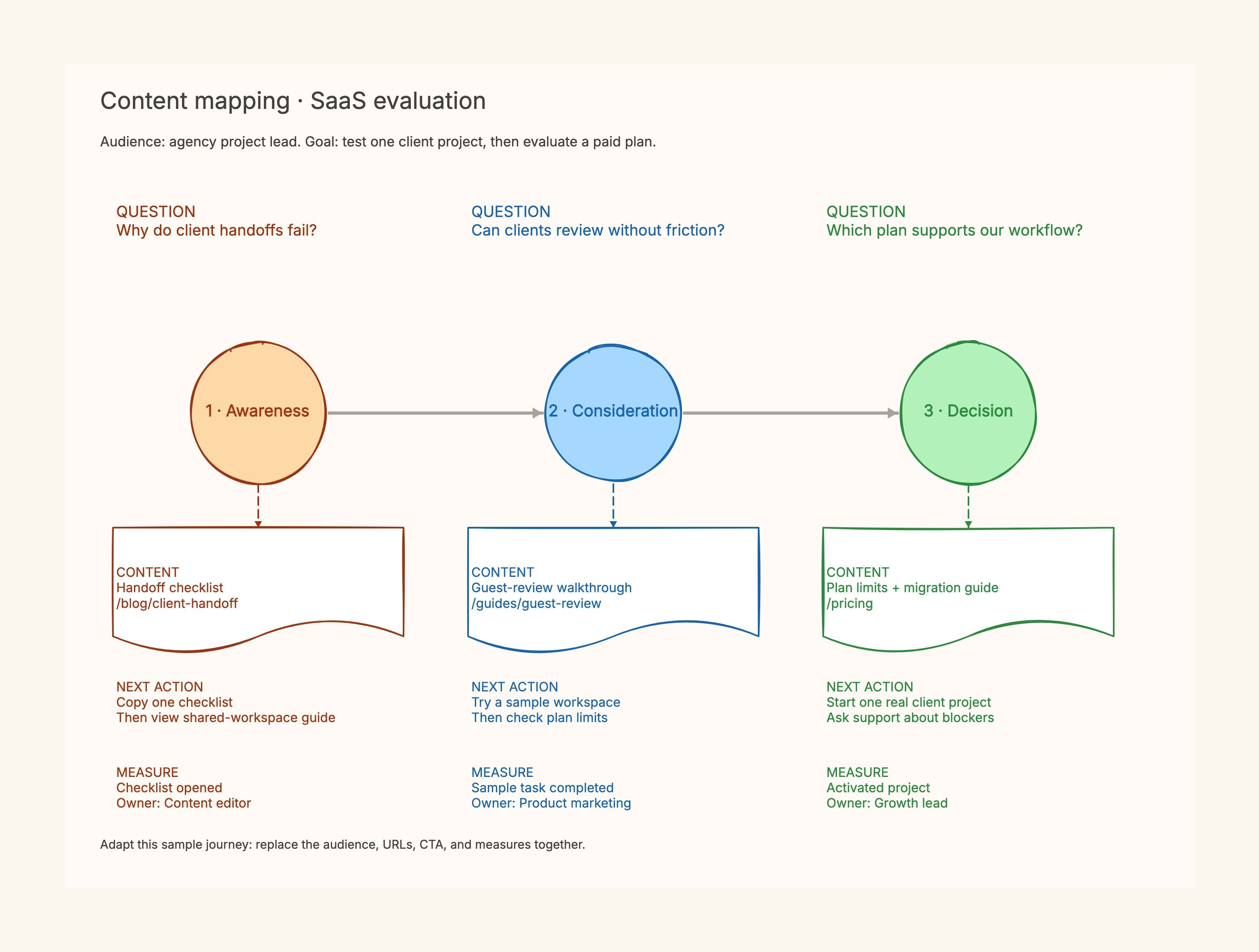
Agency-focused SaaS

Who uses it: Product manager or growth lead

Audience: project lead coordinating client handoffs.
Checklist → task demonstration → plan and migration details.
Goal: complete one real client project during evaluation.

Why this works: Product limits must be verified before the walkthrough promises a particular access workflow.

Linen bedding store

Who uses it: Ecommerce content and support team

Texture question → material comparison → size and product details.
After purchase → verified care guide.
Keep add-to-cart separate from completed orders.

Why this works: The extra care stage gives the map a support role after the purchase rather than forcing all content toward checkout.

Family photography studio

Who uses it: Photographer and studio manager

Wardrobe advice → relevant galleries → package terms.
Action: submit a suitable date inquiry.
Verify image permissions, service area, and availability.

Why this works: Qualified inquiries need service fit and clear expectations, not only more form submissions.

Student workshop registration

Who uses it: Student organizing a campus workshop

Is this for beginners? → workshop outline.
What will I need? → preparation guide.
When and where? → current schedule and registration.

Why this works: A workshop map can prioritize an informed registration and attendance preparation rather than a commercial purchase.

Creator course evaluation

Who uses it: Creator building a practical learning library

Can I learn the basics? → one complete free lesson.
Does the format suit me? → sample exercise and course outline.
What is included? → accurate enrollment terms.

Why this works: The sample must deliver a useful task by itself; enrollment content should clarify prerequisites and scope.
Review your mapping decisions

  • Replace the audience and outcome before individual cards.
  • Keep observed data distinct from proposed actions.
  • Assign an owner for each claim and measure.

Related resources

How it compares to similar tools

Content map vs calendar

A map explains why content exists; a calendar schedules its delivery.

Content map vs keyword map

Journey questions and next actions differ from assigning searches to URLs.

Planning vs automation

This board records decisions; it does not send campaigns or track live events.

Common mistakes to avoid

  • Identical CTA at every stage

    Choose an action that follows the question just answered.

  • A new page for every cell

    Check whether an existing page can answer related needs before expanding.

  • Claims without an owner

    Ask product, merchandising, or service owners to verify applicable details.

Frequently asked questions

Are these customer growth results?+

No. The scenes are teaching examples, with no measured conversion gains claimed.

Can visitors skip stages?+

Yes. Numbered stages organize content planning; actual journeys can loop or skip.

Does this template measure analytics?+

No. Define events here, measure them in your analytics system, and review evidence later.

Start editing online

Go back to the template, swap in your own content, and keep the same structure if it fits your project.

Use this template: /editor/new?template=content-mapping

Plan with this template