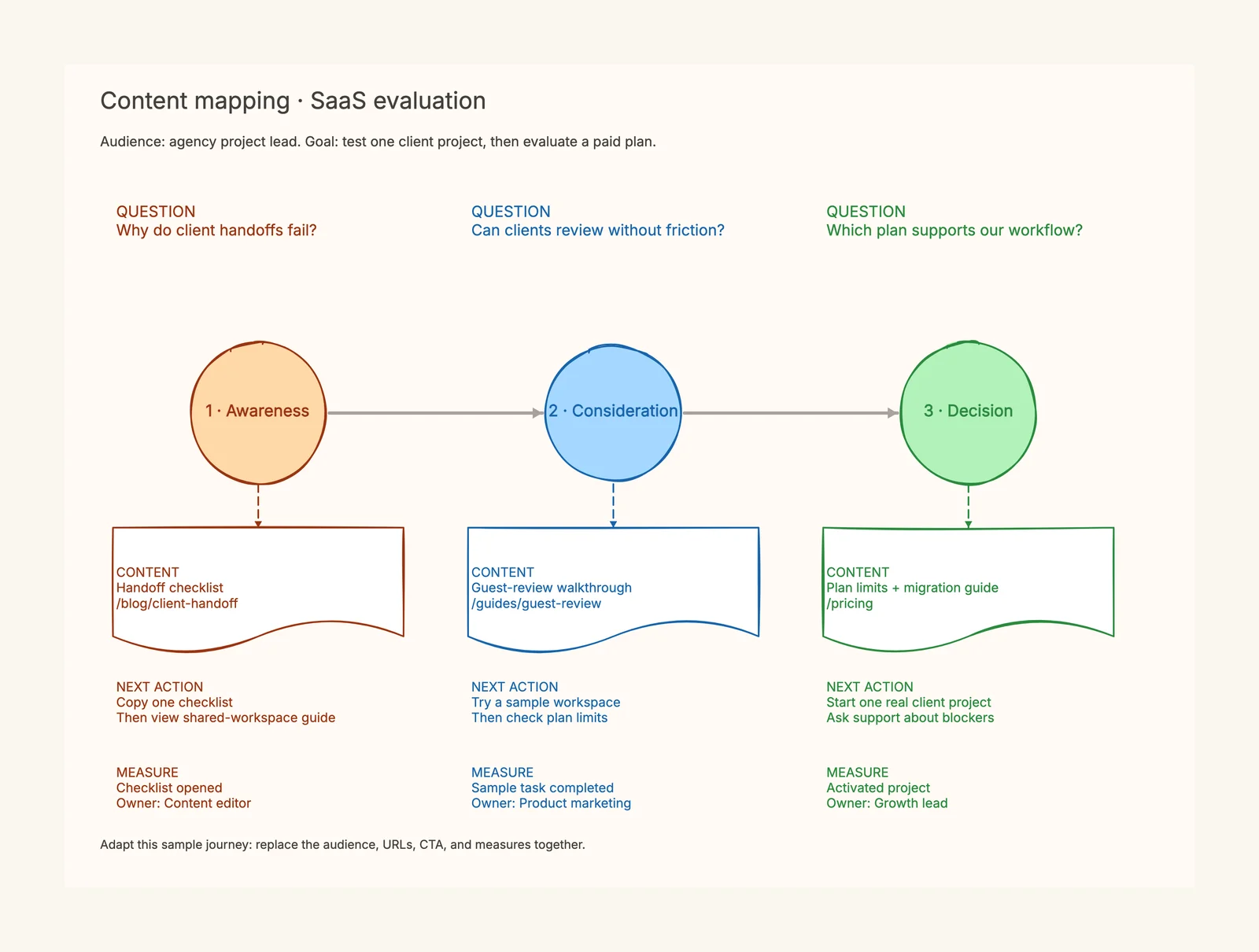
Content mapping gives every page a job in the buyer journey. Choose an audience, identify the questions it asks while making a decision, and connect those questions to a helpful page and a sensible next action. The result should tell your team what content is missing and what existing content needs a clearer path forward.
We will build a complete map for an illustrative project-management SaaS serving small agencies. By the end, you will have a plan covering awareness, consideration, and decision, with page ideas, calls to action, owners, and measurements. This is a planning exercise, not a measured growth case study or a description of CodePic's product features.
What is content mapping?
HubSpot's content mapping explanation connects content with buyer personas and their stage in the journey. Shopify also describes a content map as a representation of how assets reach an audience at an appropriate moment. The useful output is a working plan, not a decorative funnel.
Consider a visitor who is frustrated by failed client handoffs. They may need a checklist before they are ready to compare software. Once they have understood the process, a guest-review walkthrough becomes useful. A pricing page belongs when they are evaluating whether the service fits their team's requirements.
Those needs may be served by different formats: an article, a template, a demonstration, a product page, or support documentation. Content mapping does not require turning every question into a blog post.
The content mapping template organizes each stage into four editable fields: question, content, next action, and measurement. It includes SaaS, ecommerce, and local-service scenarios so you can see how the same planning principle changes with the business.
Separate the map from your calendar and keyword plan
Three planning documents often get confused:
| Document | Main question | Example decision |
|---|---|---|
| Keyword map | Which page should serve this search? | Assign a handoff-related group to a guide |
| Content map | What does this audience need next? | Link the guide to a sample review workflow |
| Content calendar | Who produces it, and when? | Schedule the walkthrough after product review |
You can maintain them together, but keep their purposes visible. A calendar full of weekly publishing dates does not show whether a visitor can progress from a useful answer to a real product evaluation.
If you are still choosing which searches belong on which URLs, start with keyword mapping. Then connect those destinations in the journey. This order reduces the chance of planning a new article for a question an existing page already answers.
Step 1: Pick one audience and one outcome
Define a narrow working audience using a real task. “Small businesses” is too broad for the example. “An agency project lead coordinating client reviews across several projects” gives us a situation to investigate.
Choose a business outcome that corresponds to useful product adoption: completing one real client project in a trial workspace. This is more informative than “get more traffic.” It also prevents the team from treating an email signup as the final success when the product's value depends on actual use.
Write constraints beside the audience: limited setup time, external clients who dislike new accounts, and uncertainty about guest access. These are scenario assumptions. In your own project, replace them with support questions, interviews, sales notes, and observed behavior.
Do not invent demographic detail that has no effect on the content. The person's job, problem, and decision constraints are enough to begin. Assign an owner to validate uncertain assumptions before the plan becomes a publishing brief.
Step 2: Collect questions from actual interactions
List the audience's questions before proposing page titles. Support conversations, demo objections, search queries, onboarding friction, and customer interviews can all contribute evidence.
For the agency scenario, the initial questions are:
- Why do client handoffs repeatedly fail?
- What information should be included in a handoff?
- Can clients comment without a difficult setup process?
- How does this workflow compare with email and spreadsheets?
- Which plan includes the required access and permissions?
- What happens to current projects when the team migrates?
Keep the wording close to how customers ask. A marketing phrase such as “maximize collaborative productivity” hides the problem; “can my client review this without another account?” describes a decision the content must resolve.
Add a source and confidence note. Questions from one interview can be useful, but label them accordingly. Do not claim that every customer shares a concern because the team found it memorable.
Step 3: Place questions into stages without forcing a funnel
Use awareness, consideration, and decision as loose organizing headings. Awareness helps someone understand a problem; consideration helps compare approaches; decision resolves product fit and commitment.
A person may arrive at the pricing page first, then return to a guide. Your map should allow that movement. The stages organize what you publish; they are not proof of the exact route every visitor takes.
| Stage | Question | Needed answer |
|---|---|---|
| Awareness | Why do client handoffs fail? | A concrete process and checklist |
| Consideration | Can clients review work easily? | A realistic workflow demonstration |
| Decision | Will the plan support our team? | Accurate limits, terms, and migration steps |
Avoid assigning stages solely by content format. A blog post can answer a late-stage concern, and a product page can explain an unfamiliar problem. The audience's question determines the role.
Step 4: Audit existing content against those questions
Put existing URLs beside the questions. Open each page and check what it actually answers. A broad feature overview may mention client feedback without explaining how a guest review works.
Use three gap labels: missing content, incomplete answer, and missing next action. This distinction prevents unnecessary new pages. If the handoff guide already explains the process but lacks a link to a usable checklist, the next task may be updating the page rather than writing a replacement.
Check factual accuracy at the same time. A journey loses value if a comparison sends people to a pricing page with outdated access limits. Include a product or service owner in reviewing claims before you publish them.
Google's helpful-content guidance emphasizes whether people learn enough to achieve their goal. In this workflow, use that as a review question for each mapped asset rather than treating keyword inclusion as completion.
Step 5: Choose one useful next action per step
A call to action should fit the question the page has just answered. The handoff guide can offer a checklist. The workflow demonstration can invite a sample task. A decision page can help someone begin a real trial project or clarify an unresolved requirement.
“Book a demo” does not have to appear at every stage. A visitor who has barely identified the problem may not be ready. Giving that visitor a useful checklist can make the next evaluation step clearer without demanding a premature sales conversation.
Write the destination as well as the CTA label. “Learn more” is not a plan unless the team knows which resource comes next. Keep links specific enough that a writer can implement them without another meeting.
Use the template for this stage of the discussion. Replace its example questions and page paths together, then keep the useful fields. Removing measurement or next-action fields just to make the board look cleaner discards important decisions.
A complete SaaS content map
The following teaching map joins the decisions into one usable plan. These are illustrative destinations, not existing URLs on a real customer website.
| Stage | Content and destination | Next action | Measure | Owner |
|---|---|---|---|---|
| Awareness | Handoff checklist at /blog/client-handoff | Copy a checklist, then read the shared-workspace guide | Checklist opened | Content editor |
| Consideration | Guest-review walkthrough at /guides/guest-review | Complete a sample review task | Sample task completed | Product marketing |
| Decision | Plan limits and migration guidance at /pricing | Start one real client project | Activated project | Growth lead |
Each row has a different success condition. An awareness page can be useful even before someone starts a trial. A decision page should be judged against more than page views if its task is helping a team commit.
The map also exposes dependencies. The demonstration cannot promise frictionless guest access until the product team verifies the actual workflow. The pricing page must state the applicable limits. The content team can draft independently, but the final claims need their owners' review.
For contrasting situations, read the three content mapping examples. The ecommerce example adds post-purchase care; the local-service example focuses on a qualified booking inquiry.
Step 6: Turn gaps into a small delivery plan
Do not schedule every blank cell immediately. Prioritize the gap closest to a blocked user task, supported by evidence and practical to fix.
In this scenario, suppose the checklist exists but the review walkthrough is missing. Producing the walkthrough may be more valuable than publishing another broad awareness article. The map makes the choice visible, although it does not prove a particular conversion lift.
Give each task a deliverable and review condition: record the sample workflow, verify plan details, link the guide to the demonstration, and instrument the intended event. Some actions belong to product, support, or analytics rather than the writer.
Keep the plan small enough to finish and inspect. A few connected, accurate assets are easier to evaluate than a calendar containing dozens of speculative titles.
Measure progress without claiming more than the data shows
Record a baseline, implementation date, and observation window. Use stage-appropriate signals, then check whether the relevant users are reaching the desired task. Page views alone cannot tell you whether a visitor completed a review workflow.
Analytics attribution is imperfect. People can return directly, switch devices, or skip the mapped route. Treat observed paths as partial evidence, and combine them with support and interview feedback.
If you also monitor AI discovery, keep citations separate from visits and activation. The generative engine optimization tools guide explains which tools measure those different layers. A page can be cited without receiving a click, so an AI visibility increase is not automatically a conversion increase.
Review the map when audience needs, product limits, or the service offering changes. Keep useful pages current and revise the next action when it no longer matches the reader's situation.
Common mistakes
Mapping a generic persona. Name a task and constraint; otherwise every asset seems suitable for everyone.
Creating a page for each cell. First check whether an existing page can satisfy a related question. A planning grid is not a quota for new URLs.
Offering the same CTA everywhere. Let the next step follow from the question just answered.
Measuring every stage by traffic. A checklist open, useful comparison visit, and qualified inquiry represent different progress.
Presenting stages as actual tracking evidence. The map is a hypothesis. Confirm or revise it using behavior and conversations.
Build your first map
Open the template below, choose the scenario closest to your business, and replace the audience, questions, URLs, next actions, and measures. Review more content mapping scenarios when you need a different structure rather than another version of the same funnel.