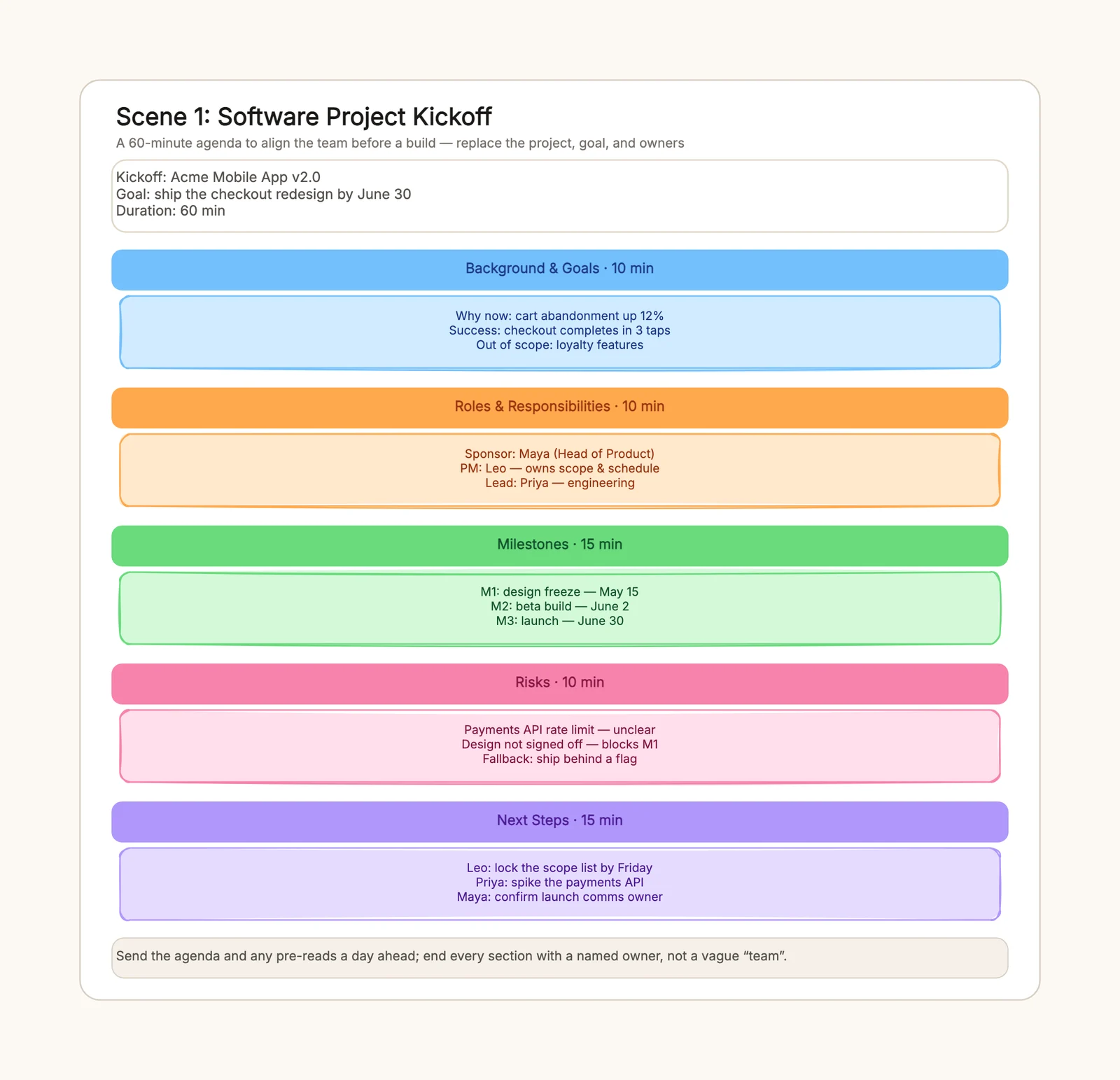
A project kickoff meeting agenda is the difference between a team that walks out of the first meeting aligned and one that spends the next two weeks re-asking questions that were already answered. It turns "let's get everyone in a room" into a timed plan with five fixed sections, each ending in a named owner. If your kickoffs tend to produce a whiteboard of ideas and no follow-through, the problem is rarely the people — it is the agenda.
This guide shows how to build a kickoff agenda that ends with owners and dates, then walks through the three shapes it takes for a software feature, a marketing campaign, and a cross-functional launch. You can adapt the project kickoff meeting agenda template and edit the goal, owners, and durations directly in the browser.
What a project kickoff meeting agenda should achieve
A kickoff agenda is not a status update and not a brainstorm. It is a handoff: the project moves from "an idea someone has" to "work with owners and dates." A useful agenda should answer four questions: why are we doing this, who owns each part, when does it ship, and what are we doing next.
A good kickoff agenda produces five outcomes:
- everyone leaves reading from the same problem and success metric;
- every section has a named owner, not a vague "the team";
- there are at least three dated milestones, so the finish line is visible;
- risks are raised with fallbacks, before they become launch-week surprises;
- the meeting closes by reading the next steps aloud, each with an owner and a date.
Avoid treating every kickoff as the same size. A software feature kickoff runs 60 minutes with sponsor, PM, and lead roles; a marketing campaign kickoff runs 45 minutes and centers owners on channels and approvals; a launch spans several teams and needs the next-steps block to carry the most weight. Start from the same five-section backbone and branch where the meeting genuinely differs.
How to build a project kickoff meeting agenda
The most useful kickoff agenda is organized around owners, not around topics. A topic list tells people what will be talked about; an owner list tells them what will be decided and by whom.
1. Fix the duration first
Start with how long the room has. A 60-minute meeting gets roughly 10 minutes per section, with more for milestones and next steps. The duration is the constraint that stops the background section from eating the whole hour, so write a suggested time on every block before you write the content.
2. Put background and goals first
Open with why now and what success looks like. The background block should carry a measurable success metric — "checkout completes in three taps" rather than "improve checkout" — and a short out-of-scope note so the room does not wander. If the team cannot agree on the goal, the rest of the agenda will not save the project.
3. Name the roles
Write the sponsor, the PM or lead, and the people who will do the work. The sponsor clears blockers; the PM owns scope and schedule; the lead owns execution. If any section ends up owned by "the team," that section has no owner, and it will slip. For more on deciding who belongs in the room, a stakeholder map helps before you send the invite.
4. List milestones with dates
Three dated milestones are enough to make the finish line real — a design freeze, a beta, and a launch, or the campaign's equivalents. Dates matter more than detail here: a milestone without a date is just a wish. Keep the milestones short so the group can see the arc of the project at a glance.
5. Surface risks with fallbacks
Reserve a block for risks and give each one a fallback, not just a label. "Payments API rate limit" is a problem; "ship behind a feature flag" is a plan. Raising risks at kickoff feels uncomfortable, which is exactly why they belong on the agenda — a risk hidden in the first meeting becomes a fire in the last week.
6. Close with next steps that carry owners and dates
The last block is the one that determines whether the meeting mattered. Every action needs a name and a date — "Leo locks the scope list by Friday," not "follow up later." Read them aloud before the room clears, then send the filled-in agenda as the meeting notes. If you want a dedicated structure for the decisions themselves, the meeting notes template pairs cleanly with this agenda.
Software project kickoff example
A software feature kickoff usually runs 60 minutes. The background block states the problem in numbers — cart abandonment up 12% — and the success metric in behavior — checkout completes in three taps. Out of scope goes in the same block so "loyalty features" gets parked before it derails the build.
Roles are explicit: Maya is the sponsor, Leo the PM, Priya the engineering lead. Milestones are design freeze on May 15, beta on June 2, and launch on June 30. Risks include the payments API rate limit and the unsigned design, each with a fallback. Next steps end with three names and three dates.
The most common software-kickoff mistake is letting scope creep into the goal block. Keep out-of-scope visible in the background section, and the milestones stay honest.
Marketing campaign kickoff example
A campaign kickoff compresses the same five sections into 45 minutes because there is less build and more approval. The goal is measurable — 5,000 trial sign-ups in six weeks — and the roles center on the growth lead and the brand designer rather than engineering.
Milestones become creative approved, landing page live, and first report, with a social push in between. Risks are approval delays and budget shifts, both of which need an owner and a deadline in the room. The next steps assign the channel plan to one name and the first creative to another.
The campaign-kickoff mistake that costs the most is a goal nobody can measure. "Raise awareness" cannot close the meeting; "5,000 sign-ups in six weeks" can.
Product launch kickoff example
A launch kickoff spans product, marketing, sales, and support, so the agenda hands each workstream to a single accountable owner. The background block states what ships, why now, and the adoption target — 20% of paid seats in 30 days. Roles name Ana for release, Ben for announcement, Cleo for support.
Milestones run feature complete, enablement docs ready, and launch plus a support blitz. Risks — late sales enablement, a support queue spike, a docs gap — each get a fallback, and the next-steps block is the widest part of the board because the handoff is the point.
For launches, keep the next steps at the same altitude across teams: one name and one date per action, so no workstream disappears into a cross-team gap.
Before and after the kickoff
The kickoff agenda only works if the room is prepared and the follow-through is owned. Before the meeting, circulate the agenda and any background in advance so the time goes to decisions, not reading. After the meeting, send one short recap with the decisions, owners, and next actions, and lock the first milestone on the calendar. A kickoff that ends with vague enthusiasm but no named owner fades within a week; a kickoff that ends with one clear next step stays alive.
Common kickoff agenda mistakes
No time per section
Without a duration on each block, background eats half the meeting and next steps get two minutes. Put a suggested time on every section before the meeting starts.
Sections owned by "the team"
An agenda that assigns nothing to a name ends with everyone agreeing and nobody doing. Write a named owner next to every section and every next step.
Skipping risks
Risks that are not raised at kickoff become launch-week surprises. Reserve a block for risks and give each one a fallback, not just a label.
Vague next steps
"Follow up later" is not a next step. Every action needs an owner and a date, written in the agenda before the meeting ends.
Reusing a generic agenda
A generic meeting agenda lacks the background, roles, milestones, and risks sections a kickoff needs. Use a kickoff-specific structure instead of a topic list.
Keep the agenda reusable
Review the agenda after the project and note which sections overran and which owners drifted, so the next kickoff starts from a better plan. Keep a skeleton — the five sections with blank owner and date slots — in your workspace, and fill it fresh each time rather than copying the last project's names.
Start with the project kickoff meeting agenda template, replace the goal, owners, and durations with your own, and close the meeting by reading the next steps aloud. For the decisions that come out of the room, see the meeting notes template, and for deciding who should be in it in the first place, the stakeholder map template.