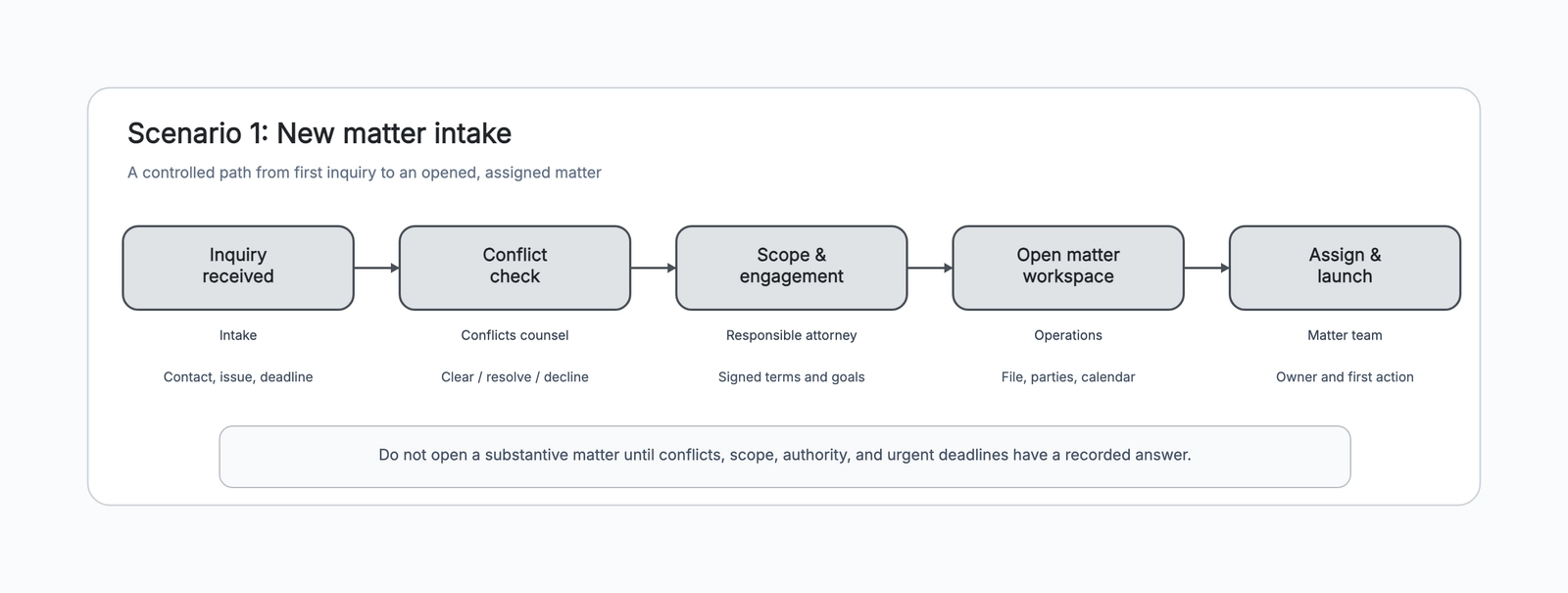
A legal case management workflow is not a substitute for legal judgment. It is the operating map around that judgment: the shared path that helps a firm open work carefully, move it through real deadlines and decisions, and close it without leaving records or financial tasks behind.
When a matter is small, people can often carry the process in their heads. As volume grows, the hidden work becomes risky. An inquiry arrives in one inbox, a deadline appears in a calendar, documents sit in a shared drive, a client instruction is summarized in a note, and several people each assume someone else owns the next step. The substantive work may be excellent while the operation around it becomes fragile.
This guide explains how to turn a firm’s approved procedures into a visible legal case management workflow. It is a practical operating-design exercise, not legal advice. Use the legal case management workflow template to draw your version as you go, then have the people responsible for ethics, practice management, records, and finance review it against the policies that apply to your firm.
Begin with one matter type, not the whole firm
“Case management” is too broad to map in one pass. A litigation matter, a commercial transaction, an immigration filing, and an estate plan may share some intake and closeout controls but have very different stages in the middle. Start with one matter type and one repeatable operating problem.
Good first targets include a new matter intake that keeps coming back for missing information, a litigation team that loses track of discovery handoffs, or a closeout process where billing and retention tasks are regularly delayed. State the outcome in one sentence: “Open employment matters only after the approved conflict, scope, and deadline checks are complete.” That gives the team a useful boundary.
If several practice groups need the same intake controls, map a shared intake backbone first and create separate middle-stage workflows afterward. A single diagram that tries to capture every exception will be ignored by the people who need it most.
Step 1: Record the actual path of a recent matter
Choose one recently opened or closed matter and ask the people who touched it to narrate what happened. Capture the real path rather than the intended process: the email that triggered work, the spreadsheet used for a check, the person who called the client, the calendar event, the document that was missing, and the point where the team had to improvise.
Mark four things beside each step: who acted, what triggered the action, what record proves it happened, and what could stop the matter from moving forward. That turns a verbal story into an operating map. It also uncovers invisible dependencies, such as a paralegal waiting for an attorney’s instruction before adding a date, or finance waiting for a matter number before it can complete its work.
Do not treat a meeting as proof. “The team discussed it” is not an operational artifact. A completed intake form, approved engagement, calendar entry with a responsible role, client instruction confirmation, or filed document is evidence the next role can rely on.
Step 2: Separate gates from ordinary tasks
Not every task has the same consequence. Some activities can happen in parallel; others are gates that must have an approved answer before the matter continues. Intake is the clearest example. A firm may have a defined route for conflicts, urgency, authority, scope, and engagement. The exact procedure is firm- and jurisdiction-specific, but the workflow should make the gate visible.
Use a gate label that describes the result, not the department: “approved conflict route complete” is clearer than “send to conflicts.” The role can change by firm; the proof should stay explicit. If there is an urgent deadline, show its exception route rather than letting it become an informal reason to skip the rest of the intake path.
This is a design lesson that applies later too. A filing deadline, client settlement authority, release of funds, or document-destruction decision is not merely a box to tick. It is a controlled decision with a required owner and a record.
Step 3: Give every deadline an operational owner
Calendar systems are essential, but dates alone do not manage work. For each deadline in the workflow, write five fields: the governing source, the responsible role, a preparation date, a review date, and the escalation route if the date is at risk.
That small structure changes the conversation from “Is it on the calendar?” to “Who is preparing it, who reviews it, and what happens if the required information has not arrived?” A paralegal may own calendar maintenance, an attorney may own substantive review, and another role may own client approval. The workflow should show those handoffs without assuming that one person is responsible for everything.
Use a RACI chart when a deadline or approval involves several roles and the final accountable person is unclear. The customer-facing lifecycle view and the RACI serve different purposes: one shows the route; the other settles responsibilities in the difficult handoffs.
Step 4: Turn client decisions into reusable checkpoints
Many workflow failures are not missed tasks. They are decisions that were discussed but not converted into a clear next action. A client may need to choose between settlement options, approve an expense, supply evidence, or authorize a change in scope. If the decision lives only in an email thread, the team cannot easily tell what was decided, by whom, and what remains.
Create a recurring decision checkpoint with five prompts: issue, options, recommendation, authority, and next date. The workflow does not tell the attorney what to recommend. It makes sure the team creates a durable record and a follow-up path after the professional judgment is made.
This checkpoint is especially valuable around strategy reviews. Discovery changes the facts, hearings change the timeline, and client priorities can change the available options. A visible decision stage connects those changes back to the matter plan rather than leaving them scattered across notes.
Step 5: Design the evidence loop during the matter
The middle of a case often contains the most activity and the least shared visibility. Documents arrive, requests are served, interviews happen, and strategy evolves. Rather than making the workflow a long list of every task, define the repeating evidence loop: preserve and assess, update the plan, gather and review evidence, check strategy and client authority, then decide the next procedural or resolution step.
For a transaction, the loop may become diligence, drafting, negotiation, approval, and signing. For an advisory matter, it may be facts, analysis, advice draft, client review, and final deliverable. The shape is less important than the evidence at each transition. What has changed? What decision is now needed? Who needs to see it?
A process map can be useful if you need to draw one detailed sub-process, such as document review or closing instructions. Keep the main legal case management workflow at the level the full matter team actually uses.
Step 6: Make closeout a real workflow
Resolution is a milestone, not the end of operations. A matter can be substantively complete while the client has not received a closing communication, the invoice remains unreviewed, funds need reconciliation, the retention rule is not applied, or access is still open to people who no longer need it.
Build closeout as a separate sequence: confirm the result and any next rights or obligations; provide the approved client closeout; complete finance and trust-accounting steps that apply; apply the approved record-retention and access rules; then archive a searchable record and capture practical lessons. This makes closeout dependable without pretending that one standard applies to every firm.
The final debrief should be brief and useful. Ask what information arrived too late, which handoff was unclear, which template saved time, and what exception appeared more than once. Those answers are the raw material for the next workflow improvement.
Step 7: Pilot, audit, and revise the map
Do not launch a new workflow as a static policy graphic. Use it on a small batch of matters, then compare the drawn path with the evidence created in the real work. Did each gate have a record? Did every deadline have an owner and preparation route? Did the client decision checkpoint produce a usable next action? Did closeout finish without manual chasing?
Review exceptions with the people who own the firm’s processes. Some should become a formal alternate path; others should remain escalations precisely because they require judgment. The goal is not to eliminate discretion. It is to stop routine coordination from consuming the attention needed for discretion.
A simple way to build the first board
Open the legal case management workflow template and start with its new-matter intake scene. Replace the five labels with the stages your firm has already approved. Under each stage, write one role and one artifact that proves the handoff can occur. Then trace a recent matter across the board with the actual team.
After that, add the middle-stage loop and closeout scene only when the first scene is working. A legal case management workflow becomes valuable when it gives every person a reliable answer to three questions: what is the next controlled action, who owns it, and what record shows it is done?