For most former Jamboard users, the shortest answer is this: choose FigJam for the closest all-purpose collaborative canvas, Miro for structured workshops, and Microsoft Whiteboard when your school or organization already lives in Microsoft 365. Choose Excalidraw or tldraw when opening a link and drawing quickly matters more than workspace administration. Choose CodePic for account-free, hand-drawn diagrams and reusable templates when you do not need several people editing at the same time.
Those are different jobs. There is no useful winner until you decide whether you are replacing Jamboard's live participation, classroom simplicity, free-form sketching, or basic diagramming.
Jamboard Is Gone, So Migration Matters More Than Feature Lists
Google ended the Jamboard app on December 31, 2024. Before that shutdown, Jam files became view-only and Google provided a wind-down process that included PDF conversion and partner migration options. The practical consequence in 2026 is that choosing a Jamboard alternative is not about waiting for Google to restore an old workflow. It is about deciding what to rebuild and where future boards will live.
Start by auditing what survived:
- If you have PDFs, keep them as records and visual references. A PDF preserves appearance, not the original editable objects.
- If content was migrated to a partner, test ownership and guest access before assuming the migration reproduced your classroom or workshop workflow.
- If the important material exists only in screenshots, rebuild only the reusable structure—not every old sticky note.
- Do not plan around native Jam-file import unless the new vendor explicitly documents it. CodePic, for example, does not import Jam files.
This distinction prevents a common mistake: selecting a tool because its toolbar looks familiar, then discovering that students cannot enter, boards do not remain editable, or exports do not preserve what the team needs.
Quick Comparison of the Best Jamboard Alternatives
| Tool | Best fit | Real-time co-editing | Account-free start | Main trade-off |
|---|---|---|---|---|
| FigJam | Closest general team/classroom replacement | Yes | No | Free workspace limits and Figma account model |
| Miro | Facilitated workshops and mature team spaces | Yes | No | More setup and plan-dependent controls |
| Microsoft Whiteboard | Microsoft 365 schools and organizations | Yes | No | Best experience depends on Microsoft identity and tenant setup |
| Excalidraw | Fast, informal hand-drawn collaboration | Yes | Yes | Lighter workspace administration |
| tldraw | Polished link-based canvas and custom app experiments | Yes | Yes | Hosted-app and SDK use are different decisions |
| CodePic | Lightweight diagrams, templates, PNG/JSON handoff | No | Yes | View-only sharing, no Jam import |
The “account-free” column describes whether an individual can begin drawing, not whether every collaboration or persistence feature works without an identity. Always test the exact sharing flow you expect participants to use.
1. FigJam: Best Overall Jamboard Alternative
FigJam is the strongest default when the old Jamboard workflow was “open a shared board, add notes and drawings together, and keep the result in a team space.” It offers real-time multiplayer collaboration, sections, shapes, connectors, stamps, templates, and facilitation-friendly interactions. Teams that already use Figma gain a particularly coherent workflow because FigJam uses the same identity and workspace model.
The free Starter plan is enough to evaluate the experience, but team-file limits matter. Figma's official plan documentation distinguishes team files from personal drafts and changes what can be shared or kept in a team space. That is not necessarily a problem for one class experiment; it becomes important when every subject, workshop, or cohort expects a permanent board.
Choose FigJam when:
- multiple people must edit together;
- a friendly, low-training interface matters;
- designers already work in Figma;
- you want one managed home for templates and boards.
Look elsewhere when you need no-account participation, local-first file ownership, or a large free archive of team boards. For a deeper comparison, see our FigJam alternatives guide.
2. Miro: Best for Structured Workshops
Miro is a better Jamboard replacement when the board is part of a facilitated process rather than a casual sketch. Its mature workspace model, template catalog, and workshop-oriented controls suit discovery sessions, retrospectives, planning meetings, research synthesis, and cross-functional collaboration.
That breadth creates friction, too. An instructor or facilitator should define the frame, permissions, and activity sequence before inviting a large group. Free-plan limits and facilitation controls can change by plan, so verify the official pricing page instead of basing a rollout on an old comparison table.
Choose Miro when:
- a facilitator needs structured activities and reusable workshop templates;
- the team expects boards to become durable project spaces;
- integrations and administrative controls matter;
- participants are willing to learn a broader product.
Avoid choosing it purely because it has more features. For a five-minute class prompt, the additional workspace overhead may be more significant than the extra capability. Our Miro alternatives comparison covers lighter options.
3. Microsoft Whiteboard: Best for Microsoft 365
Microsoft Whiteboard is the logical first test for schools and organizations already using Microsoft identities and Teams. It supports real-time work on a shared canvas and sits close to meetings, classes, and tenant-managed accounts. That reduces the policy and procurement work of introducing a separate vendor.
There is one current platform detail to plan for: Microsoft says the standalone Whiteboard apps for Windows and mobile retire on October 16, 2026, while the web experience and Whiteboard inside Teams continue. A 2026 rollout should therefore test the browser or Teams workflow rather than depend on a standalone app as the long-term access point.
Choose Microsoft Whiteboard when:
- every participant already has an appropriate Microsoft account;
- the session happens inside Teams;
- tenant administration and organizational ownership are priorities;
- adding another workspace would be harder than accepting a more integrated tool.
Test guest and student access carefully. “Our organization owns Microsoft 365” does not automatically mean every external participant can enter and edit a board with the permissions you expect.
4. Excalidraw: Best for Fast Hand-Drawn Collaboration
Excalidraw is the best answer when people liked Jamboard because it got out of the way. Open the canvas, share a collaboration link when needed, and use a small set of rectangles, arrows, text, images, and freehand drawing. The hand-drawn appearance is well suited to early thinking because it signals that the work is still open to change.
The project is open source, and its core drawing model is familiar to many technical and product teams. Its strength is not institutional administration; it is low-friction sketching. Before using it for a class, test how participants will retain their work, how the room link will be distributed, and whether your organization requires centrally managed ownership.
Choose Excalidraw when:
- participants need to start with little training;
- rough diagrams and annotations are the main activity;
- link-based collaboration is more important than a formal workspace;
- an intentionally small toolset helps the group focus.
See our Excalidraw alternatives guide if you like this category but need a different storage, collaboration, or diagramming model.
5. tldraw: Best for a Polished Canvas and Builder Flexibility
tldraw occupies a similar quick-canvas category, with a polished editor and real-time synchronization examples documented for developers. The hosted app is useful for rapid visual thinking, while the SDK is relevant to teams that want whiteboard behavior inside their own product.
Do not treat those as the same purchasing decision. A teacher comparing hosted whiteboards cares about account access, link behavior, and saving. A product team evaluating the SDK must also examine licensing, hosting, synchronization, and engineering maintenance. The familiar canvas is only the visible layer.
Choose tldraw when:
- you want a fast, modern free-form canvas;
- shared-link sketching fits the session;
- your product team may eventually need an embeddable canvas;
- a minimal interface matters more than a workshop template catalog.
For more detail, read our tldraw alternatives guide.
6. CodePic: Best for Lightweight Diagrams, Not Live Workshops
CodePic is a narrower but useful Jamboard alternative when the real task is to create a hand-drawn diagram quickly, start from a structured template, and hand off an image or editable file. It works in the browser without signup, provides an infinite canvas and diagram shapes, and exports PNG and JSON. Public sharing links are view-only.
That last sentence is the important boundary: CodePic does not currently offer real-time multiplayer editing. It also does not import Jam files. It is not the right replacement for a room where 25 students place notes at once or a facilitator watches a workshop evolve live.
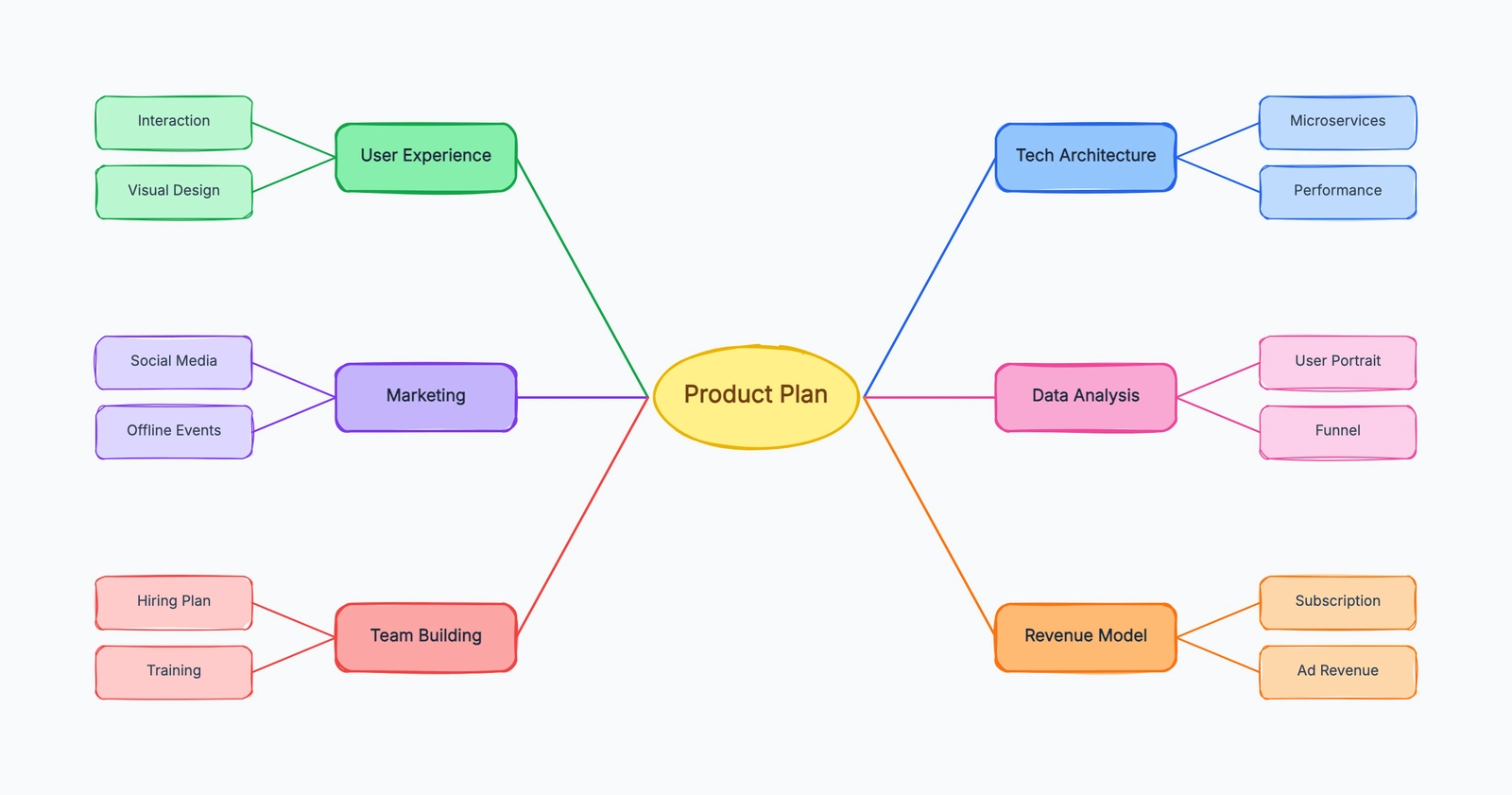
It is a reasonable fit when one person creates the visual and others review it, or when participants make separate diagrams and submit exported images. For example, start with this editable brainstorming structure:
Choose CodePic when:
- you need no-account diagram creation;
- a hand-drawn visual style is desirable;
- reusable diagram templates save setup time;
- PNG output or editable JSON handoff is enough;
- review can happen through a view-only link or exported image.
Choose a multiplayer tool above when the session depends on simultaneous editing.
Which Jamboard Alternative Should a Teacher Choose?
For a whole-class board, test FigJam, Microsoft Whiteboard, Excalidraw, and tldraw with two student accounts before making a decision. The correct test is not “Can I draw a sticky note?” It is this complete flow:
- A teacher creates the board and defines the activity area.
- A student opens the invitation on the actual school device.
- Two students edit at the same time.
- The teacher removes or restores content and handles an inappropriate edit.
- The class exports or preserves the result.
- A student returns after the session and sees only what permissions allow.
If any step fails, the tool may still be useful—but not for that classroom workflow. Also check keyboard access, contrast, screen-reader support, mobile behavior, data retention, and whether minors may create accounts under your institution's policies.
CodePic fits a different classroom pattern: the teacher provides a template, each student builds an individual diagram, and the student submits a PNG or JSON file. That can work well for concept maps, process explanations, and visual summaries, but it is not collaborative Jamboard behavior.
Pilot a lesson and the next-day recovery
Use a fictional activity: each student places one observation in a shared area, the teacher groups the observations, and the class selects one question to investigate. Test with the actual student account type and device model before using the board for a class.
Check the complete lifecycle. Can students join and contribute with the intended role? Can the teacher keep track of the active area? After closing the tab, can the owner find the board again and let an absent student view the result? Export one readable copy and verify who owns the editable source when a class changes teachers.
A personal drawing tool can satisfy a five-minute individual sketch while failing the shared-class requirement. Conversely, a managed workspace can introduce unnecessary setup for a one-person task. Test the activity, not a generic “free whiteboard” badge.
For old work, start from the files you actually retained. Google’s Jamboard shutdown is complete; do not promise that a new tool can recover deleted source files. Rebuild only the parts that still need editing, and keep the PDF as a dated reference.
Compare the broader free whiteboard options if the six choices do not match your access requirements.
Which Tool Is Closest to Jamboard?
FigJam is the closest general successor because it combines an approachable canvas with live collaboration and templates. Microsoft Whiteboard is closer organizationally for Microsoft 365 users. Excalidraw and tldraw are closer to Jamboard's immediate “open and sketch” feeling. Miro goes beyond Jamboard into facilitated team workflows. CodePic is closer only for the subset of users who used Jamboard primarily to make simple diagrams themselves.
So the practical recommendation is:
- Choose FigJam for the safest all-purpose starting point.
- Choose Miro for planned workshops and durable team boards.
- Choose Microsoft Whiteboard for Teams-centered organizations.
- Choose Excalidraw for fast, informal hand-drawn collaboration.
- Choose tldraw for a polished quick canvas or future embedding needs.
- Choose CodePic for account-free diagrams and templates without live co-editing.
Run one real activity before committing. A 15-minute pilot will reveal more than a long feature matrix—especially around sign-in, guest access, ownership, and what remains editable after everyone closes the tab.