A customer success workflow is not a prettier checklist for CSMs. It is the operating agreement that tells a cross-functional team what happens after a customer signal appears: who notices it, who owns the next move, what proof is needed, and when the account is ready to advance.
That distinction matters in SaaS. A customer can attend a kickoff and still never activate. An account can have a green health score while its executive sponsor has gone quiet. A renewal can look healthy until procurement asks a question no one owns. If the work lives only in calendars, private notes, and a handful of recurring meetings, the team reacts late and customers experience a different process every time.
This guide shows how to build a practical customer success workflow around one full account example. It focuses on how to design the motion, not on choosing a platform. You can use the customer success workflow template to map the three lifecycle moments as you read.
What a good workflow makes visible
Start with four fields beside every stage. They sound simple, but they prevent most fuzzy workflows.
- Trigger: the observable event that starts the stage.
- Accountable role: one role that must move it forward.
- Evidence: a signal that proves the work happened or the customer is ready for the next stage.
- Customer outcome: the practical result the customer should notice.
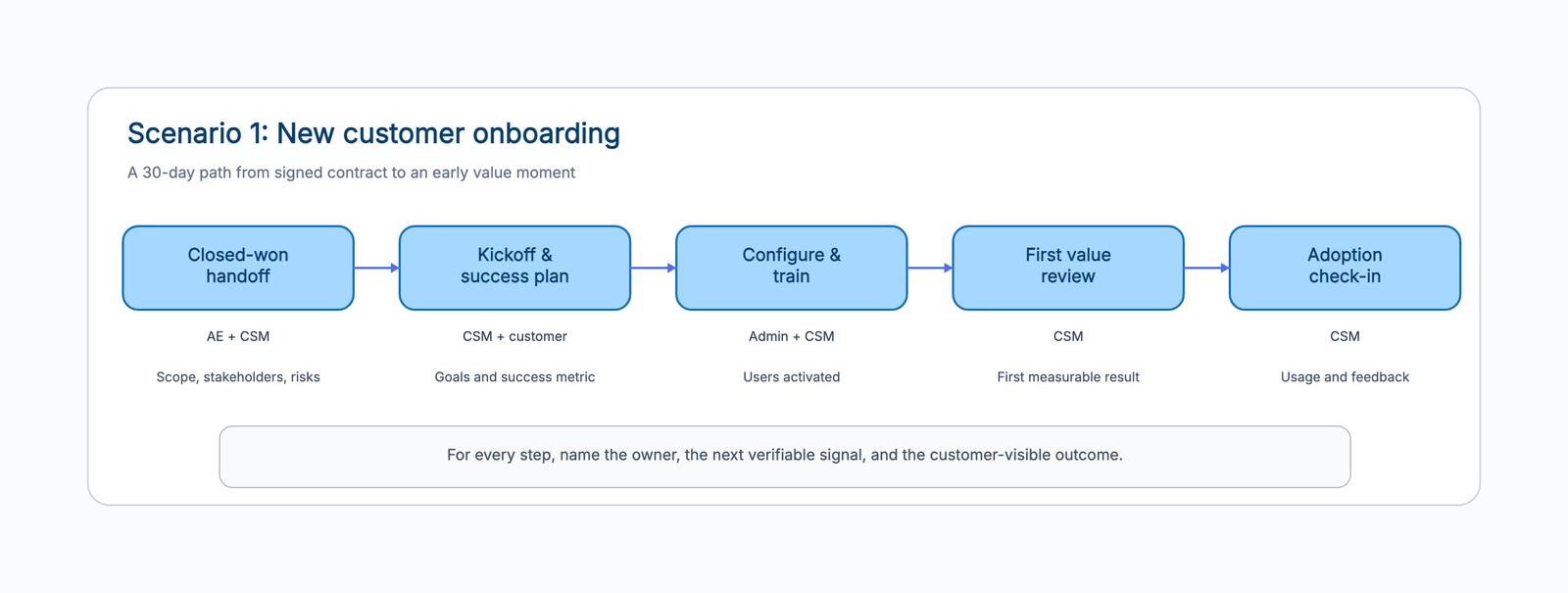
For example, “run kickoff” is not a strong stage. A stronger version is: after the contract is signed, the CSM owns a kickoff that produces a documented success metric, named sponsor, administrator, target date, and known implementation risk. The evidence is a jointly confirmed plan, not a calendar event. The customer outcome is clarity about what success looks like.
This framing also makes handoffs visible. Sales may own commercial context before signature; the CSM owns the success plan after handoff; support or implementation may own a technical blocker; an account executive may join again for an expansion discussion. A workflow does not remove those boundaries. It makes them safe to operate.
A running example: a 90-day SaaS customer path
Imagine a B2B analytics product sold to operations teams. The buyer wants fewer manual reports, the administrator must connect data sources, managers need a dashboard they trust, and an executive sponsor wants evidence that reporting time fell. The customer success workflow should follow that reality.
The first milestone is not “welcome email sent.” It is a complete sales handoff: the CSM knows the promised use case, people involved, buying trigger, data constraints, contract term, and early risks. The next milestone is a success plan with a single first-value target, such as a weekly operations report produced without manual spreadsheet work. Activation is complete only when the data connection and the first user group are live. Adoption is not counted by raw logins; it is shown by the defined team using the report in its normal operating rhythm.
At day 60 or 90, the CSM reviews the result with the sponsor. If the report saved time, improved a decision, or reduced an error, record that evidence. It becomes the anchor for the renewal conversation later. If the result is missing, the account is not simply “behind.” It enters a risk diagnosis path with an owner, hypothesis, date, and next proof point.
Step 1: Choose one segment and one moment
Avoid starting with “the customer lifecycle” for every account. That project becomes a giant diagram with dozens of exceptions and no owner. Choose one segment and one recurring moment instead: enterprise onboarding, self-serve activation, an at-risk account, or renewal preparation.
Segments should differ when their time to value, stakeholder structure, or response model differs. A high-touch enterprise customer may need implementation gates and executive alignment. A digital customer may need product events and timely human outreach only after a meaningful missed signal. The shared language can remain the same, but the workflow should not pretend the motions are identical.
Write a one-sentence purpose before drawing: “Help new operations-team customers produce their first trusted weekly report within 30 days.” That sentence filters out stages that do not help reach the outcome.
Step 2: Map the current path before fixing it
Ask the people who do the work to narrate a recent account from signature to value. Capture the real path, including waits, detours, and spreadsheets. Do not start from the process you wish existed.
Look especially for four failure patterns: a task that begins only when somebody remembers it; a handoff with two presumed owners; a customer waiting without a clear next expectation; and a meeting that closes without a decision or artifact. Each one is a workflow design issue before it is a tooling issue.
You can use a swimlane diagram for a detailed view of the cross-team path, then compress the customer-facing stages into the customer success workflow. The two diagrams have different jobs: the swimlane shows operational detail; the lifecycle board shows the few decisions the whole account team must share.
Step 3: Limit the main path to five or six stages
Long workflows look thorough but rarely get used. A CSM should be able to glance at an account and tell which stage it is in, what proves it can move on, and who acts next. Five or six stages is enough for most individual motions.
For onboarding, try: closed-won handoff, kickoff and success plan, configuration and training, first value review, and adoption check-in. For risk recovery, try: health signal falls, diagnose, agree a recovery plan, track progress, recover or escalate. For renewal, try: early review, document value, executive alignment, offer, signed or learned.
The labels can change, but the transition conditions must be concrete. “Customer engaged” is too vague. “Administrator connected the data source and three managers viewed the weekly report” is a usable signal.
Step 4: Design signals, not vanity metrics
Health scores are useful because they surface attention. They become dangerous when a team treats a single number as a diagnosis. Low usage can mean a missing integration, a product fit concern, a temporary seasonal pattern, or an executive conflict. The first risk-workflow action should be diagnosis, not an automatic message that assumes the reason.
For each stage, choose one signal that matters to the customer’s intended outcome. During onboarding, it might be a configured workspace. During adoption, it might be a recurring behavior by the target user group. During value review, it might be a result that the sponsor recognizes. During renewal, it might be a documented outcome and a confirmed decision process.
Metrics are most useful when paired with a human question: “What changed in the customer’s work because of this behavior?” If no one can answer it, the metric may be activity rather than value.
Step 5: Give exceptions a visible route
Every healthy workflow has exceptions. The goal is not to automate them away; it is to identify them before they become silent delays. Flag conditions such as a stalled implementation, executive sponsor change, security review, billing dispute, or a customer reporting an unmet promise.
For each exception, define the escalation role, expected response time, and decision needed. In the running example, a blocked data connection might go to implementation with a two-business-day response target. A sponsor change could trigger a CSM task to rebuild alignment and an account executive task to confirm commercial context. A red health score alone should not trigger executive escalation unless the diagnosis says it is needed.
This is why a RACI chart can complement the workflow. Use it when the exception involves several functions and the accountable decision maker is unclear.
Step 6: Review the workflow with account evidence
Roll out the workflow with a small cohort, not every account at once. Pick ten accounts in the same segment and review the board weekly. Where did the flow stall? Which signal was ambiguous? Did two roles claim the same handoff? Did a customer receive a message that did not match their situation?
Track a small scorecard: time from signature to first value, activation completion, adoption of the defining behavior, time from risk signal to named owner, and renewal forecast accuracy. Compare by segment. A shorter time is not automatically better if customers are being moved forward without real value proof.
After two or three cycles, revise the labels and transition conditions. A workflow is a living operating design, not a process document that becomes obsolete after the kickoff.
Common design traps
The most common trap is using internal activity as the finish line. “CSM sent resources” says nothing about the customer’s progress. Define the result the customer should have instead.
Another is starting renewal at the end of a contract. The renewal workflow should begin when there is still time to prove value, understand priorities, and solve real blockers. For many annual contracts, a 120-day review is more useful than a 30-day scramble.
Finally, do not hide commercial work from customer success or customer context from sales. A customer sees one company. The workflow should make each contribution clear without making the customer coordinate the handoff.
Build your first version on a shared board
Start with the three scenes in the customer success workflow template: onboarding, risk recovery, and renewal. Delete the scenes you do not need, rename the stages, and write one real signal below each box. Then ask a CSM and an account executive to walk a recent account through it. If they cannot agree on the next owner or the proof of progress, you have found the most valuable thing to improve.
The goal is not a perfect diagram. It is a reliable way for the team to help customers reach value before risk and renewal conversations arrive.