Choose an AI animation generator by the output you need to change later. A generated MP4 may be suitable for an illustrative shot, while a reusable character, editable motion path or rigged asset requires a different kind of deliverable. “Animation” describes an appearance and a process; it does not guarantee access to the underlying objects.
This walkthrough includes an original six-second reference animation, a static SVG source and a custom keyframe JSON file. The MP4 was rendered with conventional interpolation, not an AI model. It provides a transparent motion baseline for discussing control and revision, not a fabricated comparison of generated animation quality.
Separate the animation task from the visual style
Someone searching for an AI animation generator may want a cartoon clip, a moving photograph, a character performance, a motion graphic or a three-dimensional asset. Those tasks can look similar in a promotional montage while requiring very different inputs and outputs.
Adobe Firefly's animation page presents AI-assisted animation as a production route. Inspect the exact mode and deliverable rather than inferring an editable rig or scene from the word “animation.” A video output and an object-based animation project solve different downstream problems.
| Need | Useful deliverable | Question to ask |
|---|---|---|
| One illustrative moving shot | Reviewed video clip | Can I accept the whole visible result? |
| Exact labels and transitions | Editable graphic layers and timing | Can I move one object independently? |
| Repeated character action | Suitable reusable character setup | Can identity and motion be revised separately? |
| A three-dimensional scene | Appropriate scene or asset format | Do I receive geometry and other required data? |
Do not assume a tool provides all four. A cartoon-styled clip can be flattened video, while a simple moving square can have fully editable timing. Style does not tell you how much control remains after export.
Use a small motion contract before testing tools
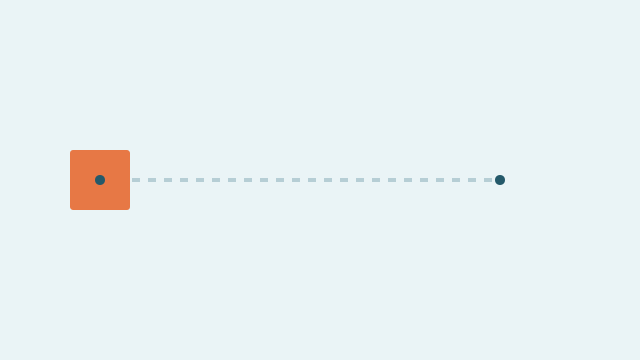
Our reference contains one orange square on a pale blue background. It moves from x=100 to x=300 during seconds zero to two, continues to x=500 while turning ninety degrees during seconds two to four, then returns toward x=100 while turning to 180 degrees during seconds four to six.
The frame is 640 by 360 pixels at 24 frames per second. The square keeps its size and color, and the camera does not move. The rendered file contains 144 frames and no audio. These are properties of this authored fixture, not specifications promised for any AI tool.
| Time | Position | Rotation | What stays fixed |
|---|---|---|---|
| 0 seconds | x=100, y=180 | 0 degrees | Size, color, frame |
| 2 seconds | x=300, y=180 | 0 degrees | Same square |
| 4 seconds | x=500, y=180 | 90 degrees | Same square |
| 6 seconds, endpoint | x=100, y=180 | 180 degrees | Same square |
The last encoded frame is at 143/24 seconds, just before the six-second endpoint. That is normal for this frame sequence; the endpoint defines interpolation rather than adding a 145th frame. Keep such distinctions explicit when comparing an exact motion plan with rendered video.
Download and inspect the reference assets
- Six-second conventional reference MP4
- Static editable SVG source
- Custom keyframe JSON
- Construction notes and limitations
The SVG supplies vector shapes in the initial state. It is not itself the full animated project. The JSON records the timing data in a simple custom schema; it is not an industry-standard interchange format and is not claimed to import directly into every editor. The MP4 is the rendered result and does not contain editable vector layers.
You can inspect the SVG in a suitable vector editor and re-enter the keyframes into your preferred animation workflow. If you build an importer or renderer, map time, position and rotation explicitly. Do not tell a collaborator that the files are universally compatible just because the data is readable.
The baseline is intentionally simple. It isolates whether a workflow preserves object identity and supports a requested revision. Complex characters, cloth and camera movement can be added after those basic controls are understood, rather than making the first test impossible to diagnose.
Sketch the motion states before choosing a tool
Open a blank whiteboard and draw the start, turn and end states in three frames. Add duration notes to the arrows and list the color, size and identity details that must remain fixed. Use this motion board to agree on revisions before choosing generated footage or editable animation; the board plans the action rather than rendering it.
Test a generated route without pretending it is keyframe control
An original prompt for an illustrative version could say: “One orange paper square moves horizontally across a pale blue background. Its size and color remain constant. The camera stays fixed. It turns once near the right side, then returns toward its starting area. No additional objects or text appear.”
That is a request for visible behavior. Unless the selected mode exposes exact timing and motion controls, it is not a guarantee of the numerical path in the JSON. A good-looking result can be acceptable for an atmospheric insert while failing a task that requires precise positions at specific moments.
Use a supported image reference when the task needs a particular initial appearance. Confirm which frame or reference mechanism the actual mode accepts. A general text prompt and a start-frame input should not be treated as equivalent tests when one supplies visual identity and the other does not.
Keep the requested behavior, model or mode, settings, source and original download with each attempt. Mark the interval you actually adopt. If the square grows, changes material or exits the frame, record that failure instead of counting the clip as fully successful because the movement is smooth.
Ask for the revision that matters to your project
A useful second task is: “Keep the first two seconds unchanged, make the turn slower and hold the square at the right side for one extra second.” This reveals whether timing can be edited independently or whether the workflow requires another full render with possible changes elsewhere.
An object-based project can usually express such a change as altered keyframes in the chosen animation system. A flattened clip may need retiming, compositing or regeneration. Retiming can also change the apparent movement and does not recover the original vector or character structure.
For a recurring character, test a second expression or action without changing the identity. For an explanatory motion graphic, test an exact label change. For a three-dimensional deliverable, inspect the actual asset and its required components in the destination software. Choose the revision that reflects the real job.
The AI image-to-video workflow focuses on animating a still into a usable shot. This article addresses the next decision: whether a shot is enough or the production needs editable objects. Neither route is universally better; the required handoff determines the practical choice.
Review two-dimensional character animation separately
A two-dimensional character needs stable proportions, recognizable features and readable action. A cartoon filter alone does not establish those qualities. Check the beginning, middle and end of a movement, especially at overlaps, turns and contacts with props.
Separate appearance references from action references in your review notes. A character can look correct while performing the wrong event, or execute the event while changing identity. Combining those into a single “looks good” score hides the reason a later shot fails.
If the production needs many episodes with the same character, consider whether a reusable asset-based workflow is easier to maintain than independently generated clips. The answer depends on the style, permitted variation and revision volume. Run a small repeated-character trial before budgeting a whole series.
Precise speech introduces another layer. Keep approved dialogue and audio separate from visual performance, and inspect synchronization after export. The AI lip sync guide covers constant offsets, drift and local mouth errors rather than treating all speech failures as one problem.
Do not confuse three-dimensional appearance with a 3D asset
A video can look three-dimensional while containing no downloadable geometry, rig or scene. If the next person must change a camera angle, relight an object or animate a joint, ask for the actual required asset type. A screenshot or MP4 cannot supply those controls by itself.
Write the handoff requirements before selecting a service: intended software, object scale, materials, animation data and any other necessary components. Verify them in the delivered file. Avoid promising format compatibility from a marketing thumbnail or a broad “3D animation” label.
For a single shot, a rendered clip may be enough and can be simpler to deliver. For an interactive scene or reusable production asset, the absence of editable structure can be decisive. The important distinction is the work that must happen next, not whether one output looks more sophisticated.
Compare useful results and revision effort
Keep a log of attempts, accepted intervals, corrections and human editing time. A cheap generated second may be expensive if every identity fix changes the action again. Conversely, a one-off clip may not justify building a detailed reusable asset system.
Use the same motion contract where candidate workflows can support it, and document unavoidable differences. Do not label a free-form prompt result and a manually keyed reference as an equal model benchmark. The reference here demonstrates intent and controllability, not a measured victory for one tool.
Free access needs account-level checks for output restrictions, watermarking, available modes and retained project access. This article has not tested every free plan or established a universal cheapest animation tool. Confirm the current account before promising editable delivery to someone else.
Keep the animation handoff explicit
For generated footage, deliver the source references, prompt, original output, selected interval and review notes. For editable motion, deliver the required source project or assets plus a rendered preview and clear compatibility notes. Name what is included and what must be rebuilt.
A storyboard can record action intent and reference states, while the AI explainer workflow shows why exact state changes may favor editable graphics. CodePic supports planning; it does not turn a rendered clip back into an animation rig.
An AI animation generator is a good fit when its output supports the next real task. Start with a transparent motion example, request a meaningful revision and inspect the files you receive. That makes the choice concrete: a reviewed piece of footage when footage is enough, or editable motion when the production needs to keep changing it.