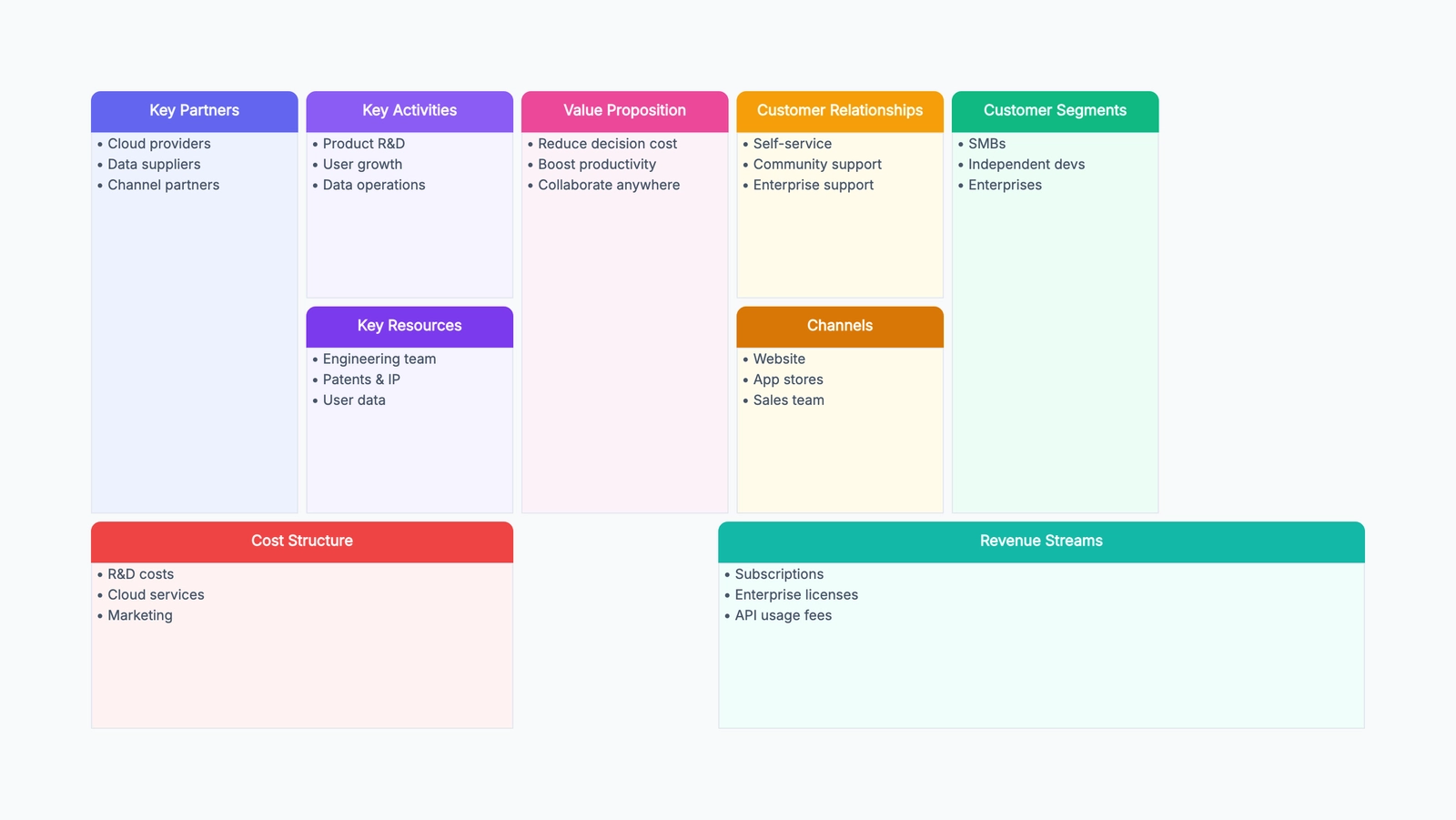
A business model canvas is a one-page tool for showing how a business creates, delivers, and captures value. Instead of writing a long business plan, you map the important parts of the business onto a single visual canvas: who the customers are, what problem you solve, how you reach them, how money comes in, and what it costs to operate.
The format was popularized by Alexander Osterwalder and Yves Pigneur in Business Model Generation. Its biggest advantage is not that it makes strategy look neat. It forces a team to make the business model explicit. When everything sits on one page, vague assumptions become easier to spot.
For an early-stage idea, a business model canvas helps you move from "this could be a good product" to "this is how the product might become a real business." For an existing company, it helps teams compare the business they think they run with the business they actually run.
Why the Business Model Canvas Works
The business model canvas works because it breaks a business into 9 connected building blocks. Each block is simple enough to discuss on its own, but the real value comes from seeing how the blocks influence each other.
A pricing decision changes your revenue streams, but it may also change your customer segments. A new sales channel might open access to a larger market, but it can also add cost, require new partnerships, or change the relationship customers expect from you.
That is why the canvas is especially useful for early planning and team alignment. It gives founders, product teams, marketers, sales teams, and operators a shared language. Instead of debating isolated features or tactics, the team can ask better questions:
- Are we solving a real problem for a specific customer?
- Do our channels match how those customers actually buy?
- Can our revenue model support the activities and resources we need?
- Which parts of this model are assumptions rather than facts?
A business model canvas is not a forecast and it is not a replacement for validation. It is a structured way to organize what you believe, then decide what needs to be tested first.
The 9 Building Blocks
1. Customer Segments
Customer segments are the groups of people or organizations you serve. A segment is not just "small businesses" or "students." It should describe a group with shared needs, buying behavior, budget, and context.
For example, "independent course creators selling paid workshops to professional learners" is more useful than "educators." The first version tells you who you are designing for and how they might make purchasing decisions.
2. Value Propositions
The value proposition explains why customers choose your product instead of doing nothing or using an alternative. It should connect directly to the customer's problem, desired outcome, or job to be done.
Good value propositions are specific. "An easier way to manage courses" is weak. "Launch a paid course in one afternoon without setting up payments, hosting, or email automation separately" is much clearer.
3. Channels
Channels describe how customers discover, evaluate, buy, and receive your product. Channels can include search, social content, app marketplaces, sales calls, partnerships, paid ads, communities, newsletters, and direct referrals.
The important question is not "where can we promote this?" It is "where does this customer already look for a solution, and what channel can we realistically win?"
4. Customer Relationships
Customer relationships describe the type of relationship customers expect from you. Some businesses are self-serve. Some require onboarding, account management, support, community, or long-term consulting.
This block matters because relationship style affects cost and scalability. A $19/month self-serve tool cannot usually support high-touch onboarding for every customer. An enterprise product often must.
5. Revenue Streams
Revenue streams show how the business makes money. Common models include subscriptions, one-time purchases, usage-based pricing, transaction fees, licensing, ads, and service retainers.
Revenue streams should match how customers perceive value. If customers get value every month, subscription pricing may make sense. If value is tied to a single project, a one-time payment or service fee may fit better.
6. Key Resources
Key resources are the assets required to deliver the value proposition. These can be people, technology, brand, data, intellectual property, capital, distribution access, or operational capabilities.
For a software company, the key resource might be the product platform and engineering team. For a marketplace, it might be supply, demand, trust systems, and liquidity.
7. Key Activities
Key activities are the most important things the company must do well. They are not every task on the team's to-do list. They are the activities that make the model work.
For a SaaS tool, key activities might include product development, customer onboarding, support, and conversion optimization. For a media business, they might include content production, audience growth, and ad sales.
8. Key Partnerships
Key partnerships are external relationships that help the business operate, reduce risk, acquire customers, or access capabilities it does not want to build internally.
Partners might include suppliers, integration platforms, payment processors, agencies, affiliates, distributors, technology vendors, or strategic business partners.
9. Cost Structure
Cost structure shows the major costs required to operate the model. This includes people, software infrastructure, marketing, sales, operations, partnerships, payment processing, support, and administrative overhead.
The goal is not to calculate every expense perfectly on day one. The goal is to understand which costs grow with usage, which costs are fixed, and whether the revenue model can support them.
Business Model Canvas Example: Online Course Platform
Imagine a startup building an online course platform for independent experts who want to sell practical, cohort-based courses.
Customer Segments: Independent consultants, coaches, and subject-matter experts who already have an audience but do not want to stitch together payment tools, video hosting, email automation, and community software.
Value Propositions: Launch and sell a polished paid course quickly, without technical setup. The platform handles payments, course pages, email reminders, live session scheduling, student access, and basic analytics in one place.
Channels: SEO content around course creation, creator newsletters, YouTube tutorials, partnerships with creator communities, referral programs, and comparison pages for people searching for alternatives to general learning management systems.
Customer Relationships: Mostly self-serve, with guided templates, onboarding emails, help docs, and live chat for paid users. Higher-tier customers get launch reviews and priority support.
Revenue Streams: Monthly subscription plans, a small transaction fee on course sales for lower-tier plans, and an annual plan for established creators who want predictable cost.
Key Resources: The course platform, payment infrastructure, email delivery system, analytics dashboard, creator templates, engineering team, and trust with the creator community.
Key Activities: Product development, payment reliability, onboarding flow improvement, content marketing, customer support, and partnerships with creator educators.
Key Partnerships: Payment processor, video hosting provider, email delivery service, affiliate partners, creator communities, and integration partners for tools like Zoom or calendar apps.
Cost Structure: Engineering salaries, hosting, payment processing fees, email infrastructure, support, content production, affiliate commissions, and customer acquisition.
Seeing the full canvas makes the strategy easier to discuss. If the platform depends on self-serve growth, SEO and templates matter. If it adds high-touch launch consulting, the cost structure changes. If transaction fees become the main revenue stream, payment volume and creator success become central metrics.
How to Create a Business Model Canvas
Start with the customer and value proposition. These two blocks are the center of the canvas for a reason. If you cannot describe a specific customer and a clear reason they would care, the rest of the canvas will be guesswork.
Next, fill in channels and customer relationships. Think through the full journey: how customers find you, what convinces them to try, how they buy, what support they need, and what keeps them using the product.
Then map revenue streams. Be honest about how money actually arrives. "We will charge a subscription" is only the start. What is the price range? Who approves the purchase? How often does the customer feel enough value to keep paying?
After that, work through key resources, key activities, and key partnerships. This side of the canvas answers the operational question: what must be true inside and around the company to deliver the value proposition?
Finally, fill in the cost structure. Look for the costs that could break the model: expensive customer acquisition, high support load, heavy infrastructure costs, low margins, or partnerships that take too much of the revenue.
Once the canvas is complete, do not treat it as finished. Circle the riskiest assumptions. Which customer segment is unproven? Which channel might not work? Which cost could be higher than expected? Those assumptions become your validation plan.
Common Mistakes
Writing a business plan instead of a canvas. A canvas should be concise. If every block becomes a paragraph of strategy language, the one-page advantage disappears. Use short phrases that invite discussion.
Being too generic. "Everyone who needs productivity" is not a customer segment. "Saves time" is not a strong value proposition. Generic blocks make the canvas feel complete while hiding the hard decisions.
Ignoring cost structure. Teams often enjoy filling in customer and revenue blocks, then treat costs as an afterthought. That is dangerous. A model can look attractive until support, sales, infrastructure, or acquisition costs are included.
Not validating assumptions. The canvas is only a hypothesis. A beautiful canvas does not prove that customers will buy, channels will convert, or partners will cooperate. Use it to decide what to test, not to declare the business solved.
Mixing multiple business models on one canvas. If you serve very different customers with different pricing, channels, and operations, create separate canvases. Otherwise the result becomes too blended to guide decisions.
Business Model Canvas vs. Other Strategy Tools
| Tool | Best For | Main Difference |
|---|---|---|
| Business Model Canvas | Seeing how a business creates, delivers, and captures value | Covers the whole business model on one page |
| Lean Canvas | Testing startup assumptions quickly | More focused on problem, solution, unfair advantage, and metrics |
| SWOT Analysis | Summarizing internal strengths/weaknesses and external opportunities/threats | Diagnostic, not a full model of how the business works |
| Value Proposition Canvas | Understanding customer jobs, pains, gains, and product fit | Zooms into customer-value fit rather than the whole company |
| Product Roadmap | Planning what a team will build over time | Shows delivery priorities, not how the business makes money |
Use a business model canvas when you need the whole model in view. Use a lean canvas when the idea is still very uncertain and you need to pressure-test startup assumptions. Use a value proposition canvas when the weak spot is customer understanding. Use a roadmap only after you have enough confidence about what you are building and why.
Frequently Asked Questions
What is the main purpose of a business model canvas? A business model canvas helps you describe and discuss how a business works on one page. It connects customers, value proposition, channels, revenue, resources, activities, partnerships, and costs so the team can see the model as a system.
Who should use a business model canvas? Founders, product teams, business strategists, marketers, students, and innovation teams can all use it. It is especially useful when an idea is early enough that the team needs clarity before writing detailed plans.
Is a business model canvas the same as a business plan? No. A business plan is usually a longer document with market analysis, financial projections, operational plans, and execution details. A business model canvas is a concise visual summary of how the business model is supposed to work.
How often should I update the canvas? Update it whenever you learn something important: a customer segment changes, a channel fails, pricing shifts, costs are higher than expected, or a new partnership changes the model. For early-stage teams, reviewing it every few weeks is reasonable.
Can I use a business model canvas for an existing business? Yes. Existing businesses use it to evaluate new products, compare business units, clarify strategy, or identify weak spots in the current model. It can be just as useful for diagnosing an existing business as it is for planning a new one.
Next Steps
Ready to map your business model? Try our free Business Model Canvas template to visualize your strategy on one page.
The Business Model Canvas works well alongside SWOT analysis — use SWOT to evaluate your strengths, weaknesses, opportunities, and threats, then use the canvas to design how you'll respond strategically. For a quick SWOT template, see our guide on free SWOT analysis tools.