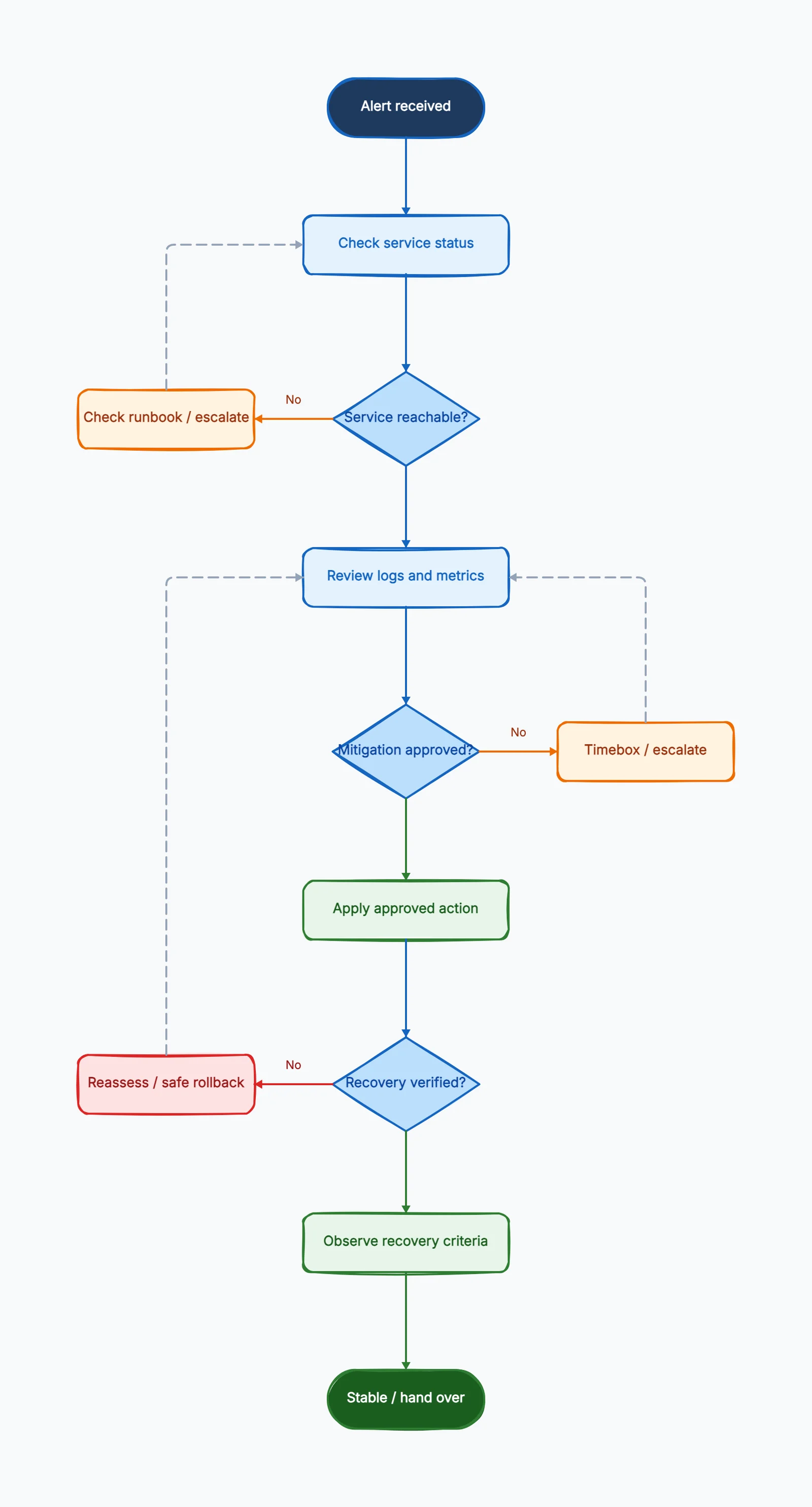
A troubleshooting flowchart turns an observed problem into a sequence of evidence-based decisions. It is useful when the next action depends on what a check actually shows, especially during incidents when people are working under pressure.
The goal is to help a responder choose a safe next step, recognize the limits of their authority and know when to escalate. A chart should not instruct everyone to restart a service, wait a fixed number of minutes and declare success.
Start with a specific symptom and scope
Choose one entry condition: for example, a checkout error-rate alert affecting customers. “Something is broken” is too broad to route reliably. Write down which service, environment and user journey the chart covers, plus where responders find the authoritative runbook.
Separate customer impact from the alert itself. An alert can be caused by instrumentation trouble, while a customer-facing incident can exist without the expected alert. The first check should help establish impact and scope using the signals available for that service.
Also name the intended responder. A support agent, an on-call engineer and an incident commander have different permissions. If a step requires access the reader does not have, draw an escalation handoff rather than implying the chart grants that access.
Define decisions that can be answered
A useful diamond asks one observable question. “Do synthetic checkout requests fail from more than one location?” is more actionable than “Is the system healthy?” Attach the dashboard, query or approved check that supplies the answer.
Use an unknown branch when evidence may be missing. If the metrics backend is unavailable, the answer is not automatically no. Route to another approved source or a more experienced owner. Do not make responders invent a conclusion just to follow one of two arrows.
Keep checks and actions separate. Reading a dashboard is a check. Changing routing, rolling back a deployment or restarting a component changes the system. The diagram should make that difference visible so a low-risk investigation does not quietly become an unapproved intervention.
Draw the core troubleshooting path
1. Receive the symptom and record context. Capture the incident reference, first observed time, affected journey and initial evidence. Use one shared incident record so simultaneous responders do not create conflicting accounts.
2. Establish impact and ownership. Check customer-facing signals and known incidents. If scope exceeds the service owner's authority, activate the appropriate incident process. A duplicate report should join the existing response rather than start an independent change.
3. Run approved diagnostic checks. Review service and dependency signals, recent changes and representative failures. An unreachable endpoint may reflect DNS, network, authentication, dependency or application trouble. It is a symptom, not a restart instruction.
4. Is an authorized mitigation available? Compare evidence with the runbook's conditions. A mitigation may be appropriate before the root cause is known. If there is no supported action, collect focused evidence and escalate at the checkpoint instead of improvising a destructive fix.
5. Execute one controlled action. Record who approved it, what changed and when. Coordinate concurrent changes through the incident owner. Multiple untracked interventions can make both recovery and later diagnosis harder.
6. Verify customer-facing recovery. Recheck the affected journey and relevant system signals. A successful deployment command or a green health endpoint alone does not prove the customer's checkout works again.
7. Observe or escalate. Use the service's recovery criteria and an observation window appropriate to its traffic or job cycle. If verification fails, reassess the action and escalation path. Roll back only when rollback is valid and authorized for the current state.
8. Hand over follow-up work. Record remaining risk, evidence, temporary controls and owners. Root-cause analysis, permanent fixes and runbook improvements can continue after the incident is stabilized.
Worked example: errors after a deployment
In this hypothetical case, customers report checkout failures shortly after an application deployment. The on-call engineer confirms elevated errors in the checkout journey and opens an incident record. A successful homepage check does not end the investigation because the reported failure is specific to checkout.
The engineer compares the affected release, error signatures and dependency signals. The timing makes the deployment a hypothesis, not proof. The runbook permits a rollback only when its compatibility checks pass and the incident owner approves it.
A database change may make a previous application version incompatible. The chart therefore includes “rollback prerequisites met?” before the action. If the answer is unknown, the responder escalates to the service owner instead of treating rollback as an always-safe undo button.
Suppose the prerequisites pass and the owner approves rollback. One responder executes it and records the version and time. Others continue collecting evidence without making independent production changes. This makes the effect of the action easier to assess.
Afterward, the team checks representative checkout requests and the relevant error and latency signals. If customer impact persists, the flow returns to a focused investigation checkpoint with the new evidence. It does not repeatedly roll back the same release or restart unrelated components.
If checkout recovers, the incident owner selects the observation and communication plan from the service's runbook. Low traffic may require a different confirmation method from a high-volume period. The team records that mitigation succeeded while the underlying cause remains under investigation.
Put controls around loops and changes
| Decision | Evidence needed | Exit when evidence is missing |
|---|---|---|
| Is customer impact confirmed? | Journey checks and service signals | Use another approved source or escalate |
| Is this a known failure mode? | Matching symptoms and runbook conditions | Continue focused diagnosis |
| Is mitigation permitted? | Scope, prerequisites and authorization | Ask the authorized owner |
| Did recovery criteria pass? | User-facing result and relevant system signals | Reassess, contain or escalate |
| Can the incident close? | Observation, communication and follow-up ownership | Keep the incident open or hand over explicitly |
Every loop needs a checkpoint. The chart might ask the incident owner to reassess after a documented investigation interval or after a defined set of checks. The exact value belongs to the team's operating policy; an arbitrary number from a tutorial is not a substitute.
Repeatedly collecting the same logs is not progress. At a checkpoint, summarize what was tested, what changed and which hypotheses remain. The next branch should request new evidence, a different specialist or a containment decision.
Treat irreversible changes separately. Deleting data, applying a schema migration or moving traffic can have consequences that a generic rollback arrow does not cover. Link to the approved procedure and responsible role instead of squeezing a hazardous instruction into a tiny rectangle.
Make the diagram readable under pressure
Use action rectangles and decision diamonds with short, specific labels. Put long commands, prerequisites and dashboards in the runbook; reference them from the chart. This keeps the picture readable without removing the detail needed to act.
Group steps by responsibility when several roles are involved. The person investigating may not be the person authorizing changes or updating customers. A handoff should include the incident reference, current impact, evidence and the requested decision.
Give end states distinct names. “False alarm confirmed,” “service stabilized with follow-up” and “escalated to incident command” are different outcomes. One generic “resolved” box can hide unfinished risk or an unaccepted handoff.
Test the chart with a tabletop exercise
Run through a known failure, an unknown failure, missing telemetry, a failed mitigation and a permissions barrier. Ask a responder unfamiliar with the draft to explain the next step and the evidence they would use.
Include a scenario where rollback is unavailable and one where service checks look healthy but the customer journey still fails. These cases reveal unsafe assumptions that a happy-path walkthrough misses.
Record ambiguity as a documentation defect. If a reviewer needs to guess the owner, threshold or permission, amend the chart or its linked runbook. Repeating the exercise after a material system change is more useful than changing a revision date without checking the instructions.
Build an editable troubleshooting flowchart
Start with the troubleshooting flowchart template. Replace its illustrative labels with your actual symptoms, approved checks, mitigation prerequisites and escalation owners. Use the flowchart symbols guide for consistent shapes.
CodePic lets you arrange and edit the diagram, export a PNG, retain editable JSON and share a read-only view. It does not monitor services or execute the actions in the chart. Keep production credentials and sensitive incident evidence outside public diagrams.
Frequently asked questions
Is a troubleshooting flowchart a decision tree?
It often contains decision-tree branches, but it can also include actions, loops, handoffs and recovery stages. Choose the structure that expresses the actual diagnostic process.
Can mitigation happen before root-cause analysis?
Yes, when an approved action fits the evidence and its prerequisites are satisfied. Clearly distinguish “service restored” from “cause proven.”
Should every failed fix be rolled back?
Assess the current state and runbook. Some actions are not safely reversible. A failed verification should trigger reassessment and escalation, with rollback used only where valid and authorized.