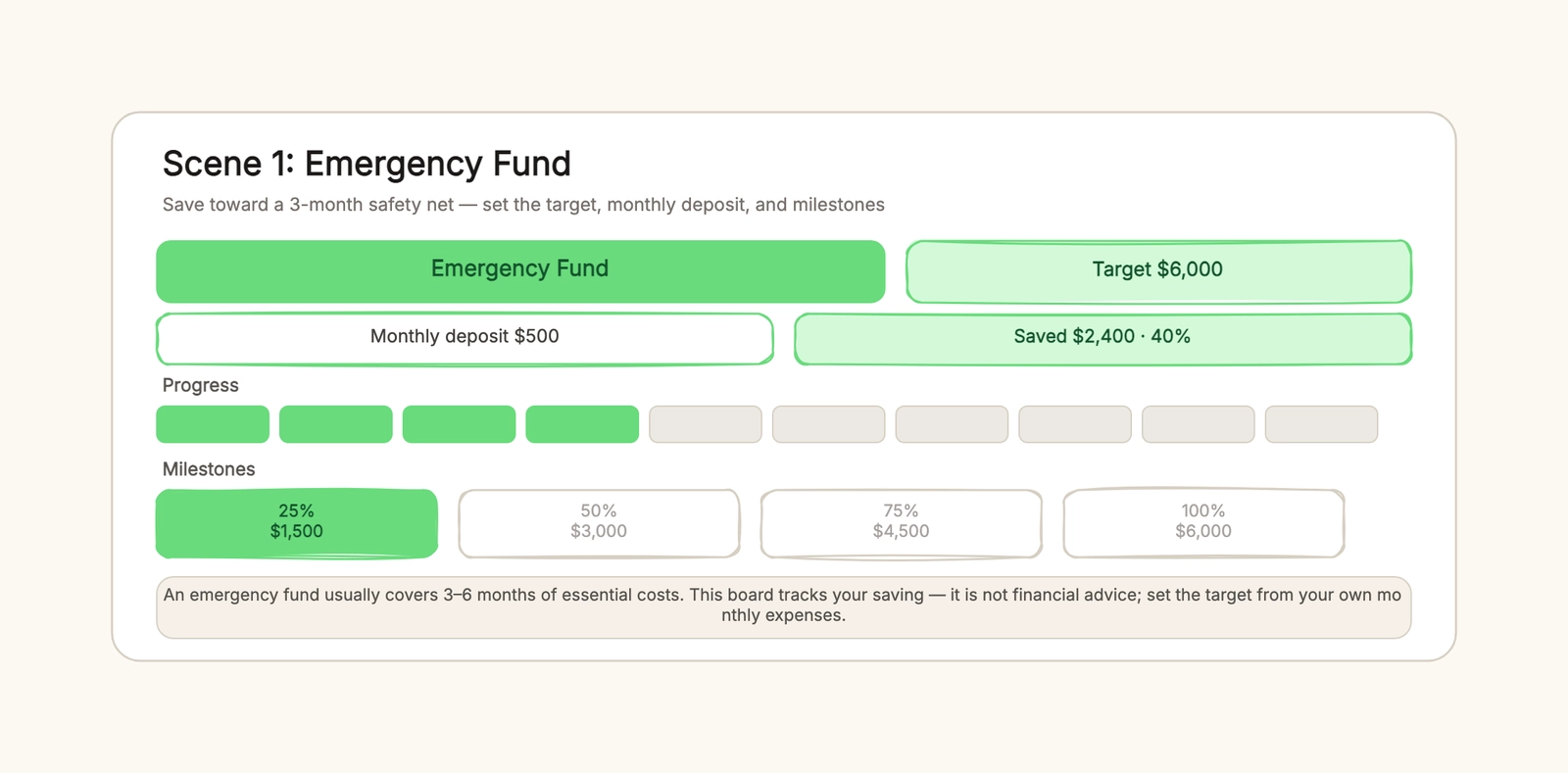
A savings tracker answers one question most budgets never get around to: am I actually closer to the thing I'm saving for? A budget tells you where your money went last month; a savings tracker tells you how far a single goal has moved and whether your pace will get you there in time. The two do different jobs, and the goal almost always loses when you try to run it off the budget alone.
Here is the whole method in one paragraph. Pick one goal and put a number on it. Choose a monthly deposit you can keep up without raiding the fund. Split the target into milestones at 25%, 50%, and 75%. Each month, record what you have saved and fill the matching part of a progress bar. That is it — five steps, no spreadsheet formulas, no app required. The rest of this guide walks through each step with a worked example, then gives you a blank framework you can copy into the savings tracker template.
Why a target matters more than a budget
People abandon savings goals for one reason more than any other: the goal was never a number. "Save more" has no finish line, so it has no momentum. The moment you write "emergency fund — $6,000," the goal stops being a feeling and becomes a distance you can measure.
A target also changes how you react to surprises. If the goal is vague, an unexpected expense just gets absorbed and the plan quietly dies. With a fixed target, the same surprise becomes a number you add back — $6,000 is now $6,000 minus the repair bill, and the progress bar shows exactly what the setback cost. That visibility is what keeps a goal alive across months, and it is the entire reason a tracker beats a mental note.
Pick a target you can justify from your own numbers. An emergency fund target should come from your monthly essential costs, not a round figure you saw in a headline. A trip target is the real cost of flights, lodging, and food. A purchase target is the price of the item plus tax. Write the number down and do not move it while you save.
Step 1: set one goal and put a number on it
Start with a single goal. There is a temptation to track the emergency fund, the trip, and the laptop all at once, and that is how all three end up half-funded and unreadable. One tracker per goal is the rule — each gets its own target, its own deposit, and its own progress bar.
The number should be specific and time-bound. "Emergency fund — $6,000 by December" is a goal; "a cushion for a rainy day" is not. The deadline is the part people skip, and it is what turns the target into a monthly number. If you need $6,000 in twelve months, you need $500 a month. No deadline, no pace.
Step 2: pick a deposit you can actually keep up
The monthly deposit is where most savings plans fail, and the failure is almost always ambition. Someone picks $800, holds it for two months, hits a rough patch, and stops entirely. A tracker with a gap in it is worse than a smaller number held steady, because the gap tells you the plan was never realistic.
Choose the amount you can set aside on your worst month, not your best one. If that means $250 instead of $500, take the $250 and accept a longer timeline. The progress bar will still fill, just slower — and a slow bar that moves every month beats a fast bar that stops. If your income varies, set a floor you can always meet and add extra only when it genuinely will not come back out.
Automate the deposit if you can — same day, right after pay. The less you have to remember, the less the tracker depends on willpower.
Step 3: split the target into milestones
A six-month goal is too far away to feel real. The fix is milestones, and the natural ones are 25%, 50%, and 75% of the target. Each is a checkpoint that tells you whether you are ahead, on pace, or drifting.
Milestones do two things. They shrink the goal into pieces you can actually finish, which keeps the early months from feeling pointless. And they surface problems early — if you are behind at the 25% mark, you have nine months to adjust instead of discovering it in the final month. In the template, milestones are small pills under the progress bar that light up as you pass them, so the whole timeline reads at a glance.
Write a date next to each milestone, not just a percentage. "25% by March" is a commitment; "25% eventually" is a wish.
Step 4: record what you've saved and fill the bar
The progress bar is the heart of the tracker, and the rule is simple: fill it only with money that has actually landed. Do not shade in "what I'm about to save" or "what I'll get back at tax time." The bar means something only when it tracks reality.
Each month, add the deposit to the saved figure and fill the matching number of blocks. Seeing four of ten blocks shaded after a few months is a small, concrete reward that a spreadsheet balance never gives you. It is also the cheapest early-warning system you will find: if the bar is not moving, the deposit is not happening, and you will notice the moment you look.
This is the step most people drop, and dropping it is how a tracker silently stops being a tracker. Set a recurring reminder to update it the day the deposit lands.
Step 5: review monthly and start the next goal at 100%
Once a month, look at the tracker and answer three questions: is the deposit still realistic, am I ahead or behind on milestones, and does the target still make sense. Adjust the deposit if life changed, but leave the target alone unless the goal itself changed.
When the bar hits 100%, do something most people forget: close the goal out and start the next one. A finished tracker is a record you can look back at, and the habit that carried one goal will carry the next. Move the completed scene aside in the template, duplicate a fresh one, and write the next target.
A worked example: the $6,000 emergency fund
Put the steps together on a real goal. Say you want a three-month emergency fund, and your essential monthly costs — rent, food, utilities, transport — come to $2,000. Three months is $6,000, so that is the target.
You can set aside $500 a month without touching the essentials, so that is the deposit. Twelve months gets you there. Your milestones are $1,500 at 25%, $3,000 at 50%, and $4,500 at 75%, with dates four, eight, and twelve months out.
Four months in, you have saved $2,400. The tracker shows 40% — four of ten blocks filled, the 25% milestone lit up, and the 50% milestone still a few months away. A month later a car repair costs $300, and instead of abandoning the plan, the tracker just shows the saved figure pause at $2,600 while the next two deposits land. The goal did not die; it visibly took a small hit and kept going.
That is the whole value of the method: the number moves, the bar shows it, and the setback becomes a line item instead of a reason to quit. You can open the savings tracker template and rebuild this exact scene by swapping in your own numbers.
A blank framework to copy
When you sit down to fill in your own tracker, here is the empty shape to fill:
- Goal — one sentence, one target, one deadline.
- Target — the number the goal is worth, from your own costs.
- Monthly deposit — the amount your worst month can still afford.
- Milestones — 25%, 50%, 75%, each with a date.
- Progress — saved so far, updated every month, filled honestly.
That is the entire framework. There is nothing else to it, and that is the point — the less machinery between you and the goal, the more likely you are to keep the habit.
Emergency fund vs. sinking fund vs. debt payoff
Three things get confused with a savings tracker, and they are worth separating because they change which tool you reach for.
An emergency fund is for surprises — a job gap, a repair, a medical bill you did not see coming. A sinking fund is for an expense you know is coming, like a trip or a laptop, so you save toward it on purpose. Both run on the same tracker structure; the only difference is what the target is for.
A debt payoff plan is the opposite direction entirely. A savings tracker builds a balance up toward a future goal; a debt payoff plan pays a balance down to zero. One saves, one repays. If you are clearing credit-card or loan balances, you want the debt payoff plan template, which orders your debts for the snowball or avalanche method. Saving while high-interest debt is still accruing is a decision worth making deliberately — this tracker just gives you the saving half of it, not investment or financial advice.
For the habit side of the equation — actually making the deposit each month — the habit tracker template pairs well, and if the savings goal is part of a bigger plan, the goal setting template turns it into a full objective with metrics.
What usually derails a savings plan
Most abandoned savings goals fail the same few ways, and none of them are mysterious.
The deposit is set too high and dies at the first rough month. The target is a round headline number instead of your own costs, so it never feels real. Every goal is jammed into one balance, so nothing has its own progress. Milestones are skipped, so a six-month goal feels endless. And the saved figure stops getting updated, so the tracker quietly becomes decoration.
Each of these has the same cure: shrink the ambition, ground the number in your own life, keep one goal per tracker, mark milestones, and update monthly. A modest tracker you keep beats an ambitious one you abandon, every time.
Keep the tracker honest
The only rule that matters is that the progress bar reflects reality. Fill it only with money that has landed, update it on the same day the deposit arrives, and let a stalled bar be a signal instead of a failure. A tracker that tells you the truth — even when the news is "we're behind" — is worth more than a prettier plan that hides it.
This article is a guide to tracking a savings goal, not financial advice. Investment choices, tax implications, and major money decisions belong with a licensed advisor; the tracker only organizes the saving you have already decided to do.
Start with the savings tracker template, replace the target, deposit, and milestones with your own, and fill the first block this month. For the other half of the coin, see the debt payoff plan template, and for keeping the monthly habit alive, the habit tracker template.