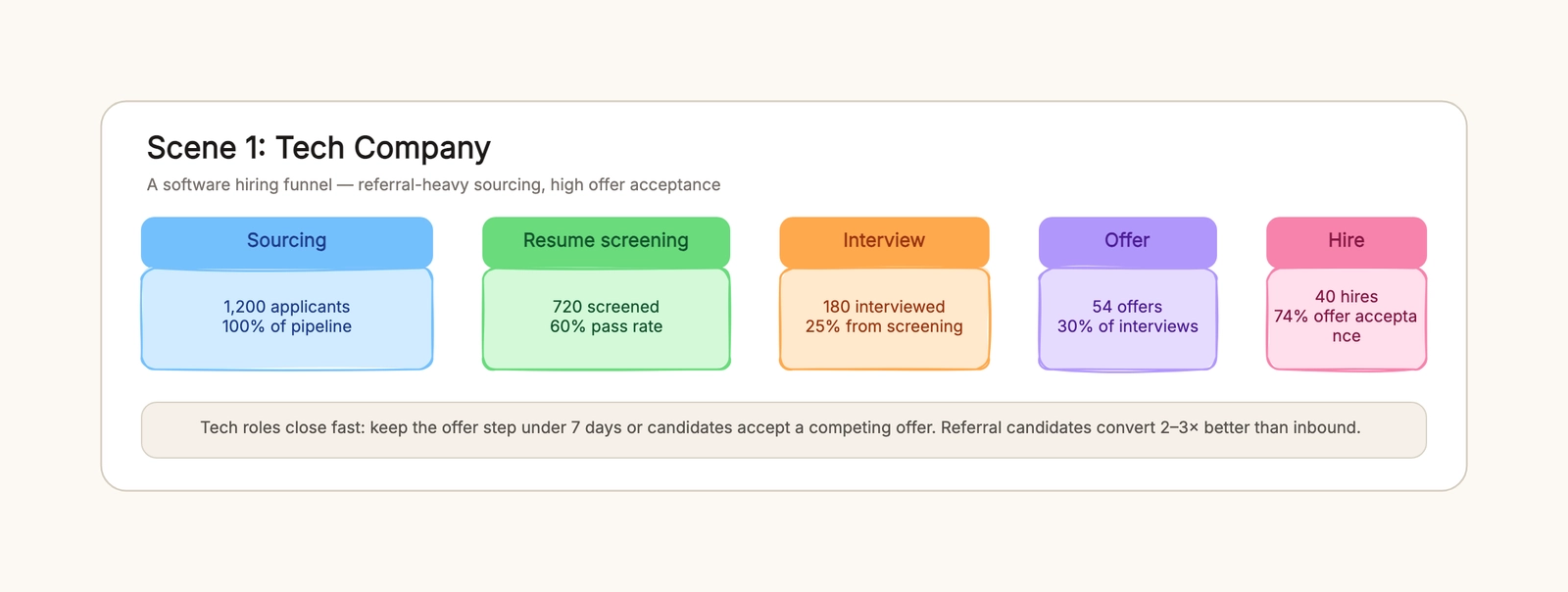
A recruiting pipeline is where your hiring numbers actually live. It is the funnel from the moment a candidate applies to the moment someone signs, with a count at every step so you can see exactly where the funnel leaks. If you have ever ended a quarter knowing you hired three people but not knowing how many applicants it took to get them, you were running hiring without a pipeline.
This guide walks through how to build a recruiting pipeline from sourcing to hire, how to read the conversion numbers, and how to fix the stage that is dropping the most candidates. You can adapt the recruiting pipeline template and edit the counts and stages directly in the browser.
What a recruiting pipeline should show
A recruiting pipeline is not the same thing as a hiring process flowchart. A flowchart maps the steps and decisions a single candidate walks through — apply, phone screen, interview, decision, offer. A recruiting pipeline maps the volume across a whole requisition: how many people entered, how many survived each stage, and where the drop-off happened. The flowchart tells you what happens; the pipeline tells you how many make it through.
A useful recruiting pipeline should answer four questions: how many candidates enter, how many pass each stage, what the conversion is between each pair of stages, and where the biggest leak sits. When you have those four numbers, a weak applicant pool and a slow interview stage stop looking the same — they show up as different points on the same funnel.
A workable pipeline should produce five outcomes:
- a candidate count at every stage, not just the final hire;
- a conversion rate between each adjacent pair of stages;
- a clear view of which stage drops the most people;
- a sense of how long the offer step takes, since a slow offer loses candidates;
- numbers you can update each quarter to see whether a change worked.
Avoid treating every role as the same funnel. A tech role, a retail storefront, and a clinical team run very different pipelines, and forcing one shape onto all three hides the real problem. Start from the same five stages and branch where the role genuinely differs.
How to build a recruiting pipeline
The most useful pipeline is organized around the five stages every hire goes through, with a number at each one. When every stage has a count, the drop-off becomes visible instead of vague.
1. Set the five stages
Write the stages first: sourcing, resume screening, interview, offer, and hire. Some roles insert a phone screen or a technical assessment between screening and interview, and a clinical role adds a credential check up front. Start with five and add gates only where the role actually has them.
2. Enter the candidate count at each stage
Pull the counts from your last requisition. Sourcing is the total that applied; screening is how many passed the resume review; interview is how many you actually spoke to; offer is how many you extended; hire is how many accepted. If you do not have these numbers, the first version of your pipeline is just a guess — that is fine, it gives you a baseline to correct next quarter.
3. Compute the conversion between stages
Divide the later stage by the earlier one. If 1,200 applicants became 720 screened candidates, the screening pass rate is 60%. Do this for every adjacent pair. The conversion numbers are the point of the exercise — they are what turn "hiring is slow" into "the offer stage is where people walk away."
4. Find the biggest leak
Look for the stage with the sharpest drop. A 60% screen pass and a 30% interview-to-offer ratio point at different fixes. The leak is the stage to work on first, before you spend more on sourcing.
5. Time the offer step
The count is not the only number that matters. In competitive roles, the days between interview and offer matter as much as the conversion rate, because a slow offer hands the candidate to a competing team. Record the offer timeline alongside the counts.
6. Update the numbers each quarter
A pipeline from last year describes last year. Refresh the counts each cycle so the funnel reflects the current requisition, and you can tell whether a change actually moved the numbers.
The five stages, with numbers
A concrete tech requisition makes the funnel easy to read. Start with 1,200 applicants. Resume screening keeps 720, a 60% pass rate. Of those, 180 reach an interview, or 25% of the screened pool. The interview produces 54 offers, 30% of the people interviewed. Of those 54, 40 accept — a 74% offer-acceptance rate.
Those four conversions tell a story the final hire number hides. The steepest drop is between screening and interview, which suggests the resume screen is either too loose and flooding the interview stage, or too strict and cutting good candidates. The offer-acceptance rate is healthy, so the problem is not the offer — it is upstream. That is the whole point of the pipeline: it points you at the right fix instead of letting you guess.
For more on the steps and decisions inside the flow itself, the hiring process flowchart article maps the process a single candidate walks through, which pairs naturally with the volume view a pipeline gives you.
How the funnel changes by industry
The five stages stay the same, but the shape of the funnel changes a lot by role type.
Tech
A tech funnel is referral-heavy and the offer step is the risk point. Candidates hold competing offers, so a slow decision costs you the hire. Track the interview-to-offer ratio and the days between interview and offer as closely as you track the applicant count.
Retail
A retail funnel is wide at the top and fast through the middle. Thousands of applicants, a quick screen on availability and attitude, and a high offer-acceptance rate. The leak in retail is usually the screening stage — either you are spending too long on it or the screen is not filtering for availability, so interviews get wasted on people who cannot work the shifts you need.
Healthcare
A healthcare funnel narrows early. Credential and background checks cut the pool before anyone reaches an interview, so the interview-to-offer ratio looks different from tech. The pipeline shows the early gate doing most of the filtering, which means the fix is usually in sourcing — finding enough qualified, licensed candidates — rather than in the interview itself.
Reading the conversion math
The conversion between stages is the whole diagnostic. A weak applicant pool shows up as a low sourcing number and a high pass rate — few people apply, but most of them are qualified. A slow screen shows up as a big drop between screening and interview. A low offer-acceptance rate shows up at the end, and it usually means compensation, timing, or the interview experience, not the top of the funnel.
Three numbers to watch:
- Sourcing to screening — low numbers here mean the posting is not reaching the right people or the role is unattractive.
- Screening to interview — a sharp drop here means the screen is either too loose or too strict, or the recruiters are overloaded.
- Offer to hire — a low acceptance rate means the offer, the timeline, or the interview experience needs work, not the sourcing.
Work on the stage with the sharpest drop first. Adding more sourcing when the offer stage is the leak just pushes more candidates into the same hole.
Common recruiting pipeline mistakes
Tracking only the final hire count
If you only watch the number that got hired, you cannot see the leak. Record every stage so the conversions are visible, and the fix stops being a guess.
Not locating where candidates actually drop
A weak pool and a slow screen need different fixes. Pin the drop-off to a specific stage before changing anything, or you will "fix" the wrong end of the funnel.
Not timing the offer
In tech especially, a slow offer loses candidates to competing offers. The days between interview and offer are a conversion number of their own, and they deserve the same attention as the counts.
One funnel for every role
A retail pipeline and a clinical pipeline have different shapes. Model each role type separately, or the single blended funnel will hide the real problem in both.
Letting the funnel go stale
A pipeline from last quarter tells you about last quarter. Update it each cycle so it reflects the current requisition and you can measure whether a change actually worked.
Keep the pipeline useful over time
Review the pipeline after each requisition and note where the numbers moved, so the next one starts from a better baseline. Keep a short version — the five stages and the three conversion ratios — in your notes, and expand it when a role is hard to fill. A pipeline you update once a quarter is a hiring process you can actually steer.
Start with the recruiting pipeline template, replace the counts and stage names with your own, and fix the stage that drops the most candidates. When you are ready to map the steps a single candidate walks through, the hiring process flowchart guide covers the process side, and the onboarding flowchart template picks up where the hire ends.