Onboarding usually breaks down in the gaps: the kickoff that never got scheduled, the training nobody confirmed was finished, the new user who got stuck and quietly churned. An onboarding flowchart makes those gaps visible by drawing the path from day one to first success — including what happens when someone stalls.
This guide maps a real onboarding flow that works for both customers and employees. For the format basics, see What Is a Flowchart?.
Why Draw Onboarding as a Flowchart
Onboarding isn't linear. People miss kickoffs, skip training, get stuck on setup. A checklist hides those branches; a flowchart shows them — and showing the "what if they stall?" path is the difference between an onboarding process that recovers and one that loses people silently.
The same flow works for customer onboarding, employee onboarding, partner activation, and implementation handoff. The milestones are the same shape even when the details differ.
Step by Step
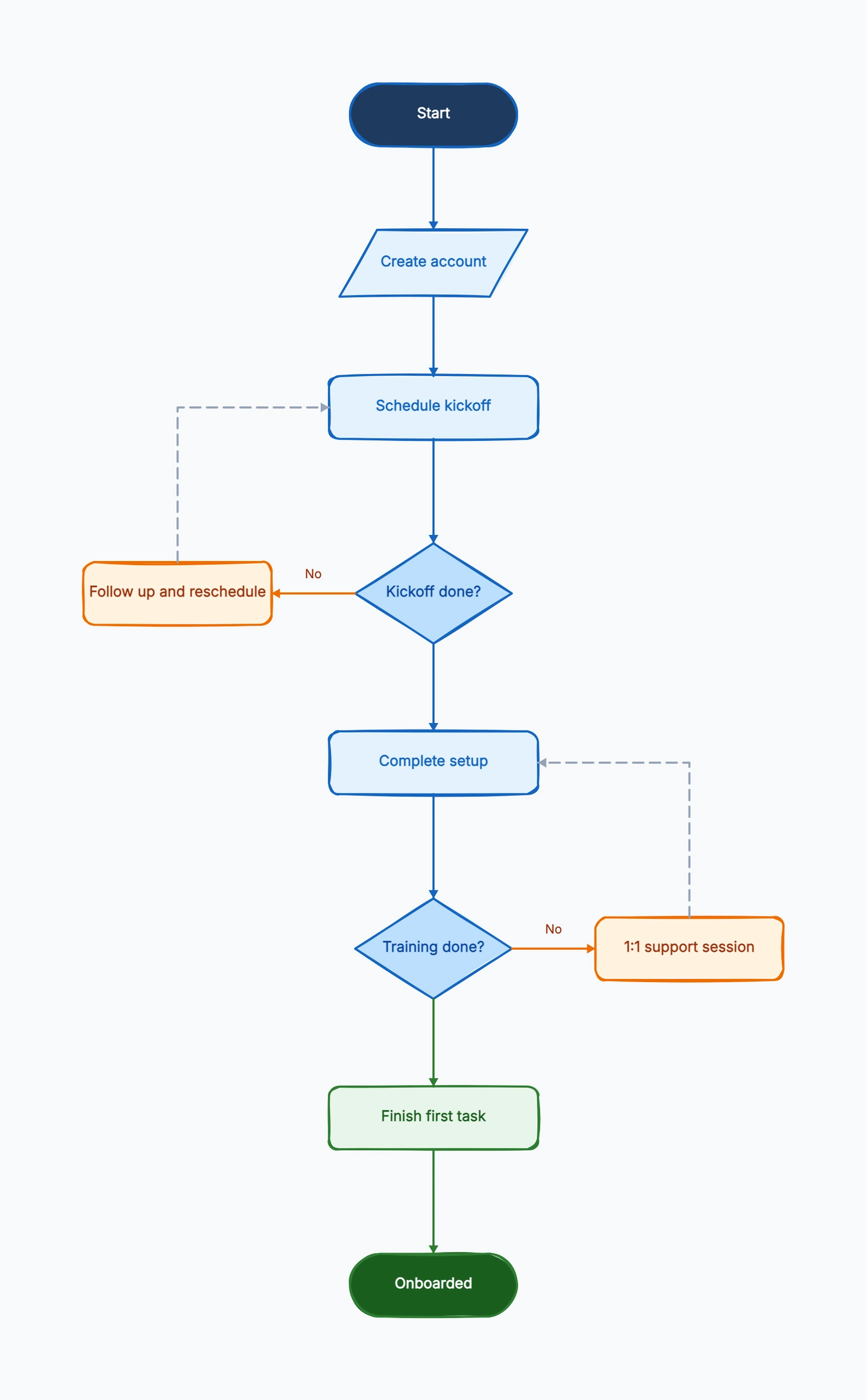
Here is the flow from our onboarding flowchart template:
1. Start — create account. The process begins with access: the new customer or employee gets an account, login, or workspace.
2. Schedule kickoff. Book the orientation or kickoff session early — this is the step most often skipped, and skipping it is where onboarding starts to drift.
3. Kickoff done? (decision). If No, route to Follow up and reschedule and loop back. If Yes, continue. This follow-up loop is what keeps people from falling through the cracks.
4. Complete setup. The new user finishes configuration, profile, tools, or workspace setup.
5. Training done? (decision). If No, route to a 1:1 support session — a human touchpoint for anyone who's stuck — then loop back. If Yes, continue.
6. Finish first task. The real milestone. Onboarding isn't "they logged in"; it's "they did the first meaningful thing." This step ties completion to actual value.
7. Onboarded (end). The terminal state, reached only after the first real success.
Notice the two recovery loops (reschedule, 1:1 support). They are what separate a robust onboarding flow from a fragile one. Open the flowchart maker with this template to see how they route back.
Common Mistakes
Defining "onboarded" as "signed up." The end state should be a first real success, not account creation. If your flowchart ends at "account created," it's measuring the wrong thing.
No recovery path for stalls. What happens when someone misses the kickoff or can't finish setup? If there's no loop back, your process drops them. The decision diamonds with "No" branches are where recovery lives.
One giant "Training" box. If training is five sub-steps, break it out. A single overloaded box hides where people actually get stuck.
Frequently Asked Questions
What is an onboarding flowchart?
An onboarding flowchart maps the path a new customer or employee takes from day one to first success — setup, kickoff, training, and the support path that kicks in when someone gets stuck.
What is the difference between customer and employee onboarding?
The structure is nearly identical — setup, kickoff, training, first success — so one template covers both. Only the content of each step differs.
Ready to map yours? Start from the onboarding flowchart template — it loads with kickoff, training, and recovery loops already in place, no signup required.
Related Reading
- Types of Flowcharts — which format fits your process
- Onboarding flowchart examples — layouts to copy
- How to Make a Flowchart — the general tutorial
- Flowchart Symbols Guide — every shape explained