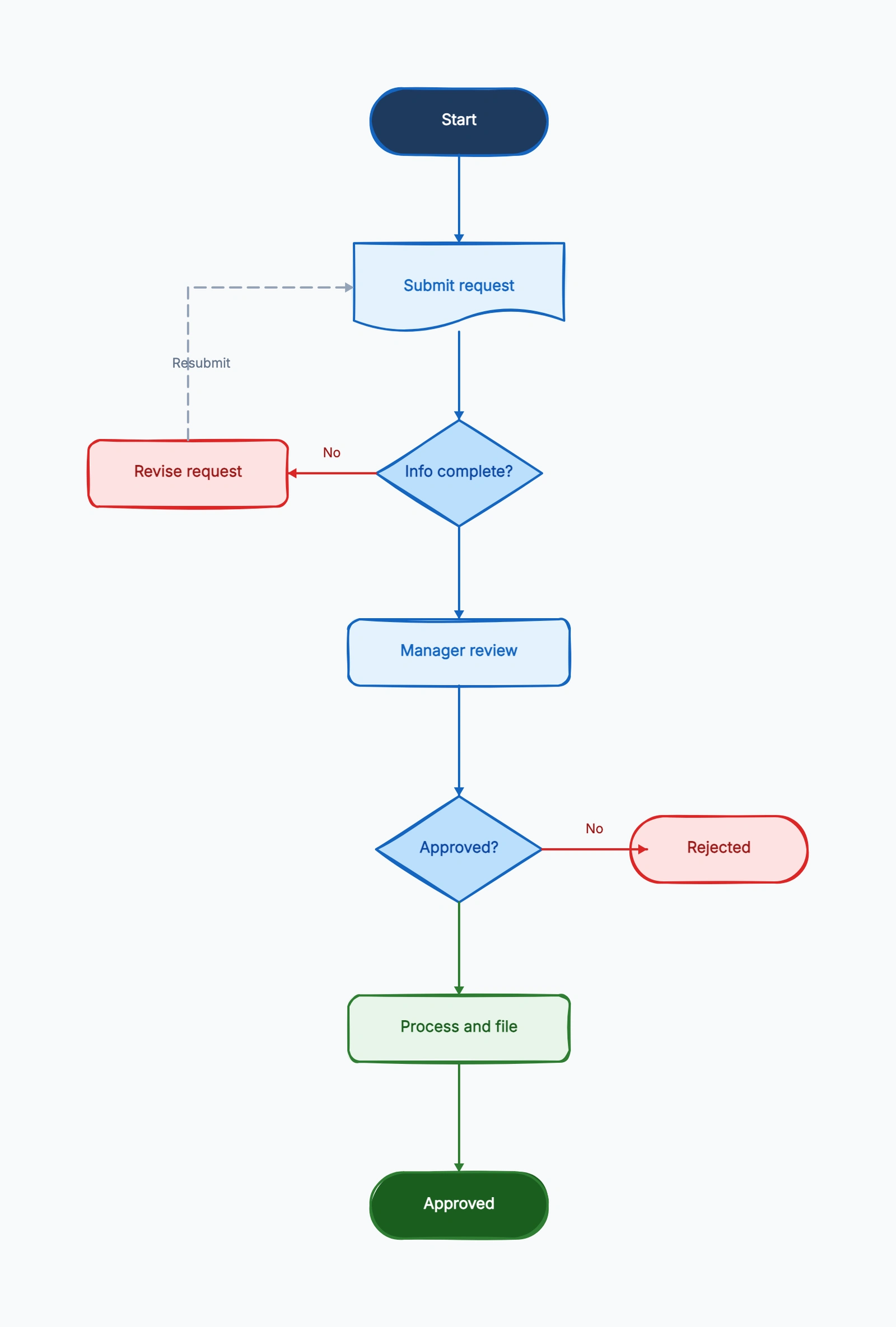
Most approval processes live in people's heads or buried in a wiki paragraph: "send it to your manager, and if it's over $5,000 it also needs finance." That ambiguity is exactly why requests stall. An approval process flowchart turns those unwritten rules into a diagram anyone can follow.
This guide walks through how to map one, using a real request-to-sign-off flow as the example. For the format basics, see What Is a Flowchart? and the flowchart symbols guide.
What an Approval Flowchart Shows
A good approval flowchart answers three questions that plain text usually leaves vague:
- Who reviews the request, and in what order?
- What happens when the request is incomplete or gets rejected?
- Where does an approved request actually end up?
The second question is the one most people forget. A linear "submit → approve → done" diagram isn't an approval flow — it's a wish. Real approvals have rejection loops, and showing them is the whole point.
Step by Step
Here is the flow our approval flowchart template maps, which you can use as a model for your own:
1. Start — submit request. The process begins when someone submits a request: a purchase, a content draft, a budget, a contract.
2. Completeness check (decision). "Info complete?" If No, the request goes to a Revise request step and loops back — nobody should review an incomplete request. If Yes, it moves forward.
3. Manager review. The first approval stage. The reviewer evaluates the complete request.
4. Approval decision (decision). "Approved?" This is the core branch:
- Yes → Process and file → Approved (end state)
- No → loops back to Revise request so the requester can address the feedback and resubmit
5. Apply threshold rules. Decide whether value, risk, contract type, or data sensitivity requires another reviewer. Put the rule inside the diamond: "Over $5,000?" is more useful than "Extra approval needed?"
6. Set a time limit and escalation. A request waiting for review is a real state. Add an SLA check and route overdue work to a reminder, delegate, or escalation owner.
7. Close and record the result. End with an explicit outcome such as Approved and ordered, Rejected and closed, or Withdrawn. Store the request version, approver, timestamp, decision reason, and evidence at the same point.
That loop-back on rejection is what makes this a flowchart and not a checklist. Open the flowchart maker with this template to see how the rejection arrow routes back to the revision step.
Worked Example: A Purchase Request
Suppose an employee needs a $7,500 analytics subscription. A useful approval flow does more than send a form to a manager:
- The requester submits the business purpose, supplier, annual cost, budget code, contract, and data-access requirements.
- An intake check confirms that every required field and attachment is present. Missing information returns to the requester before a reviewer spends time on it.
- The manager confirms the business need and budget owner. A rejection here returns with a reason and creates a new request version.
- A value decision checks whether the amount exceeds the organization's $5,000 threshold. Because this request does, it moves to finance.
- A data-sensitivity decision checks whether the supplier will process customer or employee data. If yes, security and legal reviews can run in parallel; if no, the flow skips them.
- Finance approves the spend, procurement creates the order, and the system records the decision trail.
- The requester receives one of three explicit outcomes: approved and ordered, rejected and closed, or returned for revision.
This exposes two kinds of branches. A business-rule branch changes who reviews the request; a quality branch returns incomplete work for correction. Keeping them visually distinct makes the diagram easier to maintain when thresholds or policies change. Compare layouts in the approval flowchart examples.
Define Routing Rules Before Drawing
Write a small decision table before placing shapes. It prevents vague diamonds and reveals where reviews can happen in parallel.
| Condition | Route | Evidence required |
|---|---|---|
| Request incomplete | Return to requester | Missing-field list |
| Within budget and below threshold | Manager approval | Business purpose and budget code |
| Above spending threshold | Add finance review | Quote and total cost |
| Handles sensitive data | Add security and legal reviews | Data-flow summary and contract |
| Review exceeds SLA | Escalate or delegate | Reminder and escalation timestamp |
Each row should become either a labeled branch or a validation rule outside the visual flow. Do not put every policy sentence inside the diagram. Keep the chart readable, then link to detailed policy definitions.
Assign Ownership with Swimlanes
Use a standard flowchart when one team owns nearly every step. Switch to swimlanes when the important question is where responsibility changes. A purchase flow might use lanes for Requester, Manager, Finance, Security/Legal, and Procurement.
Place an action in the lane of the person who performs it, not the person who receives a notification. Cross-lane arrows then represent handoffs. If finance and security can review at the same time, split into parallel paths and join only after every required decision is complete.
Keep systems separate from people when automation matters. A Workflow system lane can own validation, reminders, timestamps, and notifications, while human lanes own judgment. This makes automation opportunities visible without pretending every approval can be automated. Compare other layouts in Types of Flowcharts.
Add SLA, Delegation, and Escalation Paths
The most damaging approval state is often not rejection but silence. Model waiting explicitly:
- Start the review timer when a complete request reaches an approver.
- Send a reminder before the deadline, not only after it.
- Allow a named delegate for absence, but preserve who made the decision.
- Escalate overdue work to a role or queue, not an individual who may also be unavailable.
- State whether returning for revision pauses or restarts the SLA clock.
Avoid automatic approval merely because a reviewer missed a deadline unless policy explicitly permits it. For spending, security, legal, or compliance decisions, escalation is usually safer than implied consent.
Validate the Flow with Real Requests
Walk three records through the finished diagram: one clean approval, one incomplete request, and one high-risk rejection. Check that every decision has labeled exits, every return arrow says what must change, parallel reviews have a join rule, and every path reaches a named outcome.
Also verify that every waiting state has an owner and SLA, and that the final step records enough information to reconstruct the decision. Ask someone who did not design the process to trace a request. If they need a verbal explanation to choose a branch, rewrite the rule on the chart.
Save the reviewed diagram beside its policy owner and revision date so the process does not drift away from the version people actually follow.
Common Mistakes
No rejection path. If your diagram only shows the happy path, it's documenting what you hope happens, not the process. Every approval decision needs a "No" branch.
Unlabeled decision exits. Every diamond exit needs a label — "Yes / No", "Approved / Rejected". An unlabeled branch forces the reader to guess.
Skipping the completeness check. Sending incomplete requests into review wastes reviewers' time. A quick "Info complete?" gate up front catches this.
Too many approval layers. If a request passes through five sequential approvers, the diagram (and the process) becomes a bottleneck. The flowchart often makes over-engineered approval chains obvious — which is a good reason to draw it.
When to Use a Simpler Flow Instead
If one owner checks one condition and makes one decision, a short checklist or status field may be clearer than a multi-lane chart. Use a flowchart when there are branches, returns, thresholds, parallel reviews, or uncertain ownership. The goal is to make consequential routing visible, not to diagram every administrative action.
Frequently Asked Questions
What is an approval process flowchart?
An approval process flowchart is a diagram that shows how a request moves from submission through review to a final decision, including what happens when information is missing or the request is rejected.
How do you show rejection in an approval flowchart?
Use a decision diamond like "Approved?" with a "No" branch that loops back to a "Revise request" step. The revised request then re-enters review.
How many approval levels should a workflow have?
Use the fewest levels that control real risk. Add reviewers because a threshold or policy needs their expertise, not simply because hierarchy exists.
How do you prevent approval requests from stalling?
Give every waiting state an owner and SLA, send reminders before the deadline, support delegation, and route overdue work to an escalation queue.
What belongs in an approval audit trail?
Capture the request version, requester, reviewer, decision, timestamp, reason, evidence, and policy rule applied.
Ready to map your own? Start from the approval flowchart template — it loads with the request, review, and rejection-loop structure already in place, no signup required.
Related Reading
- Types of Flowcharts — process, swimlane, and more
- Approval flowchart examples — real layouts to copy
- Flowchart Symbols Guide — every shape explained
- How to Make a Flowchart — the general tutorial