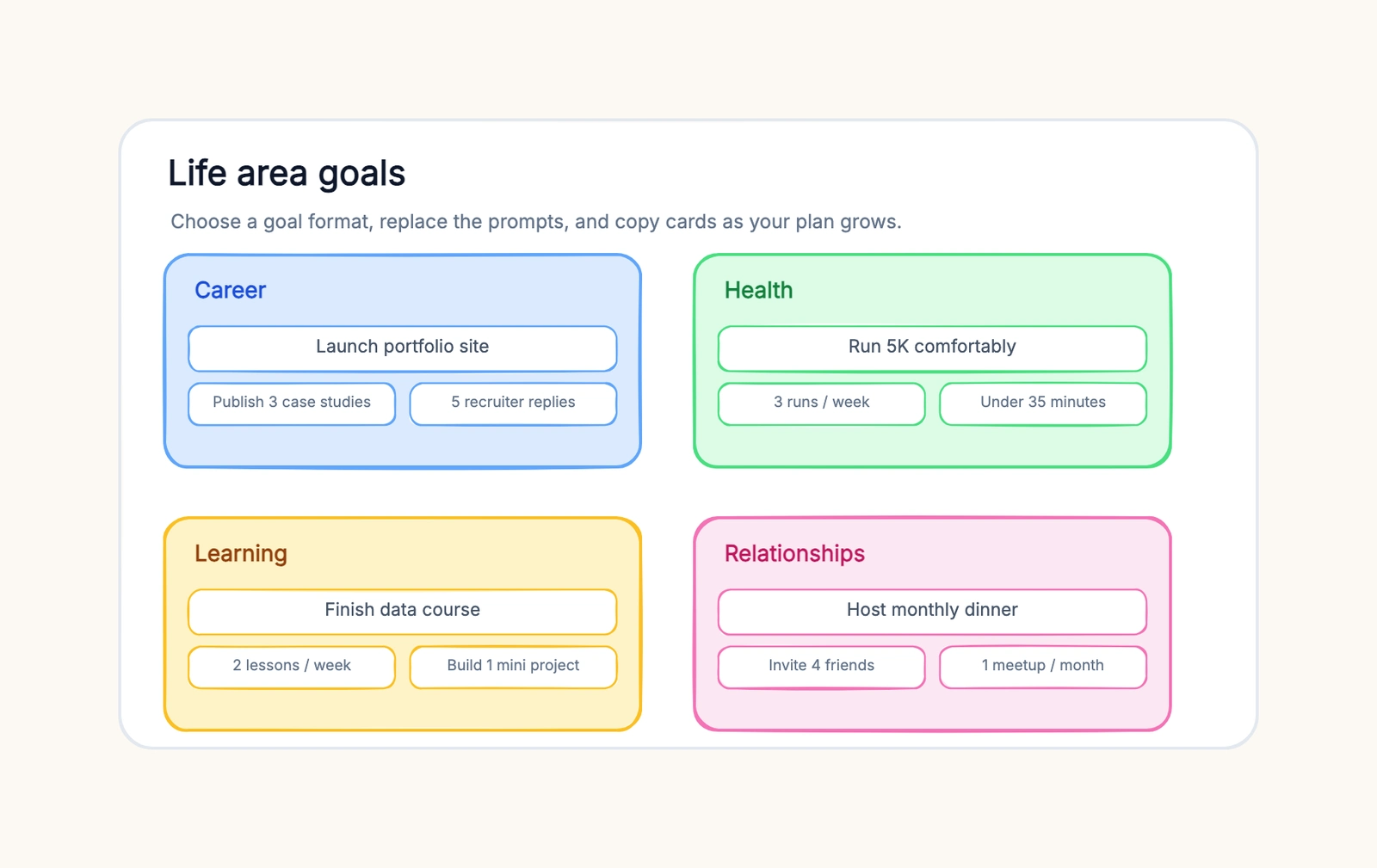
Every January, millions of people write goals in a notebook: get fit, save money, learn a language, change jobs. By March, most of those pages are closed and forgotten. The goals weren't unreasonable — they were just written in the wrong medium. A page of text has no room to show the relationships between goals, no way to break a year into steps, and no place to track progress as it happens.
A whiteboard fixes that. When you map goals instead of listing them, you can brainstorm freely, group related ambitions into categories, turn vague wishes into measurable targets, and connect each goal to the milestones that make it real. This guide shows you how to set goals visually — which frameworks actually work on a board, how to structure the space, and how to avoid the mistakes that make most goal setting a waste of paper. It works with a free hand-drawn whiteboard like CodePic, where the infinite canvas gives you unlimited room to spread everything out.
Why Written Goals in a Notebook Don't Stick
Writing a goal down is a good first step, but a list of sentences has hard limits, and those limits are why the notebook fails.
A list hides the relationships between goals. Your fitness goal and your health goal overlap. Your career goal and your learning goal feed each other. In a flat list, every item sits on its own line, so you can't see that two goals share one root cause or that one goal is a stepping stone to another. A map surfaces those connections and lets you combine, split, or reorder goals the way you'd actually pursue them.
A list has no structure for breaking things down. "Get fit" is a sentence. "Run a 10K by October, 3 runs a week, rest days Sundays" is a plan. A text page gives you no natural place to hang the milestones under the goal, so people tend to write the goal and then skip the part that makes it achievable. On a board, you have room to hang every sub-step beneath it.
A list is dead after the day you write it. You write the goals, close the notebook, and nothing about the medium pulls you back. A visual board is something you look at — it lives on the wall or the screen, it changes as you make progress, and the act of moving a card from "in progress" to "done" is feedback a text list never gives you.
A list is easy to cheat. When a goal is a sentence, it's vague enough to claim progress on. "Read more" — you read an article, done, right? When the goal is a number on a card ("24 books this year, 2 a month"), vagueness has nowhere to hide. Mapping goals forces them into a shape you can measure.
Goal Frameworks That Work on a Board
Four frameworks translate well to a visual board. Pick the one that fits the goal — or combine them, since they answer different questions.
SMART goals as quadrants
SMART stands for Specific, Measurable, Achievable, Relevant, and Time-bound. On a board, the cleanest way to use it is a quadrant layout: draw a 2×2 grid, with "Specific → Vague" on one axis and "Measurable → Feelings" on the other, and place each goal in the right quadrant. Anything that lands in the vague or feelings corner gets rewritten until it moves. It's a fast filter that forces every goal to earn its place.
OKR-style tree
An OKR tree works bottom-up or top-down. Start with one Objective — "Make the product easier to use" — in a box at the top, then hang Key Results beneath it: "Cut activation time from 18 to 8 minutes," "Raise trial-to-paid from 8% to 12%." On a canvas this becomes a literal tree: one root objective, a few branches for key results, and leaves for the specific work. The visual tree makes the dependency obvious — you can see at a glance which key results actually feed which objective.
Yearly → quarterly → monthly breakdown
This is the framework for long horizons. Draw three zones on the board: the year at the top, the four quarters below it, and the current month at the bottom. Each goal starts as a single card in the year zone, then splits into smaller cards that move down into quarters and months. The board becomes a map of how the year turns into this week's actions. When you review, you check whether the month's cards still lead somewhere, and you notice drift early because the chain from month to year is visible.
Milestone timeline
Some goals are too big for a quadrant and too linear for a tree — a house renovation, a book, a job search. For those, use a horizontal timeline. Put the end state on the right (a card that says "apartment painted and furnished") and work leftward, adding milestone cards: measure and budget, buy materials, prime, paint, furnish. Each milestone has a date and a "done when" note. The timeline turns an overwhelming project into a sequence of checkable steps.
How to Map Your Goals on a Whiteboard
The framework matters, but the process matters more. Here's the sequence that works on an infinite canvas.
1. Brainstorm without editing. Start with total freedom. Put every goal, wish, and half-formed ambition on the canvas as a quick card — whatever comes to mind, no judging. The trick here is volume: you can't prioritize what you haven't written down. On an infinite canvas you have unlimited space, so nothing gets left off because the page ran out.
2. Group into categories. Once the ideas are out, start clustering. Typical buckets: career, health, learning, relationships, finances, personal growth. Drag related cards together and give each cluster a colored label. Grouping does two things at once — it reveals what you actually care about (one overflowing cluster vs. an empty one) and it gives you a natural place to check balance. If "career" has fifteen cards and "health" has one, that's information.
3. Prioritize and trim. This is where the board earns its keep. Within each cluster, pick the goal that matters most and move it to the top. Be brutal: the whole point of a goals board is that you can't do everything, and the visual layout makes that obvious. Three to five real goals beat twenty vague ones. Everything else goes to a "someday / maybe" area at the edge of the canvas — not deleted, just parked where it won't dilute your attention.
4. Make each goal measurable and time-bound. For each surviving goal, add the numbers and the deadline. "Get fit" becomes "run a 10K by October, 3 runs a week." "Learn Spanish" becomes "hold a 15-minute conversation by December, 20 minutes of Duolingo daily." If you can't attach a number and a date, it's not a goal yet — it's a theme.
5. Attach milestones and track progress. Under each goal, add milestone cards with dates. Then add a simple progress marker — a checkbox, a colored fill, or a status label. The board becomes your review tool: every week you open it, look at the whole picture, and update the cards. Progress you can see is progress you continue.
Practical Examples
The same process produces very different boards depending on the goal. Here are three shapes to copy.
Yearly personal goals
Draw three zones: Year, Quarters, Month. In the Year zone, four goal cards — one per major life area. Say: "Run a 10K," "Ship a side project," "Save for a down payment," "Read 24 books." Below each, split into quarter cards: Q1 for the running goal is "base mileage, 3 runs a week." The Month zone holds this month's cards only, so the board doesn't overwhelm you — the year is one glance up, the month is one glance down, and every week's review checks the chain between them.
Quarterly team OKRs
One objective box at the top, two or three key-result branches below, and under each key result, the workstream cards the team owns. The visual tree replaces the slide deck. In a planning meeting you can point at the tree and ask the question that matters: "Which of these key results is behind?" The board makes the answer visible instead of buried in a spreadsheet. Move a card when a workstream slips and you're running a live plan, not an archive.
30-day challenge tracker
The simplest board shape, and the one with the best feedback loop. A grid: one column per day, one row per habit. Every day you fill in the cells you completed, and the grid fills like a progress bar. Thirty cells of a habit row done in a row is a concrete, satisfying thing to look at — a goal setting template you can actually see working. It turns "meditate every day" from an intention into a visible chain.
Common Mistakes
Too many goals. The single most common failure. Twenty goals on the board means no goal gets real attention. The board reveals this instantly — the more crowded the canvas, the less likely anything on it gets done. Trim to three to five, and park the rest. Focus is a feature, not a limitation.
No milestones. A goal without milestones is a wish with a deadline. "Learn to code" with no intermediate steps has no progress to mark, so the board never updates and the goal fades. Break every goal into dated milestones before you move on — if a goal can't be broken down, you don't understand it well enough to commit to it.
Goals that aren't measurable. "Be healthier," "do better at work," "grow my network" — these sound like goals and behave like nothing. Without a number and a date, there's no way to know if you're on track, and no way to feel progress. Rewrite every goal until you can answer "how will I know I've done it?" with a number.
Confusing themes with goals. "Health," "career," "growth" are categories, not goals. They go in the cluster labels, not on the goal cards. A goal is specific and time-bound; a theme is a bucket that holds several goals. Mixing them up produces a board full of words that can't be checked off.
Never reviewing. A goal setting template isn't a one-time exercise. Goals die from neglect, not from being wrong. Put a weekly ten-minute review on the calendar, update the progress markers, and do a monthly and quarterly reset. The board only works if you keep touching it — which is exactly why a visual board beats a notebook page you close and forget.
Frequently Asked Questions
How many goals should I set?
Three to five meaningful goals per cycle is the sweet spot for most people. Enough to matter, few enough to actually pursue. If your list runs past seven, you're mixing in tasks and wishes that belong in a to-do list, not a goals board.
How often should I review my goals?
Weekly — a ten-minute check keeps goals alive and catches drift early. Pair that with a bigger monthly review and a quarterly reset. A visual board makes the weekly check fast because you can see the whole picture at once instead of scrolling through notes.
SMART goals vs OKRs — which is better?
They answer different questions. SMART is great for individual, task-shaped goals where you want clarity and measurability. OKRs are better for outcome-focused work in teams and quarters. Most people combine them: an OKR-style objective with SMART key results.
Plan Before You Start
Your goals deserve more than a page in a notebook. Use this goal setting template to map out your goals visually — brainstorm on an infinite canvas, group them into categories, break each one into milestones, and keep it as a living plan you review every week. The hand-drawn style keeps it feeling like a plan you're still working on, not a final document gathering dust.
Related Reading
- What Is an OKR? — the full guide to Objectives and Key Results
- OKR vs KPI — when to measure outcomes and when to measure output
- What Is a Product Roadmap? — applying the same thinking to a product timeline
- How to Make a Mind Map — for brainstorming the goals themselves
- Free SWOT Analysis Template — assessing where you stand before you set targets