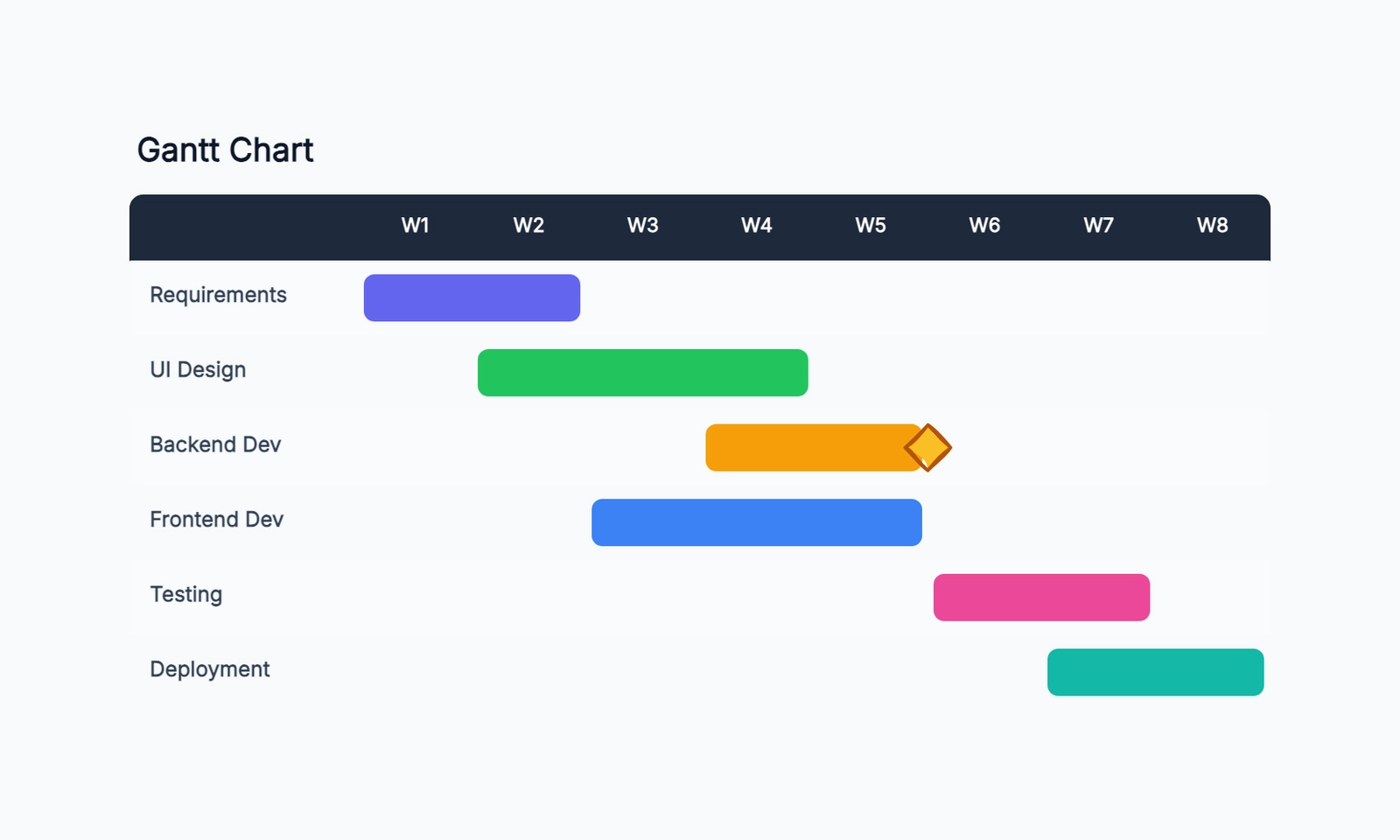
A Gantt chart is a type of bar chart used in project management to show a project schedule. Tasks are listed down the left side, time is represented along the horizontal axis, and each task is shown as a horizontal bar spanning from its start date to its end date. Arrows between bars show dependencies — tasks that must complete before another can begin.
Henry Gantt developed the chart in the early 1900s as a way to track manufacturing schedules. Today it's the standard format for communicating project timelines across engineering, construction, marketing, product development, and virtually every other field that manages multi-step work.
The value of a Gantt chart isn't just the visual — it's what the process of building one forces you to do. You must list every task, estimate how long each takes, and identify which tasks depend on which. That process surfaces planning gaps before they become schedule delays.
If you're new to Gantt charts and want to create one yourself, see our step-by-step guide to making a Gantt chart. For a quick start, try our free Gantt chart template.
What a Gantt Chart Shows
A fully built Gantt chart communicates several things simultaneously:
Tasks and their duration. Each bar represents one unit of work. The position of the left edge of the bar shows when the task starts; the right edge shows when it ends. The length represents how long it takes.
The project timeline. The horizontal axis is a calendar — days, weeks, or months depending on the project length. You can scan across any week and see everything happening that week.
Dependencies. Arrows connecting bars show sequencing constraints. A dependency arrow from Task A to Task B means Task B cannot start until Task A is complete. Dependencies are what turn a list of tasks into a planned sequence.
The critical path. The longest unbroken chain of dependent tasks determines the earliest possible project completion date. Any task on the critical path that slips delays the entire project. Tasks not on the critical path have "float" — they can slip by a limited amount without affecting the end date.
Milestones. Major events, deadlines, or deliverables appear as diamond symbols on the timeline. Milestones are moments in time, not durations — they have no bar.
Resource assignment. Many Gantt charts include a column showing who owns each task. This makes resource conflicts visible: when two tasks owned by the same person overlap, the chart reveals the double-booking.
Progress tracking. After work begins, the bars can be partially filled to show what percentage of each task is complete.
Key Gantt Chart Concepts
The Critical Path
Understanding the critical path is essential for using Gantt charts effectively. The critical path is the longest sequence of dependent tasks from start to finish. It determines the minimum time the project can take.
If a project has three parallel tracks of work, the critical path runs through the longest track. The other tracks can have delays equal to the difference in their length — that's their float.
Knowing the critical path tells you where to focus. A delay to a non-critical task is inconvenient. A delay to a critical path task is a project delay.
Float (Slack)
Float is the amount of time a task can slip without affecting the project end date. Tasks on the critical path have zero float — any delay immediately affects the end date. Tasks off the critical path have positive float.
Float gives you flexibility in resource allocation. If a critical path task needs more resources to avoid slipping, you can sometimes pull resources from a non-critical task that has float.
Baseline vs. Actual
Professional Gantt charts often show two versions of the schedule: the baseline (the original plan) and the actual (how the schedule has evolved). Comparing them shows where the project has drifted and by how much.
Real-World Gantt Chart Examples
Software Product Launch
For a team launching a new product feature:
| Task | Owner | Week 1-2 | Week 3-4 | Week 5-6 | Week 7-8 |
|---|---|---|---|---|---|
| Requirements | PM | ████ | |||
| UI Design | Design | ████ | |||
| Backend API | Eng | ████ | ████ | ||
| Frontend Dev | Eng | ████ | |||
| QA Testing | QA | ████ | |||
| Launch ▲ | end of W8 |
The critical path: Requirements → UI Design → Frontend Dev → QA → Launch. Backend API runs in parallel with UI Design and has float equal to the difference in duration.
Marketing Campaign
For a content and campaign team:
| Task | Week 1 | Week 2 | Week 3 | Week 4 | Week 5 | Week 6 |
|---|---|---|---|---|---|---|
| Strategy | ████ | |||||
| Creative Brief | ████ | |||||
| Copywriting | ████ | ████ | ||||
| Design Assets | ████ | |||||
| Legal Review | ████ | |||||
| Campaign Live ▲ | end |
Legal review is on the critical path — if it runs long, the campaign launch moves.
Construction Project
For a building renovation:
| Task | Month 1 | Month 2 | Month 3 | Month 4 | Month 5 |
|---|---|---|---|---|---|
| Permits | ████ | ||||
| Demolition | ████ | ||||
| Electrical | ████ | ||||
| Plumbing | ████ | ||||
| Drywall | ████ | ||||
| Finishing | ████ | ||||
| Handover ▲ | end |
Electrical and plumbing run in parallel (same month, different crews), then must both complete before drywall can start.
Research and Report Project
For a consulting team delivering a client report:
| Task | Week 1 | Week 2 | Week 3 | Week 4 |
|---|---|---|---|---|
| Data Collection | ████ | ████ | ||
| Analysis | ████ | |||
| Report Writing | ████ | |||
| Client Review ▲ | end |
Simple linear dependency chain — the entire project is on the critical path with zero float.
How to Build a Gantt Chart
Step 1: List every task. Start with a brain dump — write down everything that needs to happen. Then organize tasks into logical phases. Break tasks into the right size: specific enough that one person can own it and you can estimate the duration, but not so granular that the chart has 200 rows.
Step 2: Estimate durations. How long does each task take? Be honest about estimates, including review cycles, handoff time, and buffer for unexpected problems. Tasks that you genuinely don't know how long they'll take need a flag and extra buffer.
Step 3: Define dependencies. Go through the task list and identify which tasks can't start until another completes. Write these as: "Task B requires Task A." There are several dependency types, but finish-to-start (Task B starts when Task A finishes) covers most cases.
Step 4: Identify parallel work. Many tasks don't depend on each other and can run simultaneously. Identifying parallel tracks is how you shorten the overall project timeline. Two tasks that each take two weeks can complete in two weeks total if they run in parallel, not four weeks sequentially.
Step 5: Draw the chart. Start from the project start date and place tasks according to their dependencies and parallel work. Connect dependent tasks with arrows.
Step 6: Find the critical path. Trace the longest connected sequence of dependent tasks. That's your critical path. Mark it distinctly — this is where schedule risk lives.
Step 7: Assign owners. Every task needs one named person responsible for it. Scan the chart for resource conflicts — where one person is scheduled for two or more overlapping tasks.
When to Use a Gantt Chart
Projects with defined scope and multiple dependent tasks. If you know what needs to happen, roughly how long each step takes, and which tasks depend on which, a Gantt chart is the right tool.
Communicating a schedule to stakeholders. A Gantt chart is the standard format for presenting a project timeline to anyone who needs to understand the schedule without knowing every detail.
Tracking progress. Once the project is underway, the chart becomes a comparison between plan and actual, surfacing where things are ahead or behind.
Resource planning. Seeing all tasks on a timeline shows when people are overloaded and when they have capacity.
When Not to Use a Gantt Chart
Agile development with evolving scope. Gantt charts assume a plan. In environments where requirements change sprint to sprint, the plan is wrong before the ink dries. Kanban boards and sprint planning serve these teams better. (See our Kanban vs Gantt comparison for help deciding which fits your workflow.)
Early exploration. If you don't know what the tasks are, you can't build a Gantt chart. Explore first (mind map, whiteboard), then plan.
Ongoing operational work. Support queues, content pipelines, and maintenance work don't have a start and end — they're continuous. Kanban is the better tool.
Very short projects. A two-day sprint with five tasks doesn't need a Gantt chart. A checklist is sufficient.
Gantt Chart vs. Other Planning Tools
| Tool | Best for |
|---|---|
| Gantt chart | Multi-task projects with dependencies and a defined end date |
| Kanban board | Continuous flow work with no defined project end |
| Sprint board | Iterative development in fixed-length cycles |
| Project checklist | Simple linear tasks with no parallelism |
| Mind map | Exploring scope before tasks are defined |
| Roadmap | Long-range planning at theme/quarter level |
Frequently Asked Questions
What software do I use to make a Gantt chart? Dedicated tools: TeamGantt (free tier for 1 project), GanttProject (free desktop app). Project management platforms with Gantt views: Notion (timeline view), ClickUp (free tier). Diagramming tools: CodePic and draw.io both support Gantt chart templates. For a detailed breakdown, see our comparison of free Gantt chart makers.
How far in the future should a Gantt chart extend? No further than your ability to estimate with reasonable accuracy. A six-month chart where months 4-6 are pure guesses isn't a plan — it's a guess with a visual. Better to plan months 1-2 in detail and months 3-6 at a phase level.
Who should see the Gantt chart? Everyone involved in delivering the project, plus the stakeholders who need to understand the timeline. The chart works best as a shared reference, not a private planning artifact.
What's the difference between a Gantt chart and a roadmap? A roadmap is a strategic document showing direction over quarters or years. A Gantt chart is an operational document showing specific tasks over days or weeks. Roadmaps are for alignment; Gantt charts are for execution.