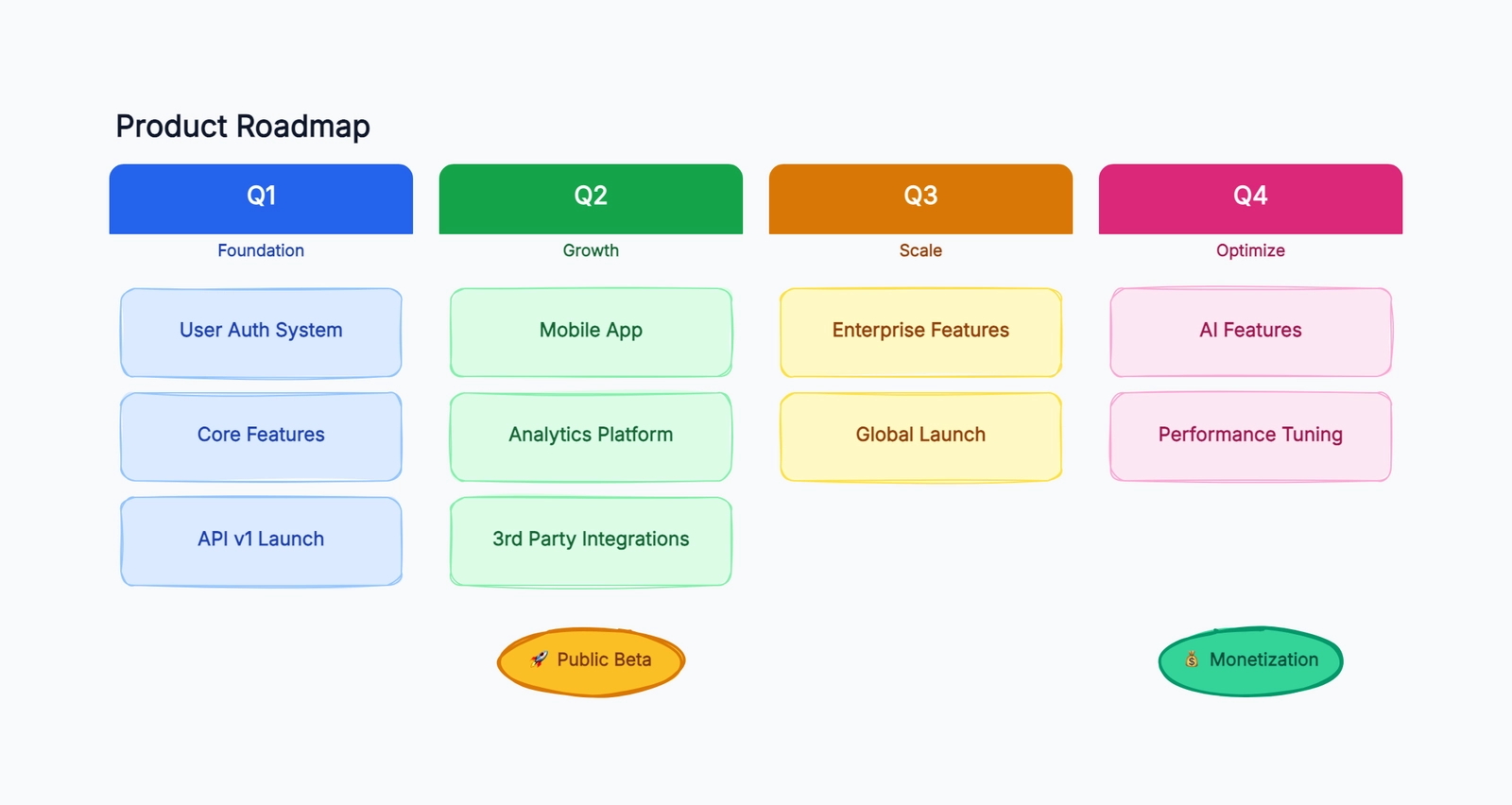
A product roadmap does a few things at once: it aligns the team on what's being built and why, it gives stakeholders a view into priorities without drowning them in backlog details, and it forces you to make sequencing decisions visible. That last part is the hardest — deciding what comes first, what can wait, and what you're deliberately not doing this quarter.
The tools below all offer free ways to create roadmaps, but they approach the problem differently. Some are full product management platforms with roadmaps as one feature. Others are visual tools that let you draw a roadmap without an underlying data model. The right choice depends on whether you need a living document tied to your backlog or a visual artifact for communication.
ProductPlan and Aha! Roadmaps are paid benchmarks, not permanent free tools. They are included so you can see what a dedicated roadmap platform adds before deciding whether the free options are enough.
Start with a Free Product Roadmap Template
Before comparing software, decide what the roadmap must communicate. A useful first version needs only an initiative, customer outcome, strategic theme, timeframe, owner, status, and a link to supporting evidence or delivery work. Use one row or card per initiative. Copying every user story onto the roadmap turns it into a second backlog.
For example, “Reduce failed checkout payments” is an initiative, “Raise the successful checkout rate” is the outcome, “Revenue reliability” is the theme, and “Q4” is the timeframe. Keep detailed tickets in GitHub, Jira, or Linear and link to them from the roadmap.
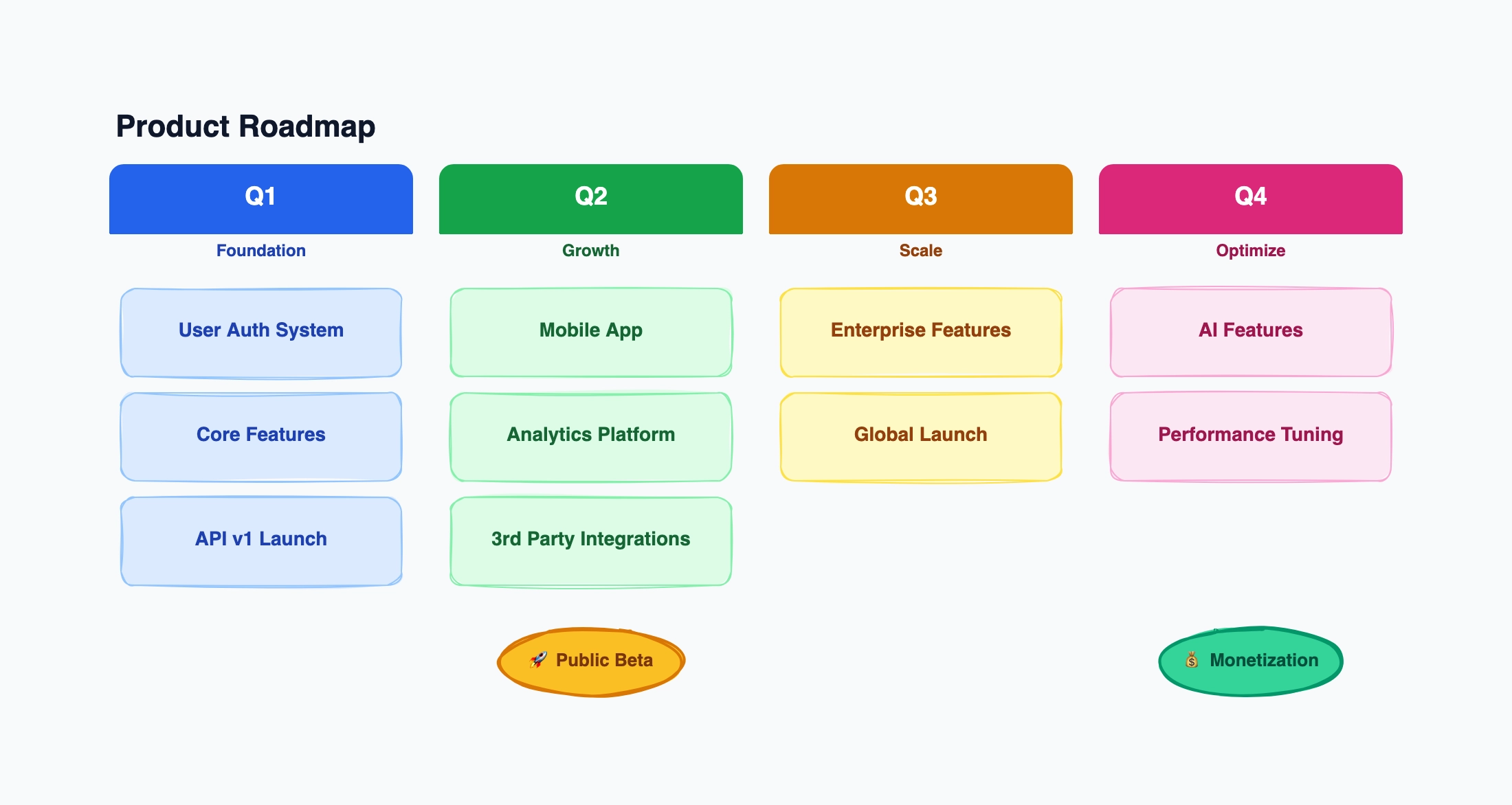
Open the free editable product roadmap template for a presentation-ready visual. Start with three swimlanes for strategic themes and four time columns for quarters, or replace quarters with Now, Next, and Later when dates are uncertain. Add a visible last-updated note before sharing it.
What to Look For in a Roadmap Tool
Timeline flexibility. Some teams plan by quarter, others by sprint, others use a simple Now / Next / Later framework. The tool should support however your team thinks about time — not force you into one model.
Swimlanes and grouping. Being able to group initiatives by team, product area, or strategic theme turns a flat list into something people can actually parse. Without grouping, a roadmap with 20+ items becomes noise.
Integration with your backlog. Can roadmap items link to epics, user stories, or tasks in your project tracker? This matters if you need the roadmap to reflect actual progress rather than aspirational timelines.
Stakeholder sharing. Executives and cross-functional partners need to see the roadmap without being able to edit it. A shareable read-only view (or a presentation export) is essential for most teams.
Status tracking. Showing whether an initiative is on track, at risk, or complete. Without this, the roadmap becomes stale the moment you publish it.
Notion
Free tier: Unlimited pages and databases Collaboration: Real-time Timeline display: Database timeline view (date ranges), or manual Now/Next/Later boards Swimlanes: Via database grouping (by property)
Notion gives you the building blocks to construct a roadmap from scratch. Create a database with fields for initiative name, status, timeframe, team, and priority, then switch to a timeline view. You'll get a horizontal bar chart of your initiatives — it's a roadmap.
The flexibility is both the strength and the weakness. You can model your roadmap however you want, but you have to build it yourself. There's no "roadmap template" that's ready to use out of the box — you need to set up the database schema, create the right views, and configure grouping. If your team is already fluent in Notion, that takes 15 minutes. If not, it can feel like a rabbit hole.
Notion's roadmap won't link to Jira or Linear. If your backlog lives elsewhere, the roadmap becomes a separate artifact that needs manual syncing — which often means it drifts out of date.
Best for: Teams already deep in Notion who want full control over their roadmap structure and don't mind building it from scratch.
Trello
Free tier: Unlimited boards, 10 boards per workspace Collaboration: Real-time Timeline display: Now / Next / Later columns (manual); Timeline power-up (paid) Swimlanes: Labels as pseudo-swimlanes
Trello's most natural roadmap format is a three-column board: Now, Next, Later. Each card is an initiative, labeled by team or theme. It's dead simple, and for early-stage teams or small products, it works surprisingly well.
The limitation hits when you want a time-based view. Trello's Timeline power-up (which shows cards on a calendar-style timeline) is a paid feature. On the free plan, your roadmap is a categorized list, not a timeline. That's fine for internal alignment but less useful when presenting to stakeholders who expect to see quarters or dates.
There's no concept of progress tracking beyond moving cards between columns. And if you want to link cards to tasks in another tool, that requires integrations that are mostly behind paid tiers.
Best for: Small teams or solo PMs who want the simplest possible roadmap — a prioritized list organized by time horizon, without the overhead of a dedicated tool.
GitHub Projects
Free tier: Unlimited (for public and private repos) Collaboration: Real-time (GitHub users) Timeline display: Roadmap view (date-based), table, and board views Swimlanes: Grouping by custom fields
GitHub Projects added a dedicated roadmap view that plots issues and pull requests on a timeline. If your team's work is tracked in GitHub Issues, the roadmap can directly reflect actual development progress — no manual syncing needed.
You can create custom fields for things like team, priority, and quarter, then group and filter by them. The roadmap view supports date ranges per item, so you get a real timeline rather than just a list.
The catch: it's GitHub-centric. Non-technical stakeholders who don't use GitHub will need you to share screenshots or export the view. There's no polished "share a read-only link" experience for people outside the repository. And the roadmap view is tightly coupled to issues — if your product planning happens at a higher level than individual issues, the mapping can get awkward.
Best for: Developer-facing products where the team already tracks everything in GitHub and wants a roadmap that reflects real issue status without duplicating data.
Miro
Free tier: 3 editable boards Collaboration: Real-time Timeline display: Freeform (manual positioning), roadmap templates available Swimlanes: Manual (draw rows/columns)
Miro is a whiteboard, and its roadmap templates give you a starting canvas with swimlanes, time columns, and sticky notes. You drag items into position, color-code by theme, and add connectors or annotations. The result is a visually rich roadmap that looks great in presentations.
The roadmap is purely visual — there's no data model behind it. Moving a sticky note doesn't update a database. This means the roadmap is exactly as current as the last time someone manually updated it.
The free tier limits you to 3 editable boards, which is tight if you use Miro for other things too (workshops, retrospectives, brainstorming). Each board can hold a lot, so one roadmap board is feasible, but it eats into your quota.
Miro has a large template library, so you can find roadmap layouts for quarterly planning, sprint planning, theme-based roadmaps, and more — and modify them freely.
Best for: Teams that want a collaborative, visually flexible roadmap for workshops and presentations, and already use Miro for other whiteboarding activities.
ProductPlan (Paid Platform)
Free access: Product tour and sales consultation; no permanent free editor plan Collaboration: Paid editors, unlimited viewers Timeline display: Customizable roadmap and portfolio views Swimlanes: Built in
ProductPlan is a purpose-built roadmap tool, and it shows. The interface is designed specifically for roadmap creation: you get a timeline with swimlanes, drag-and-drop item placement, color-coded bars for initiatives, and milestone markers. It feels like a roadmap tool, not a project management platform adapted for roadmaps.
ProductPlan's current pricing is sales-led and billed annually. Its single plan includes unlimited roadmaps, portfolio views, prioritization, integrations, dependencies, and unlimited viewing access. A product tour helps evaluation, but this is not a free roadmap tool.
Best for: Product organizations comparing a managed roadmap and portfolio platform, not individuals looking for a permanent free editor.
CodePic
Free tier: Unlimited Collaboration: Read-only link sharing Timeline display: Visual (template-based, customizable layout) Swimlanes: Visual (draw as needed)
CodePic is a diagramming tool with a product roadmap template. You're drawing a roadmap, not managing one — there's no backlog integration, no status syncing, no dependency tracking between initiatives. The roadmap is a visual artifact.
That positions it for a specific use case: creating roadmap visuals for proposals, investor decks, kickoff presentations, or early-stage planning when you need to communicate intent before you have a backlog to connect to. When a PM needs to show "here's what we're thinking for the next three quarters" in a meeting, a visual roadmap built in 10 minutes is more useful than a perfectly configured ProductPlan instance that took two hours to set up.
The AI generation feature lets you describe your product plan and get an initial roadmap layout automatically, which you can then adjust. The hand-drawn style makes it clear that the roadmap is a plan, not a commitment — useful framing in early conversations with stakeholders.
For teams that need a living roadmap connected to their backlog, CodePic is not the right tool. For teams that need a clear visual to align on direction, it's fast and effective.
Best for: PMs who need roadmap visuals for communication — presentations, proposals, planning meetings — rather than ongoing roadmap management.
Aha! Roadmaps (Paid Trial)
Free access: Time-limited trial; no permanent free Roadmaps plan Collaboration: Included in paid product plans Timeline display: Professional roadmap and release views Swimlanes: Built in
Aha! is one of the most comprehensive product management platforms available, with roadmaps, strategy mapping, idea management, and deep integrations with development tools. The paid product is excellent.
Aha! Roadmaps starts at $59 per user per month and offers a free trial rather than a permanent free plan. The former Aha! Notebooks product was relaunched as Aha! Knowledge, which is also paid. Treat Aha! as a benchmark for strategy, ideas, releases, dependencies, integrations, and portfolio roadmaps.
Best for: Teams budgeting for a full product-development suite and using the trial to verify fit before purchase.
Quick Comparison
| Tool | Free Plan | Collaboration | Timeline View | Swimlanes | Backlog Integration | Best For |
|---|---|---|---|---|---|---|
| Notion | Unlimited | Real-time | Database timeline | By property | No (manual sync) | Teams in Notion |
| Trello | 10 boards | Real-time | Now/Next/Later only | Labels | Limited (paid) | Simplest possible roadmap |
| GitHub Projects | Unlimited | Real-time (GitHub) | Date-based roadmap | Custom fields | Native (Issues) | Dev-facing products |
| Miro | 3 boards | Real-time | Freeform / templates | Manual | No | Workshops & presentations |
| ProductPlan | No permanent free plan | Paid editors, free viewers | Roadmap + portfolio | Built-in | Paid platform | Product organizations |
| CodePic | Unlimited | Read-only link | Visual template | Visual | No | Communication & visuals |
| Aha! Roadmaps | Trial only | Paid product | Roadmap + releases | Built-in | 30+ integrations | Full PM suite evaluation |
How to Choose
If your team already uses Notion or Trello: Build the roadmap where you already work. Notion gives more structure; Trello gives more simplicity.
If your product is developer-facing and tracked in GitHub: GitHub Projects' roadmap view eliminates data duplication and reflects real progress.
If you need a managed roadmap and portfolio platform: Evaluate ProductPlan as a paid product. Its unlimited viewer model is useful when a small group of editors publishes roadmaps to many stakeholders.
If you want a collaborative visual roadmap for workshops: Miro's roadmap templates work well for group planning sessions.
If you need a roadmap visual for a presentation or proposal: CodePic — faster than any of the above for creating a clear visual artifact without configuring a tool.
If you're ready to invest in a full product management platform: Use the Aha! Roadmaps trial to test the paid product; there is no permanent free Roadmaps edition.
For ongoing roadmap management tied to research, portfolios, and delivery systems, a paid platform such as ProductPlan or Aha! can justify its cost. For lightweight planning, Notion or GitHub Projects are solid free choices. For communicating a roadmap visually without tool overhead, CodePic or Miro is the faster path.
Related Reading
- What Is a Product Roadmap? — definition, examples, and best practices
- What Is an OKR? — roadmaps show direction, but OKRs define the outcomes you're aiming for