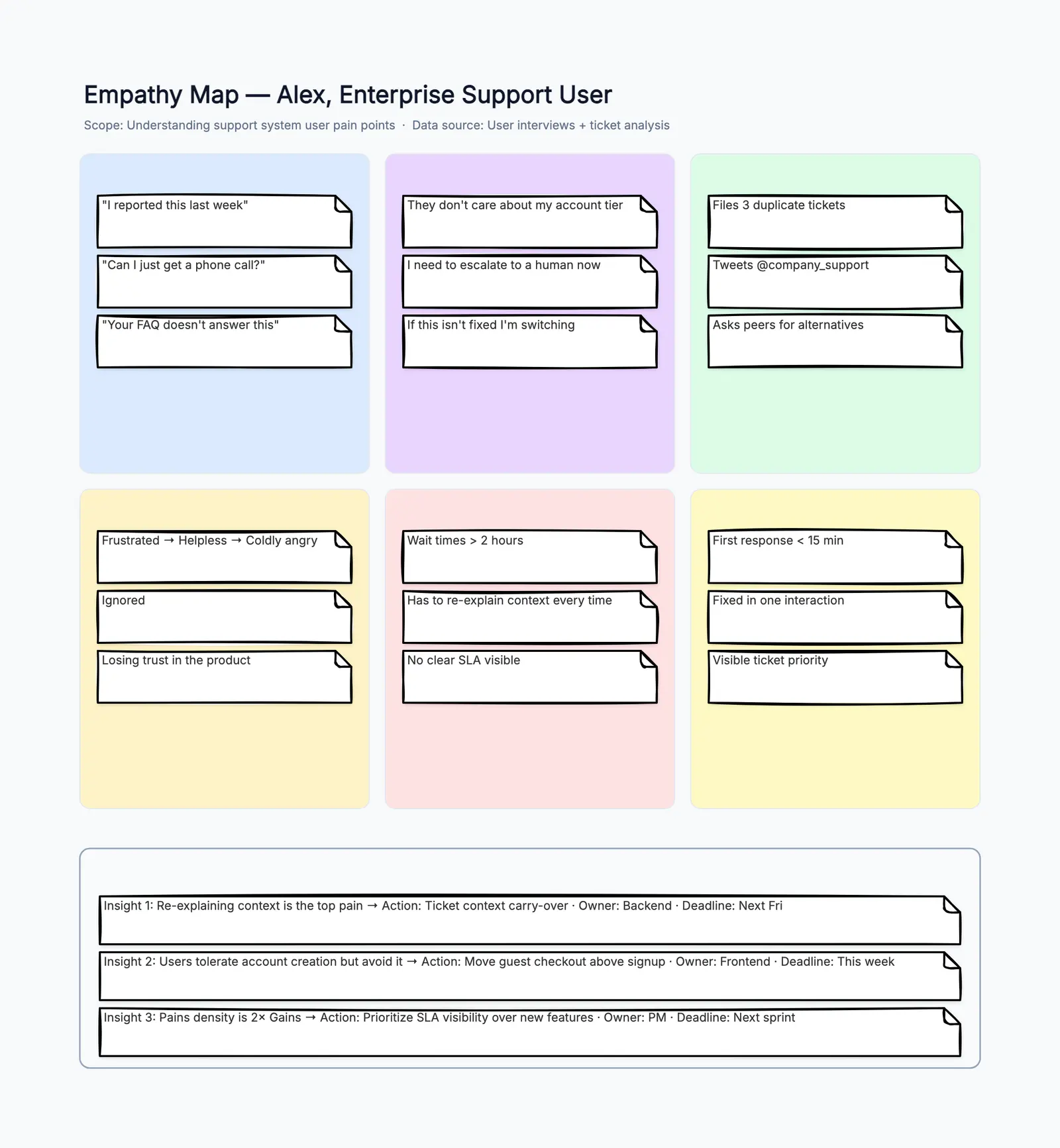
An empathy map template turns abstract user research into a concrete, shareable visual that your whole team can reference. Instead of everyone carrying different mental models of the user — "I think they want speed," "I heard they care about simplicity" — the empathy map forces the team to agree on what the user says, thinks, does, and feels, backed by evidence where possible and clearly marked as assumptions where not.
The empathy map was popularized by Dave Gray and has become a standard tool in design thinking, UX design, and agile product development. Its power is its simplicity: four quadrants on one page, each asking a different question about the same user. When a product manager, a designer, and an engineer each fill the quadrants from their own perspective, the gaps become immediately visible — and those gaps are often where the best product insights live.
If you want to start with a ready layout, open the free empathy map template. It comes with a pre-filled UX example. The rest of this guide covers when to use an empathy map, how to fill each quadrant with useful content, and how to turn the map into action.
When to Use an Empathy Map Template
Empathy maps are useful whenever a team needs to align on who the user is before making decisions about what to build. They are lightweight enough to create in a 30-minute workshop and rich enough to reference throughout a project.
Use an empathy map for:
- Kickstarting a new feature or product: before writing user stories or specs, fill an empathy map to ground the team in the user's reality
- Synthesizing user research: after interviews or usability tests, capture what you learned in one structured format instead of scattered notes
- Building or refreshing personas: empathy maps are often the raw material for persona creation — fill one per user segment
- Aligning cross-functional teams: when engineering, design, and marketing have different ideas about the user, an empathy map workshop creates a single shared reference
- Preparing for a design sprint: the Understand phase of a design sprint often includes empathy mapping as a way to pool existing knowledge
- Onboarding new team members: hand a new hire an empathy map of your primary user instead of a 30-page research report
Do not use an empathy map as a replacement for talking to real users. It synthesizes what you know — it does not generate new knowledge.
The Four Quadrants: How to Fill Each One
An empathy map becomes useful when each quadrant captures a different dimension of the user's experience. Quadrants that repeat the same information in different words are a sign that the team has not gone deep enough.
Says
Capture direct quotes from the user. These should be verbatim statements from interviews, usability tests, support tickets, or social media. Examples:
- "I never know where to find the export button."
- "It takes me way too long to set up a new project."
- "I love that it syncs automatically — that saves me hours."
If you are filling the map from assumptions, write what you expect users would say and mark it clearly: "(assumption)."
Thinks
What does the user think but may not say aloud? This quadrant captures internal motivations, concerns, and mental models. It is the hardest quadrant to fill from data alone — it requires interpretation — but it is also the most valuable. Examples:
- "This tool is probably overkill for what I need."
- "If I make a mistake here, will it break everything?"
- "I wonder if the free version even has this feature."
A good technique: after a user says something in an interview, ask yourself "what are they not saying?" The gap between what users say and what they think is where product opportunities hide.
Does
Observable actions and behaviors. What does the user actually do — not what they say they do, and not what you wish they did? Examples:
- Opens the app, hesitates on the dashboard for 15 seconds, then navigates to Settings
- Exports the report to Excel before sharing, even though the tool has a built-in share feature
- Searches Google for "[tool name] tutorial" instead of using the in-app help
Behavior is the most reliable quadrant because actions do not lie. When the Does quadrant contradicts the Says or Thinks quadrants, believe Does.
Feels
Emotional states. What frustrates, excites, confuses, or reassures the user? Use emotion words: frustrated, anxious, relieved, confident, overwhelmed, delighted. Examples:
- Frustrated when the upload takes more than 10 seconds
- Anxious about sharing the wrong version with a client
- Relieved when auto-save catches an unsaved change
- Confused by ambiguous error messages
Map emotions across the user's journey, not just as a static list. The same user might feel confident during setup, frustrated during their first task, and relieved when they discover a shortcut.
Free Editable Empathy Map Template
The free empathy map template on CodePic includes:
- Four color-coded quadrants: Says (blue), Thinks (green), Does (amber), Feels (red) — distinct colors make the map scannable in meetings
- User persona placeholder in the center: name, role, and a brief description of who this map is about
- Pre-filled example content: a realistic UX example for a project management tool user, with each quadrant populated
- Pains and Gains section: below the quadrants, space to capture what causes frustration and what would delight the user
- Fully editable: click any sticky note to edit, drag to reorganize, add or remove items in any quadrant
How to Run an Empathy Mapping Workshop
You do not need a professional facilitator to run an empathy mapping session. Here is a 30-minute format that works with any team:
- Pick one user or persona (2 minutes). Do not try to map multiple users at once. Focus on one well-defined user segment.
- Set up the template (3 minutes). Open the empathy map template on a shared screen or project it in the room. Make sure everyone can see and contribute.
- Fill Says first (5 minutes). Start with direct quotes from user research. If you have interview transcripts, pull verbatim quotes. If you are working from assumptions, state them explicitly.
- Fill Does next (5 minutes). Observable behaviors are the most objective quadrant. Use analytics data, session recordings, or support logs where available.
- Fill Thinks (5 minutes). This is the interpretive quadrant. For each quote and behavior, ask: "what is this person probably thinking?"
- Fill Feels (5 minutes). Map emotions to specific moments in the user's experience. Use a simple scale: positive, neutral, negative.
- Discuss gaps and surprises (5 minutes). What did different team members add? Where do the quadrants contradict each other? What assumptions do you need to validate?
After the workshop, the empathy map becomes a living document. Update it as you learn more from user research, and reference it when making product decisions: "Does this feature address something in the Pains quadrant?"
Common Mistakes
Filling the map alone. An empathy map built by one person captures one person's perspective. The value comes from multiple team members contributing — the designer sees things the engineer does not, and vice versa.
Vague entries. "User is happy" is not useful. "User feels relieved when the auto-save notification appears because they lost work in a previous tool" is useful. Be specific.
Skipping the Does quadrant. Behavior is the most reliable data you have. Do not fill three quadrants with opinions and leave Does empty because you did not observe any users. Go find behavioral data.
No follow-up actions. An empathy map without next steps is a poster. After the session, identify 2–3 concrete actions: a feature to deprioritize, a usability test to run, a user quote to validate.
Empathy Map Template vs. Persona and Journey Map
Empathy maps, personas, and journey maps are often used together, but they answer different questions. A persona answers "who is this user?" A journey map answers "what happens across the experience?" An empathy map answers "what is going on in the user's head and behavior at this moment?"
That difference matters because teams often jump to a persona too early. A persona can become a polished profile with a name, photo, and demographic details, while the actual evidence stays vague. An empathy map keeps the team closer to raw research. It asks for quotes, actions, thoughts, and emotions before you package the user into a broader artifact.
Use an empathy map before a persona when:
- you have interview notes but have not synthesized them yet
- the team disagrees about what users actually care about
- you need to separate evidence from assumptions
- you want a fast workshop artifact rather than a polished research deliverable
Use a journey map after an empathy map when:
- you need to show how the user's emotions change across multiple stages
- pain points happen at specific moments in a workflow
- multiple teams own different parts of the experience
- the next step is prioritizing improvements across the journey
In practice, the flow is simple: collect research, build an empathy map for one user segment, turn repeated patterns into a persona, then map that persona's journey. The template helps with the first step: getting shared evidence onto the canvas quickly.
Start with the Free Empathy Map Template
An empathy map template takes about 30 minutes to fill and gives your team a shared user understanding that lasts the entire project. Open the free empathy map template, replace the pre-filled example with your own user research, and start building products from empathy rather than assumptions.