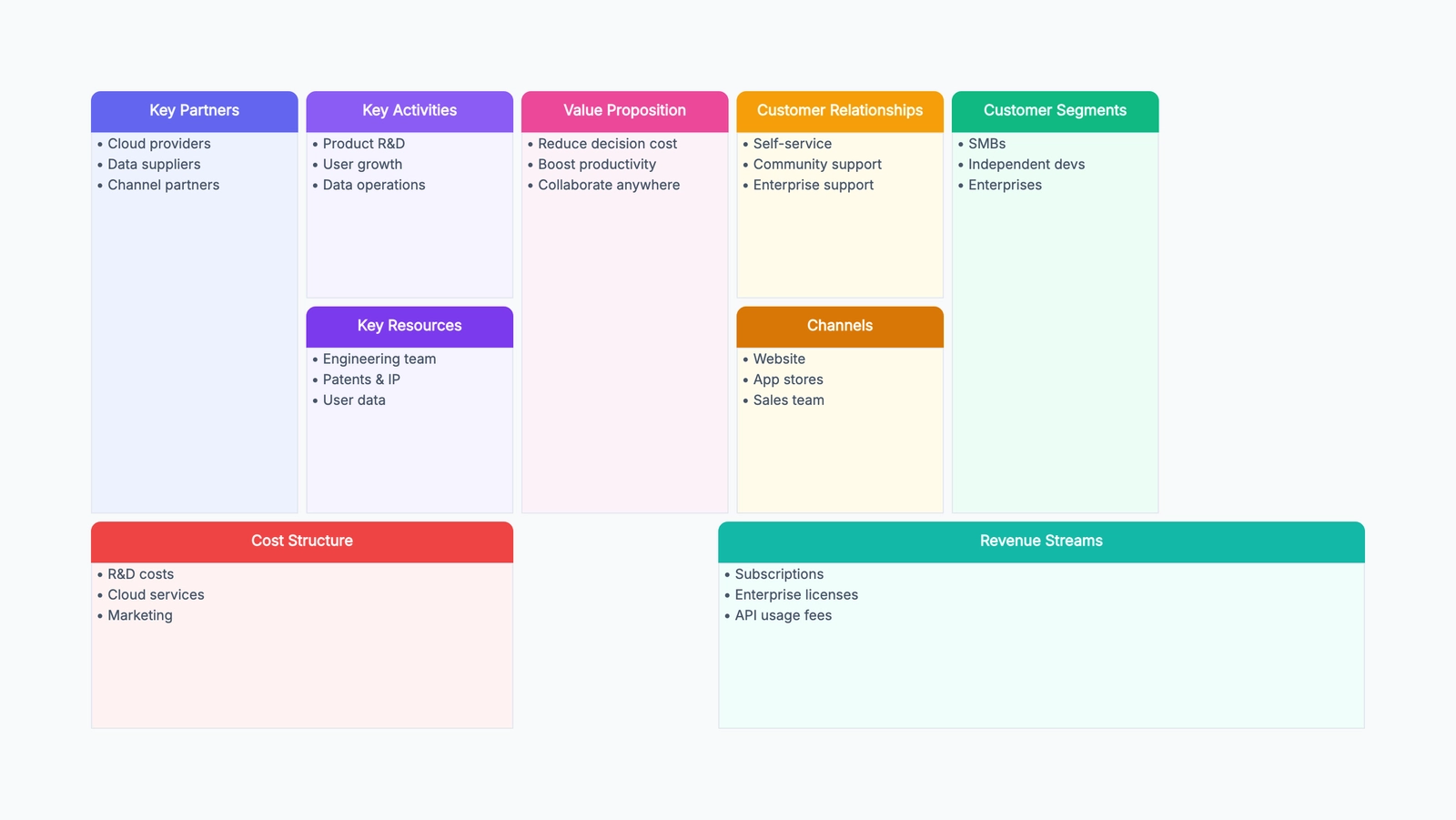
A Business Model Canvas template replaces a 40-page business plan with a single page that captures how your business creates, delivers, and captures value. The nine building blocks — from Customer Segments to Cost Structure — fit on one canvas, making it easy to see how a change in one block affects the others. If you raise prices (Revenue Streams), does that change your Customer Segments? If you outsource development (Key Partnerships), what happens to your Key Activities?
The Business Model Canvas was created by Alexander Osterwalder and introduced in his book Business Model Generation. It has become the standard tool for describing and testing business models because it is fast, visual, and forces clarity. A 40-page business plan lets you hide behind words. A one-page canvas exposes gaps instantly.
If you want to start with a ready layout, open the free Business Model Canvas template. It is pre-filled with a SaaS startup example. This guide explains each of the nine blocks with examples and shows how to use the canvas to test assumptions rather than just fill boxes.
The Nine Building Blocks
1. Customer Segments
Who are you creating value for? List your customer groups. A SaaS product might serve "small marketing teams (1–10 people)" and "freelance designers." A marketplace serves two segments simultaneously: buyers and sellers. Be specific — "everyone" is not a segment.
2. Value Propositions
What problem do you solve for each segment? What value do you deliver? This is the reason customers choose you over alternatives. Value propositions can be quantitative (price, speed) or qualitative (design, experience, brand). For each customer segment, you should have at least one distinct value proposition. Example: for small marketing teams, "create campaign reports in 5 minutes instead of 2 hours."
3. Channels
How do you reach each customer segment? Channels include marketing (social media, content, ads), sales (direct sales, partners, self-service), and distribution (app store, website, resellers). List the channels for awareness, evaluation, purchase, delivery, and post-purchase support.
4. Customer Relationships
What kind of relationship does each segment expect? Personal assistance, self-service, automated service, communities, co-creation? Customer relationships drive acquisition, retention, and upselling. A SaaS product might use automated onboarding emails for acquisition, a knowledge base for self-service retention, and a dedicated account manager for enterprise upselling.
5. Revenue Streams
How does the business make money? Common revenue models: subscription, per-use fee, licensing, advertising, freemium with paid upgrades, one-time purchase. List each revenue stream and, if possible, its share of total revenue. A SaaS product might have "monthly subscriptions (80%)" and "onboarding setup fees (20%)."
6. Key Resources
What assets do you need to deliver the value proposition? Resources can be physical (servers, office), intellectual (patents, software, data), human (engineers, designers), or financial (cash, credit). A software company's key resources are probably its engineering team and its codebase.
7. Key Activities
What do you need to do every day to make the business work? For a SaaS company: software development, server maintenance, customer support, content marketing. For a consulting firm: client acquisition, project delivery, expert network development.
8. Key Partnerships
Who are your critical partners and suppliers? Why do you need them? Partners might provide technology (cloud hosting), distribution (resellers), resources (suppliers), or credibility (brand partnerships). List each partner and what you get from them.
9. Cost Structure
What are the major costs in your business model? Fixed costs (salaries, rent), variable costs (cloud hosting, payment processing fees), and one-time costs. Identify which Key Resources and Key Activities drive the largest costs. For a SaaS business, the biggest costs are usually engineering salaries and cloud infrastructure.
Complete Business Model Canvas Example
The free template comes pre-filled with a SaaS startup example:
Customer Segments: Small marketing teams (1–10 people) who need fast reporting; freelance social media managers who manage multiple clients.
Value Propositions: Generate client-ready campaign reports in 5 minutes instead of spending hours in spreadsheets; one-click export to PDF and Google Slides.
Channels: Content marketing (SEO blog, templates), social media (LinkedIn, Twitter), product-led growth (free tier, referrals), direct sales for enterprise.
Customer Relationships: Self-service onboarding with templates, community forum, email support for free tier, dedicated support for paid plans.
Revenue Streams: Monthly subscriptions — Pro ($29/mo), Team ($99/mo), Enterprise (custom).
Key Resources: Engineering team (full-stack, 4 people), cloud infrastructure, report generation engine, template library.
Key Activities: Product development, server maintenance, content creation, customer support.
Key Partnerships: Cloud provider (AWS), payment processor (Stripe), analytics APIs (Google Analytics, Meta).
Cost Structure: Engineering salaries, cloud hosting, payment processing fees, marketing and content.
How to Test Assumptions with the Canvas
The real value of a Business Model Canvas is not filling the boxes — it is testing whether the assumptions in the boxes are true. After you fill the canvas:
- Circle the riskiest assumptions. Which block has the most guesses? For most startups, it is Customer Segments and Value Propositions — you are guessing who cares and why.
- Design a test for each risky assumption. If you assume "small marketing teams need faster reporting," interview 10 marketing managers and ask how they currently build reports and what frustrates them.
- Update the canvas after each test. The canvas is a living document. Cross out assumptions that do not survive testing and write in what you learned.
- Repeat. A canvas that has not changed after three months of testing is a sign you are not testing hard enough.
Business Model Canvas Template Example: SaaS Startup
A useful Business Model Canvas template should include a realistic example, not just nine empty boxes. Empty boxes are fine once you already understand the framework, but beginners need to see the level of specificity expected.
For a SaaS reporting startup, weak entries look like this:
- Customer Segments: marketers
- Value Proposition: saves time
- Channels: website
- Revenue Streams: subscription
Those entries are technically filled in, but they do not help the team make decisions. Stronger entries are specific enough to test:
- Customer Segments: small marketing teams with 1–10 people who build weekly client reports manually
- Value Proposition: turn campaign data into client-ready reports in 5 minutes instead of 2 hours
- Channels: SEO templates for reporting workflows, LinkedIn content, free report generator, agency referrals
- Revenue Streams: self-serve Pro plan for freelancers, team plan for agencies, custom enterprise contract for larger marketing organizations
The difference is testability. You can interview "small marketing teams that build weekly client reports manually." You cannot interview "marketers" as a meaningful group. You can test whether 5-minute reports matter. You cannot test "saves time" without defining how much time and for whom.
Blank vs. Pre-Filled Business Model Canvas Templates
A blank Business Model Canvas is useful in workshops where a facilitator explains each block and the group fills the canvas together. It keeps the room from copying the example too closely. But for solo founders, product managers, and students, a pre-filled example is often more useful because it shows what "good enough" looks like.
Use a blank canvas when:
- you are teaching the framework
- each team needs to generate original answers independently
- the business is confidential and example content would distract
- you already know the nine blocks well
Use a pre-filled editable canvas when:
- you are learning the framework
- you need a fast starting point
- you want to adapt a SaaS, marketplace, or service-business example
- you need to show stakeholders the expected level of detail
The CodePic template is editable, so you can use it both ways. Delete the sample text if you want a blank business model canvas, or keep the example and replace one block at a time.
Common Business Model Canvas Mistakes
Writing slogans instead of assumptions. "Empower teams to work better" sounds nice, but it cannot be tested. Write the concrete problem, audience, and outcome.
Mixing customer segments. If freelancers, small teams, and enterprises all appear in the same canvas, the value proposition and channels may conflict. Create separate canvases for segments that buy differently.
Ignoring costs until the end. Costs are not bookkeeping trivia. If your key activities require expensive manual service, the revenue model must support that.
Treating the canvas as final. The first version is a hypothesis map. The canvas should change as customer interviews, pricing tests, and product usage data reveal what is true.
Making every block equally detailed. Early teams often spend an hour polishing "Key Partners" while the customer segment is still vague. That is backwards. Put the most detail into the blocks with the most uncertainty and risk. For a new product, that usually means customer segments, value propositions, channels, and revenue streams. For a mature business exploring a new market, the riskiest blocks may be key activities, cost structure, or partner dependency.
Skipping the link between blocks. A good canvas is not nine separate sticky-note areas. Each block should make the others more believable. If the value proposition is "fast implementation for small teams," the channels should reach small teams, the revenue model should match their budget, and the key activities should support fast onboarding. When a block contradicts another block, the canvas is doing its job: it has revealed an assumption that needs testing.
Start with the Free Business Model Canvas Template
A Business Model Canvas template takes an afternoon to fill and saves weeks of writing a business plan that nobody reads. Open the free template, replace the pre-filled SaaS example with your own model, and start testing your riskiest assumptions.