An AI product video generator can turn a product photograph into a moving presentation, but the result still needs a product-accuracy review. Begin with approved photos, choose three modest shots, and separate exact labels from generated motion. A beautiful clip is unusable if it changes the item a customer will receive.
This workflow plans an original nine-second demonstration for an unbranded amber pump bottle. It includes a shot brief, prompts, rejection rules, and an editing handoff. The bottle is a fictional teaching product; no model benchmark, generated demonstration, or product-performance test is claimed.
Decide what the video must demonstrate
A product presentation shows appearance, scale, or an ordinary interaction. An advertisement additionally needs an audience, persuasive claim, and next action. Start with the presentation before turning it into an AI video ad. This prevents a cinematic effect from becoming an unsupported claim about performance.
For the amber bottle, the task is simple: show its overall silhouette, the pump and label area, and its position on a countertop. We are not claiming a particular volume, formula, hygiene benefit, or dispensing accuracy. Those details would require the real product specification and appropriate evidence.
Write the acceptance sentence: “The viewer can recognize the same amber bottle and pump in three connected shots.” This gives the project a measurable production goal. It does not promise conversion gains or guarantee that generated footage will be acceptable.
When the task is a software demonstration, use an accurate screen recording for actual interface behavior. A generated scene of someone holding a phone is not evidence that a button works. Plan such differences in a video script before selecting a generator.
Prepare a source pack rather than one casual snapshot
Gather the approved front view, a useful side view, and a detail of the pump. Include the real packaging artwork when it is available. Keep a neutral reference image without dramatic distortion, heavy blur, or an object hiding part of the product.
Give each image a specific role. The front view establishes the expected silhouette. The side view confirms depth. The pump detail defines the nozzle and its relationship to the bottle neck. Multiple images are helpful only if the selected generation mode supports them appropriately; uploading a folder does not mean every file becomes a reference constraint.
Record nonnegotiable features: amber cylindrical body, one dark pump, short nozzle pointing left, rectangular cream label area, and a stable base. A real project should substitute its actual attributes. Also record permissible variation, such as background texture or the exact shape of a soft reflection.
Inspect the source at full size. A warped label, ambiguous nozzle, or clipped base is a poor foundation for motion. If exact text matters, plan a source-preserving composite or a conventional filmed close-up. Do not rely on a prose instruction to preserve every letter across frames. The image-to-video guide covers the basic input and crop checks.
Plan three shots with different jobs
The proposed nine seconds are an editing target, not a single-generation requirement. Generate supported durations and select useful intervals. Leave enough room for cuts rather than demanding every action occur on an exact frame.
| Planned interval | Job | Suggested treatment | Main rejection condition |
|---|---|---|---|
| 0–3 seconds | Establish the product | Stable three-quarter view, minimal background motion | Bottle silhouette changes |
| 3–6 seconds | Show pump and label area | Small push-in or separate detail crop | Nozzle or label area warps |
| 6–9 seconds | Place product in context | Countertop view with generous negative space | Scale or contact becomes implausible |
Do not make every shot a different spectacular move. Variety can come from framing and information, while motion remains restrained. Three unrelated backgrounds may look like three products rather than three views of one product.
Use consistent surface color, lighting direction, and bottle orientation across the sequence. A pump facing left in the first shot and right in the next may suggest a mirrored or redesigned item. Keep these decisions visible in a storyboard, particularly when more than one person selects takes.
Choose the generator by its input and review path
Look for a mode that accepts the approved product image, exposes the needed framing controls, and permits the intended download. A tool labeled “product video generator” may instead assemble a template with still images, stock footage, and captions. That can be useful, but it is a different deliverable from generating new physical motion.
Runway's creation documentation describes its video workflow, while its image prompting guide explains the motion role of text. Those sources establish documented workflows, not successful preservation of this bottle.
Before committing a batch, test the hardest required property. If the label must be readable, examine a downloaded attempt at the final display size. If the product must rotate, check whether the unseen side is accurate. A model producing a plausible object is insufficient when a customer expects a particular SKU.
Compare the full workflow, including revisions and compositing. A template-based motion treatment that preserves the original photo may be a better choice than newly generated geometry for exact packaging. The free-tool comparison helps separate access, allowances, and export checks.
Write prompts that preserve the product's role
For Shot A, use an approved image and ask for a stable introduction:
The amber pump bottle stands still on the countertop. The camera holds a steady three-quarter view. A broad soft reflection shifts gently across the glass. The bottle retains its cylindrical body, dark pump, short nozzle, and upright base throughout the shot.
For Shot B, keep the motion small:
The camera advances slightly toward the upper half of the stationary amber bottle, showing the pump and cream label area more closely. Maintain the same viewing angle. The bottle and countertop remain stable, with soft coherent reflections.
For Shot C, let composition provide the change:
A steady wider view of the same amber bottle on a clean cream countertop, with open space to the right for later editorial text. Quiet realistic lighting, subtle background atmosphere, the product remains unchanged and firmly supported.
These are starting instructions, not hard geometry locks. If the pump deforms, reduce motion or use a still-based treatment. If a reflection resembles new text, remove that interval. If the background shifts perspective inconsistently with the bottle, reconsider the move. More prompt patterns appear in AI video prompts.
Review identity, physics, and implied claims separately
Identity review asks whether the object is the same item. Compare the first, middle, and last frames with the approved reference. Count visible components and inspect their attachment points. A pump that briefly splits into two is a rejection even if most of the shot looks convincing.
Physics review asks whether movement and contact make sense. Does the base stay on the counter? Do shadows follow the light? Does a moving camera reveal plausible depth? These checks are especially important around transparent glass, reflections, handles, hinges, and liquids.
Claims review asks what a viewer could reasonably infer. A generated stream of liquid might suggest a dispensing behavior that was never tested. A fictional laboratory scene might imply certification. Keep the visual promise within what the real product and supporting evidence establish.
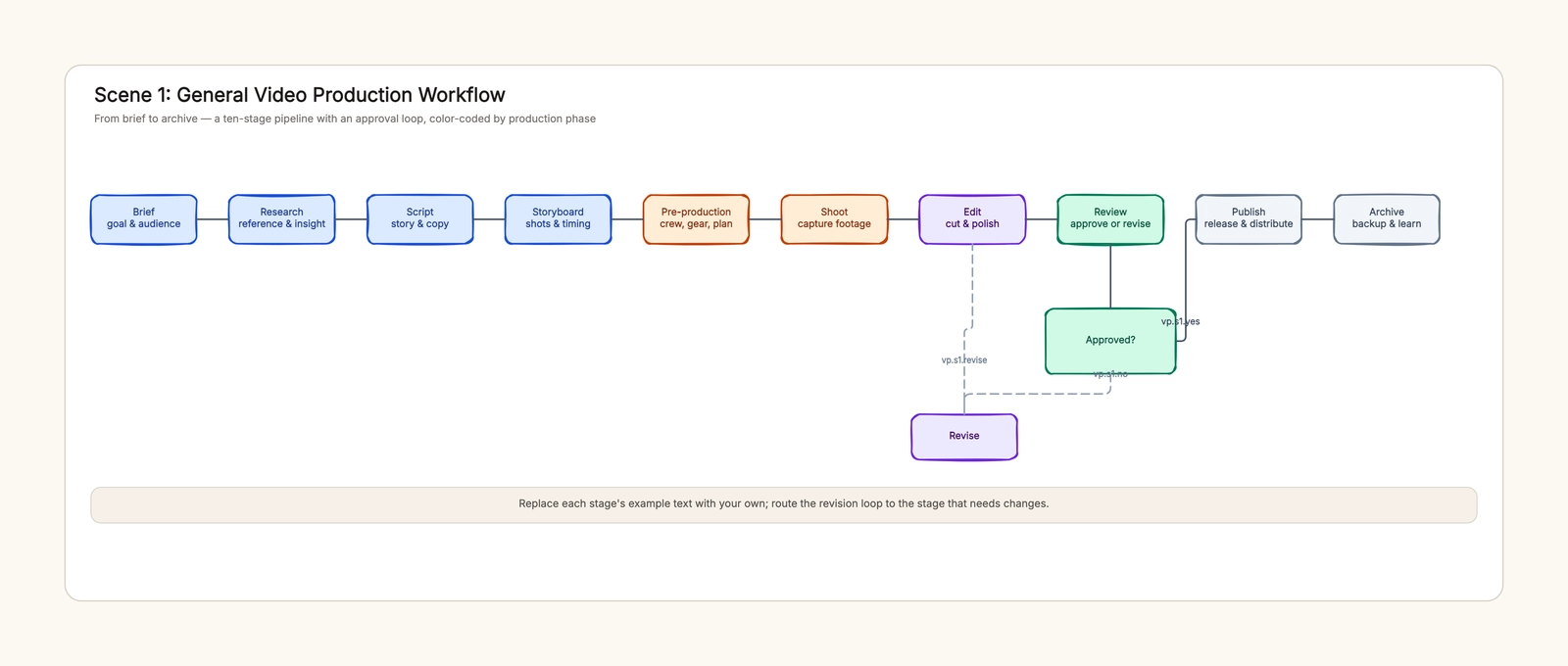
Use distinct notes for each failure. “Wrong label” goes to compositing or source correction; “floating base” goes to motion or shot design; “unsupported performance implication” goes to the brief. Sending every problem back as “make it more realistic” wastes revisions. The production workflow template can map the responsible reviewer and return path.
Add labels and copy in editing
Treat mandatory product information as editable design content. Use approved artwork, accurate spelling, and a stable placement. Where a label must follow a surface, a proper tracked composite may be necessary; a flat overlay that slides independently of a rotating bottle also fails the accuracy test.
Add captions after the picture sequence works. Leave enough time to read them at the intended screen size. Do not fill all empty space merely because the generator left room. A short product presentation can be more legible with one clear detail per shot.
Keep the audio proportionate. A subtle ambience or a simple licensed music bed may suffice. Avoid generated testimonials, invented user quotes, or performance language unsupported by the brief. If a presenter introduces the bottle, approve the words before reviewing mouth synchronization.
Export a draft in the actual delivery ratio and review it as a file. Check watermarks, crop, playback, text edges, and sound. A product that was legible in a large preview may become indistinct in a small social feed. Review the deliverable rather than only the generation interface.
Budget revisions and hand off the evidence
Define an attempt budget per shot. After the agreed revisions, choose between a simpler generated move, conventional animation, a composite, or a real shoot. The budget should encourage a useful decision rather than an endless search for a perfect take.
Measure production efficiency using accepted intervals, not the number of files generated. Record the cost of rejected takes and editing time. If no accurate interval survives, the workflow has not completed the task, even though video files exist.
The final package should contain approved product references, selected clips, prompt and settings notes, editable label artwork, audio sources, and the final accuracy sign-off. Name the exact product version and delivery date so later packaging changes do not silently invalidate an old video.
An AI product video generator is most helpful when the brief tolerates some visual invention around a stable product. When the product itself cannot change, build the workflow around that constraint. Use the canvas to plan shots and approvals; generate and edit the actual media in the appropriate video tools.