OpenAI shipped GPT-image 2 on April 21, 2026. Google had already launched Nano Banana 2 (Gemini 3.1 Flash Image) two months earlier on February 26. Both claim "production-grade" image generation. Both render text well. Both have public APIs. So which one should you actually use?
Reading benchmark blog posts didn't give me a clear answer either. So I built a side-by-side comparison the way I wished someone had drawn it for me — four little chunks, each answering one question. This post walks through the comparison, and at the bottom you can fork the template to swap in your own data, your own models, or your own scoring.
TL;DR
| Question | Short answer |
|---|---|
| Cheaper per image at 1K? | GPT-image 2 (~$0.05 mid quality) edges Nano Banana 2 ($0.067) |
| Cheaper at 4K? | Nano Banana 2 ($0.151 official, $0.075 batch) — GPT-image 4K is still beta |
| Better text rendering across scripts? | GPT-image 2 — ~99% accuracy across Latin/CJK/Hindi/Bengali |
| Multi-character / multi-object consistency? | Nano Banana 2 — up to 5 characters + 14 reference objects in one workflow |
| In-image translation / localization? | Nano Banana 2 only |
| Real-time web-grounded generation? | Nano Banana 2 only (pulls from Gemini's knowledge) |
| Consumer entry point? | GPT-image 2 → ChatGPT Plus $20 / Pro $200. Nano Banana 2 → Gemini app, free with limits |
Both are excellent. The decision usually hinges on whether your workload is multilingual text-heavy (lean GPT-image 2) or multi-subject brand/storyboard work (lean Nano Banana 2).
Frame 1 — Basic Parameters at a Glance
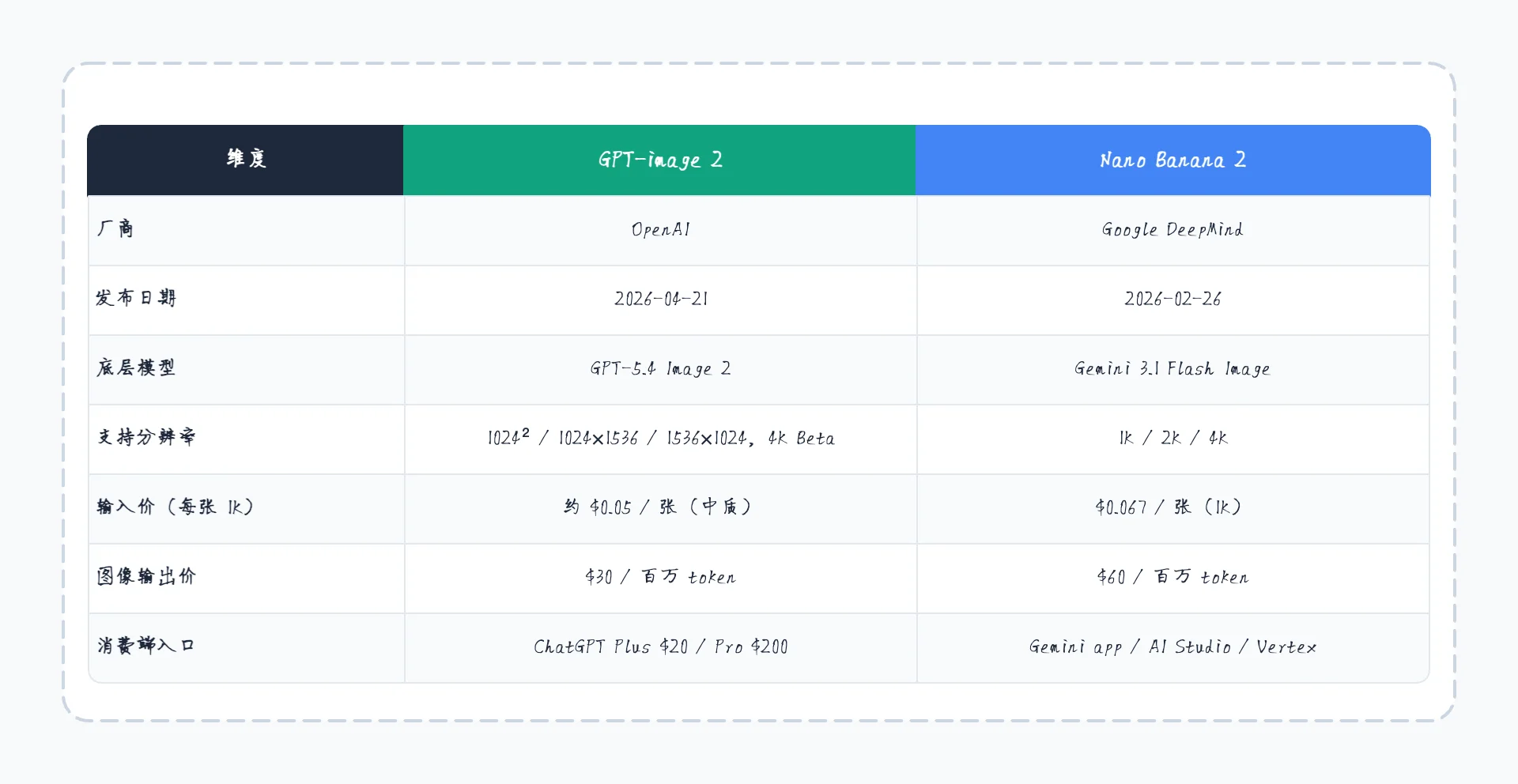
A plain parameter table is the boring-but-essential part of any model comparison. This is what you grab before any deeper conversation.
| Dimension | GPT-image 2 | Nano Banana 2 |
|---|---|---|
| Vendor | OpenAI | Google DeepMind |
| Released | 2026-04-21 | 2026-02-26 |
| Underlying model | GPT-5.4 Image 2 | Gemini 3.1 Flash Image |
| Resolutions | 1024² / 1024×1536 / 1536×1024, 4K in beta | 1K / 2K / 4K |
| Per-image (1K, mid) | ~$0.05 / image | $0.067 / image |
| Output token price | $30 / 1M tokens | $60 / 1M tokens |
| Consumer access | ChatGPT Plus $20 / Pro $200 | Gemini app / AI Studio / Vertex |
The headline number — $30 vs $60 per million output tokens — looks like GPT-image 2 wins on price by 2×. But token counts per image differ between the two, so the per-image gap is much smaller. At 1K, GPT-image is about 25% cheaper. At 4K, Nano Banana 2's batch API actually undercuts GPT-image's beta pricing.
Frame 2 — Capability Scores Side by Side
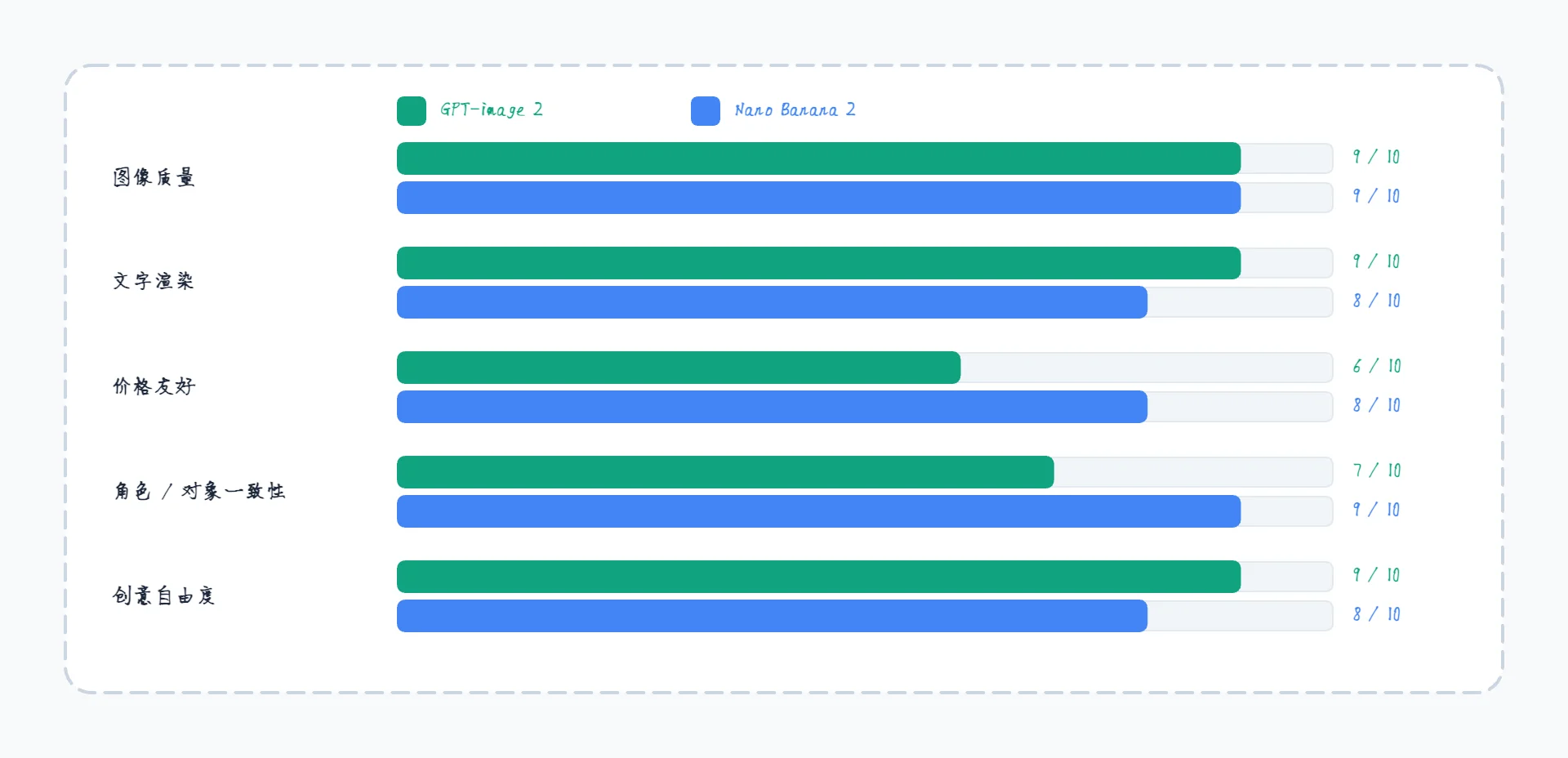
Numbers can't capture everything, so I scored both models 1–10 across five dimensions. These are subjective — based on each vendor's stated capabilities and what's actually been shipped to the API as of June 2026.
| Capability | GPT-image 2 | Nano Banana 2 | Notes |
|---|---|---|---|
| Image quality | 9 / 10 | 9 / 10 | Both flagship-class; differences are stylistic, not technical |
| Text rendering | 9 / 10 | 8 / 10 | GPT-image's multi-script accuracy is the stronger published claim |
| Price friendliness | 6 / 10 | 8 / 10 | Nano Banana's Flash tier + batch discount pulls this up |
| Subject consistency | 7 / 10 | 9 / 10 | Nano Banana 2 is built around this; up to 5 chars + 14 objects |
| Creative freedom | 9 / 10 | 8 / 10 | GPT-image 2 generally accepts wider prompts with fewer rejections |
The bars deliberately don't have one "winner." For poster work with mixed scripts, GPT-image 2's text fidelity matters. For an e-commerce catalog where the same model and the same product need to look identical across 200 shots, Nano Banana 2's consistency is decisive.
Frame 3 — Where They Sit on Price vs Quality
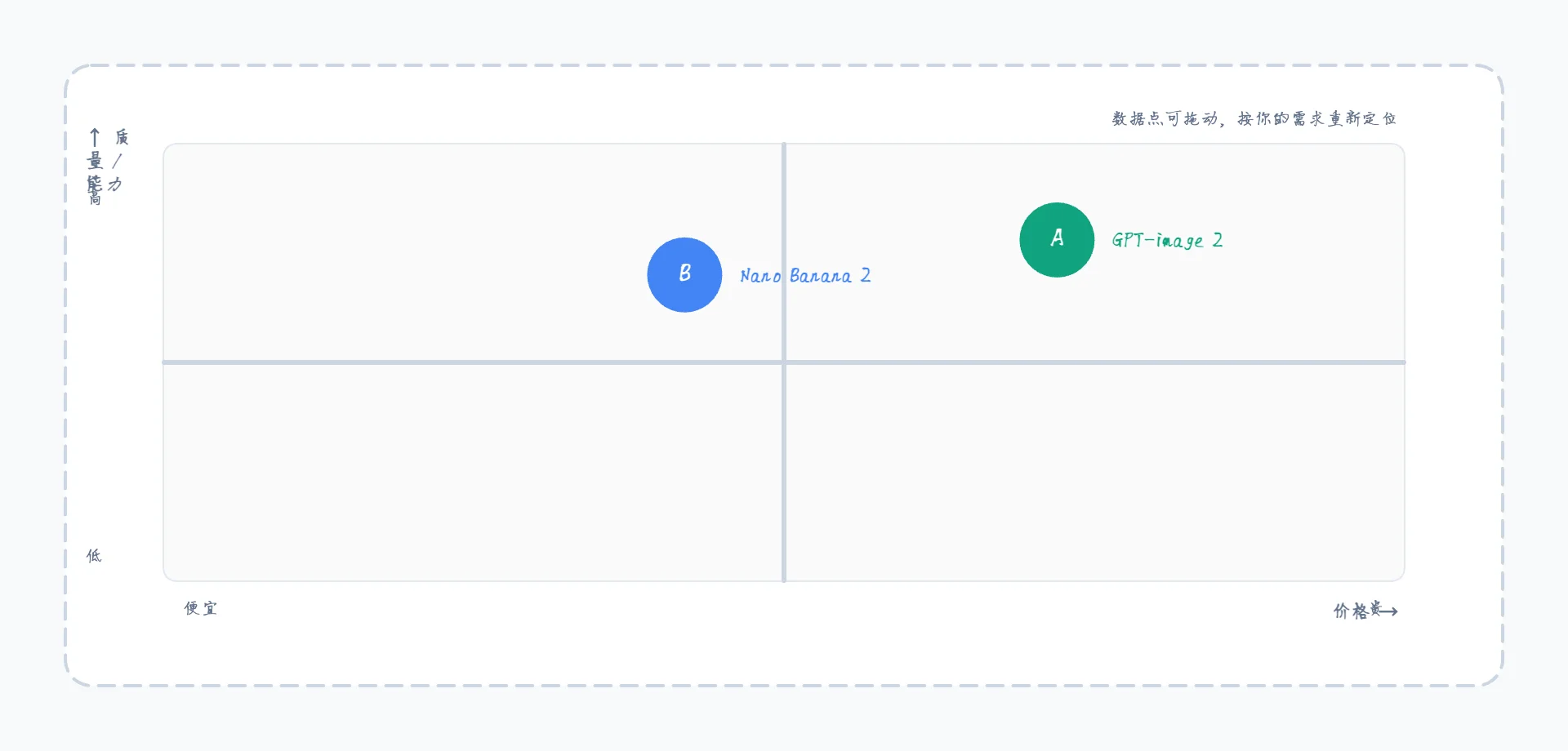
A quadrant chart says one thing that the table can't: both are in the upper-right "high quality" region, but Nano Banana 2 sits slightly to the left (cheaper) while GPT-image 2 sits slightly higher on the quality axis.
In a wider market view you'd see open-source models (SDXL, FLUX) clustering bottom-left, mid-tier APIs (Imagen 3, mid-Midjourney) in the middle, and these two anchoring the top-right. If you're choosing between just these two, you're already in flagship territory — the question is which axis matters more for your use case.
Frame 4 — Feature Matrix
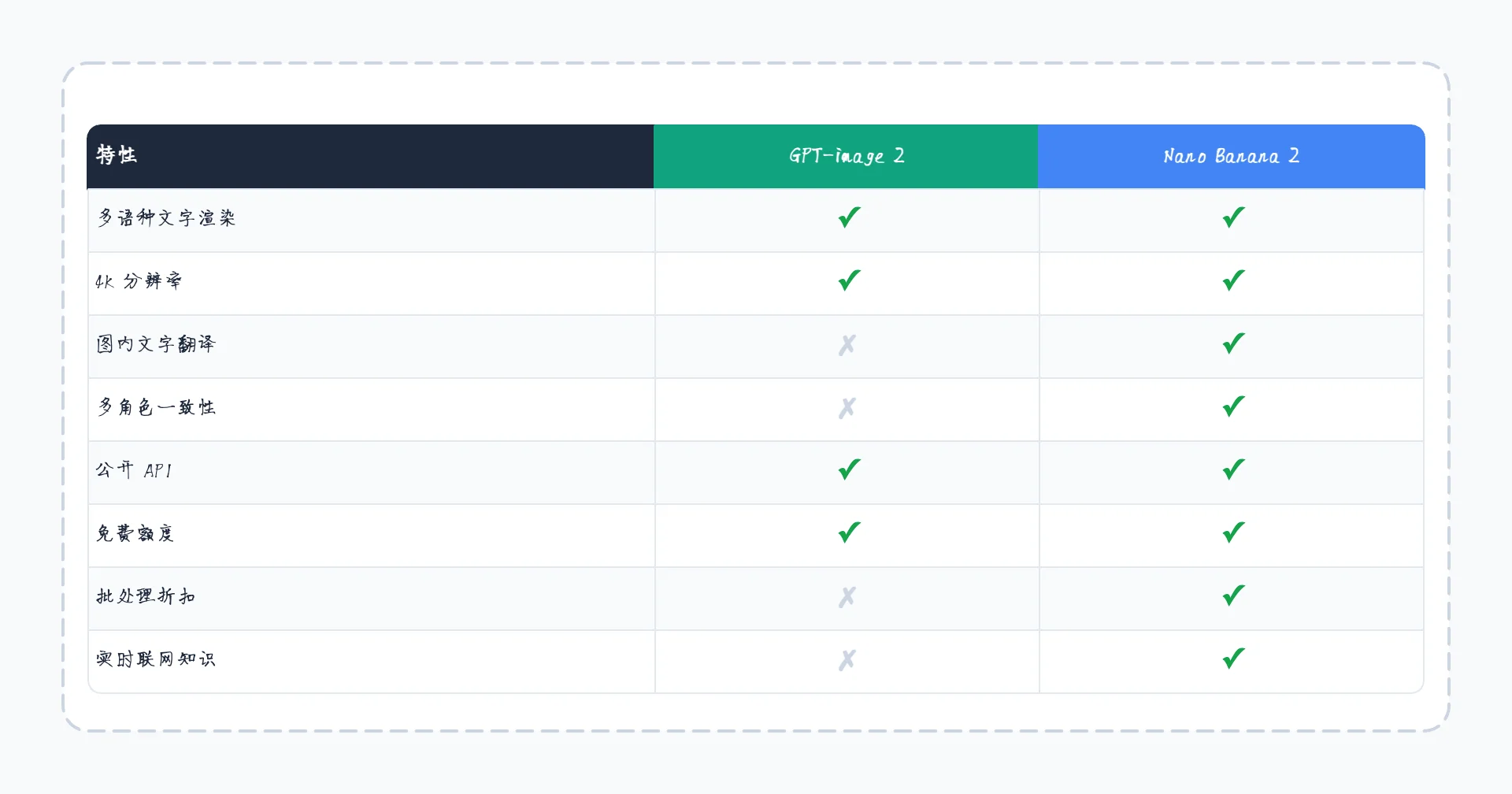
This is where the two diverge most clearly. Check-marks and crosses cut through marketing language faster than any prose.
| Feature | GPT-image 2 | Nano Banana 2 |
|---|---|---|
| Multilingual text | ✓ | ✓ |
| 4K resolution | ✓ (beta) | ✓ |
| In-image translation | ✗ | ✓ |
| Multi-subject consistency (5+ entities) | ✗ | ✓ |
| Public API | ✓ | ✓ |
| Free tier | ✓ (rate-limited) | ✓ (Gemini app) |
| Batch discount | ✗ | ✓ (50%) |
| Real-time web knowledge | ✗ | ✓ |
Nano Banana 2 is essentially a superset on the "newer model" features — translation, consistency, batch, web-grounded generation. GPT-image 2's advantages are subtler: better text rendering on certain scripts, broader creative freedom, and OpenAI's ecosystem of ChatGPT integrations.
Which Should You Pick?
Practical recommendations:
- Multilingual marketing posters, packaging, menus → GPT-image 2 (text accuracy)
- Product catalogs, brand assets, multi-shot consistency → Nano Banana 2 (subject consistency)
- You're already paying for ChatGPT Plus / Pro → GPT-image 2 is included
- You need 4K at production scale → Nano Banana 2 batch API ($0.075 / image)
- You want generated content grounded in real-world facts → Nano Banana 2 (web-grounded)
- You want minimal prompt refusals for stylized / creative work → GPT-image 2
Both have free tiers worth trying before committing.
Make Your Own Comparison
The chart above is a CodePic template. Each section is a self-contained Frame — if you only need the parameter table, delete the other three. If you want to compare three models instead of two, copy the column and shift things over.
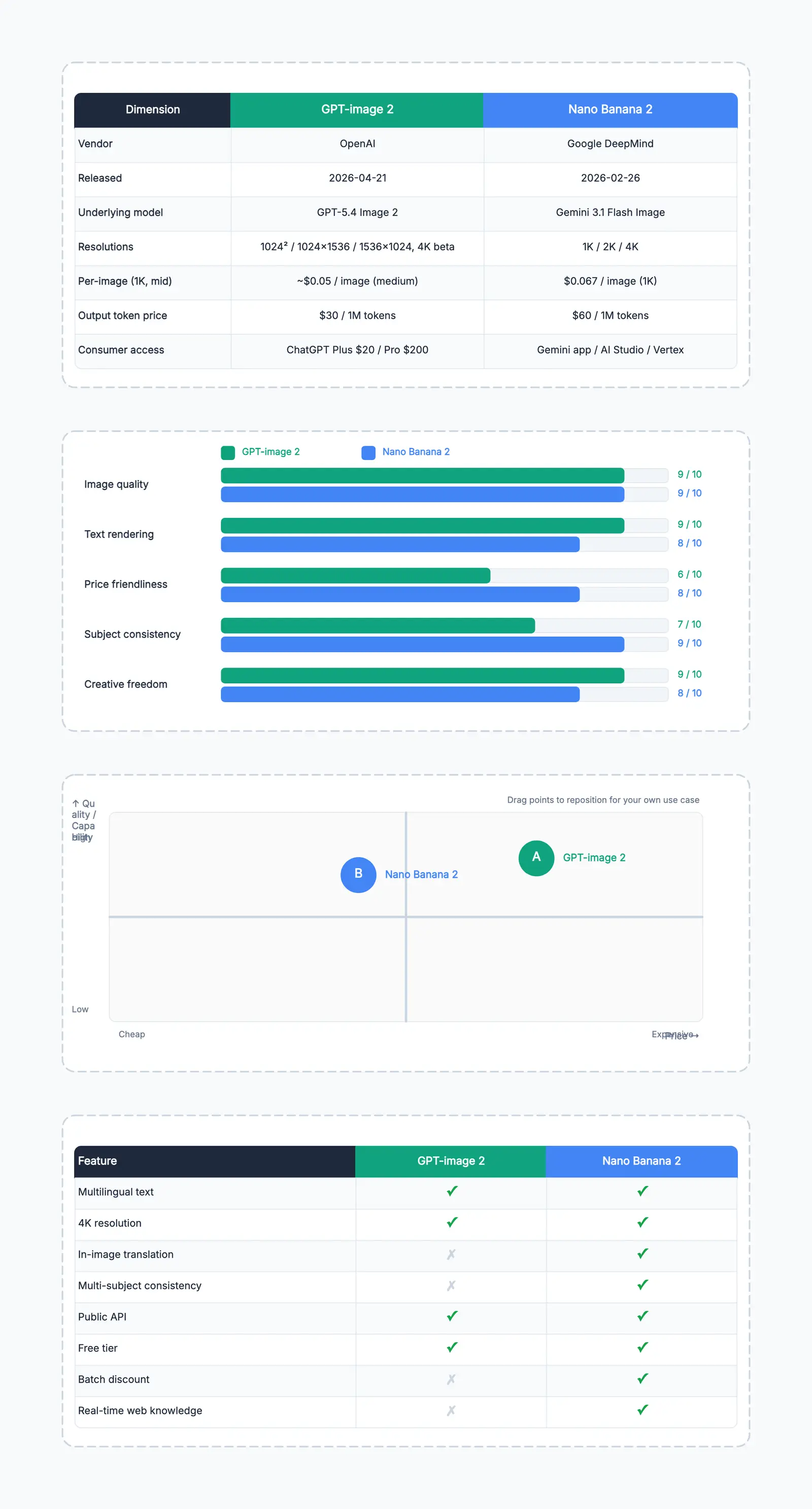
AI Model Comparison
Try this templateThe same template works for comparing LLMs (Claude, GPT, Gemini), dev tools (Cursor vs Copilot vs Windsurf), SaaS plans, or any "which one should we pick" decision your team needs to make visually. Swap the labels, swap the bar lengths, drag the quadrant points — that's the whole workflow.