Whimsical has earned its reputation by doing something rare: keeping things simple without feeling basic. Its flowcharts, wireframes, mind maps, and docs live in a single, cohesive interface that's fast and visually clean. You don't need to watch a tutorial or read documentation — open it, pick a type, and start building. That combination of breadth and simplicity is genuinely hard to find.
So why look elsewhere? Whimsical Free now includes unlimited private files but only 3 collaborative boards, plus limited AI usage and short version history. That is generous for solo work but tight for a team building a shared board library. Technical notation and deeper data-driven diagrams are another reason to compare alternatives.
The tools below each approach the problem differently. Some are more flexible, some are cheaper, some are more technical. None of them are perfect drop-in replacements — Whimsical's specific mix of simplicity and polish is unique — but depending on what matters most to you, one of these will be a better fit.
1. Miro
Miro is the most obvious alternative if what you need from Whimsical is a general-purpose visual workspace. It covers flowcharts, mind maps, wireframes, sticky notes, retrospectives, journey maps, and more — with a significantly larger canvas and a richer template library than Whimsical offers.
The collaboration experience is Miro's strongest card. Real-time co-editing works smoothly, and the free plan allows unlimited collaborators on up to three boards. For workshop-style sessions — brainstorming, sprint planning, design critiques — Miro is built for exactly that.
The tradeoff is complexity. Where Whimsical makes you productive in seconds, Miro has a learning curve. The interface is dense, the options are extensive, and it's easy to spend time exploring features instead of drawing. If you valued Whimsical for its restraint, Miro will feel like moving from a notebook to a control panel.
Best for: Teams that run collaborative workshops and need a flexible whiteboard that covers many use cases beyond diagramming.
2. FigJam
FigJam is Figma's whiteboard product, and its biggest advantage is ecosystem. If your design team already lives in Figma, FigJam integrates seamlessly — same file organization, same permissions, same keyboard shortcuts. Running a wireframe review or planning session alongside your actual design files feels natural rather than context-switching.
For Whimsical's core use cases — quick flowcharts, wireframes, brainstorming boards — FigJam handles them competently. The sticky notes and voting features are well-designed for team sessions, and the collaboration is real-time and smooth.
Where FigJam falls short compared to Whimsical is in structured diagramming depth. Whimsical's flowchart and mind map modes are purpose-built and feel precise; FigJam's are more freeform. It's better thought of as a collaborative canvas than a diagramming tool. The free plan allows three files, which matches Whimsical's restrictions.
Best for: Design teams already using Figma who want a whiteboard that feels native to their existing workflow.
3. Excalidraw
Excalidraw takes a fundamentally different design philosophy from Whimsical. Where Whimsical is clean and polished, Excalidraw is deliberately rough — everything looks hand-drawn, like a sketch on a whiteboard. It's open source, completely free, and requires no signup.
That hand-drawn aesthetic isn't just cosmetic. It signals "this is a draft, not a deliverable," which makes people more comfortable iterating and suggesting changes. For early-stage architecture discussions, quick diagrams during a meeting, or any context where you want ideas to feel disposable, it works well.
The limitation is structure. Excalidraw has no dedicated flowchart mode, no wireframe components, no mind map layout — it's a blank canvas with basic shapes. You can build anything, but you build everything from scratch. If you rely on Whimsical's smart connectors and automatic layout, Excalidraw will feel manual by comparison.
Best for: Developers and technical teams who want zero-friction sketching for brainstorming and architecture discussions, and who don't need structured diagram modes.
Test the Switch with One Wireframe
Open this wireframe, add a screen, change a user path, and ask a teammate to review it. Repeat the task in the alternatives on your shortlist.
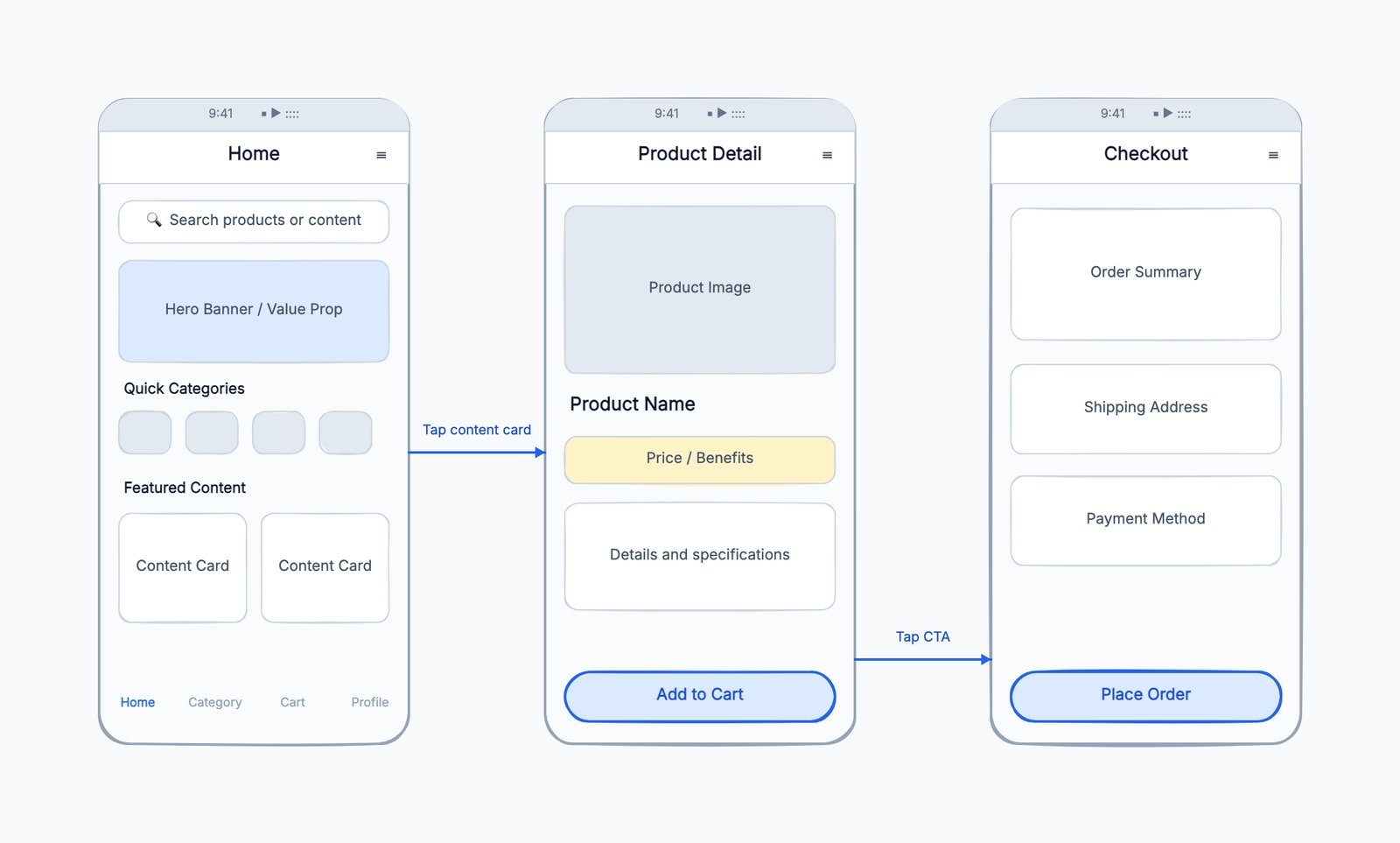
Wireframe
Try this templateThe result shows whether you need Whimsical-like speed, deeper UI components, formal review controls, or a free canvas with fewer workspace limits.
4. Lucidchart
Lucidchart is what you move to when you need Whimsical's diagramming capabilities at a professional scale. It covers flowcharts, wireframes, org charts, UML, ERDs, network diagrams, BPMN — the kind of technical diagram types that Whimsical intentionally doesn't touch.
The strength is precision and breadth. Lucidchart's shape libraries are deep, its connector logic is smart, and it supports data-linked diagrams where you can import from a spreadsheet and auto-generate org charts or system maps. Integrations with Google Workspace, Microsoft 365, Confluence, and Jira are mature.
But Lucidchart is more complex to learn and use. Whimsical lets you throw together a flowchart in 30 seconds; Lucidchart requires more deliberate setup. The free plan is limited to three documents with an object cap per diagram, and paid plans start around $9 per user per month. If you're switching from Whimsical because of pricing, Lucidchart's paid tiers will feel similar.
Best for: Teams that need formal, detailed technical diagrams — UML, ERD, network topology — and are willing to trade simplicity for coverage.
5. Notion
Notion isn't a diagramming tool — it's a workspace for docs, wikis, and project management. But if you were using Whimsical primarily for its docs and light flowcharting, Notion might cover enough of what you need without a separate tool.
Notion's strength is in structured documents: meeting notes, project specs, knowledge bases, and task tracking all live in one place. It supports simple embedded diagrams through integrations (you can embed Mermaid diagrams or third-party tools), and its database views can replace some of what people use flowcharts and mind maps for — like mapping out decision trees or organizing information visually.
The honest take: if you regularly create flowcharts, wireframes, or mind maps, Notion is not a real replacement for Whimsical. But if most of your Whimsical usage was docs with occasional simple diagrams, consolidating into Notion simplifies your toolchain.
Best for: Teams that used Whimsical mainly for documentation and lightweight planning, and who want to consolidate into a single workspace tool.
6. draw.io
draw.io is the alternative to choose when Whimsical's clean simplicity matters less than notation depth, file ownership, and price. Its core web and desktop editors are free, require no account, and cover UML, BPMN, ERD, network, cloud, circuit, floor-plan, and many other shape libraries.
The .drawio XML format can live in local storage, cloud drives, GitHub, or
GitLab. Supported integrations also provide collaborative editing. The tradeoff
is interface density: draw.io exposes far more controls than Whimsical and does
not try to preserve the same guided, minimal experience.
draw.io now also generates diagrams from text, Mermaid, SQL, and CSV and offers an official MCP server. The important distinction is that it remains a file-oriented editor rather than a managed workspace like Whimsical.
Best for: Technical teams that need comprehensive notation, open files, offline editing, and no core-editor subscription.
7. CodePic
CodePic is a hand-drawn style diagramming tool that covers flowcharts, wireframes, mind maps, sequence diagrams, system architecture, ERDs, org charts, and more. It's completely free with no file limits — which directly addresses one of the main reasons people leave Whimsical.
If you want to try that workflow, start with the wireframe template.
The hand-drawn aesthetic is a deliberate choice — like Excalidraw, diagrams look sketched rather than polished, which keeps things feeling like working drafts. Unlike Excalidraw, CodePic provides structured templates and smart connectors, so you get the hand-drawn feel without building everything from scratch.
Where CodePic stands apart is AI integration. It supports the MCP (Model Context Protocol), which lets you connect it to Claude or Cursor and describe diagrams in plain language. Instead of manually placing shapes and drawing connectors, you describe "a wireframe for a dashboard with a sidebar nav and three data cards" and it generates a starting point. For teams that already work in AI-assisted environments, this changes the speed of early-stage diagramming significantly.
Best for: Developers and teams who want free, unlimited diagramming with AI generation — especially those already working with Claude or Cursor.
Quick Comparison
| Tool | Core Types | Free Plan | Real-time Collab | Simplicity | Best At |
|---|---|---|---|---|---|
| Whimsical | Flowchart, wireframe, mind map, docs | Limited files | ✓ | Excellent | Clean, all-in-one simplicity |
| Miro | All whiteboard types | 3 boards | ✓ | Moderate | Team collaboration & workshops |
| FigJam | Whiteboard, sticky notes, basic diagrams | 3 files | ✓ | Good | Figma-native design teams |
| Excalidraw | Freeform sketching | Unlimited | Shared link | Excellent | Zero-friction developer sketching |
| Lucidchart | Full technical diagrams | 3 docs (object cap) | ✓ | Low | Formal technical documentation |
| Notion | Docs, wikis, light diagrams | Generous | ✓ | Good | Doc-first teams |
| draw.io | Full technical diagrams | Unlimited core editor | Via integrations | Moderate | Free technical diagrams and file control |
| CodePic | Flowchart, wireframe, mind map, technical | Unlimited | Read-only link | Good | AI-assisted diagramming |
How to Choose
If simplicity is your top priority: That's Whimsical's strongest quality, and no alternative fully replicates it. Excalidraw comes closest in terms of low-friction entry, but without structured modes. CodePic offers templates and smart connectors that reduce manual work while keeping things approachable.
If the free plan limit is your main frustration: Excalidraw, draw.io, and CodePic are all unlimited and free. CodePic covers the broadest range of Whimsical's diagram types among the free options.
If you need technical diagram types Whimsical doesn't have: Lucidchart for formal UML, ERD, and network diagrams. CodePic for the same types in a more casual, hand-drawn style.
If team collaboration is what matters most: Miro (most comprehensive), FigJam (if you're in Figma), or stick with Whimsical's paid plan — its collaboration is genuinely good.
If you want AI to speed things up: CodePic's MCP integration lets you generate diagrams from natural language inside Claude or Cursor.
The reality: Whimsical's particular combination of simplicity, polish, and multi-type coverage is hard to match in a single alternative. Most people switching will either choose a tool that's simpler but narrower (Excalidraw), broader but more complex (Miro, Lucidchart), or free with a different aesthetic (CodePic). Know which tradeoff you're willing to make, and the choice narrows quickly.
For deeper dives into specific alternatives, see our Miro alternatives guide or Excalidraw alternatives guide. Our Best Diagramming Tools comparison provides a broader overview.


