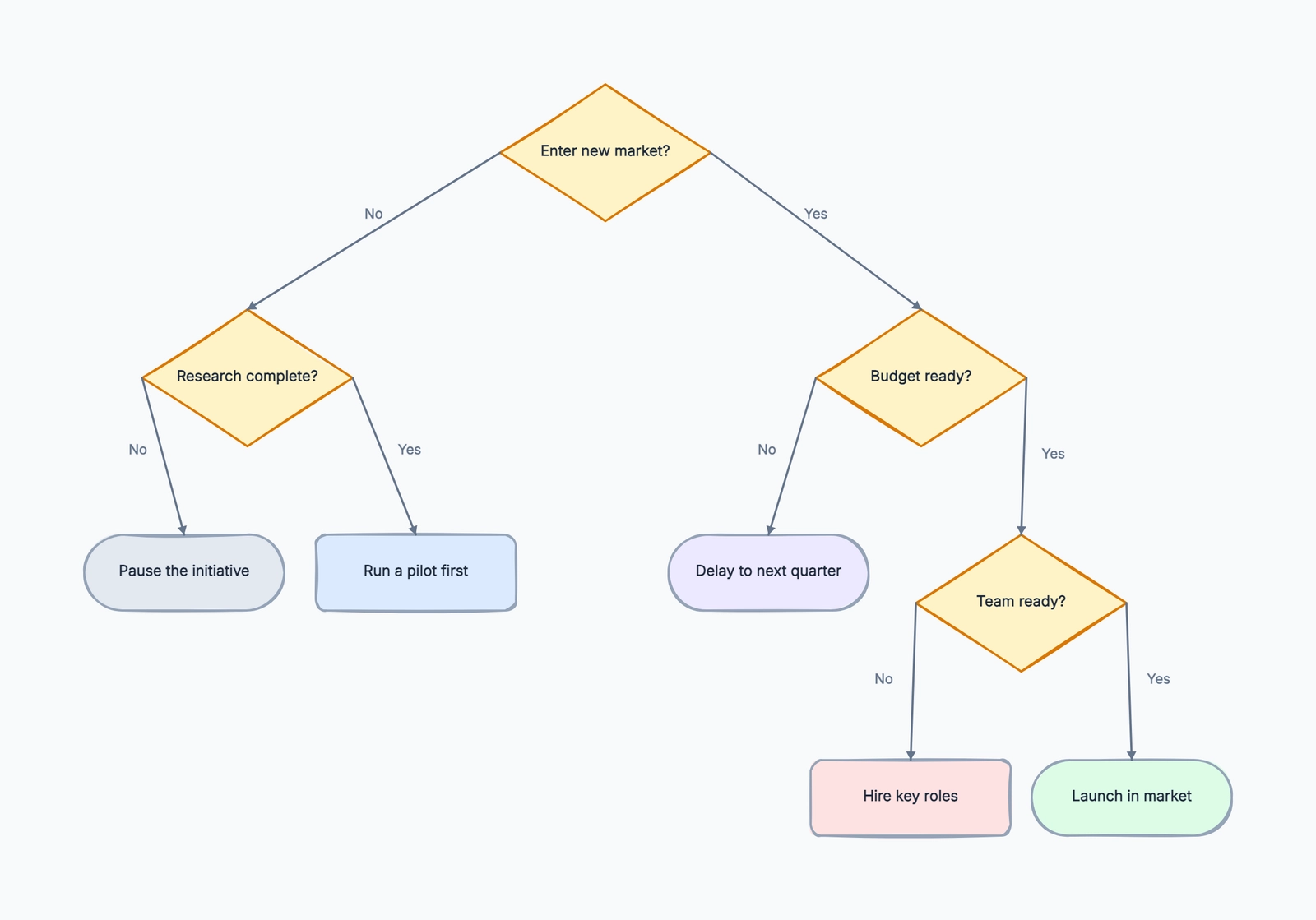
A decision tree is a diagram that shows choices, conditions, and outcomes as a branching structure. It starts with a question or problem, then splits into possible paths. Each path represents a condition, answer, or choice, and the end of the path shows the result.
Decision trees appear in two common contexts. In business and operations, they help people make decisions visibly: route a support ticket, choose a pricing plan, evaluate a candidate, or decide what to do next. In machine learning, decision trees are models that classify data by splitting it through a series of rules. This article focuses on the first use case: visual decision trees for thinking, planning, and communicating decisions. If you want to start drawing one right away, check out our decision tree template.
Why Decision Trees Work
Most decisions feel messy because several questions are mixed together at once. A decision tree separates them. Instead of asking "What should we do?", it asks one answerable question at a time.
For example, a product team deciding how to price a feature might ask:
- Is the feature used by all customers or only advanced teams?
- Does it create direct cost for us?
- Does it help larger accounts justify a higher plan?
- Would putting it behind an upgrade make the free plan less useful?
Each answer narrows the path. By the time you reach the end of the tree, the final recommendation is easier to defend because the reasoning is visible. People may still disagree with the criteria, but they can see exactly where the disagreement is.
That is the real value of a decision tree. It does not magically make a hard decision easy. It makes the logic inspectable, which is usually what teams need before they can agree.
Key Parts of a Decision Tree
Decision trees are simple, but the parts have specific roles:
| Part | What It Means |
|---|---|
| Root node | The starting question, problem, or decision |
| Decision node | A question or condition that splits the path |
| Branch | A possible answer, choice, or condition from a node |
| Leaf / outcome | The final result at the end of a path |
| Criteria | The rules used to decide which branch to follow |
The root node should be narrow enough to answer. "Improve customer experience" is too broad. "Which support channel should this customer use?" is a better root because the tree can lead to a concrete outcome.
Decision nodes should be written as questions with clear answers: "Is the customer on an enterprise plan?", "Is the order delayed more than three days?", "Does the candidate meet the required certification?" Vague nodes create vague trees.
Branches should be mutually understandable. Yes / No works when the question is binary. For more complex decisions, use labels like "High / Medium / Low," "New customer / Existing customer," or "Under $10k / $10k-$50k / Over $50k."
Types of Decision Trees
Not every decision tree is built for the same purpose. These are the most common types:
Simple decision tree. A basic branching diagram that moves from questions to outcomes. This is the format most teams use for support routing, policy decisions, internal checklists, and "if this, then that" processes.
Probability or expected value tree. A tree that attaches probabilities, costs, revenue, or risk values to branches. This is useful when the question is not just "Which path is correct?" but "Which path has the best expected result?" You might use it for investment decisions, product bets, or risk planning.
Classification tree. A tree that assigns something to a category based on attributes. In machine learning, classification trees are trained from data. In manual business use, a lightweight version might classify leads as "self-serve," "sales-assisted," or "enterprise" based on company size, budget, and urgency.
For most workplace decisions, start with a simple decision tree. Add probabilities or scoring only when the extra precision actually changes the decision.
Real-World Decision Tree Examples
Customer Support Routing
A support team can use a decision tree to decide where a ticket should go:
- Root: What type of issue did the customer report?
- Decision: Is it about billing? → Yes: route to billing support
- Decision: Is the customer unable to log in? → Yes: route to account access
- Decision: Is there an active incident affecting this feature? → Yes: send incident update
- Outcome: Assign to general product support
This prevents every ticket from starting with manual triage. It also helps new support agents make consistent routing decisions without memorizing every internal rule.
Product Pricing Choices
A product manager might use a decision tree before deciding whether a feature belongs in the free plan, pro plan, or enterprise plan:
- Is the feature needed for basic product usage?
- Does it create high infrastructure cost?
- Does it require admin controls or compliance review?
- Is it mainly valuable to larger teams?
The tree does not replace pricing judgment, but it forces the team to separate user value, cost, and packaging strategy instead of arguing from gut feeling.
Hiring Screening
A recruiting team can use a decision tree to make early screening more consistent:
- Does the candidate meet the must-have legal or location requirements?
- Do they have the minimum required experience?
- Is the portfolio or work sample relevant to the role?
- Is compensation expectation within range?
- Should the candidate move to recruiter screen, hiring manager review, or rejection?
The benefit is not automation for its own sake. It is fairness and consistency. When criteria are written down, the team is less likely to make different calls for similar candidates.
How to Make a Decision Tree
Step 1: Define the decision. Write the exact question the tree should answer. "How should we handle refunds for annual plans?" is better than "Refund policy."
Step 2: List the possible outcomes. Before drawing branches, decide what the final leaves can be. For a support tree, outcomes might be "route to billing," "route to technical support," "send self-service article," or "escalate to manager."
Step 3: List the conditions. Identify the facts you need to know to choose between outcomes: customer type, order status, budget, urgency, risk level, eligibility, usage, or anything else that changes the decision.
Step 4: Put questions in a useful order. Ask the most decisive questions early. If one answer immediately determines the outcome, put that question near the top. Avoid asking low-impact questions before high-impact ones.
Step 5: Draw the branches. Start from the root, add decision nodes, label every branch, and connect each path to an outcome. If a branch has no clear destination, the decision logic is incomplete.
Step 6: Validate missing paths. Walk through real examples. What happens for an existing customer with a billing issue and an overdue invoice? What happens for a candidate who meets the experience requirement but not the location requirement? Real cases reveal missing branches quickly.
If you already have the root question and a few outcomes, the decision tree template is a useful shortcut. It gives you a readable branching structure with labeled Yes / No paths, so you can focus on decision logic instead of spacing and connector cleanup.
Common Mistakes
Branches are not mutually exclusive. If one case can fit two branches, people will interpret the tree differently. Use sharper criteria or reorder the questions.
Conditions are too vague. "Is this high priority?" sounds clear until two teams define priority differently. Use observable criteria: response deadline, customer tier, revenue impact, severity, legal risk, or explicit thresholds.
Only drawing the happy path. A decision tree that only covers the ideal case is not very useful. Include exceptions: missing data, edge cases, ineligible cases, blocked approvals, and "none of the above."
Putting too many questions into one tree. When a tree grows too large, people stop using it. Split it into smaller trees when the decision changes topic, owner, or level of detail.
Skipping validation. A tree created in a meeting may look logical but fail in real work. Test it with past cases before treating it as policy.
Decision Tree vs. Flowchart, Mind Map, and Risk Matrix
| Tool | Best For | How It Differs from a Decision Tree |
|---|---|---|
| Decision tree | Choosing an outcome based on conditions | Focuses on branching logic and final decisions |
| Flowchart | Showing a process over time | Includes actions and sequence, not just decisions |
| Mind map | Exploring ideas around a topic | Shows associations, not rule-based paths |
| Risk matrix | Comparing likelihood and impact | Prioritizes risks, but does not show step-by-step logic |
Use a decision tree when the main question is "Given these conditions, what should happen?" Use a flowchart when the main question is "What happens next in this process?" Use a mind map when the goal is exploration. Use a risk matrix when you need to compare risks rather than choose a path.
Frequently Asked Questions
What is a decision tree in simple terms? A decision tree is a branching diagram that helps you choose an outcome by answering a series of questions. Each answer sends you down a different branch until you reach a final result.
What is the difference between a decision tree and a flowchart? A decision tree focuses on decisions and outcomes. A flowchart focuses on steps in a process. Many flowcharts include decision points, but they also show actions, handoffs, and sequence.
Can a decision tree have more than two branches? Yes. Binary Yes / No branches are common, but many decision trees use three or more branches from a node, such as Low / Medium / High or Basic / Pro / Enterprise.
Where are decision trees used in business? They are used for support routing, sales qualification, pricing decisions, hiring screens, compliance checks, troubleshooting guides, approval rules, and operational playbooks.
Are decision trees only for machine learning? No. Machine learning uses decision trees as predictive models, but decision trees are also useful as simple visual tools for human decision-making. In day-to-day work, the visual version is often more practical because it makes the reasoning clear to everyone.
How detailed should a decision tree be? Detailed enough that two people would follow the same path for the same case. If the tree becomes too large to read comfortably, split it into smaller trees or move detailed instructions into supporting notes.
Next Steps
Ready to create your own decision tree? Compare free decision tree makers or jump straight into our decision tree template and start drawing.