A shift schedule is the difference between a week that staffs itself and a week where you spend every evening texting someone to cover a gap. It turns "who's on Thursday night?" into a grid you can answer with one look: names down the rows, Monday through Sunday across the columns, and a shift in every cell.
This guide walks through how to build a weekly shift schedule from scratch, then shows the three shapes it takes for an 8-hour three-shift rotation, a 12-hour two-shift rotation, and 24/7 coverage. You can adapt the shift schedule template and edit the names, times, and shifts directly in the browser.
What a shift schedule should do
A shift schedule is not a list of who is available. It is a commitment about who covers which hours, written down so the team and the manager see the same thing. A workable schedule answers three questions: who works which shift, which days they are off, and where a handover needs to happen between back-to-back shifts.
A useful schedule should produce four outcomes:
- every shift on every day has a name, so no cell is left blank;
- the night and weekend load is spread across the team, not stacked on one person;
- off days are marked in the same grid, so rest is part of the plan;
- the handover window is written down where one shift ends and the next begins.
Avoid treating every operation as one size. A cafe open nine hours a day needs a different shape than a warehouse running around the clock. Start from the same weekly grid and branch only where the hours genuinely differ.
How to build a weekly shift schedule
The grid is the useful part, so build it before you decorate it. Names go down the left, days go across the top, and the shift or off day goes in each cell.
1. List the team down the left column
Write everyone who can work the shift, one row each. If someone has a fixed day off — a second job, a class, a childcare day — mark it now. Those constraints decide the shape of the whole week, and discovering them late means re-doing the roster.
2. Set the shift labels and times
Decide the blocks before you assign anyone. A three-shift operation uses morning (7:00–15:00), mid (15:00–23:00), and night (23:00–7:00). A two-shift operation uses day (7:00–19:00) and night (19:00–7:00). Write the labels and times at the top of the board so everyone reads the same hours.
3. Fill each cell with a shift or an off day
Work through the days one column at a time and make sure each day has the coverage it needs before you move to the next. Color the shifts as you go — morning one color, mid another, night a third, off a fourth — so the week reads as a pattern instead of a wall of text.
4. Rotate the less popular shifts
Night and weekend cells are the ones people trade away. Rather than asking for volunteers every week, rotate them: the person on nights this week moves to mornings next week. A colored grid makes the spread visible, so the rotation is obvious to the team and to you.
5. Note the handover
Where a shift ends and the next begins, write down the handover — who passes what to whom and when. Back-to-back shifts without a handover lose information, especially in a clinic, a kitchen, or a call center where the incoming person needs context.
6. Check the week for gaps and double-books
Before you share the board, scan every column for a blank cell and every row for two shifts on the same day. A blank cell is a shift nobody is scheduled to work; a double-book is one person on two shifts at once. Both are caught in seconds on a grid and missed for days in a text list.
8-hour three-shift rotation example
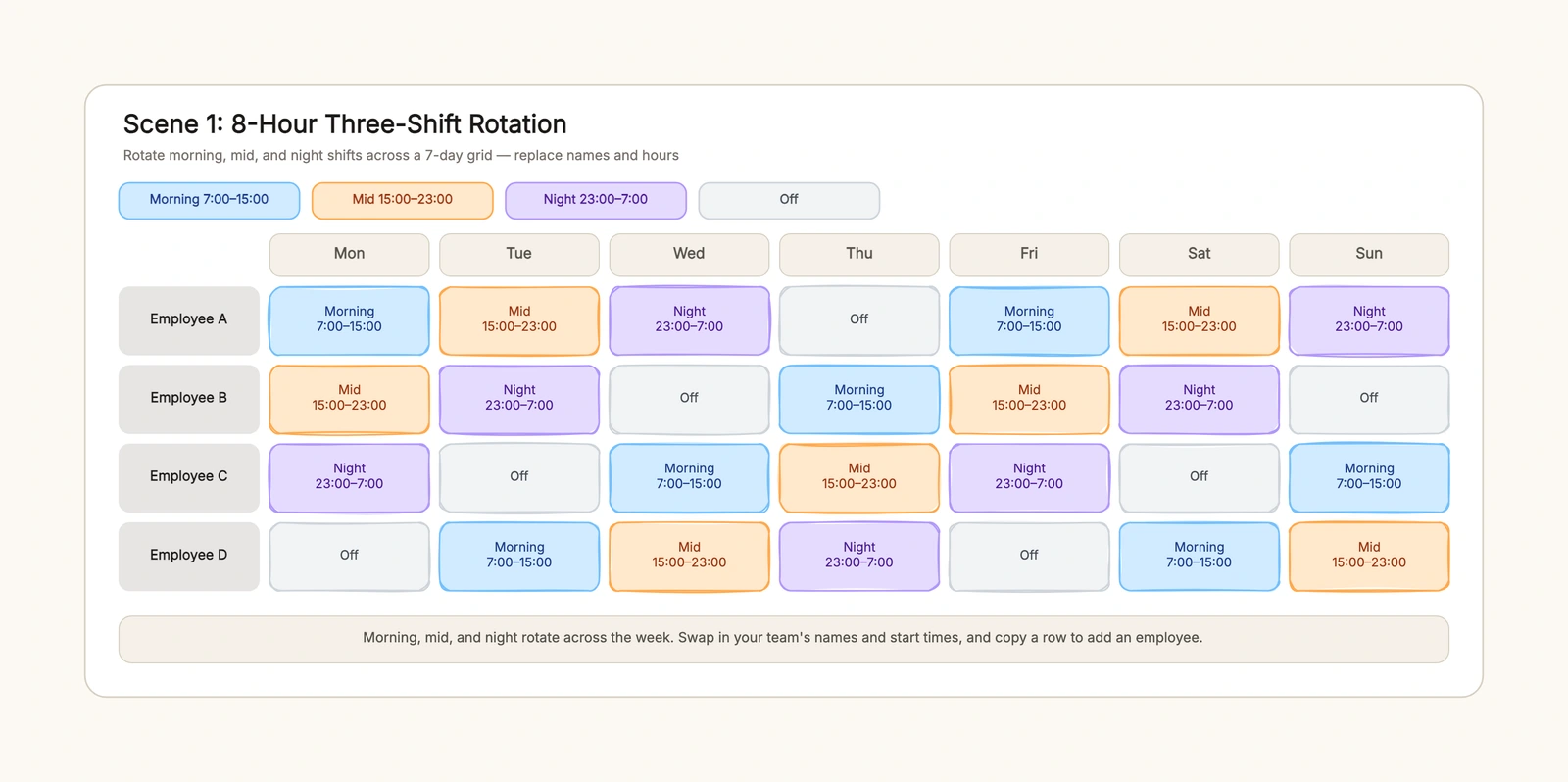
An 8-hour schedule splits the day into three blocks and rotates the team through them. Take four employees — A, B, C, and D — and run the week as a four-day cycle of morning, mid, night, and off.
Employee A works morning on Monday, mid on Tuesday, night on Wednesday, and off on Thursday, then the cycle repeats. Employee B starts one step behind: mid, night, off, morning. C and D follow, each offset by one day. The result is that every day has one morning, one mid, one night, and one person off, and no one is stuck on nights all week.
The mistake to avoid here is stacking the closing and night shifts on the newest person because they "don't mind yet." Rotate them from the first week, and the roster stays fair without a confrontation later.
12-hour two-shift rotation example
A 12-hour schedule trades three shorter shifts for two longer ones, which means fewer handovers and longer stretches off. Day runs 7:00–19:00 and night runs 19:00–7:00, and the two shifts pair up to cover the full 24 hours.
A common pattern pairs employees: A and B take the front half of the week as day and night, then flip, while C and D cover the back half. Each row still has off days, and each day still has both a day and a night person. Because the shifts are long, the handover matters more, not less — write down what the incoming shift needs to know before the outgoing shift leaves.
24/7 coverage example
Coverage is a different question than rotation. Rotation asks who works which shift; coverage asks whether every shift on every day actually has someone. Flip the grid to answer it: put the shifts as rows — morning, mid, night — and the days as columns, and write a name in every cell.
The 24/7 grid is the one to run the night before the week starts, because a blank cell is the whole point. If a shift has no name, you fix the roster before it becomes a phone call at 11 pm. This is the fastest way to see whether a hospital ward, a support line, or a data center is actually staffed around the clock.
Handling swaps and time-off requests
A roster is never finished — someone gets sick, trades a shift, or needs a day off. Plan for it in the schedule itself: mark a clear contact for swaps, keep a standby list, and set a rule for how late a swap can happen before it becomes a no-show. A schedule with no path for changes gets ignored the first time someone cannot make a shift; a schedule with a named swap route stays trusted.
Fairness across the roster
The fastest way to burn out a team is to hand the same people the same worst shifts every week. Rotate weekends, nights, and holidays across the roster, and keep the rotation visible so nobody has to ask why they always close. A fair rotation is not about making everyone equal every week — it is about making the pattern predictable and reviewable, which is what a weekly grid makes easy to see at a glance.
Common shift scheduling mistakes
Leaving a shift uncovered
A blank cell is a shift nobody works. Run the coverage check — shifts as rows, days as columns — and confirm every cell has a name before the week starts.
Stacking nights on one person
Giving the same employee every night shift is easy to do and hard to notice in a list. Color the shifts and the imbalance shows up immediately, so you can rotate the night cells.
Skipping the handover
End and start times are not a handover. Write down what the incoming shift needs — who is mid-task, what is pending, what to watch — so the transition is a handoff, not a guess.
Double-booking one person
Two people editing the roster can put the same name on two shifts in one day. One shared board with a single name per cell prevents it.
No off days in the grid
A roster with no off cells hides burnout until it surfaces as an absence. Mark rest days in the same grid so they are planned, not an afterthought.
Keep the roster useful over time
After the week runs, note what changed — who swapped, who was off sick, where the coverage sagged — and fold it into next week's grid. Keep the shift labels and colors consistent so the team learns the board once and reads it forever.
Start from the shift schedule template, replace the placeholder names with your team, and share the board before the week begins. For the team structure behind the roster, see the org chart template; for handoffs when someone leaves, the employee offboarding checklist template; and for the notes that travel between shifts, the meeting notes template.