Property management workflow automation is useful when it removes chasing, copying, and forgotten follow-ups — not when it pretends that every tenant request is the same. A good automated workflow sends the right acknowledgement, creates the right task, reminds the right person, and records what happened. A bad one closes tickets early, sends an insensitive message during an emergency, or routes a legal exception as though it were routine.
The distinction matters because property operations contain both kinds of work. A move-in packet can be requested automatically after a lease is signed. A water leak still needs a person to judge urgency. This guide shows how to design property management workflow automation around that boundary, then gives concrete patterns for maintenance, move-in, and renewal.
Start with a map, not an automation rule
Automation should come after a current-state map. Before turning on a rule, draw the actual route of one request: the trigger, every handoff, every system update, every wait, and the point where someone decides what happens next. Use roles rather than employee names: tenant, property manager, maintenance coordinator, vendor, accounting, and leasing agent.
For each step, write four short fields beside the workflow node:
- Trigger: what makes this step start?
- Owner: who is accountable for moving it forward?
- Evidence: what record proves it happened?
- Exception: when must the normal route stop and go to a person?
That small exercise exposes the weak spots. If a work order waits because no one sees the email, the automation opportunity is assignment and an overdue reminder. If it waits because nobody knows whether the issue is urgent, the opportunity is a structured triage form and an escalation rule — not automatic dispatch.
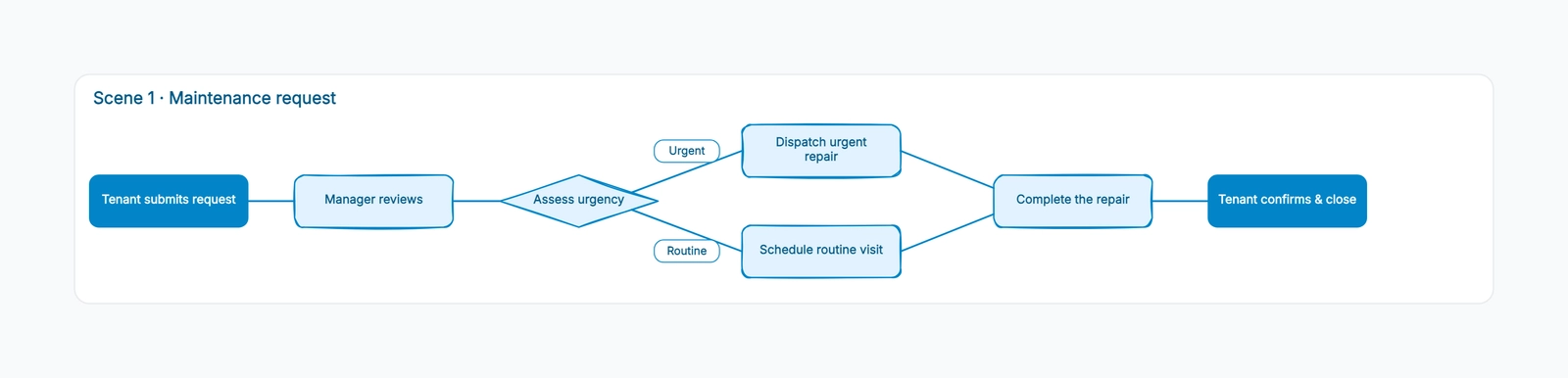
The property management workflow template is a practical place to draw this before configuring anything. Keep routine paths and exception paths visible on the same board; otherwise the exception becomes an undocumented side conversation.
A simple test: automate the handoff, not the judgment
Most property workflows contain three layers. The first is capture: receive a request, collect required information, attach documents, and acknowledge receipt. The second is coordination: create tasks, assign an owner, set a due date, and send reminders. The third is judgment: decide urgency, approve cost, interpret a lease, evaluate a repair, or resolve a dispute.
Capture and coordination are usually good candidates for automation. Judgment needs a named owner and a clearly recorded decision. That does not mean people must type everything manually. Automation can prepare a decision queue with the unit, issue category, photos, vendor history, and policy reference already attached. The human still makes the call.
This rule also protects tenant experience. An automatic “your request is complete” message is acceptable only after the system has a reliable confirmation condition. In many maintenance workflows, vendor completion is not enough. The final status should wait for a manager review, tenant confirmation, or a documented attempt to confirm.
Pattern 1: maintenance request automation
Maintenance is the best first workflow because it is frequent, measurable, and full of repeatable handoffs. The goal is not a fully automatic repair. The goal is to remove the delay between the tenant’s request and the first accountable response.
The trigger and intake
When a tenant submits a request, create one work order with the unit, contact preference, category, description, attachments, and access instructions. Immediately send an acknowledgement that states the request was received — not that a repair has been scheduled or approved.
The intake form should ask only questions that change routing. For example: Is there active water? Is heat, power, or a secure entry affected? Is anyone at immediate risk? Those answers can set an emergency flag and notify an on-call role. They should not silently decide that an issue is safe to defer.
Automated coordination
For routine requests, automation can assign the maintenance coordinator, set an initial review deadline, and start reminder timers. When a vendor is assigned, it can send the tenant a scheduling window and create a follow-up task if the vendor has not updated the work order by the agreed date.
Use status names that describe reality: received, awaiting triage, scheduled, vendor on site, awaiting confirmation, and closed. Avoid a vague “in progress” status that hides where a request is waiting.
Human checkpoints
Keep emergency classification, vendor selection when cost or access is unusual, and final quality confirmation human. Also define a reopen path. If a tenant says the repair failed, the workflow should reopen the original work order, preserve its history, and notify the owner. Creating a second unrelated ticket makes recurring failures invisible.
Pattern 2: move-in workflow automation
Move-in automation is mostly document and deadline coordination. It works best when each task is anchored to a known date, such as lease signing, payment clearance, or the scheduled move-in day.
After a lease is fully signed, an automation can create a move-in checklist: confirm required payments, request proof of insurance where applicable, schedule the condition inspection, prepare keys or access credentials, and send the tenant a single checklist of outstanding items. Each item needs an owner and due date. “Move-in team” is not an owner.
The important exception is readiness. Do not let a calendar date automatically mark a unit ready. A person should verify the inspection, cleaning, safety items, and key inventory. The system can block key-release tasks until those records are complete, but the evidence should be checked by the role accountable for handover.
This is also where automation can reduce duplicate messages. Instead of five teams emailing the tenant separately, one workflow can send a consolidated status update based on completed tasks. The message should say what remains, who is handling it, and when the tenant will hear next.
Pattern 3: renewal and vacate automation
Lease-end work benefits from date-driven automation because missed notice dates create expensive vacancies and rushed turnovers. Begin with a verified lease-end date and a configurable notice window that your team has reviewed for the applicable property and jurisdiction. Do not hard-code a legal deadline from a generic article into your system.
At the notice window, the workflow can create a renewal review task, send an approved communication template, and set follow-ups for a non-response. Once the tenant chooses, the workflow branches.
The renewal branch can prepare the renewal documents, track signatures, and notify accounting of changed charges. The vacate branch can schedule a pre-move-out inspection, create turnover tasks, capture forwarding details, and track the deposit settlement as a dated task with required documentation. A human should review any deduction, exception, or dispute before communication is finalized.
Draw both branches rather than describing the decision in a note. A visible branch reveals which tasks should disappear after renewal and which tasks must start after notice to vacate.
Design the exception lane before launch
Teams often automate the happy path and discover too late that the real workload lives in exceptions: no access, a vendor cancellation, a duplicate request, an incomplete payment, an accommodation request, or a tenant who does not respond.
For every automation, list the five most likely exceptions. Then decide three things: who receives it, how quickly they must respond, and what record they must leave before the workflow returns to normal. Put that exception lane on the diagram in a contrasting color.
This is particularly important for communications that may touch lease terms, accessibility, discrimination, deposits, or local requirements. Automation can flag and route those cases; your team should use qualified local advice and approved policies to determine the response.
Measure service quality, not just fewer clicks
An automation dashboard should not celebrate only the number of tasks created. Track outcomes that reveal whether the workflow is actually helping:
- median time from tenant request to first human review
- percentage of work orders with a clear owner at every status
- overdue handoffs and the stage where they occur
- maintenance reopen rate within a defined period
- move-ins delayed because readiness tasks were incomplete
- renewal response rate before the follow-up deadline
- exception volume and time to human resolution
Review a small sample of closed cases each month. Read the timeline as the tenant experienced it. Did they receive an acknowledgement, a meaningful update, and a correct resolution? If the system made the office faster but made the tenant ask more questions, the workflow needs work.
Build one workflow at a time
Start with one narrow automation: acknowledgement plus owner assignment for routine maintenance requests, or a move-in checklist after a lease is signed. Run it against real cases for a few weeks. Keep a visible list of exceptions, unclear statuses, and manual workarounds. Those are not failures; they are the requirements for the next version.
Once the first workflow is reliable, reuse its building blocks: intake fields, status definitions, role-based ownership, reminder rules, evidence requirements, and exception escalation. Your portfolio may grow, software may change, and staff may rotate, but those underlying patterns stay useful.
Property management workflow automation succeeds when routine work moves predictably and sensitive work reaches a person earlier, not later. Map the workflow first, automate the handoffs second, and keep the decisions where accountability belongs.
FAQ
What should I automate first in property management?
Start with the first repeatable handoff that regularly waits: acknowledging a maintenance request, assigning an initial owner, or creating a move-in checklist after a signed lease. Pick a workflow with a clear trigger and a measurable delay.
Can automation send maintenance updates to tenants?
Yes, when the message reflects a verified status. Acknowledge receipt automatically, and use scheduled updates to say a request is awaiting review or has a planned visit. Reserve completion messages for a reliable confirmation step.
How often should we review an automated workflow?
Review it after the first busy cycle, then at least quarterly or whenever the software, staffing, vendor network, or policy changes. Examine actual cases and their exceptions rather than reviewing only the intended diagram.