A meeting agenda template is the difference between a meeting that starts with a plan and one that drifts until someone glances at the clock. It turns "what are we actually here for?" into a short list every attendee can scan before they walk in. This guide walks through how to write a meeting agenda people actually follow, then shows the three shapes it takes for a weekly team meeting, a board meeting, and a staff all-hands. You can adapt the meeting agenda template and edit the topics, times, owners, and outcomes directly in the browser.
What a meeting agenda should achieve
A meeting agenda is not the same as a to-do list of topics. It is a time plan organized around outcomes, not just subjects. A workable agenda answers four questions before anyone sits down: what will be decided, who owns each topic, how long each one gets, and what each item should produce by the time it closes.
A useful agenda should produce five results:
- every topic has one owner who will speak to it and carry the outcome forward;
- every topic has a time box, so the first two items cannot eat the hour;
- every topic states an expected outcome, so it is a decision to make, not a chat;
- each item is tagged decision, discussion, or info, so people know how to prepare;
- the agenda is sent before the meeting, so attendees arrive ready instead of surprised.
Avoid treating every meeting as the same size. A weekly sync is tactical, a board meeting is governance, and a staff all-hands is alignment. They share the same backbone — topic, owner, time, outcome — but they weight those fields differently, and the agenda should reflect that.
How to build a meeting agenda
The most useful agenda is written as outcomes, not labels. "Marketing" is a conversation; "decide the Q3 budget" is an agenda item. When every line states what it should produce, the meeting has a finish line for each topic.
1. Set the goal and the duration first
Write one sentence for the meeting's goal and a fixed duration. These two numbers decide everything else: a thirty-minute weekly sync holds four topics, a ninety-minute board meeting holds six. If a topic does not serve the goal, it does not make the cut.
2. List topics as outcomes
For each topic, write what it should produce. "Last week recap" becomes "shared progress snapshot." "Budget" becomes "budget vote recorded." If you cannot name the outcome, the topic is not ready for the agenda.
3. Assign an owner to each topic
Every item needs one name. The owner speaks to the topic, keeps it on time, and carries the outcome forward afterward. An item with no owner gets talked about and then dropped.
4. Time-box every item
Give each topic a duration that reflects its outcome. A decision needs more room than an update; an announcement needs the least. The total should fit inside the meeting duration, with a little slack for transitions.
5. Tag each item with its status
Mark every topic decision, discussion, or info. Decision items get the attention and the written record they need; info items can be read in advance. The tags are how the agenda tells people what to prepare for.
6. Order by priority and send it early
Put decisions before updates, so the hard work happens while the room is fresh. Then send the agenda the day before. An agenda that arrives as the meeting starts is no better than none.
Weekly team meeting example
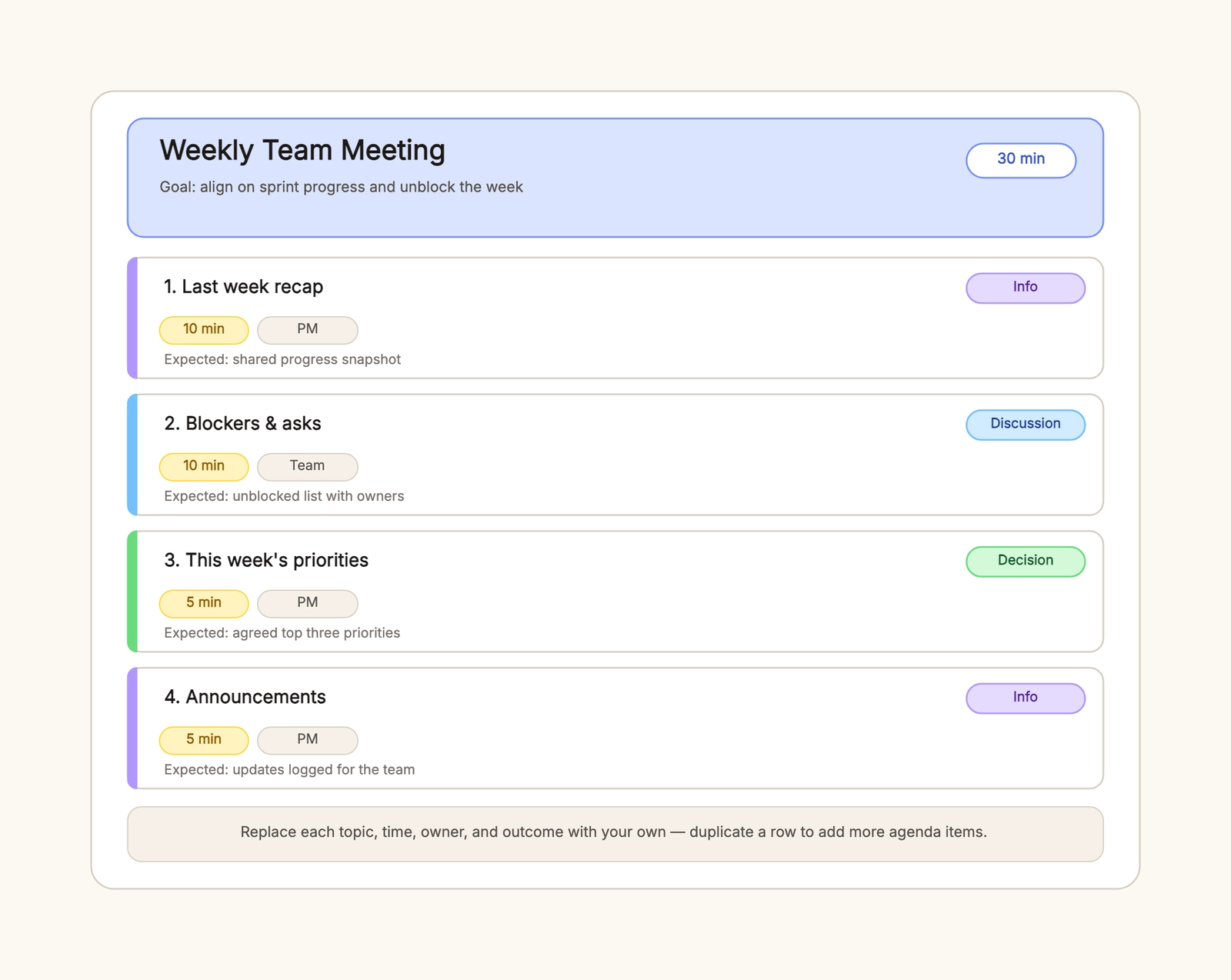
A weekly team meeting is a tactical check-in. It usually fits in thirty minutes and covers four things: what happened last week, what is blocking the team, what this week's priorities are, and any announcements.
The recap item is an info item — a shared progress snapshot with a ten-minute box owned by the PM. Blockers are a discussion item: the team raises what is stuck, and the output is an unblocked list with owners. This week's priorities are a decision item, ending with an agreed top three. Announcements are info, logged for the team.
The most common weekly-meeting mistake is treating every topic as a discussion. When everything is "let's talk about it," nothing closes. Tag the decisions, keep the updates short, and the thirty minutes hold.
Board meeting example
A board meeting agenda is governance. It leads with approvals and oversight rather than status. The shape is usually: call to order and minutes, financial review, budget approval, strategy update, committee reports, and new business.
The budget approval is a decision item and should be marked as one, with the vote recorded. The strategy update is a discussion item, giving directors room to probe before any direction is confirmed. Committee reports are info — received and noted — so they do not crowd out the items that need a decision.
The board-meeting mistake that costs the most is burying a vote inside an update. When an approval is not marked as a decision, it gets skipped or left unrecorded, and the record no longer matches what the board actually did.
Staff meeting example
A staff meeting agenda is about alignment and morale. It favors company numbers, wins, and a real block of Q&A over a long list of decisions. The shape is: welcome and wins, company performance, product roadmap, people updates, Q&A, and closing.
The wins come first because they set the tone. The performance and roadmap items are info — numbers and a preview of next quarter's features. The Q&A is the part people remember, so give it a genuine ten minutes instead of trailing off into "any other questions?"
The staff-meeting mistake is making it a one-way broadcast. If the agenda is nothing but updates, people stop coming. Leave a real block for questions, and celebrate people by name.
Agenda vs. meeting notes
An agenda is a plan; the notes are the record. The agenda is written before the meeting and lists topics, owners, time, and the expected outcome for each. The notes are written after and capture decisions and actions. Keeping them separate means the agenda stays short enough to read before the meeting, and nobody has to scan a long document to find what is next.
What to do when a topic runs over
A topic that runs past its box is a decision, not an accident. Three options cover most cases: cut it off and move on, schedule a follow-up with an owner, or consciously extend it and drop something else. The agenda gives each topic a time box precisely so this decision is visible. When every topic runs over, the problem is not the topics — it is that the boxes were too small, so re-time the agenda instead of letting the meeting run late.
Remote vs. in-person agendas
The same agenda works for both, with one change: remote meetings need the reading link and the decision point stated up front, because nobody can glance across the table to see what is happening. Put the shared document link at the top, name a single screen-sharer, and call out when a decision is needed. The time boxes matter more remotely, where side conversations and tool switching eat minutes silently.
Common meeting agenda mistakes
Topics without an owner
An item with no name gets talked about and dropped. Every topic needs one owner who will speak to it and carry the outcome forward.
No time box per item
Without a duration, the first two topics eat the hour. Give every item a time box and the meeting keeps its shape.
No expected outcome
A topic that says "marketing" is a chat; one that says "decide the Q3 budget" is an agenda. Write what each item should produce.
Decisions buried in updates
When a vote hides inside a general update, it gets missed. Mark decision items explicitly so they get the attention and the record they need.
Sending the agenda at the last minute
An agenda that arrives as the meeting starts is no better than none. Send it the day before so people can prepare and add items.
Keep the agenda useful over time
After the meeting, note which topics ran long and which could have been an email. Fold that back into the template, so each week's agenda starts better than the last. Keep a short reusable version — goal, duration, and the standard topic list — and copy it for the next meeting. An agenda is a living template, not a form you fill in once.
Start with the meeting agenda template, replace the topics, times, owners, and outcomes with your own, and send it before the room fills. For what happens during and after the meeting, see the meeting notes template. For the sprint meeting that feeds a team's week, see the sprint planning template.