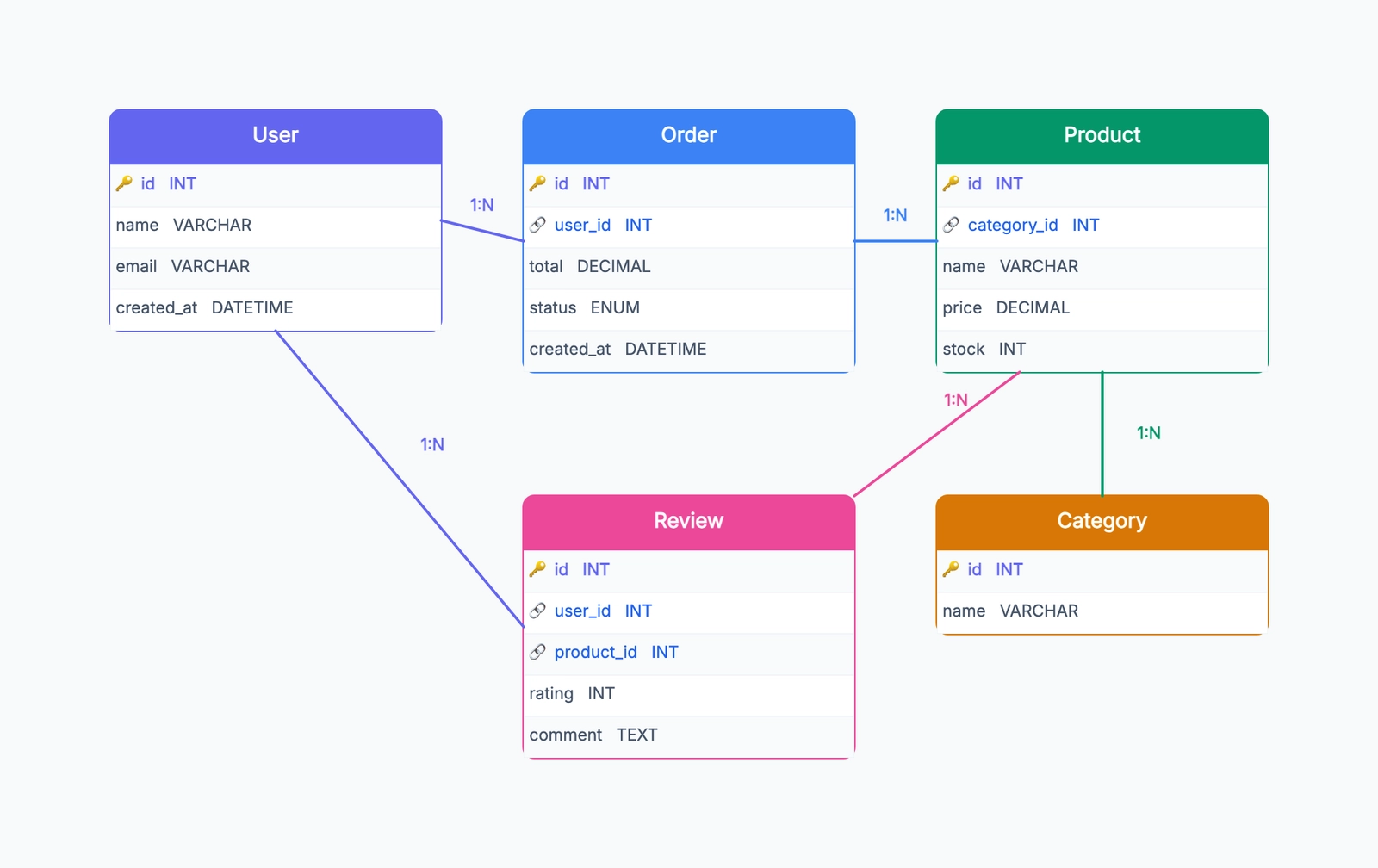
The fastest way to get comfortable with ER diagrams is to study real examples. Abstract rules about entities, attributes, and cardinality start making sense when you see them applied to systems you already understand — a store, a school, a hospital.
This article walks through five complete ER diagram examples, each for a different domain. For every example, we'll cover the entities, their key attributes, the relationships between them, and the design decisions that matter. If you're new to ER diagrams, start with What Is an ER Diagram for the fundamentals.
1. E-Commerce Database
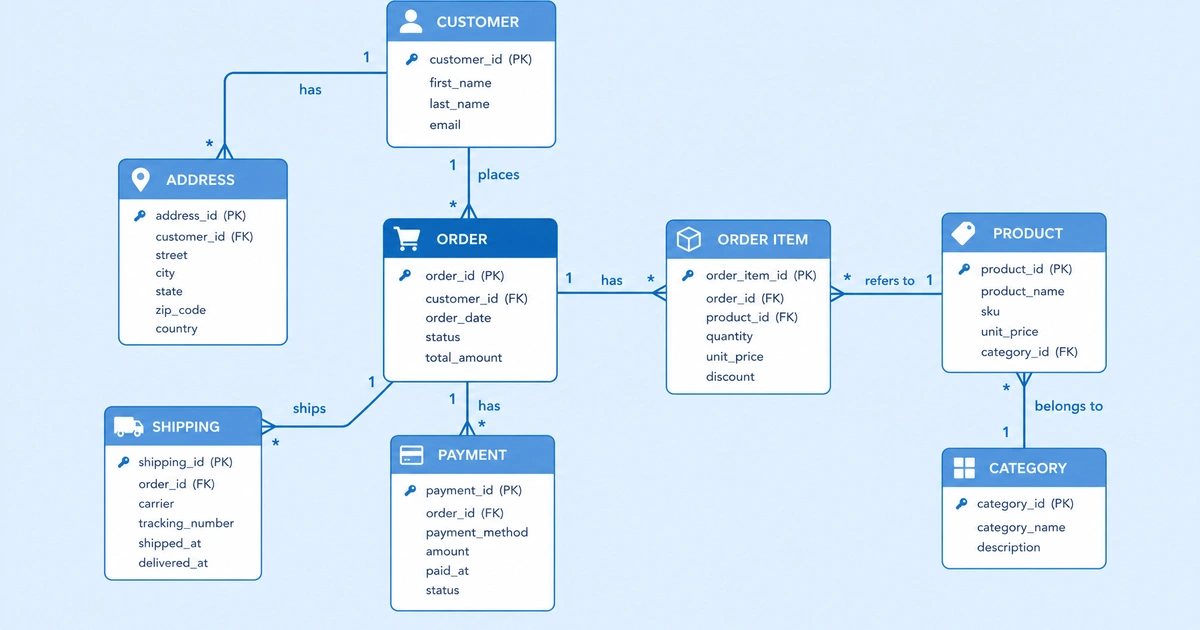
An online store needs to track customers, products, orders, and payments. This is probably the most common ER diagram you'll encounter in courses and interviews.
Entities:
- Customer — id (PK), name, email, phone, address, created_at
- Product — id (PK), name, description, price, stock_qty, category_id (FK)
- Category — id (PK), name, parent_category_id (FK, self-reference)
- Order — id (PK), placed_at, status, shipping_address, customer_id (FK)
- OrderItem — id (PK), order_id (FK), product_id (FK), quantity, unit_price
- Payment — id (PK), order_id (FK), method, amount, paid_at, status
Relationships:
- Customer → Order: one-to-many. One customer can place many orders. Each order belongs to one customer.
- Order → OrderItem: one-to-many. One order contains many items.
- Product → OrderItem: one-to-many. One product can appear in many order items (across different orders).
- Order → Payment: one-to-one (or one-to-many if you allow split payments). Each order has one payment record.
- Category → Product: one-to-many. One category contains many products.
- Category → Category: self-referencing one-to-many. Categories can be nested (Electronics → Laptops → Gaming Laptops).
Design decisions worth noting:
unit_price is stored on OrderItem, not read from Product at query time. Prices change. When you look at a historical order, you need the price at the time of purchase. This is one of the most common mistakes beginners make — referencing the live price instead of storing a snapshot.
The Product–Order relationship is many-to-many, resolved through the OrderItem junction table. OrderItem carries its own data (quantity, unit_price), making it more than just a linking table.
2. School / University Database
A school system tracks students, courses, instructors, and enrollment records. This example introduces the concept of a junction table that carries meaningful data beyond just foreign keys.
Entities:
- Student — id (PK), name, email, enrollment_date, major
- Course — id (PK), code, title, credits, department_id (FK)
- Instructor — id (PK), name, email, title, department_id (FK)
- Department — id (PK), name, head_instructor_id (FK)
- Enrollment — id (PK), student_id (FK), course_id (FK), semester, grade, enrolled_at
Relationships:
- Student → Enrollment → Course: many-to-many (via Enrollment). A student takes many courses; a course has many students. The Enrollment junction table records the semester and grade for each specific student-course pairing.
- Instructor → Course: one-to-many (simplified). One instructor teaches many courses per semester. In reality this could be many-to-many if courses have multiple instructors, but one-to-many is the common starting model.
- Department → Course: one-to-many. Courses belong to a department.
- Department → Instructor: one-to-many. Instructors belong to a department.
- Department → Instructor (head): one-to-one. Each department has one head instructor.
Design decisions worth noting:
Enrollment is the junction table between Student and Course, but it's not just a pair of foreign keys. It carries semester, grade, and enrolled_at — data that belongs to the relationship itself, not to either entity alone. Whenever your junction table has its own attributes, promote it to a proper entity with its own primary key.
The Department has a head_instructor_id that references Instructor. This creates a circular reference (Department → Instructor and Instructor → Department). That's fine in an ERD — just be careful about insert order when seeding the database.
3. Hospital / Healthcare Database
Healthcare databases are more complex than most educational examples suggest. We'll simplify, but still cover the essential structure.
Entities:
- Patient — id (PK), name, date_of_birth, gender, phone, emergency_contact, insurance_id (FK)
- Doctor — id (PK), name, specialization, license_number, department_id (FK)
- Department — id (PK), name, floor, building
- Appointment — id (PK), patient_id (FK), doctor_id (FK), scheduled_at, status, notes
- MedicalRecord — id (PK), patient_id (FK), doctor_id (FK), diagnosis, treatment, created_at
- Insurance — id (PK), provider_name, policy_number, coverage_type, expiry_date
Relationships:
- Patient → Appointment: one-to-many. A patient can have many appointments over time.
- Doctor → Appointment: one-to-many. A doctor handles many appointments.
- Patient → MedicalRecord: one-to-many. Each visit produces a medical record.
- Doctor → MedicalRecord: one-to-many. The attending doctor is linked to each record.
- Doctor → Department: many-to-one. Doctors belong to a department.
- Patient → Insurance: many-to-one. Multiple patients can share the same insurance plan.
Design decisions worth noting:
Appointment and MedicalRecord both link Patient and Doctor, but they represent different things. An appointment is a scheduled event (future or past). A medical record is the clinical outcome of a visit. Keeping them separate lets you track no-shows (appointments without medical records) and walk-ins (medical records without prior appointments).
Insurance is modeled as a separate entity rather than columns on Patient. This avoids duplicating provider details when multiple family members share the same plan.
4. Library Management Database
Library systems are a classic ER diagram exercise because they have a clean structure with clear relationships.
Entities:
- Book — id (PK), isbn, title, published_year, genre, shelf_location
- Author — id (PK), name, bio, nationality
- BookAuthor — book_id (FK), author_id (FK) [composite PK]
- Member — id (PK), name, email, phone, membership_type, joined_at
- Loan — id (PK), book_id (FK), member_id (FK), borrowed_at, due_at, returned_at
- Fine — id (PK), loan_id (FK), amount, paid, issued_at
Relationships:
- Book → Author: many-to-many (via BookAuthor). A book can have multiple authors; an author can write multiple books.
- Member → Loan: one-to-many. A member can borrow many books over time.
- Book → Loan: one-to-many. A specific book can be loaned out many times (sequentially).
- Loan → Fine: one-to-one (or one-to-zero). A loan may have an associated fine if returned late.
Design decisions worth noting:
BookAuthor is a pure junction table with no extra attributes — the composite key of book_id + author_id is sufficient. Compare this with OrderItem (e-commerce) and Enrollment (school), which carry additional attributes. The difference determines whether your junction table needs its own primary key.
returned_at on Loan is nullable. If it's null, the book is currently checked out. If it has a value, the book has been returned. This single column lets you query for both current loans and loan history without separate tables.
Fine is linked to Loan, not directly to Member. This preserves the chain of events: a specific loan was overdue, so a fine was issued. You can always find the member through the loan.
5. Social Media Platform Database
Social media data models are surprisingly complex once you account for posts, comments, likes, follows, and notifications. Here's a simplified version.
Entities:
- User — id (PK), username, email, display_name, bio, avatar_url, created_at
- Post — id (PK), user_id (FK), content, media_url, created_at, updated_at
- Comment — id (PK), post_id (FK), user_id (FK), content, created_at
- Like — id (PK), user_id (FK), post_id (FK), created_at [unique constraint on user_id + post_id]
- Follow — id (PK), follower_id (FK → User), following_id (FK → User), created_at
- Notification — id (PK), user_id (FK), type, reference_id, is_read, created_at
Relationships:
- User → Post: one-to-many. A user creates many posts.
- Post → Comment: one-to-many. A post receives many comments.
- User → Comment: one-to-many. A user writes many comments.
- User → Like → Post: many-to-many (via Like). Users can like many posts; posts can be liked by many users.
- User → Follow → User: many-to-many self-referencing (via Follow). Users follow other users.
follower_idandfollowing_idboth reference User. - User → Notification: one-to-many. A user receives many notifications.
Design decisions worth noting:
Follow is a self-referencing many-to-many relationship. The Follow table has two foreign keys that both point to User — follower_id (who follows) and following_id (who is being followed). This is conceptually different from a symmetric relationship: if Alice follows Bob, Bob doesn't automatically follow Alice.
Like is technically a junction table between User and Post, but it also carries created_at to track when the like happened. The unique constraint on (user_id, post_id) prevents a user from liking the same post twice.
Notification uses a generic reference_id that could point to a post, comment, or follow depending on the notification type. This is a pragmatic denormalization — the alternative (separate tables for each notification type) would be more normalized but harder to query.
Patterns Across These Examples
After seeing five different domains, a few patterns emerge:
Many-to-many relationships always need a junction table. E-commerce has OrderItem, school has Enrollment, library has BookAuthor, social media has Like and Follow. There's no way around it in relational databases.
Junction tables often carry their own data. OrderItem has quantity and price. Enrollment has semester and grade. When your junction table has attributes beyond the two foreign keys, give it its own primary key and treat it as a first-class entity.
Self-referencing relationships are more common than you'd expect. Category hierarchies (e-commerce), department heads (school), user follows (social media) — all involve a table referencing itself.
Nullable foreign keys represent optional relationships. A Loan with a null returned_at means the book is still out. A Fine linked to a Loan means the loan was overdue. Nullability is a design decision, not an afterthought.
Try It Yourself
The best way to learn ER diagrams is to draw them. Pick a domain you know — a restaurant, a gym membership, a music streaming service — and go through the process:
- Identify entities (the nouns)
- List attributes for each
- Find relationships between pairs
- Determine cardinality (1:1, 1:N, M:N)
- Add junction tables where needed
- Draw the diagram
Start with our ER Diagram Template — it gives you a head start with common entity shapes and relationship connectors. For a step-by-step guide on the drawing process itself, see How to Draw an ER Diagram.