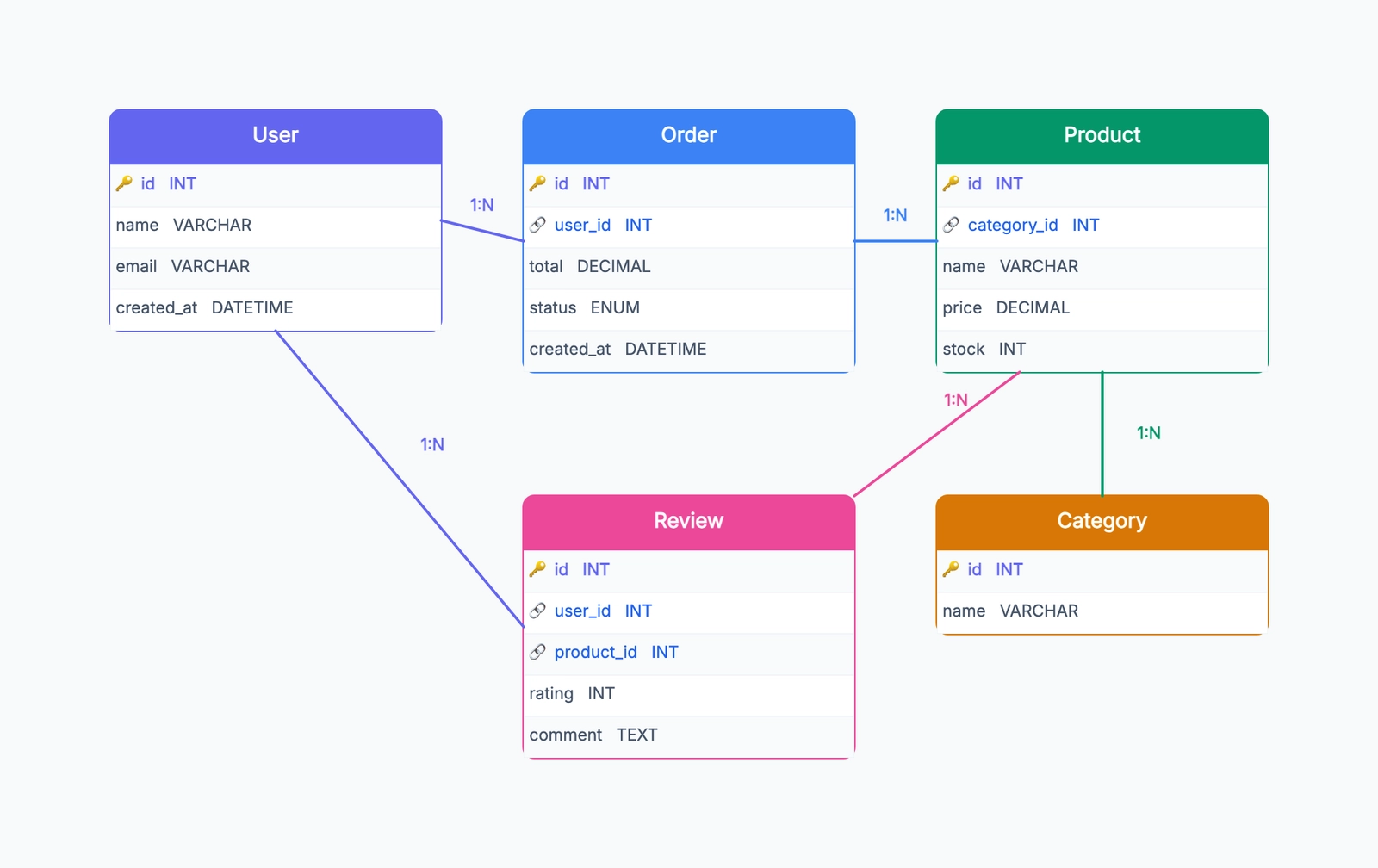
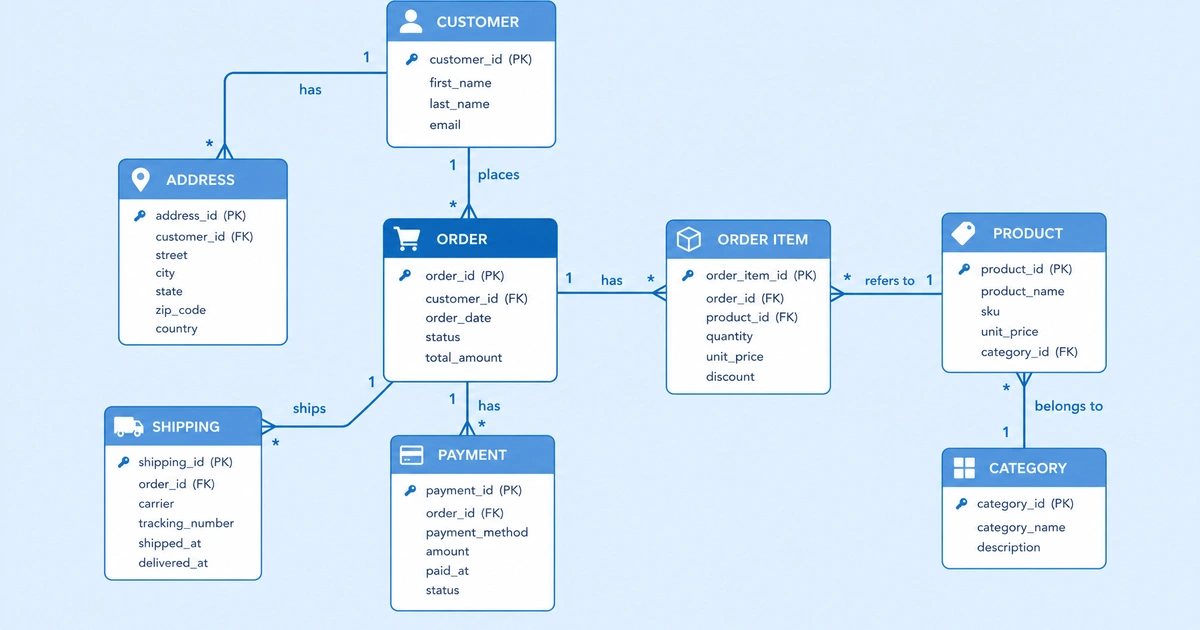
An entity-relationship diagram (ERD) is a visual map of how data is organized in a database. It shows what kinds of data exist (entities), what information each kind holds (attributes), and how different kinds of data relate to each other (relationships). For a deeper dive into what ERDs are and when to use them, see What Is an ER Diagram.
If you are designing a database from scratch, an ERD is how you think through the structure before writing any SQL. If you are joining a project with an existing database, an ERD is the fastest way to understand how the data fits together. And if you are explaining your database to someone who doesn't read SQL, an ERD is far more accessible than a schema dump.
The Three Building Blocks
Entities
An entity is a thing you want to store data about. In a database, entities become tables. Good candidates for entities are nouns that appear naturally when you describe the system:
- A user account system has Users, Sessions, and Roles
- An e-commerce store has Products, Orders, Customers, and Categories
- A blog has Posts, Authors, Comments, and Tags
The test for whether something should be an entity: does it need its own set of attributes? If yes, it's probably an entity.
Attributes
Attributes are the pieces of data you store about each entity. A User entity might have: id, email, username, password_hash, created_at. A Product might have: id, name, price, description, stock_quantity.
One attribute per entity is special: the primary key. This is the unique identifier for each record — usually an id column. Every entity must have one.
Relationships
Relationships describe how entities connect to each other. An Order belongs to a Customer. A Post is written by an Author. A Product can appear in many Orders, and an Order can contain many Products.
Relationships have two properties worth understanding: type (what kind of relationship) and cardinality (how many of each side).
Understanding Cardinality
Cardinality is the part of ERDs that trips most people up. It describes how many instances of one entity can relate to how many instances of another.
One-to-one (1:1) Each instance of Entity A relates to exactly one instance of Entity B, and vice versa. Example: A User has one Profile. A Profile belongs to one User.
One-to-many (1:N) One instance of Entity A relates to many instances of Entity B, but each instance of B relates to only one A. Example: A Customer can place many Orders, but each Order belongs to one Customer.
Many-to-many (M:N) Many instances of Entity A relate to many instances of Entity B. Example: A Product can appear in many Orders, and an Order can contain many Products.
Many-to-many relationships need a junction table — a third entity that sits between the two and holds the connection. For the product-order example, you'd add an OrderItem entity with columns for order_id, product_id, and quantity.
Step-by-Step: Drawing an ERD
Step 1: Identify your entities
Read through the system description or requirements and underline the nouns. These are your entity candidates. Then ask: does each one need its own data? Cut anything that's just an attribute in disguise.
For a library system, you might identify: Books, Members, Loans, Authors.
Step 2: Define attributes for each entity
For each entity, list the data you need to store. Mark the primary key (usually underlined or labeled PK in the diagram).
Book: id (PK), title, isbn, published_year, genre
Member: id (PK), name, email, membership_date
Author: id (PK), name, bio
Loan: id (PK), loan_date, due_date, return_date
Step 3: Identify relationships
Go through pairs of entities and ask: how do they relate?
- A Book can have many Authors (and an Author can write many Books) → many-to-many
- A Member can have many Loans (but each Loan belongs to one Member) → one-to-many
- A Loan is for one Book (but a Book can have many Loans over time) → one-to-many
Step 4: Handle many-to-many relationships
The Book–Author many-to-many needs a junction table:
BookAuthor: book_id (FK), author_id (FK)
This table has no primary key of its own — the combination of book_id and author_id is the key.
Step 5: Add foreign keys
For each one-to-many relationship, the "many" side gets a foreign key pointing to the "one" side.
- Loan gets
member_id (FK)pointing to Member - Loan gets
book_id (FK)pointing to Book
Step 6: Draw the diagram
With entities, attributes, relationships, and cardinality worked out, draw the visual:
- Rectangles for entities
- Ovals for attributes (or list them inside the rectangle — more common in modern ERDs)
- Lines for relationships, with cardinality notation at each end
- Diamond shapes for relationship names (traditional style) or just label the line
Example: E-commerce Store ERD
Customer (id PK, name, email, address)
    |
    | 1:N
    |
Order (id PK, order_date, status, customer_id FK)
    |
    | N:M (via OrderItem)
    |
Product (id PK, name, price, stock_qty, category_id FK)
    |
    | N:1
    |
Category (id PK, name, parent_category_id FK)

OrderItem (order_id FK, product_id FK, quantity, unit_price)
A few design decisions worth noting here:
unit_pricelives on OrderItem, not Product — because prices change over time and you need to record what the price was at the moment of the order- Category has a
parent_category_idself-reference — this supports nested categories (Electronics → Laptops → Gaming Laptops) - OrderItem captures
quantitybecause one order can contain multiple units of the same product
When you draw your own version, use the ER diagram template as the starting canvas. The template keeps relationship labels close to their connectors and gives you a reusable entity layout, which helps prevent the diagram from turning into disconnected database boxes.
Crow's Foot vs. Chen Notation
You'll see two main notation styles when reading ERDs:
Chen notation (the original):
- Rectangles = entities
- Ovals = attributes
- Diamonds = relationship names
- Lines with
1,M, orNlabels
Crow's foot notation (more common in modern tools):
- Rectangles with attributes listed inside
- Lines with symbols at each end indicating cardinality:
- Single vertical line = one (mandatory)
- Double vertical line = one (and exactly one)
- Crow's foot symbol (three lines) = many
- Circle = zero (optional)
Most diagramming tools default to crow's foot because it's more compact. The concepts are identical — just the visual syntax differs.
Common Mistakes
Skipping the junction table. Every many-to-many relationship needs one. Trying to represent M:N without a junction table leads to awkward schemas with comma-separated values in a column, which breaks normalization.
Putting too many attributes in the diagram. An ERD showing every column of a 30-column table becomes unreadable. Focus on primary keys, foreign keys, and the few attributes that help explain the entity's purpose. Leave the full column list to the schema documentation.
Confusing entities and attributes. If you have a country column on your User table, ask: do you need to store anything about countries beyond their name? If yes, make Country an entity. If no, keep it as an attribute.
Forgetting about nullability. Whether a foreign key is required (non-null) or optional (nullable) is important — it determines whether a relationship is mandatory or optional. Crow's foot notation can represent this with the circle (zero) vs. line (one) symbol.
Drawing the diagram before thinking through the data. An ERD built by immediately reaching for the drawing tool tends to have structural problems that are painful to fix. Spend five minutes writing out the entities and relationships in plain text first.
An ER diagram is ultimately just a way of making your data model legible — to yourself, to your team, and to anyone who joins the project later. The goal isn't a perfect diagram on the first try. It's a shared understanding that you can correct as the system evolves.
Next Steps
Ready to draw your first ER diagram? Open our free ER diagram maker template, then choose “Use this template” to load common entities and relationships into the editor — no sign-up required.
For related modeling techniques, check out UML Diagram Types to understand when ERDs are the right choice versus class diagrams or other UML diagrams.