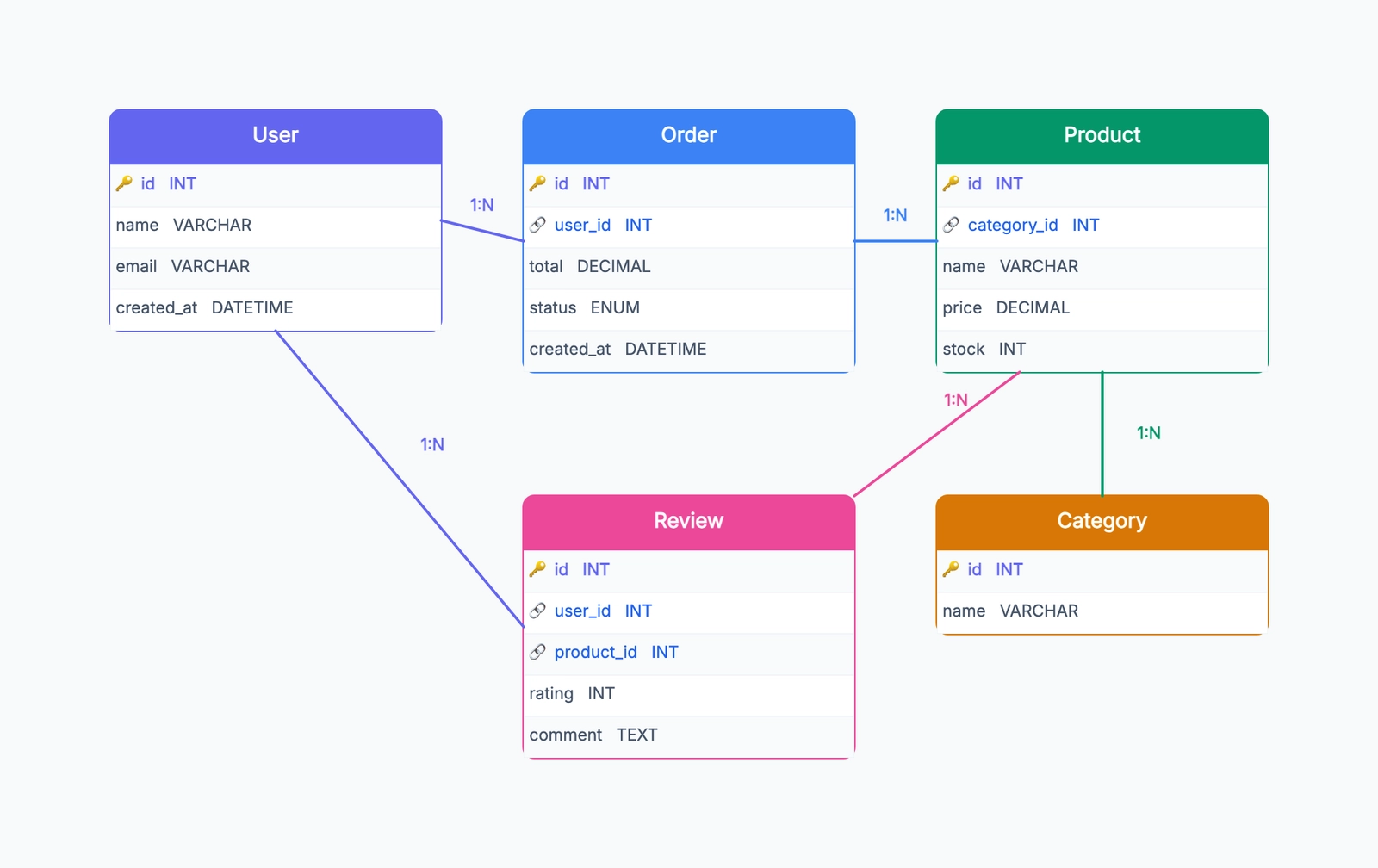
An entity-relationship diagram (ERD) is a visual map of how data is organized in a database. It shows what kinds of data exist in the system (entities), what information each kind holds (attributes), and how the different kinds of data relate to each other (relationships).
ERDs are the standard tool for designing a database before writing any SQL. They're also the fastest way to communicate an existing database structure to a new team member, a stakeholder, or a developer who needs to query data without reading through raw schema files.
The diagram was developed by Peter Chen in 1976 and has been central to software and database design ever since. Despite being nearly 50 years old, the basic notation is still taught in every computer science program and used in every database-heavy software project.
The Three Building Blocks
Entities
An entity is a type of thing the system needs to store information about. In a database, entities become tables. When you describe a system in plain language, the nouns are usually entity candidates:
- An e-commerce system has Products, Orders, Customers, Categories, Suppliers
- A blog has Posts, Authors, Comments, Tags
- A library system has Books, Members, Loans, Authors
- A school has Students, Courses, Instructors, Enrollments
The test for whether something should be an entity: does it need its own set of attributes? A Customer needs a name, email, and address. A Country (if it only needs a name) might just be an attribute on Customer rather than its own entity.
Attributes
Attributes are the pieces of data stored about each entity. They become columns in the database table.
Customer: id, name, email, phone, address, created_at
Product: id, name, description, price, stock_quantity, category_id
Order: id, placed_at, status, total_amount, customer_id
One attribute per entity is special: the primary key. The primary key is a unique identifier for each record — every row in the table has a different value for the primary key. It's usually an auto-incrementing integer named id, though it can be any unique value.
In an ER diagram, primary keys are typically underlined (in Chen notation) or labeled "PK" (in crow's foot notation).
Foreign keys are attributes that reference the primary key of another entity — they're how relationships are implemented in a relational database.
Relationships
Relationships describe how entities connect to each other. The relationship name is usually a verb:
- Customer places Order
- Order contains Products
- Post is written by Author
- Student enrolls in Course
Every relationship has a cardinality — a description of how many instances of one entity can relate to how many instances of another.
Understanding Cardinality
Cardinality is the aspect of ERDs that trips people up most often. It's important because it determines the table structure and where foreign keys go.
One-to-One (1:1)
One record in Entity A matches exactly one record in Entity B, and vice versa.
Example: A User has one Profile. A Profile belongs to one User.
In the database: the foreign key can go in either table. Often put the foreign key on the less-critical entity. A user_id column on the Profile table points back to User.
Real-world occurrence: One-to-one relationships are relatively rare. When you see them, consider whether the two entities should just be merged into one table.
One-to-Many (1:N)
One record in Entity A relates to many records in Entity B, but each record in Entity B relates to exactly one record in Entity A.
Example: A Customer can place many Orders, but each Order belongs to exactly one Customer.
In the database: the foreign key goes on the "many" side. The Orders table has a customer_id column that points to the Customers table.
Real-world occurrence: This is the most common relationship type. Most data models are dominated by one-to-many relationships.
Many-to-Many (M:N)
Many records in Entity A relate to many records in Entity B.
Example: A Product can appear in many Orders. An Order can contain many Products.
In the database: you can't implement M:N directly. You need a junction table (also called an association table, bridge table, or linking table) that sits between the two entities and holds the relationship.
For Products and Orders, the junction table is typically called OrderItem or OrderLine, and it contains:
order_id(foreign key to Orders)product_id(foreign key to Products)quantity(additional attribute specific to the relationship)unit_price(the price at time of purchase — stored here because prices change)
Real-world occurrence: Many-to-many relationships appear frequently wherever a "belongs to multiple" scenario exists.
ER Diagram Notation
There are two main notation styles you'll encounter:
Chen Notation (original)
- Rectangles for entities
- Ovals for attributes (connected to their entity by lines)
- Diamonds for relationship names (connected to both entities)
- Numbers or letters (1, N, M) next to relationship lines to show cardinality
Chen notation is taught in many database textbooks and is the "textbook" way to draw ERDs. It's more verbose but very explicit.
Crow's Foot Notation (modern standard)
- Rectangles for entities, with attributes listed inside
- Lines between entities for relationships
- Symbols at the ends of lines to show cardinality:
- Single vertical bar
|= exactly one (mandatory) - Double vertical bar
||= exactly one (and no more) - Crow's foot
<(three lines) = many - Circle
O= zero (optional)
- Single vertical bar
Crow's foot is the notation used by most modern diagramming tools (draw.io, Lucidchart, CodePic) because it's more compact and easier to read at a glance. The symbols at each end of a relationship line tell you the minimum and maximum for each side.
A line that reads ||—< from Customer to Orders means: each Order has exactly one Customer (the || end), and a Customer can have many Orders (the < end).
A Complete Example: E-Commerce Database
Here's how a simplified e-commerce database looks as an ERD:
Entities and key attributes:
- Customer (id PK, name, email, address)
- Order (id PK, placed_at, status, customer_id FK)
- Product (id PK, name, price, stock_qty, category_id FK)
- Category (id PK, name, parent_category_id FK)
- OrderItem (order_id FK, product_id FK, quantity, unit_price)
Relationships:
- Customer
1:NOrder (one customer can have many orders) - Order
M:NProduct (via OrderItem junction table) - Product
N:1Category (many products per category) - Category
N:1Category (self-referencing for nested categories)
Notable design decisions:
unit_price lives on OrderItem, not Product. Product prices change over time. When you want to look at historical orders, you need the price at the time of purchase, not today's price. Storing it on OrderItem preserves this.
category_id on Category references the same table (self-reference). This allows nested categories: Electronics → Laptops → Gaming Laptops. A top-level category has a null parent_category_id.
If you want to turn this example into an editable diagram, start with the ER diagram template. It already includes entity boxes, relationship connectors, and cardinality labels, so you can focus on the data model instead of rebuilding the notation from scratch.
How to Draw an ERD
For a detailed walkthrough with more examples, see How to Draw an ER Diagram.
Step 1: Identify entities. Read the system description or requirements. Write down every noun that appears repeatedly. These are your entity candidates. Eliminate any that are just attributes in disguise.
Step 2: Define attributes. For each entity, list the data you need to store. Mark the primary key. Mark which attributes will become foreign keys.
Step 3: Identify relationships. Go through each pair of entities and ask: how do they relate? Write it as: "A [verb] B" and "B [verb] A." This gives you the relationship and helps clarify cardinality.
Step 4: Determine cardinality. For each relationship: can a single A relate to multiple Bs? Can a single B relate to multiple As? This determines if it's 1:1, 1:N, or M:N.
Step 5: Add junction tables. For every M:N relationship, add a junction table with foreign keys to both entities. Add any attributes that belong to the relationship itself (quantity, date, price, etc.).
Step 6: Add foreign keys. For each 1:N relationship, add a foreign key column on the "many" side pointing to the "one" side's primary key.
Step 7: Draw the diagram. Place entities as boxes. Connect them with lines. Add cardinality notation at each end.
When to Use an ERD
Before starting any database-backed application. An ERD drawn before writing code makes structural problems visible when they're cheap to fix.
When joining an existing project. An ERD of an existing database communicates the data model far faster than reading migration files or schema dumps.
When planning a migration or refactor. Visualizing the current structure and the target structure side by side makes it clear what needs to change.
When debugging data integrity issues. ERDs help identify missing foreign keys, incorrect cardinality assumptions, or circular dependencies that are causing data problems.
In technical interviews and design discussions. ERDs are a standard format for communicating database design ideas — knowing how to draw one quickly is a useful skill.
Common Mistakes
Confusing entities and attributes. If you have a country field on your User table, ask: do I need to store anything about countries beyond their name? If not, it stays as an attribute. If you need population, capital, or other data, promote it to an entity.
Forgetting junction tables. Every M:N relationship needs one. Trying to store M:N relationships without a junction table leads to comma-separated IDs in columns — a notorious antipattern that breaks query performance and data integrity.
Missing nullability. Whether a foreign key is required (non-null) or optional (nullable) is a design decision. A nullable customer_id on Orders means guest orders are allowed. A non-null customer_id means every order must have a customer. This should be explicit in the design.
Premature normalization. Not every piece of related data needs its own table. The goal isn't the most normalized database possible — it's the right level of normalization for your application's query patterns.
Drawing without thinking about queries. The best ERD is one that makes your most important queries easy to write. Think about what data you'll need to retrieve together when designing the structure.
Frequently Asked Questions
What's the difference between an ERD and a schema? A schema is the actual database structure — the SQL definitions of tables, columns, and constraints. An ERD is a visual diagram that represents the same concepts. An ERD is easier to communicate with; a schema is what gets implemented.
Do I need to draw an ERD for every project? For any project with more than a handful of tables, yes. The time spent drawing the ERD is almost always less than the time lost to structural problems discovered later.
What software is best for ERDs? draw.io is free and excellent. Lucidchart has a generous template. CodePic supports ERDs in its hand-drawn style. For purely diagrammatic purposes, any of these work. For documentation that stays in sync with your database, specialized tools like dbdiagram.io let you define ERDs in a text syntax that generates the diagram automatically.
Next Steps
Ready to create your own ER diagram? Start with our ER Diagram Template — it includes common entities and relationships you can customize for your database design.
If you're working with other types of diagrams, you might also find UML Diagram Types helpful for understanding when to use ERDs versus class diagrams or other modeling techniques.