Choose Lucidchart for a managed cloud diagram workspace, Miro for workshop-led collaboration, Excalidraw for fast hand-drawn sketches, Creately for a combined canvas and document space, or yEd for automatic graph layout. CodePic fits users who want a free canvas with templates and AI-assisted editable diagrams.
draw.io remains the strongest default when deep technical shape libraries, offline use, and direct file ownership matter most. Switching only makes sense when the workflow around the diagram—comments, administration, workshops, automatic layout, or rapid sketching—is more important than its free core.
1. Lucidchart
Lucidchart is probably the most direct commercial competitor to draw.io. It covers the same breadth of diagram types — flowcharts, UML, ER diagrams, network topologies, org charts, AWS/GCP/Azure architecture diagrams — and adds enterprise collaboration features on top.
Where Lucidchart pulls ahead is the managed team experience. Real-time co-editing, comment threads, @mentions, document permissions, and administration live in one workspace. Persistent data linking is another strength. draw.io can generate diagrams from CSV, SQL, text, and Mermaid, but that is a different workflow from maintaining managed links between cloud documents and business data.
The trade-off is cost. Lucidchart Free allows 3 editable documents with 60 shapes per document. Its Individual plan is $9 per month plus tax and removes those document and shape limits. If your team needs a governed document workspace, the paid model may be justified. For a solo user who controls files directly, draw.io's free core editor remains hard to beat.
Best for: Teams that need enterprise-grade collaboration, data-linked diagrams, and structured review workflows — and are willing to pay for it.
2. Miro
Miro isn't a diagramming tool in the traditional sense — it's a whiteboard platform that happens to support diagrams. The distinction matters because Miro's strength is collaborative sessions: brainstorming, sprint planning, workshop facilitation, and visual thinking alongside (not instead of) diagramming.
Miro supports flowcharts, UML-style work, technical diagrams, and structured formats, but its product center is still a shared workspace that combines diagrams with workshops, planning, docs, and presentations. draw.io offers deeper file control and broad specialist shape libraries; Miro offers more activities around the diagram.
Miro makes collaboration consistent because presence, comments, workshops, and permissions live in the same service. Its Free plan keeps 3 boards editable for unlimited team members, but does not provide visitor or guest roles. draw.io can also show shared cursors and concurrent changes on supported hosts; the difference is whether you want collaboration supplied by the diagram platform or by the storage platform.
Best for: Teams that diagram collaboratively during meetings and workshops, and need a flexible whiteboard alongside their diagrams — not a dedicated diagramming tool.
Test the Alternative with One System Design
Open the system design below, add a service, ask someone to review the change, and export an editable copy. Run the same task in the shortlisted alternatives.
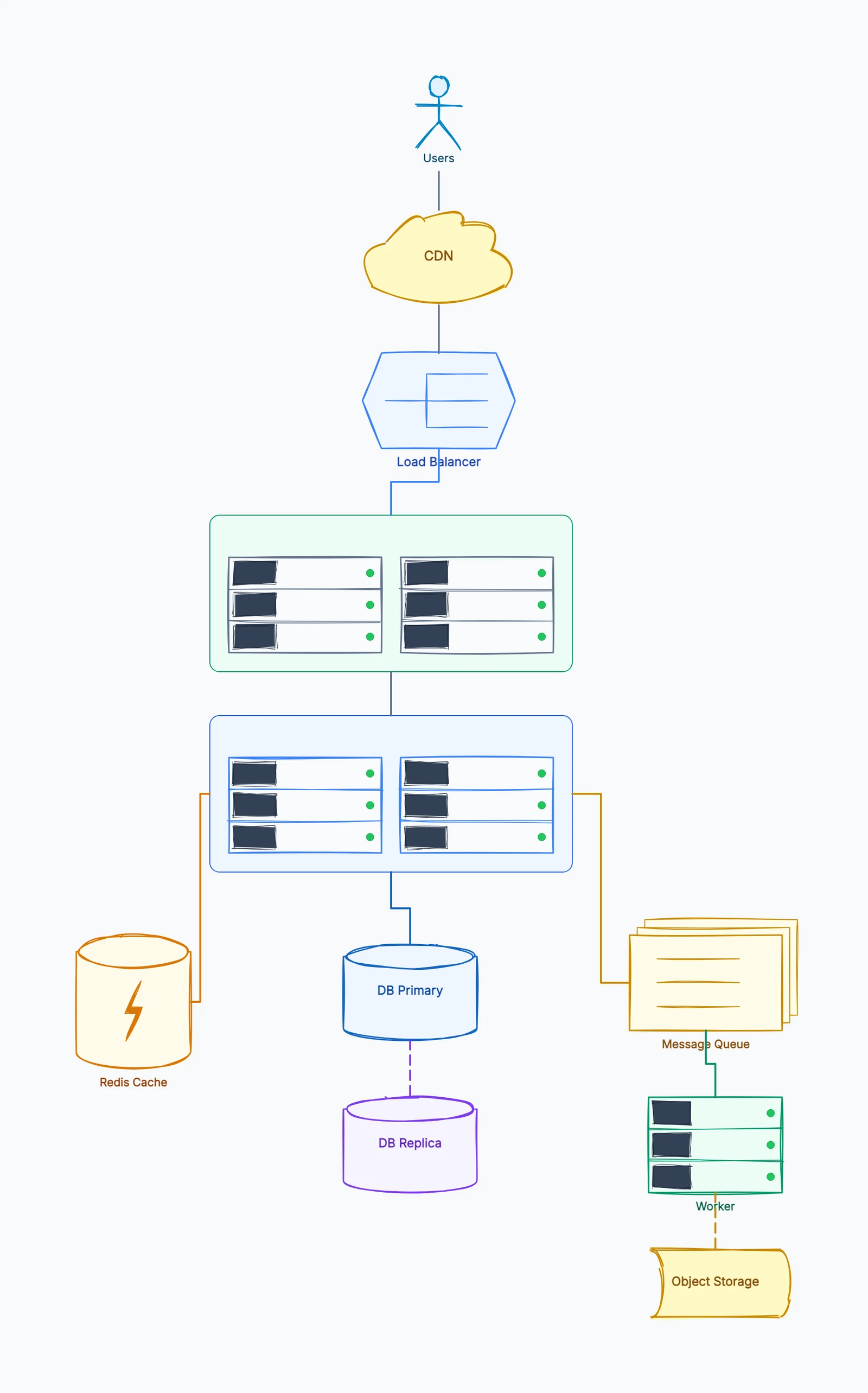
System design
Try this templateThis tests the exact reasons to leave draw.io: managed review, workshop context, automatic layout, or a faster path from an early idea to an editable diagram.
3. Excalidraw
Excalidraw shares something important with draw.io: it's free, open source, and doesn't require an account. But the two tools have completely different design philosophies. Where draw.io aims for precision and comprehensive coverage, Excalidraw aims for speed and informality.
Everything in Excalidraw looks hand-drawn. There's no snap-to-grid by default, no shape libraries to browse, no UML notation modes. You get a blank canvas, basic shapes, arrows, and text — and you start sketching. The hand-drawn aesthetic isn't just a visual style; it signals "this is a draft" which makes people more comfortable iterating.
The limitation is obvious: Excalidraw doesn't replace draw.io for formal documentation diagrams. If you need a precise ER diagram or a network topology with specific vendor icons, Excalidraw isn't trying to do that. But for quick architecture sketches during a meeting, or early-stage system design discussions where the ideas matter more than the notation, it removes all the friction that draw.io's comprehensive interface introduces.
Best for: Developers who want zero-friction sketching for brainstorming and architecture discussions, and don't need formal diagram types or notation systems.
4. Creately
Creately positions itself between draw.io's diagramming depth and Miro's collaboration features. It supports a wide range of diagram types — flowcharts, UML, mind maps, org charts, wireframes — while also offering real-time collaboration with multiple cursors and visual presence indicators.
Creately combines diagramming with canvases, folders, comments, and multi-user work. Its current Free plan includes unlimited canvases and collaborators, standard shape libraries, one folder, two imports, and a limit of 45 items per canvas. That limit matters more than the canvas count for a substantial process map.
Paid Creately plans raise item limits, add premium libraries, exports, version history, and deeper collaboration or data features. It is a stronger candidate when a team wants diagrams and visual workspaces in one managed product. draw.io remains simpler for unlimited file-based diagramming and offline ownership.
Best for: Small teams that need real-time collaboration on diagrams without paying enterprise pricing — and don't mind public diagrams on the free plan.
5. yEd
yEd is the tool you probably haven't heard of unless you work with complex graph layouts. It's a free desktop application (Java-based) developed by yWorks, and its killer feature is automatic layout algorithms — hierarchical, organic, orthogonal, circular, tree, and more.
If you have spent time manually arranging a complex graph, yEd addresses that problem directly. Import data from an Excel spreadsheet or XML, or open a graph format, then apply an automatic layout. For network topologies, organizational hierarchies, and dependency graphs with many nodes, this is a focused workflow.
The trade-off is product model. yEd is a Java desktop application for Windows, macOS, and Linux, centered on local editing and automatic layout. yWorks also offers yEd Live as an online editor. Teams seeking one cloud workspace with comments, permissions, and synchronous review should compare a collaboration-first alternative. For quick manual flowcharts, draw.io may feel more familiar; for large automatic layouts, yEd has the clearer specialization.
Best for: Engineers and analysts working with complex, large-scale graphs who prioritize automatic layout and local desktop editing.
6. CodePic
CodePic takes a deliberately different approach to diagramming. Instead of trying to match draw.io feature-for-feature, it focuses on two things: a hand-drawn visual style that makes diagrams feel like sketches rather than formal documents, and AI integration that lets you describe diagrams in plain language.
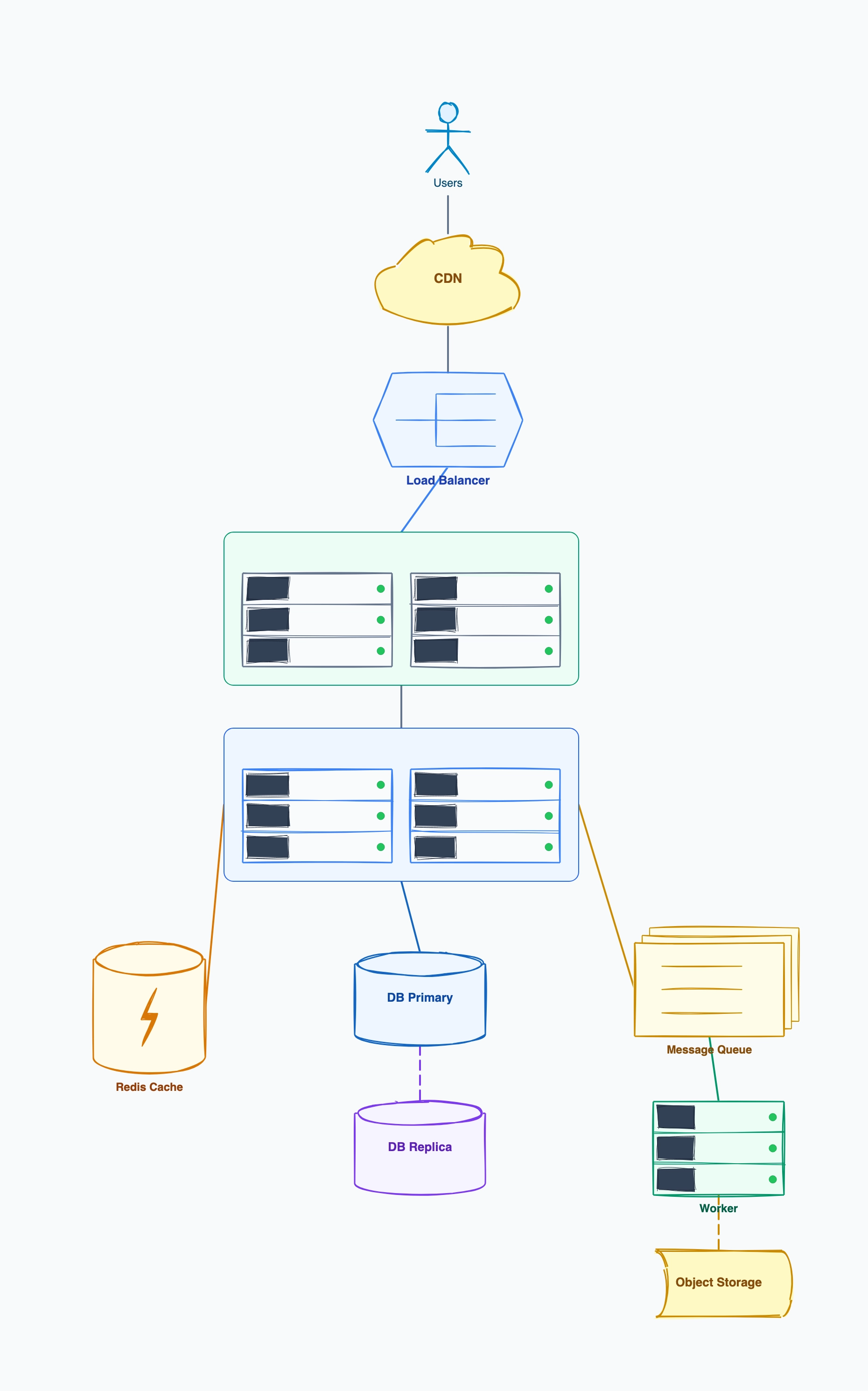
The hand-drawn aesthetic covers flowcharts, system architecture, sequence diagrams, ERDs, mind maps, and wireframes. Templates provide structure — you're not building from scratch like in Excalidraw — but the output looks informal and approachable. This makes it well-suited for technical discussions, documentation that doesn't need to look corporate, and early-stage design work.
Where CodePic genuinely differs from everything else on this list is AI generation. Through the MCP (Model Context Protocol), CodePic connects to tools like Claude and Cursor. You can describe "a microservice architecture with three services, a message queue, and a shared database" and get a generated diagram as a starting point. For teams already working with AI assistants daily, this changes the speed of diagram creation significantly.
To be direct: CodePic is not a feature-for-feature replacement for draw.io. It doesn't have draw.io's depth of shape libraries, its integration with Confluence and Google Drive, or its support for dozens of specialized notation systems. It's a different way of making diagrams — faster, more informal, AI-assisted — that works better for some workflows and worse for others. It's completely free with no file limits.
Best for: Technical teams that want AI-assisted diagram creation and a hand-drawn style — especially those already working in Claude or Cursor environments.
Quick Comparison
| Tool | Pricing | Real-time Collab | Diagram Types | Interface | Storage |
|---|---|---|---|---|---|
| draw.io | Free core editor | Host-dependent real time | Extensive (UML, ER, network, etc.) | Dense, configurable | Local/cloud/Git hosts |
| Lucidchart | Free (3 docs, 60 shapes each) / $9/mo + tax | Native workspace | Extensive + persistent data linking | Managed, polished | Lucid cloud |
| Miro | Free (3 boards) / ~$8/user/mo | Full | Basic (whiteboard-first) | Modern | Cloud |
| Excalidraw | Free, open source | Shared link | Basic (freeform) | Minimal, fast | Local/cloud |
| Creately | Free (45 items/canvas) / paid tiers | Built in | 50+ types on Free | Workspace-oriented | Cloud |
| yEd | Free | None | Good (auto-layout focused) | Dated (Java desktop) | Local |
| CodePic | Free | Read-only link | Good (hand-drawn style) | Modern | Cloud |
How to Choose
If you just want free and comprehensive: Stick with draw.io. Seriously — for a single user who needs access to every diagram type without paying, nothing beats it. The interface is dated but the functionality is deep.
If a managed collaboration workspace is the priority: Lucidchart is the formal-diagram choice; Miro is the workshop and whiteboard choice. If your team already collaborates through Google Drive, OneDrive, Nextcloud, or Confluence, test draw.io there before migrating.
If you need automatic layout for complex graphs: yEd is unmatched in this specific capability. Nothing else on this list handles large graph layouts as well.
If you want speed and informality over precision: Excalidraw for pure sketching with zero setup. CodePic for structured templates with a hand-drawn feel and AI generation.
If you're on a small team budget: Creately offers real-time collaboration at a lower price point than Lucidchart, with decent diagram type coverage.
If AI-assisted diagram creation matters: compare the edit loop, not a yes-or-no feature. draw.io now documents an official MCP server for generating editable .drawio files. CodePic also uses MCP, with generation landing directly on a hand-drawn canvas. Test which output is easier for your team to refine.
The honest summary: draw.io's combination of "completely free, no limits, extensive diagram types" is genuinely hard to match. Most alternatives either cost money, limit what you can do for free, or cover fewer diagram types. What they offer in return is better collaboration, more modern interfaces, or different approaches to creating diagrams. Know what matters most to your workflow, and the choice becomes clear.
For detailed head-to-head comparisons, see draw.io vs Lucidchart or Excalidraw vs draw.io. Our Best Diagramming Tools guide also provides a broader overview.