Back to template

Git Flow Diagram Examples

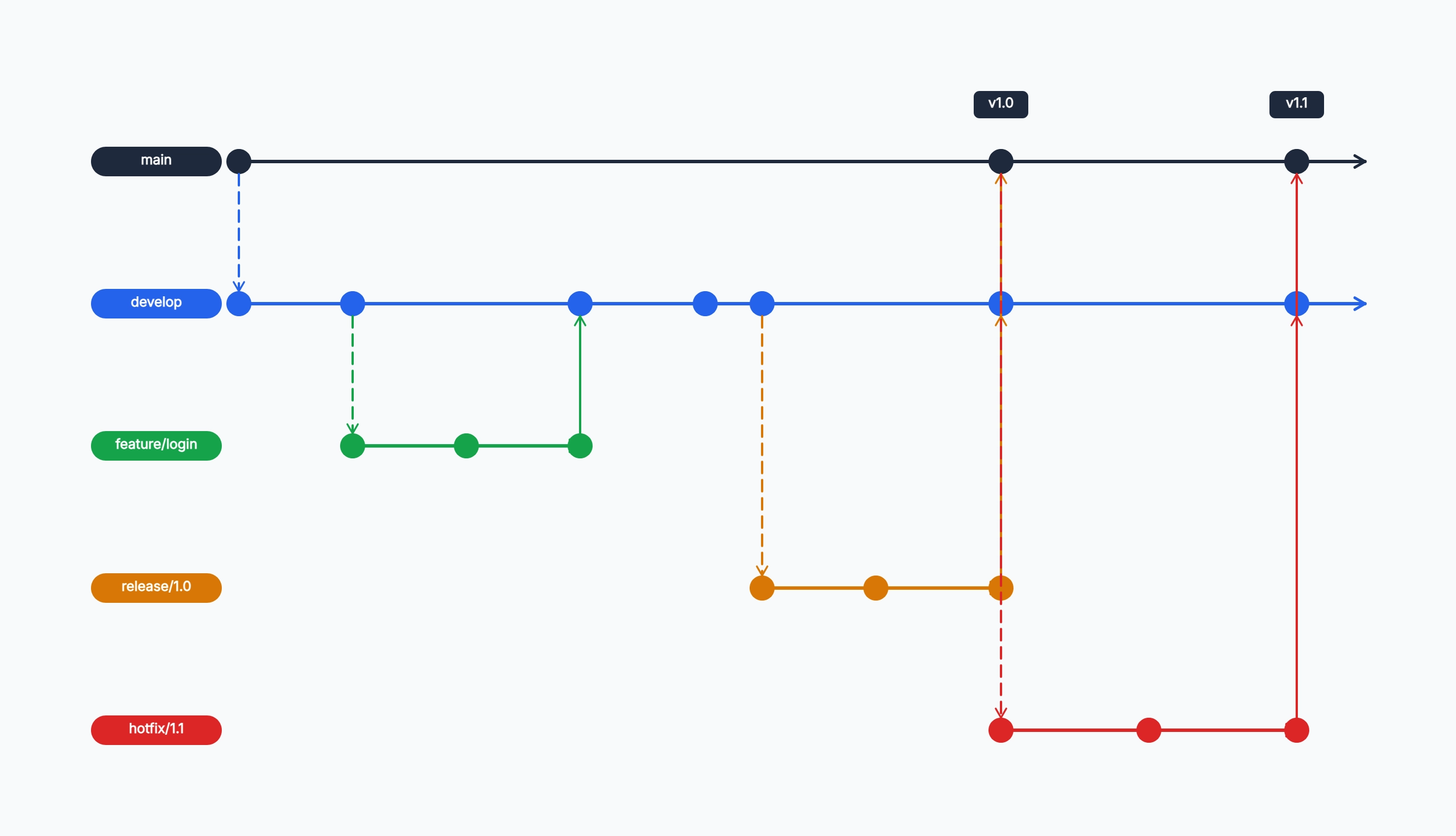
These Git Flow examples show how different teams adapt the standard model to their release cadence and risk tolerance. From a simple two-branch setup to a multi-service hotfix process, each example maps a real scenario so you can copy the structure and tailor it to your own workflow.

Git Flow Diagram Examples

Real examples

SaaS product with scheduled releases

Who uses it: Engineering team shipping a web application on a two-week release cycle

main: production-only, tagged on every release
develop: features land here after review
feature/user-auth, feature/dashboard: short-lived, merged before release cut
release/2.3: cut from develop, only bug fixes allowed, merged to main as v2.3
hotfix/2.3.1: emergency patch, merged to both main and develop

Why this works: The release branch acts as a code freeze gate — no new features after the cut, only stabilization. This lets the team ship predictably while continuing develop work in parallel.

Mobile app with App Store review delays

Who uses it: iOS/Android developer managing a submission pipeline

main: only updated after store approval
develop: continuous integration target
feature/*: one branch per ticket, merged via pull request
release/3.0: includes store metadata and build configuration changes
hotfix/3.0.1: critical crash fix submitted as an expedited review

Why this works: App Store review times make the release branch especially important — it decouples the submission queue from ongoing feature development and gives QA a stable artifact to test.

Open-source library with LTS support

Who uses it: Maintainer supporting multiple major versions simultaneously

main: latest stable, aligns with v4.x
develop: next major version work in progress
v3-maintenance: long-term support branch, security patches only
feature/new-api: experimental, merged after RFC approval
hotfix/4.0.1: patch backported to both main and v3-maintenance

Why this works: Maintaining a separate LTS branch means a hotfix must be applied twice — once to main and once to the maintenance branch. The diagram makes this dual-merge obligation visible to contributors.

Student learning Git Flow for the first time

Who uses it: Computer science student or bootcamp graduate practicing branching workflows

main: only one commit — the initial project scaffold
develop: where all class assignments are integrated
feature/add-login: first feature branch, merged after peer code review
release/v0.1: tagged for the mid-term submission
hotfix/fix-typo: practice run for an emergency patch workflow

Why this works: Running through a complete Git Flow cycle on a small project — even with trivial changes — builds the muscle memory needed to apply it on production codebases without hesitation.

Microservices team with per-service Git Flow

Who uses it: Platform engineering team managing five independent services

Each service repo has its own main / develop / feature structure
Release branches are cut by the release manager across all affected services
Hotfixes in a downstream service trigger a coordinated patch across dependent services
Version tags use semantic versioning per service, not a global release number

Why this works: In a microservices environment, Git Flow per service keeps blast radius small — a hotfix in the auth service does not require a release of the payments service.

Tips for better study mind maps

  • Keep feature branches short-lived — anything open longer than a week increases merge conflict risk.
  • Name branches consistently: feature/, release/, hotfix/ prefixes make the diagram self-documenting.
  • Tag every main merge with a semantic version number so the diagram doubles as a release history.
  • If your team rarely uses release branches, simplify to a three-branch model: main, develop, feature.

Start editing online

Go back to the template, swap in your own topics, and keep the same structure if it fits your class or project.

Use this template: /editor/new?template=git-flow

Edit this Git Flow template