A reading tracker is the difference between books you vaguely remember reading and a shelf you can look back on. It turns a stack of half-remembered titles into a list where every book has a status — reading, finished, or want to read — plus a rating and a date, so a year of reading reads like a shelf instead of a blur.
This guide walks through how to build a book, progress, and rating tracker, then shows the three shapes it takes for a yearly goal, a kids reading log, and a themed book list. You can adapt the reading tracker template and edit the titles, authors, and statuses directly in the browser.
What a reading tracker should achieve
A reading tracker is not the same as a list of books you might read someday. It is a log organized around where each book actually is — in progress, done, or still waiting — not just a pile of titles. A workable tracker should answer four questions: what am I reading now, what have I finished, what is queued next, and what did I think of the ones I finished.
A useful tracker should produce five outcomes:
- every title has a status, so no book sits in the list without a state;
- finished books carry a star rating and a finish date, so the year's pace reads at a glance;
- a want-to-read column keeps the next book queued up before the current one ends;
- the list is editable and printable, so it can live on a whiteboard, in a journal, or pinned where you read;
- the whole shelf is reviewable, so you can see what you read, skipped, and should re-read.
Avoid treating every list as the same size. A yearly goal tracks a number of books, a kids reading log tracks shared read-alouds, and a themed list tracks progress through one genre or plan. Start from the same book-plus-progress backbone and branch where the list genuinely differs.
How to build a book, progress, and rating tracker
The most useful reading tracker is organized by book, not by category like "self-help" or "novels." When each row is one title with a status, you can see the whole shelf at once and move books between states as you go.
1. Set the goal first
Write the target before the titles: a number of books, a theme to work through, or a season of reading. A concrete target is what makes the tracker measurable — "read more" has no column to check, but "24 books" does. If you are setting up a bible reading plan, the target is the plan itself, one book or section per row.
2. Add the books, one row per title
For each book, list the title and the author on one row. Do not group by category; keep each book separate so its status can move independently. If you already have a stack in mind, add them all first, then mark their states.
3. Mark each book's status
Give every book one of three states: reading, finished, or want to read. This is the part a plain title list misses, and it is what makes the shelf readable — the in-progress book, the finished ones, and the queue all sit in the same view. Color-code the status so the states read at a glance.
4. Rate and date the finished books
When you finish a book, give it a star rating and write down the date. The rating captures whether it was worth your time; the date captures the pace of the year. Both together turn a list of titles into a record you can review later.
5. Keep the want-to-read column moving
The moment you start a book, pull the next want-to-read title up and add a new one to the bottom. A queue that never empties is what keeps a reading habit alive between books — finishing one with nothing lined up next is how the habit stalls.
6. Review monthly and adjust
Once a month, look at the list and compare it to the target. Ahead of pace, raise the target or add a harder book; behind, cut the queue or swap a heavy title for a lighter one. The tracker works when it reflects reality, not when it pretends to be perfect.
Yearly reading goal example
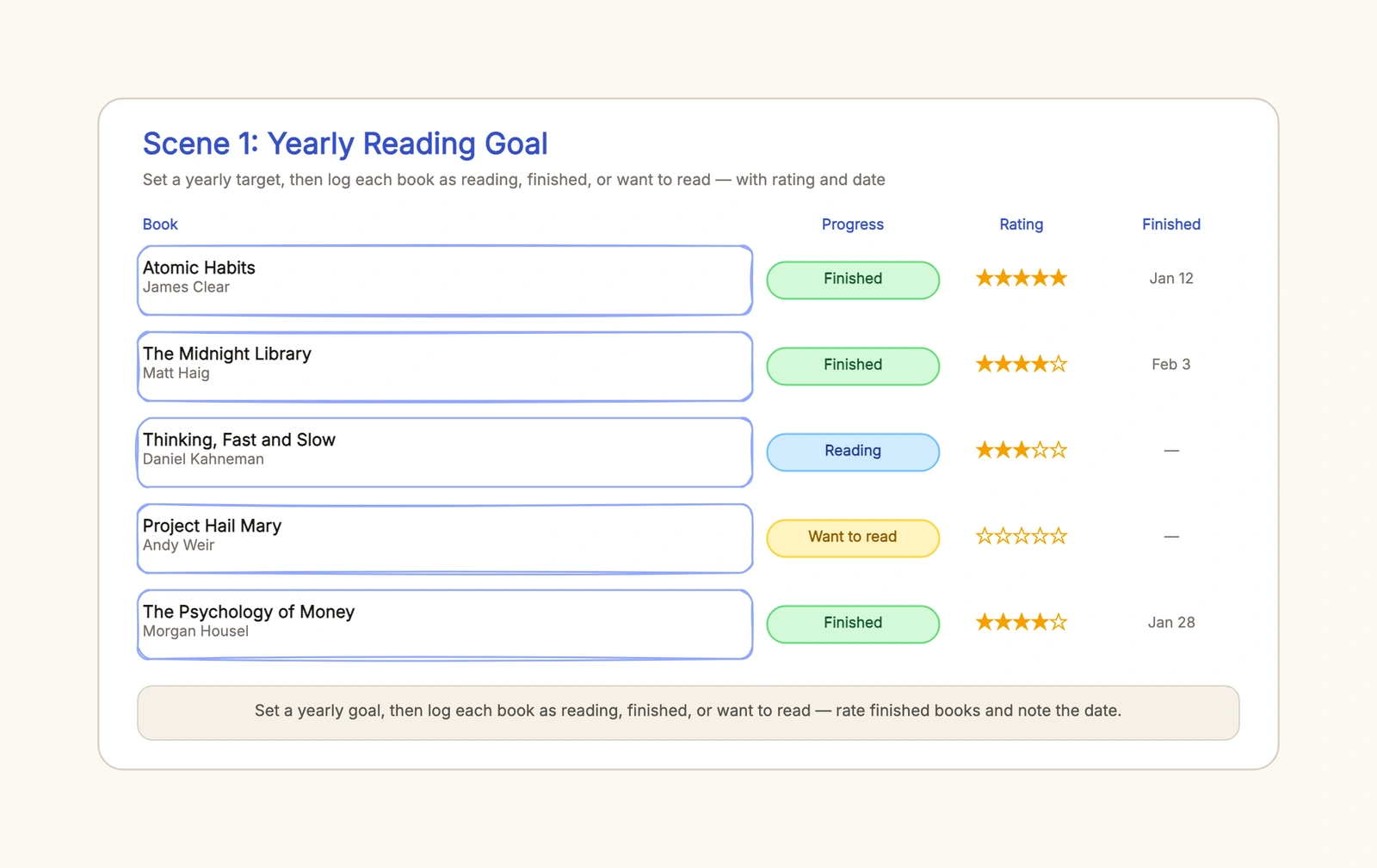
A yearly goal usually starts with a number — 24 books is a common pace for a working year. The list then logs each book against that number, with finished titles rated and dated and the queue visible below them.
A working shelf might read: Atomic Habits finished with five stars on January 12, The Midnight Library finished with four stars on February 3, Thinking, Fast and Slow still reading, and Project Hail Mary waiting in the want-to-read column. The rating column is where the honest signal lives — five stars only for the books you would press on a friend, the middle of the scale for everything that was good but not life-changing.
The most common yearly-goal mistake is rating everything five stars. If every book is perfect, the rating stops meaning anything. Save the top score for a short shelf, and the year reads more honestly.
Kids reading log: what changes
A kids reading log shifts the point of the tracker from solo progress to shared reading. The books are read-alouds and bedtime stories, and the rating is something you decide together with your child — which changes what the star column means.
The list reads like a year of shared evenings: The Very Hungry Caterpillar finished with five stars on January 6, Charlotte's Web still reading, Where the Wild Things Are finished on February 18, and The Gruffalo waiting in the want-to-read column. The finish-date column is what makes this a keepsake — a year later, the dates mark the evenings you spent reading together, not just the books.
The mistake to avoid is treating a kids log as a chore chart. It is a record of shared time, not a reading assignment. Mark progress and rate together, and let the child's verdict carry as much weight as yours. For the daily habit that fills the log, a habit tracker template pairs well with the shelf itself.
Themed book list: what changes again
A themed list groups books around one topic — product design, science fiction, or a bible reading plan — and the goal is to work through the theme rather than hit a number. The list reads as a path through one subject, with each finished book advancing you through it.
A product design list might read: The Design of Everyday Things finished with five stars on February 20, Don't Make Me Think finished on March 1, Hooked still reading, and Sprint waiting in the queue. The rating column shows which titles actually earned a re-read, which is the signal a themed list is best at producing.
A bible reading plan works the same way — one row per book or section, marked reading or finished as you go, with the finish date recording the pace of the plan. The structure does not change; only the theme and the titles do.
Capture a book without turning reading into admin
Use a two-minute rule after each session. Update the page or percentage, add one sentence about what changed or mattered, and write the next action: continue, pause, abandon, revisit a chapter, or discuss it with someone. Longer notes belong in a separate notebook only when the book warrants them. The tracker should help you re-enter the text, not compete with it.
Once a month, review three signals rather than chasing a book count. Which unfinished books still deserve attention? Which notes do you want to retrieve or share? Is your queue balanced across the subjects, formats, or voices you intended to explore? Move stale “want to read” titles out of the active list without guilt; a smaller queue is easier to choose from.
Ratings are optional and personal. If stars stop being meaningful, replace them with a short label such as “recommend,” “use for reference,” or “not for me,” plus one reason. That small explanation is more useful six months later than trying to remember the difference between three and four stars.
If the tracker is shared, record only notes you are comfortable exposing and keep private reflections elsewhere. A classroom log should follow the school's privacy expectations and avoid ranking children publicly by volume.
Keep the tracker useful over time
Review the shelf at the end of the year and note what you finished, skipped, and abandoned, so the next year starts from a better list. Keep the rating column honest and the finish dates filled in, and the tracker becomes a record instead of a chore. A shelf you review once is a shelf you read twice.
Start with the reading tracker template, replace the titles and authors with your own, and mark the first book as reading today. For the daily habit that fills the shelf, see the habit tracker template, and for deciding the target before you start the list, the goal setting template.