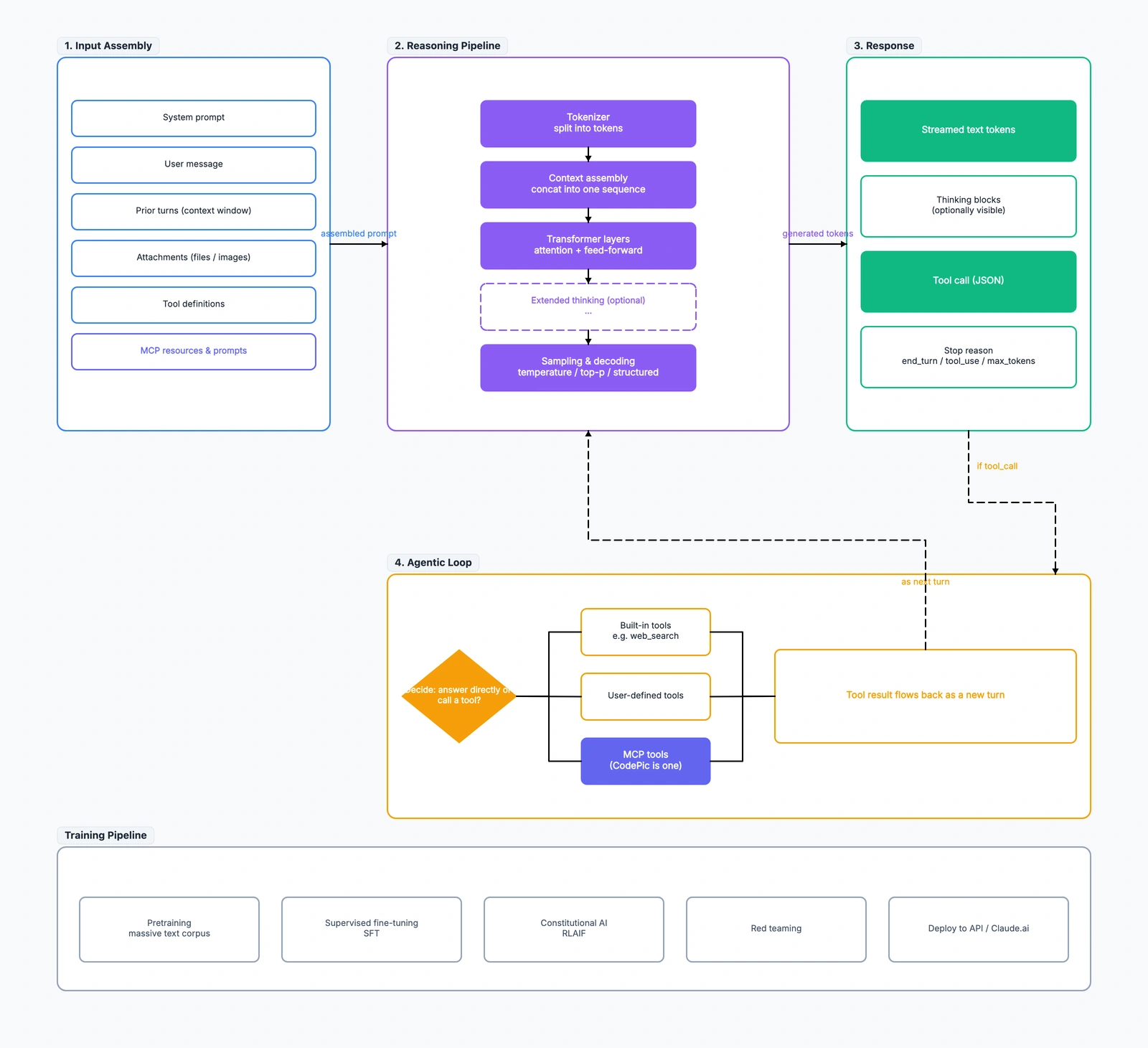
You send a message to Claude. A few seconds later, you get a response back — sometimes a plain text answer, sometimes structured JSON, sometimes a call to a tool that runs code or searches the web. What actually happened in between?
Most explainers of "how LLMs work" go straight to the transformer paper and lose the plot. This guide takes the opposite approach: one diagram, five layers, following a prompt from the moment you press Enter to the moment the response streams back. If Claude ever calls a tool along the way, we'll follow that loop too.
Open the full How Claude Works diagram alongside this article — the article walks through each frame in order.
The 30-second version
Claude's runtime is essentially a loop with four stages:
- Input Assembly — everything the model sees is packed into a single prompt
- Reasoning Pipeline — the model turns that prompt into a distribution over next tokens
- Response — tokens stream out; some become text, some are structured (tool calls, thinking blocks)
- Agentic Loop — if the response contains a tool call, an outer runtime executes the tool and feeds the result back into step 1
Everything else — the specific transformer architecture, extended thinking, MCP integration — is a detail sitting inside one of those four stages. If you can hold this four-stage loop in your head, you can reason about almost any Claude behavior.
Frame 1 — Input Assembly (what the model actually sees)
The first thing to internalize: Claude doesn't "see" your message in isolation. Every request assembles a single prompt from six sources:
- System prompt — instructions the developer or Anthropic set (persona, safety rules, response format)
- User message — the text you just typed
- Prior turns — the running conversation, up to the context window limit
- Attachments — files or images you uploaded (turned into tokens via vision encoders)
- Tool definitions — a JSON schema of every tool the model is allowed to call
- MCP resources — external context/prompts pulled in via the Model Context Protocol
All of these get concatenated into one sequence of tokens before anything else happens. This is the "context" in "context window" — not just the conversation, but the entire assembled prompt.
Practical implication: if your response feels off, the problem is often in Frame 1. A too-terse system prompt, a bloated conversation history, or an oversized tool schema all consume the same context window and shape what the model attends to.
Frame 2 — Reasoning Pipeline (inside the model)
Once the input is assembled, five things happen in order:
1. Tokenization. The assembled prompt gets split into tokens (roughly, chunks of ~4 characters for English, one character for logograms). Everything downstream operates on token IDs, not characters.
2. Context assembly. Tokens are concatenated into a single sequence, with special tokens marking role boundaries (system, user, assistant).
3. Transformer layers. The core of the model. Each layer does attention (every token looks at every other token) plus a feed-forward network, repeated N times. This is where the "understanding" happens — though nobody would call attention weights understanding.
4. Extended thinking (optional). On Claude 4 and later, the model can spend extra tokens on internal reasoning before producing its visible answer. Wrapped in <thinking> blocks that the API can expose or hide. This is the difference between "give me a quick answer" and "think hard before you answer."
5. Sampling and decoding. The final layer produces a probability distribution over the next token. Sampling parameters (temperature, top-p, structured output constraints) turn that distribution into an actual token to emit.
Steps 2–5 repeat autoregressively: emit one token, feed it back into the sequence, sample the next one, until the model produces a stop signal.
Frame 3 — Response (what comes out)
The output stream isn't just "text." It's a structured sequence with four possible components:
- Streamed text tokens — the visible response, token by token
- Thinking blocks — the extended-thinking content, optionally shown to end users
- Tool call (JSON) — a structured request to invoke a tool with specific parameters
- Stop reason — why the model stopped generating:
end_turn(done),tool_use(waiting for tool result),max_tokens(ran out of budget)
The stop reason is the most operationally important field. end_turn means the response is complete; tool_use means the runtime needs to execute a tool before continuing. Everything about "agentic behavior" hinges on this signal.
Frame 4 — Agentic Loop (the outer runtime)
When the response includes a tool_use stop reason, control leaves the model and enters the agentic loop. This is the layer where Claude becomes an agent rather than just a text generator.
The loop has three concrete steps:
- Decide — actually the model already made this decision by emitting a tool call. The runtime just reads it.
- Execute — call the tool. Tools come in three flavors:
- Built-in tools (like web search, code execution) — provided by Anthropic
- User-defined tools — arbitrary functions the developer registered
- MCP tools — external servers exposing capabilities via the Model Context Protocol. CodePic is one of these — it lets Claude create and edit hand-drawn diagrams by calling MCP tools.
- Feed the result back — the tool's output is encoded as a
tool_resultmessage and appended to the conversation. This is the "as next turn" arrow in the diagram: the result becomes a new user turn, and the whole loop restarts from Frame 1.
The loop terminates when a response comes back with end_turn instead of tool_use. In practice, this might be 1 iteration (simple lookup), 5 iterations (research task), or 50+ iterations (long-running agent job).
Why this matters: every "agent framework" you've heard of — LangChain, Anthropic's own Agents SDK, custom in-house harnesses — is essentially a specific implementation of Frame 4. They differ in how they manage the loop (parallel tool calls, retry logic, sub-agent orchestration), but the core shape is the same.
Frame 5 — Training Pipeline (background, not runtime)
The four frames above describe what happens every time you send a message. But the model itself is the result of a separate, one-time-ish pipeline:
- Pretraining — feed the model an enormous text corpus, train it to predict the next token
- Supervised fine-tuning (SFT) — give it human-written examples of good responses to specific instructions
- Constitutional AI (RLAIF) — Anthropic's variant of RLHF that uses AI feedback guided by a written constitution to shape safe/helpful behavior
- Red teaming — adversarial testing to find and patch failure modes
- Deployment — the trained model gets served via the API, Claude.ai, or Claude Desktop
None of this runs when you send a message. The training pipeline is why the model in Frame 2 behaves the way it does, but at request time it's frozen. This is why the diagram puts training in a gray, dashed frame at the bottom — it's context, not part of the runtime loop.
Where MCP fits (and why it matters)
MCP appears twice in the diagram: once as an input source (Frame 1 — resources and prompts pulled from MCP servers into the context) and once as a tool type (Frame 4 — MCP tools invoked during the agentic loop).
This dual role is the point of MCP. Traditional tool use requires the developer to hand-code every tool the model can call. MCP lets tools be discovered at runtime from external servers — the model doesn't need to be retrained to gain new capabilities. Just point a Claude client at a new MCP server, and its tools are now callable.
For a concrete example: CodePic exposes an MCP server that lets Claude create diagrams by calling create_diagram or create_from_template. From Claude's side, these look identical to any other tool call. From the user's side, "make a mind map of my project" produces an actual editable diagram in the browser — because MCP bridged the two systems.
Extended thinking, one more time
Extended thinking (the dashed box in Frame 2) is worth calling out because it changes the shape of the response. When enabled:
- The model produces a
<thinking>...</thinking>block before its visible answer - That block can be arbitrarily long — the model is essentially reasoning "out loud" internally
- The API can either show or hide these blocks depending on the client
- Extended thinking counts against the token budget, so it trades cost/latency for quality
Use it for hard reasoning tasks (math, complex multi-step planning). Skip it for simple queries where the extra tokens are pure overhead.
Reading the diagram in one direction
The way to read the How Claude Works diagram top-to-bottom:
- Follow the solid arrows through Frames 1 → 2 → 3
- If the response contains
tool_use, follow the dashed arrow into Frame 4 - Follow Frame 4's inner arrows: decision → tool execution → result node
- Follow the dashed "as next turn" arrow back up to Frame 2
- Loop until you land on a response with
end_turn - Frame 5 sits at the bottom as background — where the model's capabilities came from, but not part of the request-time flow
That's the entire runtime. Every specific behavior — a fast one-shot answer, a long agentic session with 20 tool calls, an image-input request, an MCP-backed workflow — is a specific path through this same shape.
Try it
The How Claude Works diagram is an editable template. Open it, walk through with a specific interaction you've had with Claude, and trace which frames it touched. Understanding the shape once makes every future "why did Claude do that?" question much easier to answer.
If you build with Claude — via the API, Claude Code, or MCP — this diagram is a good thing to keep pinned. Debugging model behavior is much faster when you can point to a specific frame and say "the problem is happening here."