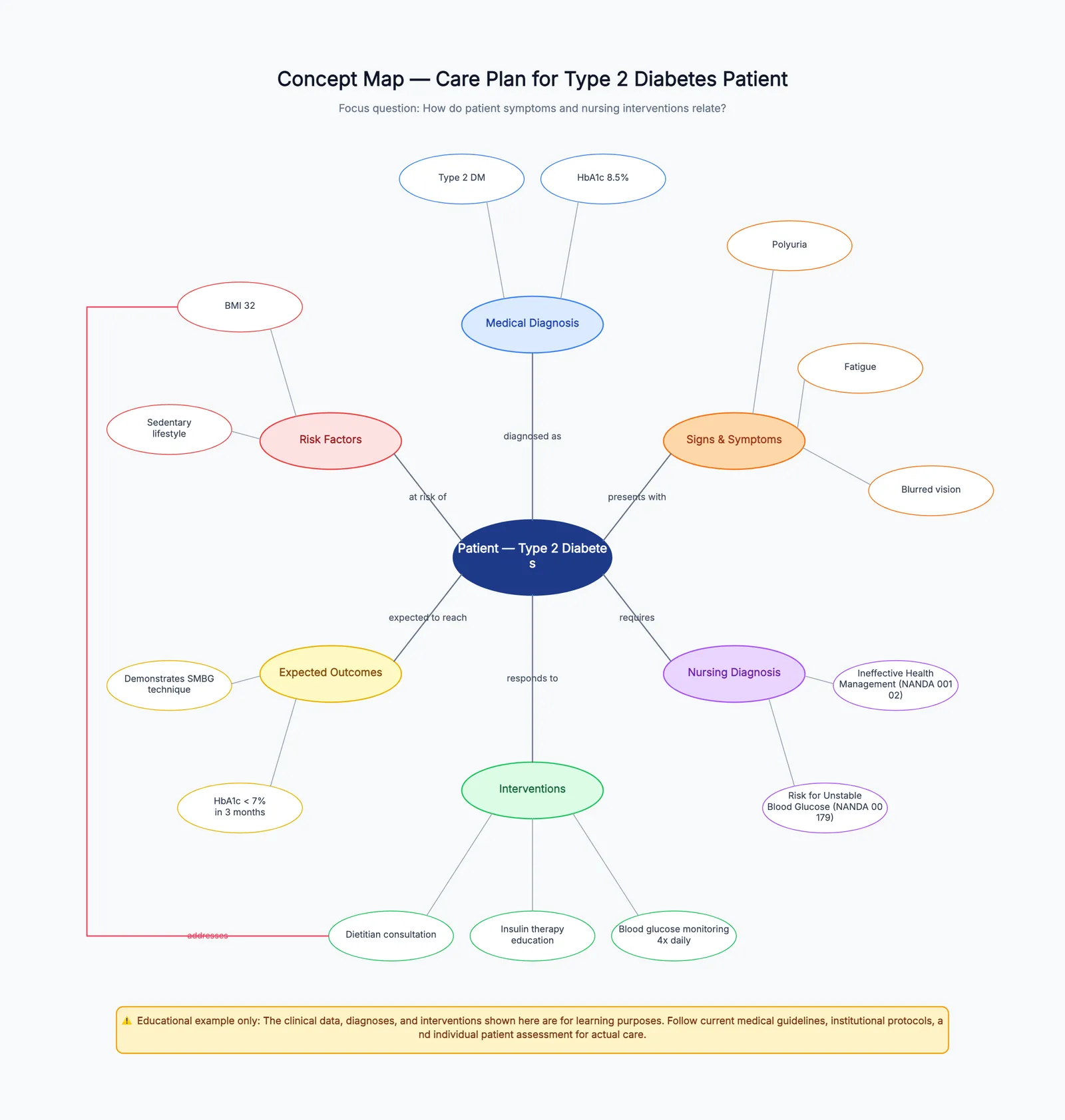
A concept map template gives you a structured starting point for turning scattered ideas into a connected knowledge map. Instead of staring at a blank canvas wondering where to put the first node, you open a pre-built layout with example concepts, labeled relationships, and a visual hierarchy that shows you how to build your own.
Concept maps are different from mind maps and flowcharts. A mind map radiates from a single center — good for brainstorming but bad for showing how ideas relate to each other. A flowchart shows a sequence of steps — good for processes but bad for knowledge. A concept map shows a network of ideas connected by labeled links like "causes," "requires," "is an example of," or "leads to." That labeling is what makes concept maps uniquely useful for learning, planning, and explaining.
If you want to start with a ready layout, open the free concept map template. It comes with a pre-filled knowledge organization example. The rest of this guide explains when to use a concept map, how to build one that is actually useful, and how to avoid the most common mistakes.
When to Use a Concept Map Instead of Other Diagrams
Pick a concept map when the goal is to understand or explain how ideas connect, not just list them or sequence them.
Use a concept map for:
- Studying complex topics: when you need to see relationships between concepts in biology, history, physics, or any subject with interconnected ideas
- Lesson planning: teachers use concept maps to plan curriculum units — what concepts to teach first and how they build on each other
- Product discovery: product managers map user needs, features, and constraints to see how they influence each other
- Research literature review: organizing papers, theories, and findings by how they relate rather than by publication date
- Knowledge management: documenting how your team's domain knowledge fits together so new members can onboard faster
- Writing and outlining: mapping the key arguments and evidence for an essay or report before writing the first draft
Do not use a concept map for step-by-step instructions (use a flowchart), hierarchical brainstorming (use a mind map), or timeline-based planning (use a timeline or Gantt chart).
How to Build a Concept Map That Is Actually Useful
A concept map becomes useful when each connection answers the question "how do these two ideas relate?" Connections without labels are just lines — they look connected but do not communicate anything.
1. Start with a focus question
Every good concept map answers one question. Examples: "How does photosynthesis work?" "What causes customer churn?" "How do microservices communicate?" Write the focus question at the top of your map. Every node and connection you add should help answer that question. If it does not, remove it.
2. List the key concepts (10–15)
Brainstorm the concepts that are relevant to your focus question. Write each one on a sticky note or in a list. Do not worry about order yet. For a map about photosynthesis, key concepts might be: sunlight, chlorophyll, carbon dioxide, water, glucose, oxygen, chloroplast, light reaction, Calvin cycle, ATP, NADPH.
3. Arrange from general to specific
Place the most general, inclusive concepts at the top. Place more specific concepts below. This creates a natural reading order: top-down from broad to detailed. The most general concept in photosynthesis might be "Photosynthesis" itself, with "Light Reaction" and "Calvin Cycle" as second-level concepts.
4. Connect concepts with labeled links
Draw lines between related concepts and — this is the most important step — write a word or short phrase on each line that explains the relationship. Use verbs or short phrases: "produces," "requires," "occurs in," "is converted to," "releases." For photosynthesis: "Light Reaction" → "produces" → "ATP," and "ATP" → "powers" → "Calvin Cycle."
5. Add cross-links
Cross-links connect concepts in different parts of the map. They show you understand the big picture, not just isolated pairs. In a photosynthesis concept map, a cross-link might connect "Oxygen" (an output of the light reaction) to "Cellular Respiration" (a separate process in animals that consumes oxygen). Cross-links are what separate a good concept map from a simple outline.
Free Concept Map Template: What Is Included
The free concept map template on CodePic includes:
- Pre-built node hierarchy: general concepts at the top, specific details below, so you can see the structure immediately
- Labeled connections: example relationships like "requires," "produces," and "includes" already written on the connecting lines
- Color-coded concept groups: related concepts share a color so you can visually group ideas at a glance
- Editable everything: click any node to change the text, drag to reposition, add or delete connections, and change colors
The template is built on an infinite canvas, so you can expand in any direction as your concept map grows. Unlike fixed-size templates in Google Slides or PowerPoint, you will not run out of space.
Common Concept Map Mistakes
Nodes without labels on connections. This is the number one mistake. A line between two concepts without a label says "these are related somehow." That is not useful. Always add a verb or short phrase to every connection.
Too many concepts on the first pass. Start with 10–15 concepts maximum. A concept map with 40 nodes is impossible to read and even harder to revise. Build a clear map first, then add detail in layers.
String maps instead of network maps. A string map is a concept map where every node connects to exactly one other node in a linear chain. That is just an outline in diagram form. A real concept map has branching and cross-links — nodes should connect to multiple other nodes.
No focus question. Without a focus question, you will add every concept you can think of and end up with an unreadable mess. Write the question first and hold yourself to it.
How to Use the Concept Map Template
- Open the template. It loads in your browser — no signup, no download.
- Read the focus question at the top of the pre-filled example. Replace it with your own.
- Edit the nodes. Click any concept to rename it. Delete concepts that are not relevant to your question and add new ones.
- Adjust the connections. Click a connection label to edit the relationship. Add new connections by drawing from one node to another.
- Rearrange for clarity. Drag nodes to create a clean top-down or left-to-right reading flow. The connections move with the nodes.
- Export or share. Download as PNG for a presentation, or share a live link so your team can view and comment.
Blank, Printable, and Online Concept Map Templates
People search for a blank concept map template when they want structure without example content. That is useful for exams, worksheets, and classroom activities, but it is not always the best starting point for a first draft. A blank page still asks you to invent the hierarchy, the relationship labels, and the layout all at once. For most users, a pre-filled editable example is faster because you can replace rather than design from scratch.
Use a blank concept map when:
- a teacher needs a printable worksheet for students
- the relationships should be discovered by the learner, not suggested by the template
- you want every group in a workshop to start from the same empty frame
- the topic is sensitive and example content would bias the discussion
Use a pre-filled concept map example when:
- you are new to concept mapping and need to see what a good relationship label looks like
- the team needs a fast working draft, not a classroom exercise
- you want to show stakeholders the level of detail expected
- the map will keep evolving after the first session
If you need a printable concept map template, export the finished map as a PNG and place it into a document or slide. For classroom use, keep the map simple: one focus question, 8–12 blank nodes, and empty connector labels students can fill in. For team use, keep the online editable version as the source of truth and export snapshots only when you need a static handout.
A Concept Map Example You Can Adapt
Here is a practical structure for a product discovery concept map:
Focus question: Why are new users failing to complete onboarding?
Core concepts:
- New user onboarding
- Account setup
- Template selection
- First export
- Activation moment
- Support tickets
- Tutorial content
- Team invite
- Pricing limit
Relationship labels:
- "requires" between account setup and first export
- "reduces confusion" between tutorial content and template selection
- "triggers" between first export and activation moment
- "creates friction" between pricing limit and team invite
- "reveals" between support tickets and onboarding confusion
This example is useful because the relationships say something specific. "Support tickets → onboarding confusion" is weaker than "Support tickets reveal onboarding confusion." The verb turns a line into an insight. When you edit the template, treat every connector label as a sentence fragment. If the phrase cannot be read aloud naturally, rewrite it.
Start organizing your ideas with the free concept map template. It opens instantly in your browser with a ready-to-edit example.