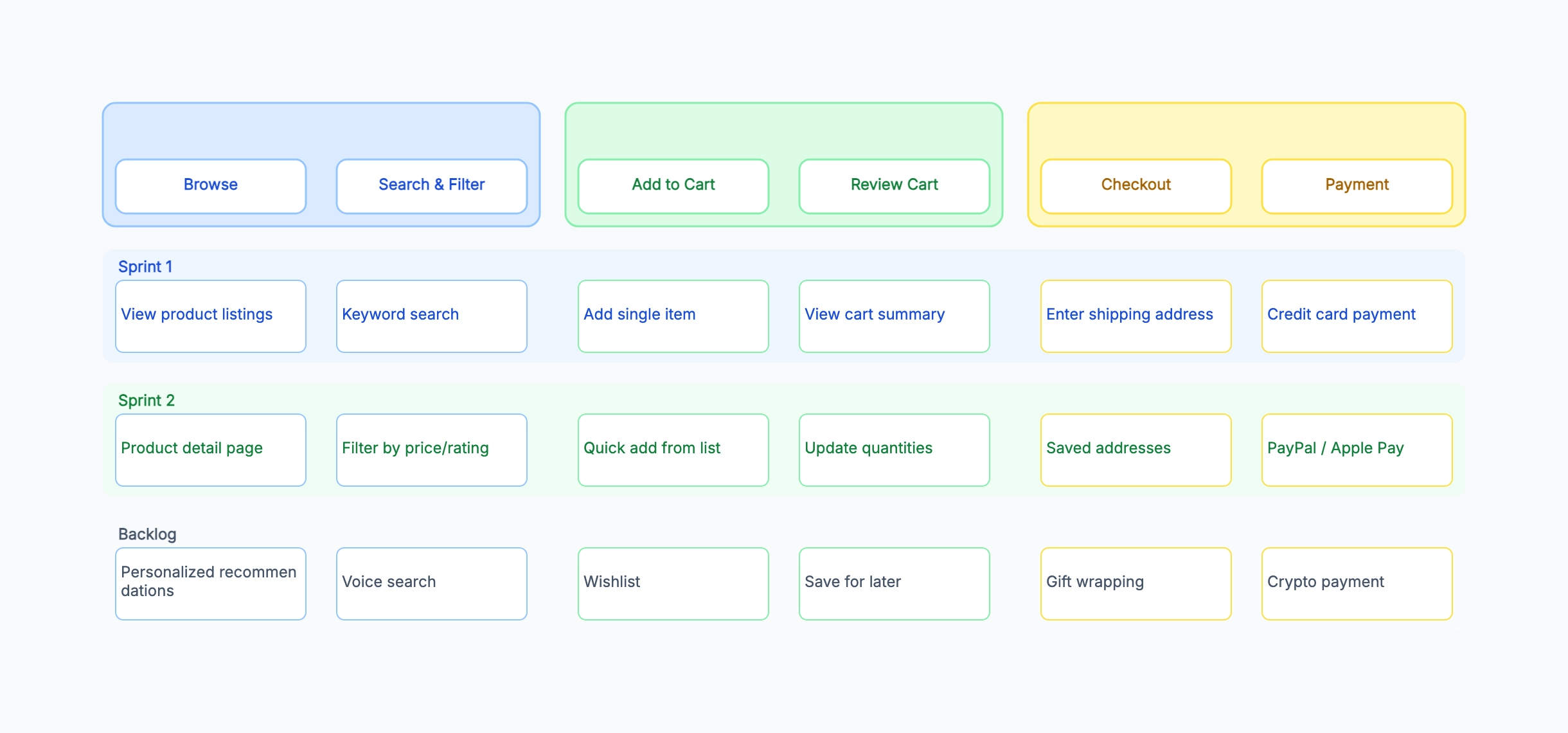
E-commerce checkout flow
Who uses it: Product manager planning a three-sprint delivery for a new shopping experience
Backbone: Discover → Add to Cart → Checkout → Payment → Confirmation
Sprint 1: Product listing, basic search, add to cart, address form, card payment
Sprint 2: Product detail page, filters, saved addresses, PayPal integration
Backlog: Wishlist, gift wrapping, loyalty points, one-click checkout
Why this works: Structuring the map around the purchase funnel makes it immediately obvious whether Sprint 1 delivers a complete, if minimal, end-to-end journey — the most important property of a working MVP.
SaaS onboarding redesign
Who uses it: Growth product manager reducing time-to-value for new signups
Backbone: Sign Up → Activate → First Use → Habit Formation
Sprint 1: Email signup, email verification, guided first action (create a diagram)
Sprint 2: Social login, onboarding checklist, usage tips, second-session prompt
Backlog: Team invite flow, integration setup wizard, in-app coach marks
Why this works: Onboarding maps benefit from a journey axis that mirrors actual activation milestones — the team can see whether they are solving the signup problem or the activation problem, which often need different squads.
Internal HR tool for leave management
Who uses it: Scrum team building an internal tool for a 200-person company
Backbone: Request Leave → Manager Approval → Calendar Sync → HR Record Update
Sprint 1: Submit request form, email notification to manager, approve/reject action
Sprint 2: Calendar integration, delegation when manager is absent, bulk approval
Backlog: Mobile app, multi-level approval chains, analytics dashboard
Why this works: Internal tools often have fewer users but higher criticality per user — placing the core request-and-approve cycle entirely in Sprint 1 ensures the tool is usable from day one even if the calendar sync slips.
Student building a course project
Who uses it: Computer science student mapping stories for a semester project
Backbone: Register → Browse Courses → Enroll → Complete → Get Certificate
Sprint 1 (mid-term): User registration, course listing, enroll button
Sprint 2 (final): Video player, progress tracking, certificate generation
Backlog (stretch goals): Discussion forum, quiz engine, instructor dashboard
Why this works: Mapping a course project as a story map helps the student demonstrate scope management skills to reviewers — Sprint 1 is a defensible demo, Sprint 2 adds depth, and the backlog shows awareness of what was intentionally deferred.
Mobile fitness app — first release
Who uses it: Indie developer shipping a v1 to the App Store
Backbone: Discover Workouts → Track Session → Review Progress → Stay Motivated
Sprint 1 / v1.0: Workout library, start/stop timer, session log, streak counter
Sprint 2 / v1.1: Custom workout builder, weekly summary, share to social
Backlog: Wearable sync, coach video content, paid subscription tier
Why this works: For indie developers, the map doubles as a launch scope document — it is easy to show investors or early users exactly what v1.0 includes and what is coming next, without a lengthy roadmap deck.