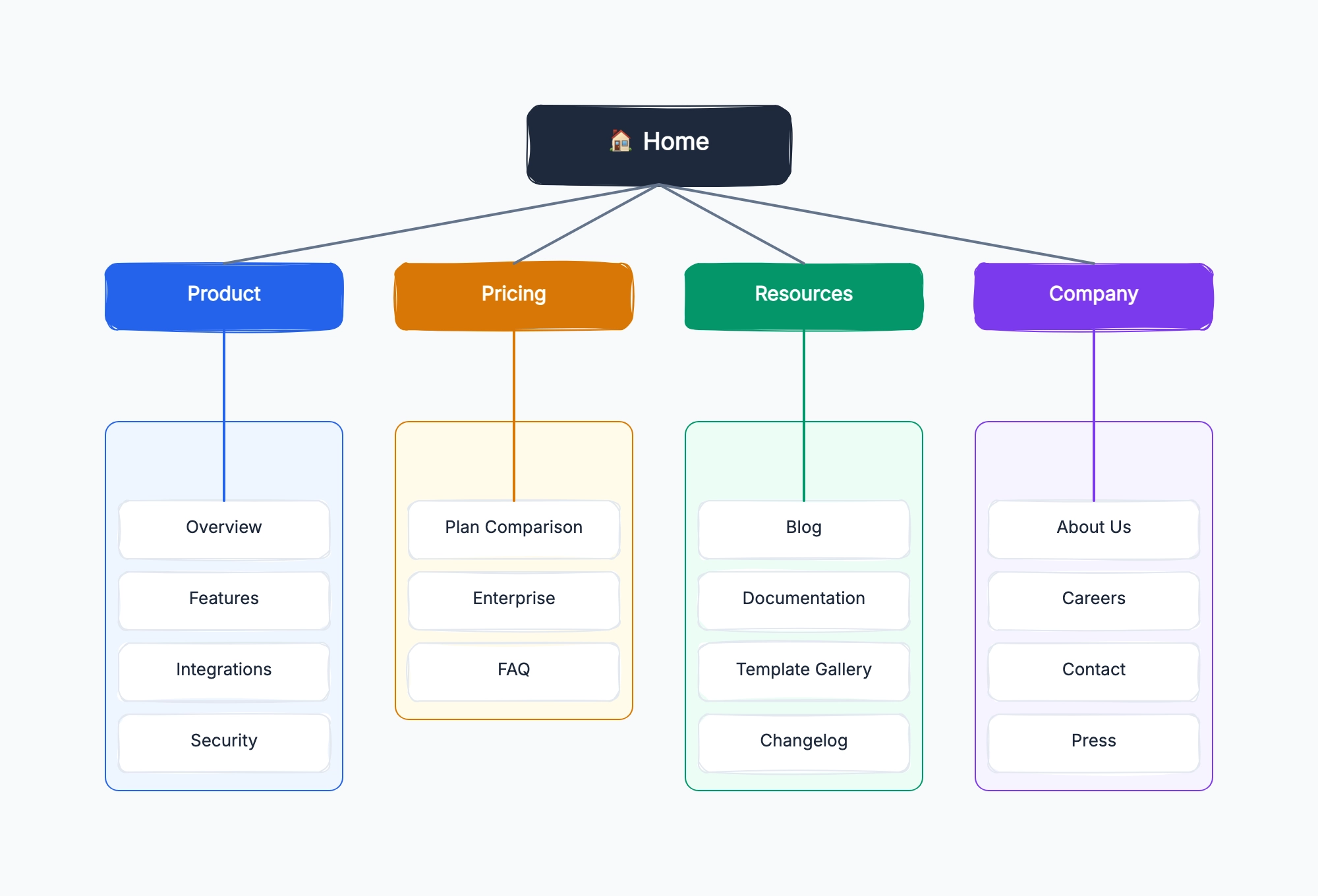
SaaS product website
Who uses it: Product marketer or growth designer planning a B2B SaaS site
Home
Product: Features / How It Works / Integrations / Security / Changelog
Pricing: Plans / Enterprise / FAQ
Solutions: By Role (PM, Designer, Dev) / By Industry / By Use Case
Resources: Blog / Documentation / API Reference / Status Page
Company: About / Careers / Press / Partners / Contact
Auth: Log In / Sign Up / Forgot Password / SSO
Why this works: Separating Solutions by role and by industry creates multiple SEO entry points for the same product — a PM and a developer searching for the same tool use different keywords, and each can land on a page written for them.
E-commerce store
Who uses it: E-commerce manager planning a product catalog structure
Home
Shop: All Products / New Arrivals / Best Sellers / Sale
Categories: [Category A] / [Category B] / [Category C]
Product Detail Page (template)
Account: Orders / Wishlist / Addresses / Settings
Checkout: Cart / Shipping / Payment / Confirmation
Info: About / Shipping Policy / Returns / Contact / FAQ
Why this works: E-commerce sitemaps need to distinguish between template pages (one product detail page design used for thousands of products) and static pages — confusing the two leads to SEO miscounts and broken internal link planning.
Content blog or media site
Who uses it: Editor or SEO manager planning a content-heavy publication
Home
Articles: Latest / Most Popular / [Topic A] / [Topic B] / [Topic C]
Article Detail Page (template)
Authors: Author Index / Author Profile (template)
Newsletter: Subscribe / Archive
About: Mission / Team / Advertise / Contact
Legal: Privacy / Terms / Cookie Policy
Why this works: Topic category pages are often the highest-value SEO pages on a content site — they aggregate articles around a keyword cluster. Mapping them explicitly in the sitemap ensures they are built as first-class pages, not afterthoughts.
Portfolio or agency website
Who uses it: Designer or creative agency planning a portfolio site
Home
Work: All Projects / [Category: Branding] / [Category: Web] / Project Detail (template)
Services: What We Do / Process / Pricing
About: Studio / Team / Values
Blog (optional)
Contact
Why this works: Portfolio sitemaps are usually shallow — most pages are reachable in two clicks. The main risk is burying project detail pages too deep; mapping the sitemap first reveals whether the navigation gets users to case studies quickly.
Web application (authenticated)
Who uses it: Product manager planning a dashboard-style web app
Public: Landing Page / Pricing / Login / Sign Up
Onboarding: Welcome / Setup Step 1 / Setup Step 2 / Invite Team
Dashboard: Overview / Analytics / Activity Feed
Main Feature A: List View / Detail View / Settings
Main Feature B: List View / Detail View
Account: Profile / Billing / Notifications / API Keys
Admin (role-gated): Users / Audit Log / Plan Management
Why this works: Web app sitemaps must distinguish between public pages (indexed by search engines) and authenticated pages (not indexed). Mapping both in one diagram helps the team see the full product scope and plan auth logic correctly.
Government or nonprofit website
Who uses it: Web manager at a public sector or nonprofit organization
Home
Services: Service A / Service B / Apply Online / Check Status
Information: News / Events / Reports / FAQs
About: Organization / Leadership / History / Locations
Get Involved: Volunteer / Donate / Partner
Contact: General / Media / Complaints
Legal: Accessibility / Privacy / Disclaimer
Why this works: Public sector sites often grow organically over years and develop deep, inconsistent hierarchies. A sitemap audit regularly surfaces pages that are three or four levels deep with no clear parent — these pages typically have zero organic traffic.