Back to template

Shift Schedule Examples

These shift schedule examples cover the rosters teams actually run: an 8-hour three-shift rotation, a 12-hour two-shift rotation, and a 24/7 coverage map. Pick the one closest to your operation and swap in your names and times.

Shift Schedule Examples

Real examples

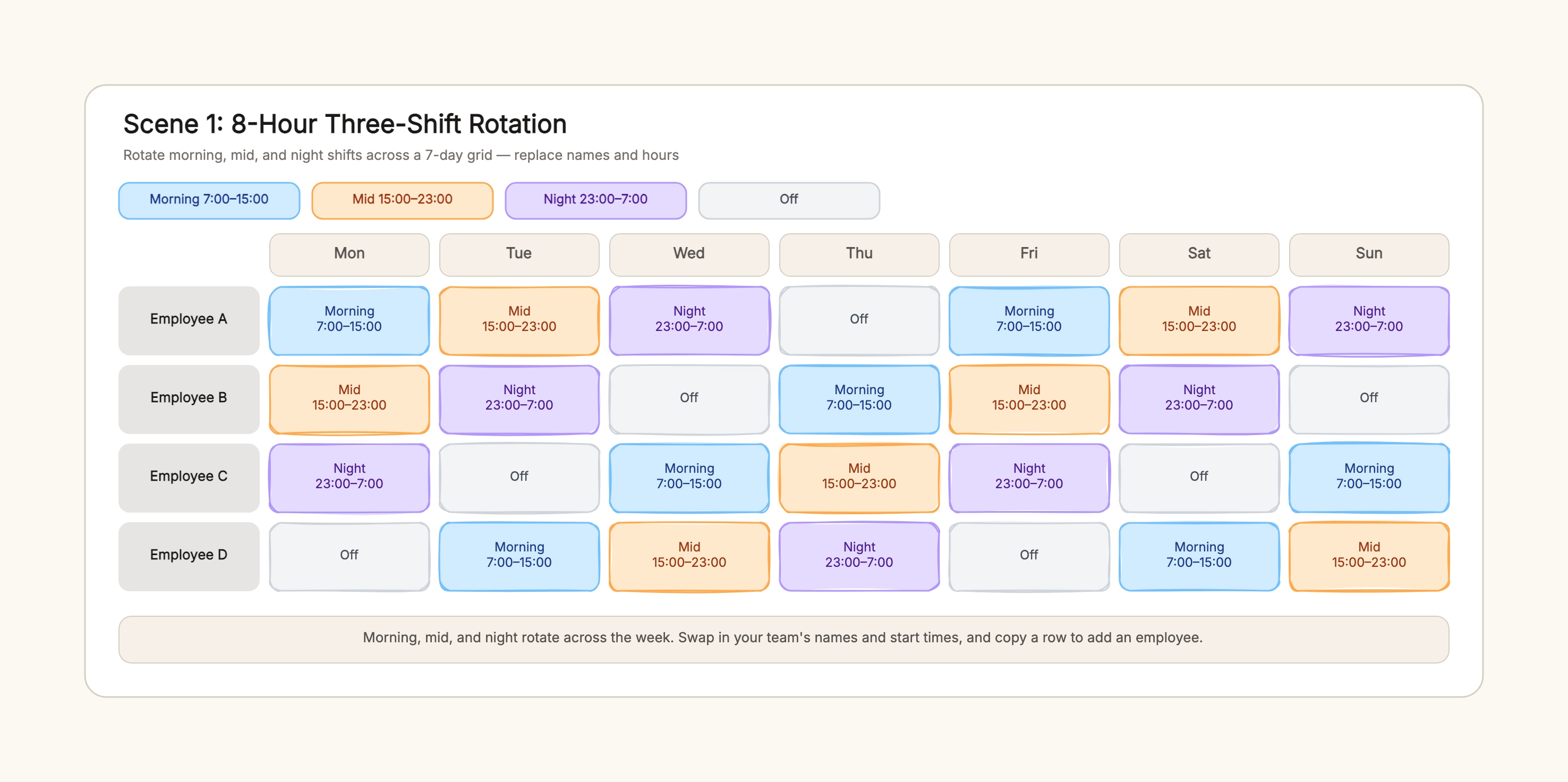
Retail store three-shift week

Who uses it: A store manager covering opening, mid-day, and closing

Rows — Employee A, B, C, D
Columns — Mon through Sun
Shifts — Morning 7–15, Mid 15–23, Night 23–7, Off
One of each shift per day, rotating across the team

Why this works: An 8-hour three-shift rotation keeps every day fully covered while rotating who works the closing and night shifts.

Warehouse 12-hour roster

Who uses it: A shift lead scheduling a 24-hour facility

Two shifts — Day 7–19, Night 19–7
Employee A — day, day, night, night, off, off, off
Employee B — night, night, off, off, day, day, off
Handover notes under the grid

Why this works: A 12-hour two-shift schedule uses longer blocks and fewer handovers, with rest days built into each row.

Hospital ward 24/7 coverage

Who uses it: A nursing supervisor confirming round-the-clock staffing

Rows — Morning, Mid, Night
Columns — Mon through Sun
Each cell — the nurse covering that shift that day
Every shift × every day filled

Why this works: Flipping the grid to shifts-by-day makes an uncovered slot immediately visible, which is the point of a coverage check.

Call center rotating nights

Who uses it: A team lead spreading night shifts fairly

Four agents — A, B, C, D
Night cells rotate A → B → C → D across the week
Off cells follow each night shift

Why this works: Color-coding nights and offs in one grid shows at a glance whether one person is carrying all the late shifts.

Cafe weekend coverage

Who uses it: A small team balancing weekday and weekend hours

Employees down the rows, Mon–Sun across the top
Weekend cells — who opens and who closes
Off days marked mid-week

Why this works: A weekly grid makes the weekend burden visible, so you can rotate who works Saturday and Sunday.

Monthly shift overview

Who uses it: A manager publishing the month for a larger team

Four weekly grids side by side or stacked
Holiday and on-call weeks flagged
One color per shift across all weeks

Why this works: Duplicating the weekly grid into a monthly shift schedule template lets the whole team see the month at once.

Tips for a clear shift schedule

  • Use one color per shift and keep it consistent across the whole board.
  • Mark off days in the same grid so rest reads as part of the roster.
  • Name who covers each shift in the 24/7 scene — a blank cell is a coverage gap.
  • Note the handover window under the grid, not just the start and end times.
  • Duplicate the weekly grid to build a monthly shift schedule template.

Related resources

Start editing online

Go back to the template, swap in your own content, and keep the same structure if it fits your project.

Use this template: /editor/new?template=shift-schedule

Use this template