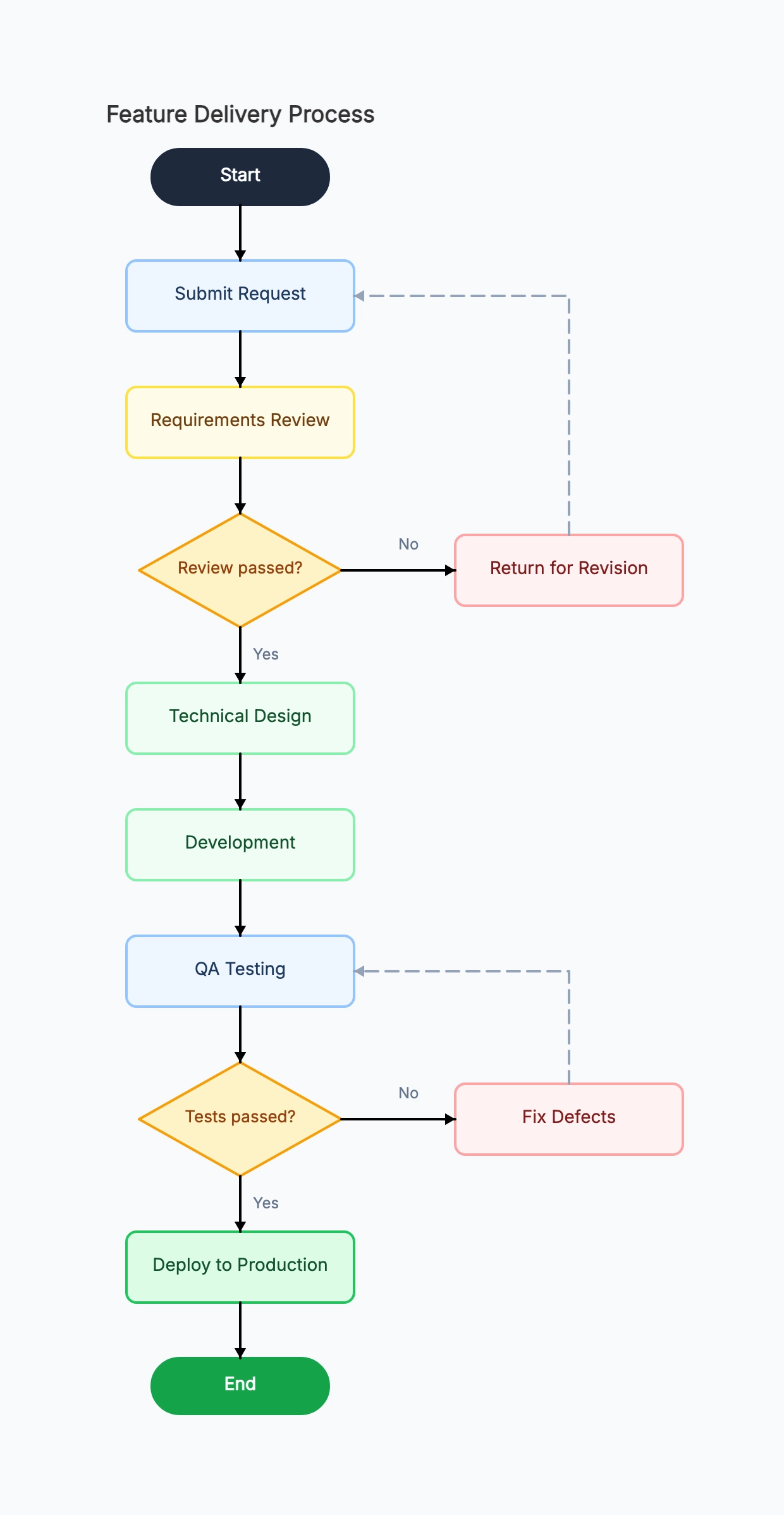
Software feature delivery
Who uses it: Engineering team documenting their development workflow
Start → Product specification written
→ Technical design review [Approved?]
No → Revise design
Yes → Development sprint
→ QA testing [All tests pass?]
No → Fix defects → back to QA
Yes → Staging deployment → Production release → End
Why this works: The explicit 'fix defects' loop back to QA (rather than back to development) was a process clarification that reduced ambiguity about who owned the fix-and-retest cycle.
Customer onboarding flow
Who uses it: Customer success team mapping the first 30 days
Start → Account created
→ Welcome email sent → Kickoff call scheduled [Call completed?]
No → Send follow-up (3 attempts) → Mark at-risk
Yes → Product walkthrough → Integration setup [Setup complete?]
No → Technical support session
Yes → First value milestone achieved → End
Why this works: Mapping the 'no kickoff call' branch revealed that at-risk customers were being handled inconsistently. The process map standardized three follow-up attempts before escalation.
Employee hiring process
Who uses it: HR team standardizing a recruiting workflow
Start → Job requisition approved
→ Job posted → Applications reviewed [Qualified candidates?]
No → Extend deadline or repost
Yes → Phone screens → Panel interviews [Hire decision?]
No → Reject with feedback
Yes → Reference check → Offer sent [Accepted?]
No → Close requisition or extend to next candidate
Yes → Onboarding initiated → End
Why this works: The hiring team discovered they had no documented step for 'offer declined' — the process map revealed the gap and they added a fallback to the next-ranked candidate.
Customer support ticket triage
Who uses it: Support team building a first-response playbook
Start → Ticket received
→ [Account active?]
No → Send reactivation link → Close
Yes → [Known issue?]
Yes → Send workaround → [Critical?] → Yes: escalate to engineering
No → Attempt reproduction → [Reproduced?]
Yes → File bug report → Close
No → Request more info → End
Why this works: The triage map reduced average first-response time by giving agents a decision path instead of relying on judgment calls. The 'critical known issue' escalation path was added after a major incident.
Invoice approval workflow
Who uses it: Finance team documenting an accounts payable process
Start → Invoice received
→ PO number present? No → Return to vendor
→ Amount under $5,000? Yes → Manager approves → Process payment
→ Amount $5,000–$50,000 → Director approves → CFO signs → Process payment
→ Amount over $50,000 → Board approval required → Process payment
→ End
Why this works: Documenting the three approval tiers as a decision map reduced the number of invoices routed to the wrong approver — a problem that had been causing 2-week payment delays.
Content publishing workflow
Who uses it: Marketing team standardizing article review and publication
Start → Brief assigned to writer
→ Draft submitted → Editor review [Approved?]
No → Return with comments → back to writer
Yes → SEO review [Optimized?]
No → Update keywords/structure
Yes → Legal review needed? Yes → Legal approves → Schedule & publish → End
No → Schedule & publish → End
Why this works: The optional legal review step (for topics like finance, health, or legal advice) was added after an incident. Making it conditional rather than mandatory for all content reduced the legal team's review load by 70%.