Back to template

POS Database Schema Examples

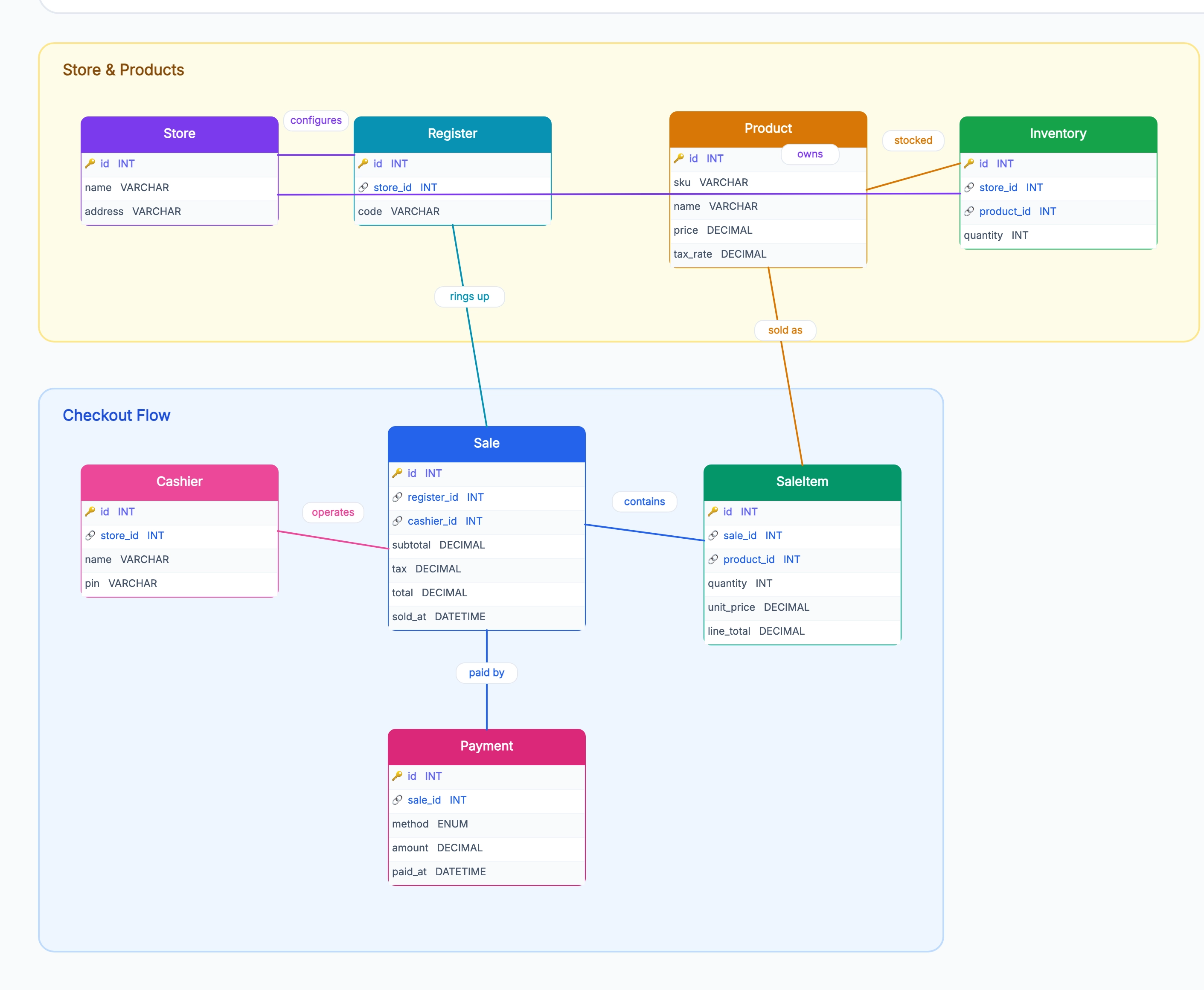
These POS schema examples show how the same store-sale-payment core adapts to a single-store shop, a multi-store retail chain, restaurant table-based POS, and mobile POS without a fixed register.

POS Database Schema Examples

Real examples

Single-store shop (the baseline)

Who uses it: Developer building a first retail POS

One Store row; no need for store_id everywhere
Product (id, sku, name, price, quantity)
Sale (id, register_id, cashier_id, total, sold_at)
SaleItem (id, sale_id, product_id, quantity, line_total)
Payment (id, sale_id, method, amount)

Why this works: Single-store shops skip the store dimension — the diagram works with quantity directly on Product. The Sale/SaleItem/Payment split is still essential because line items and split payments matter even at one store.

Multi-store retail chain

Who uses it: Team running several retail locations on one POS

Store (id, name, address) added at the top
Register and Cashier scoped to a store
StoreInventory holds quantity per product per store
Sale references store_id for reporting and reconciliation
Inter-store transfers tracked separately from sales

Why this works: Multi-store adds a Store entity and per-store inventory — the diagram now needs StoreInventory because the same SKU has different quantities at each store, mirroring the inventory schema pattern.

Restaurant POS

Who uses it: Team building a restaurant point-of-sale

Tables and Reservations replace the Customer focus
Sale (called 'Check' or 'Bill') links to a table_id
SaleItem references MenuItem instead of Product
Tips tracked as a separate field on Payment
Tabs allow a sale to stay open across multiple visits

Why this works: Restaurant POS swaps the retail product catalog for a menu and ties sales to tables — the diagram inherits the Sale/SaleItem/Payment core but adds the table-based flow that retail doesn't need.

Mobile POS (no fixed register)

Who uses it: Team building a Square-style mobile checkout

Register is virtual — a device_id rather than a fixed terminal
Cashier signs in from any device
Sale captures device_id and gps_location
Offline support: sales sync when network returns
Card payments go through a connected card reader

Why this works: Mobile POS makes the register virtual — the diagram replaces fixed terminals with device sessions, and adds offline sync because mobile devices can't depend on constant connectivity.

Tips for better study mind maps

  • Always split Sale, SaleItem, and Payment into three tables — collapsing them breaks line-item discounts and split-tender payments.
  • Store the price on SaleItem at sale time; product prices change, but historical sales must keep their original line totals.
  • Give Sale a status (open, completed, voided, refunded) so the data model captures voids and refunds without deleting rows.
  • For multi-store, put inventory in StoreInventory keyed by (store_id, product_id); putting quantity on Product breaks the moment you open a second store.

Start editing online

Go back to the template, swap in your own topics, and keep the same structure if it fits your class or project.

Use this template: /editor/new?template=pos-database-schema

Edit this POS schema template