Back to template

Inventory Management Database Design Examples

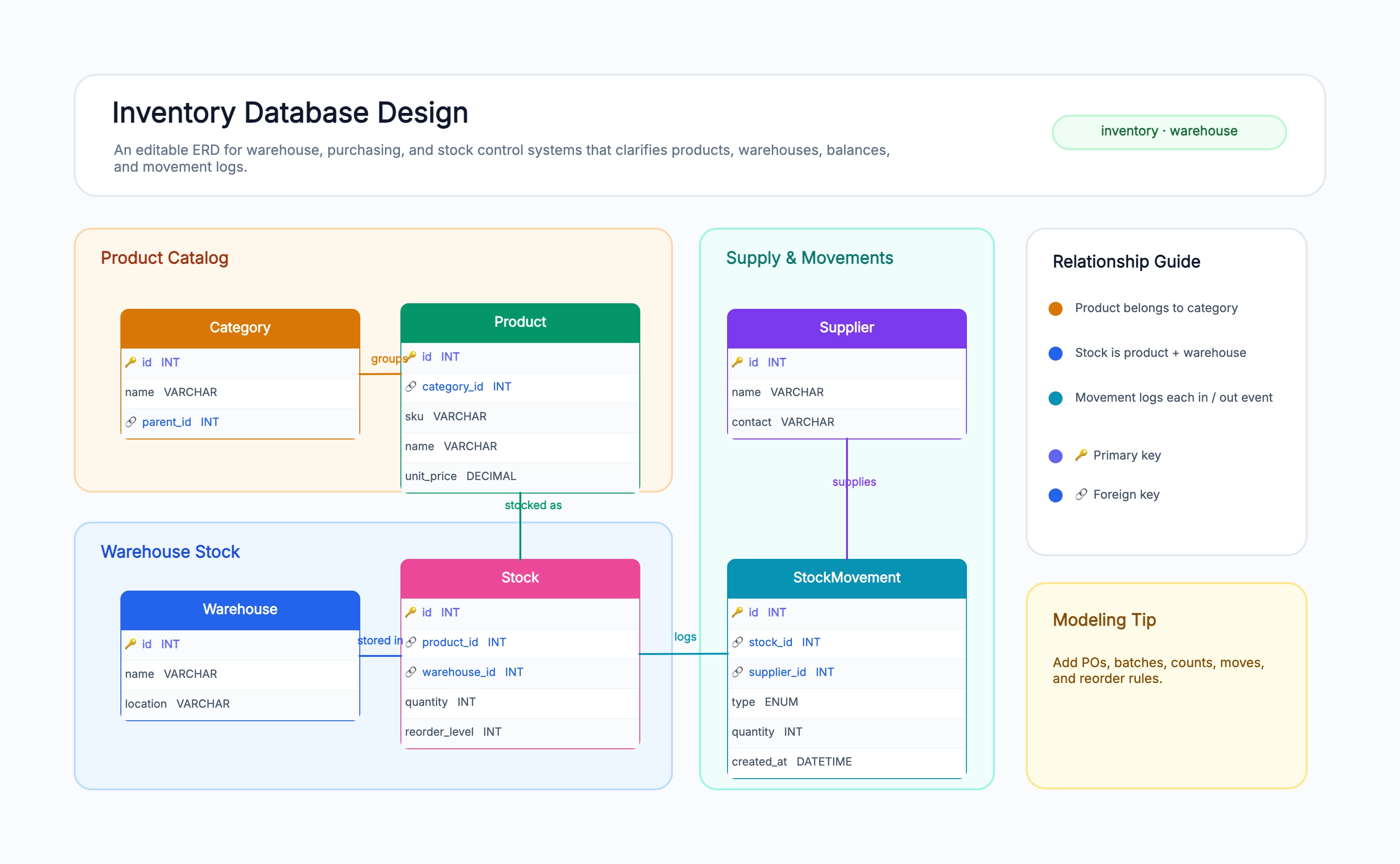
These inventory schema examples show how the same product-warehouse-stock core grows to handle multiple locations, batch and expiry tracking, and integration with a point-of-sale system.

Inventory Management Database Design Examples

Real examples

Single-warehouse inventory (the baseline)

Who uses it: Developer building a first inventory system for one location

Product (id, sku, name, unit_price, quantity, reorder_level)
Quantity lives directly on the product — no separate stock table
Category (id, name) for organizing the catalog
StockMovement (id, product_id, type, quantity, created_at)
Supplier (id, name, contact) referenced by purchase receipts

Why this works: When there's only one location, quantity can live on the product row itself — the simplest possible inventory schema. The moment a second warehouse appears, you split quantity into a separate stock table.

Multi-warehouse inventory

Who uses it: Team tracking the same product across several locations

Stock (id, product_id, warehouse_id, quantity, reorder_level)
One row per product-per-warehouse — quantity is no longer on Product
Warehouse (id, name, location)
Reorder levels can differ per warehouse
Low-stock query joins Stock to Product and filters quantity < reorder_level

Why this works: The multi-warehouse pattern is the canonical inventory schema — separating stock from product is what lets the same SKU carry different quantities and reorder thresholds at each location.

Batch and expiry tracking

Who uses it: Team handling perishables, pharmaceuticals, or lot-controlled goods

Batch (id, product_id, warehouse_id, lot_number, expiry_date, quantity)
Stock is tracked per batch, not just per product
FEFO (first-expired-first-out) queries order by expiry_date
StockMovement references a batch_id, not just a product
Alerts fire on batches approaching expiry

Why this works: Batch tracking adds a layer below stock — you need it whenever goods expire or are recalled by lot, because regulators and FEFO picking require knowing exactly which batch a unit came from.

Retail POS inventory

Who uses it: Team integrating inventory with point-of-sale

Sale (id, store_id, sold_at, total) with SaleItem lines
Each SaleItem decrements Stock for that store's warehouse
Store mapped to a Warehouse for stock purposes
StockMovement type 'sale' records the decrement automatically
Reorder triggers when post-sale quantity drops below threshold

Why this works: POS integration ties sales to stock decrements — the diagram shows a Sale feeding StockMovement, so selling an item and reducing inventory are the same transaction rather than two systems to reconcile.

Tips for better study mind maps

  • Separate Stock from Product as soon as you have more than one location — putting quantity on Product doesn't scale to multi-warehouse.
  • Make StockMovement append-only; the current quantity is derived or cached, but the movement log is the source of truth.
  • Give StockMovement a type enum (receipt, dispatch, adjustment, sale) so every quantity change is auditable.
  • Put reorder_level on Stock, not Product, so each warehouse can set its own threshold.

Start editing online

Go back to the template, swap in your own topics, and keep the same structure if it fits your class or project.

Use this template: /editor/new?template=inventory-database-design

Edit this inventory schema template