Back to template

AI Application Architecture Diagram Examples

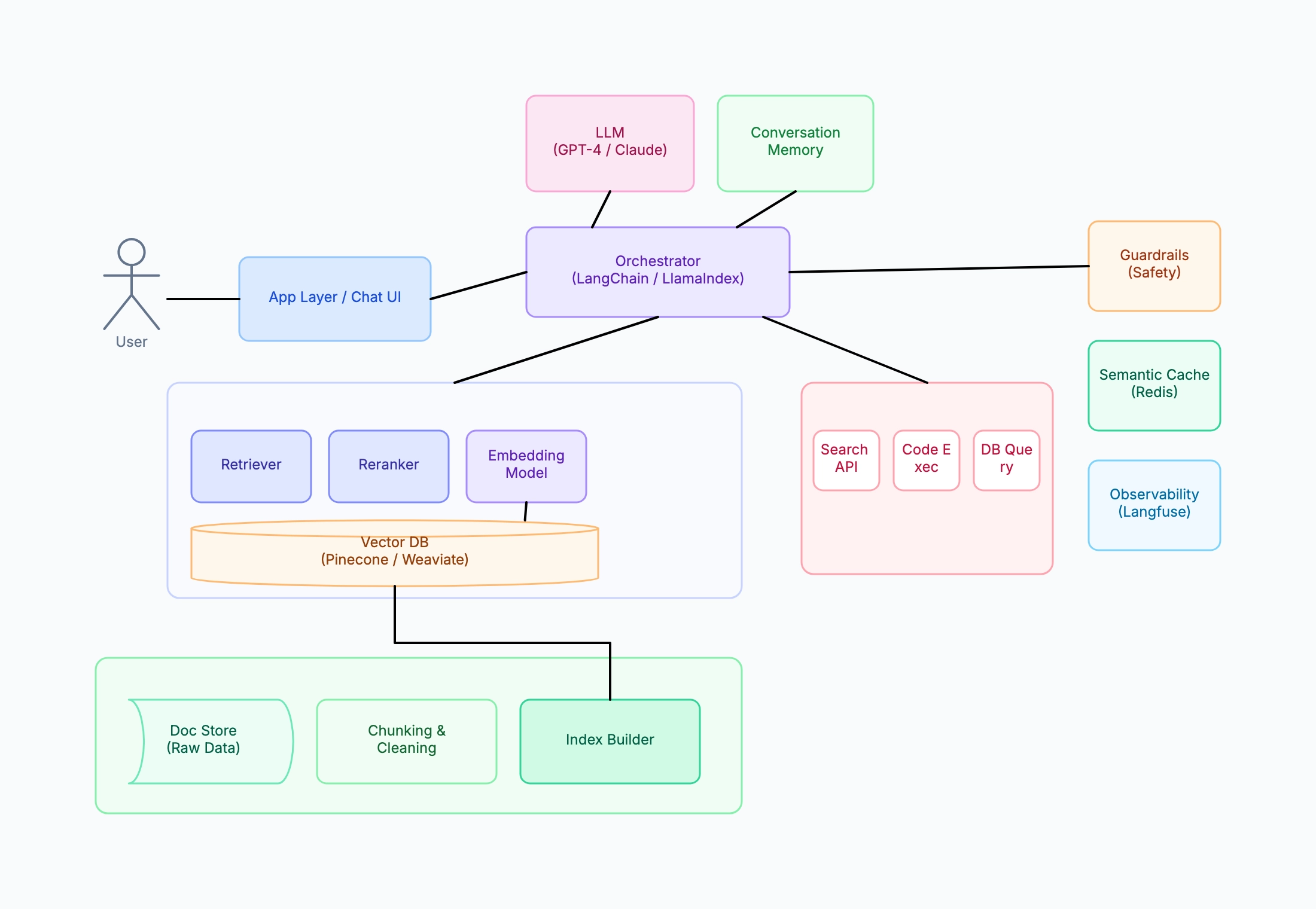
These AI architecture examples show how teams design different types of LLM-powered systems using the same core building blocks — orchestrator, LLM, vector store, and tools — assembled in different configurations for different use cases.

AI Application Architecture Diagram Examples

Real examples

Enterprise document Q&A system (RAG)

Who uses it: ML engineer building an internal knowledge base chatbot

Ingest: SharePoint / Confluence → chunker (512 tokens, 50 overlap) → embedding → Weaviate
Query path: user query → embedding → vector search (top-20) → reranker (top-5) → GPT-4
Orchestrator: LangChain with conversation history in PostgreSQL
Guardrails: PII detection on input, citation check on output
Cache: exact-match Redis + semantic similarity cache for repeated questions
Observability: Langfuse for LLM call tracing, cost tracking per department

Why this works: Enterprise RAG systems need the full stack — guardrails catch sensitive data before it reaches the LLM, the reranker improves precision when the document corpus is large and noisy, and per-department cost tracking justifies the infrastructure spend.

Coding assistant with tool use

Who uses it: Developer tools startup building a code review and generation assistant

Orchestrator: LlamaIndex ReAct agent with multi-step reasoning
LLM: Claude 3.5 Sonnet for code generation, smaller model for intent classification
Tools: GitHub API (PR diff, file tree), code execution sandbox, web search
Memory: short-term (current PR context) + long-term (user preferences, past reviews)
Vector DB: code embeddings for codebase context retrieval
No reranker — code context retrieval is handled by AST-aware chunking

Why this works: Coding assistants benefit from a ReAct agent loop because a single code generation task often requires multiple tool calls — fetch the file, understand the diff, look up relevant tests — before the LLM can produce a useful response.

Multi-agent research pipeline

Who uses it: AI researcher automating literature review and synthesis

Supervisor agent: breaks research question into sub-tasks
Search agent: queries arXiv API and semantic scholar
Read agent: extracts key claims from PDFs via RAG
Write agent: synthesizes findings into structured report
Shared vector store: all retrieved papers indexed for cross-agent retrieval
Human-in-the-loop: approval gate before write agent runs

Why this works: Multi-agent diagrams help reviewers understand which agent is responsible for which failure mode — if the output is factually wrong, was it the search agent retrieving bad sources or the write agent hallucinating a synthesis?

Student learning assistant

Who uses it: EdTech startup or computer science student building a study companion

Simple RAG: course syllabus + lecture notes → embedding → ChromaDB
Orchestrator: LangChain ConversationChain (no agent tools needed)
LLM: GPT-3.5-turbo (lower cost for student budget)
Memory: sliding window of last 10 messages
No reranker, no guardrails (single-user, trusted corpus)
Logging: simple text file for debugging, no paid observability

Why this works: A student project doesn't need the full enterprise stack — showing a stripped-down version makes it clear which components are essential (LLM, vector store, orchestrator) and which are production concerns that can be added later.

Tips for better AI architecture diagrams

  • Draw the user request path first (left to right or top to bottom), then add cross-cutting concerns at the edges.
  • Separate the RAG pipeline from the agent tool layer — they serve different purposes even if both are coordinated by the orchestrator.
  • Show the data ingestion pipeline as a separate offline flow to distinguish it from the real-time query path.
  • Add the semantic cache between the user and the orchestrator to show that it short-circuits the LLM call when a match is found.

How it compares to similar tools

RAG pipeline vs agent architecture

A RAG pipeline is a fixed path: retrieve, then generate. An agent architecture has a loop — the model decides which tool to call next, possibly many times. This is the single most important distinction to get right on the diagram, because a loop implies unbounded cost and latency while a fixed pipeline does not.

AI architecture diagram vs traditional system diagram

Traditional components are deterministic: same input, same output. An LLM call is probabilistic and can fail by returning confidently wrong output rather than an error. So an AI architecture diagram needs to show validation, guardrails, and fallback paths in places a conventional diagram wouldn't bother.

Inference architecture vs training pipeline

These serve different audiences and shouldn't share a diagram. A training pipeline covers data collection, labeling, fine-tuning, and evaluation, and runs occasionally. An inference architecture covers what happens per user request, and runs constantly. Merging them obscures which parts are on the critical latency path.

Single-model vs multi-model routing

Many production systems route cheap requests to a small model and hard ones to a large model. If your diagram shows one LLM box when reality has a router, readers will badly misestimate both cost and latency. Draw the router as its own decision point with the routing criterion labeled.

Common mistakes to avoid

  • Drawing the LLM as a single opaque box

    One box labeled "LLM" hides everything that determines behavior: the system prompt, which context is injected, tool definitions, output parsing. Split out at least prompt assembly and response validation — those are where most bugs actually live, so they're what the diagram most needs to expose.

  • Omitting the embedding step in RAG

    Diagrams often show "query → vector store → results" and skip the embedding model. But the embedding model is a hard dependency in two places: indexing and querying, and both must use the *same* model. Leaving it out hides the most common cause of silently poor retrieval quality.

  • No token cost or latency annotations

    In AI systems, cost and latency are architectural properties, not implementation details — a design with three sequential LLM calls is a fundamentally different product than one with a single call. Annotate approximate token cost and latency per LLM step so the diagram supports real design decisions.

  • Treating the vector store as a normal database

    Vector search returns approximate nearest neighbors, ranked by similarity — not exact matches. Drawing it identically to a SQL database implies deterministic lookup, which leads readers to expect guarantees the system cannot provide. Label the retrieval step with top-k and any similarity threshold.

Frequently asked questions

What are the minimum components an AI architecture diagram should show?+

For an LLM application: the entry point, prompt assembly (including what context gets injected), the model call, output validation, and the fallback path when validation fails. If you add retrieval, you also need the embedding model and the vector store. Those pieces cover where nearly all real failures occur.

How do I diagram an agent loop without making it unreadable?+

Draw the loop once with an explicit exit condition — max iterations, or a termination check — rather than unrolling several passes. The exit condition is the part reviewers care about, since an agent without one is an unbounded cost risk. Then list the available tools beside the loop instead of inside it.

Should I show which specific model I'm using?+

Show the tier and the reason, not just a version string that will be stale in months. "Small model for classification, large model for final answer" survives model upgrades and explains the design intent. Pin exact versions in config, not in a diagram meant to last.

Where do guardrails and safety checks belong on the diagram?+

Both before and after the model call, and they're different checks. Input-side handles prompt injection and disallowed requests; output-side handles hallucination, format validation, and leaking sensitive content. Showing only one side is a common gap that a reviewer will immediately question.

How do I represent caching in an AI pipeline?+

Distinguish the layers, because they behave differently: exact-match response cache, semantic cache keyed on embedding similarity, and provider-side prompt caching. Label which one you mean and what invalidates it — a semantic cache can return a wrong-but-similar answer, a risk an exact cache doesn't carry.

Start editing online

Go back to the template, swap in your own content, and keep the same structure if it fits your project.

Use this template: /editor/new?template=ai-pipeline

Edit this AI architecture template