Back to template

AI Agent Architecture Diagram Examples

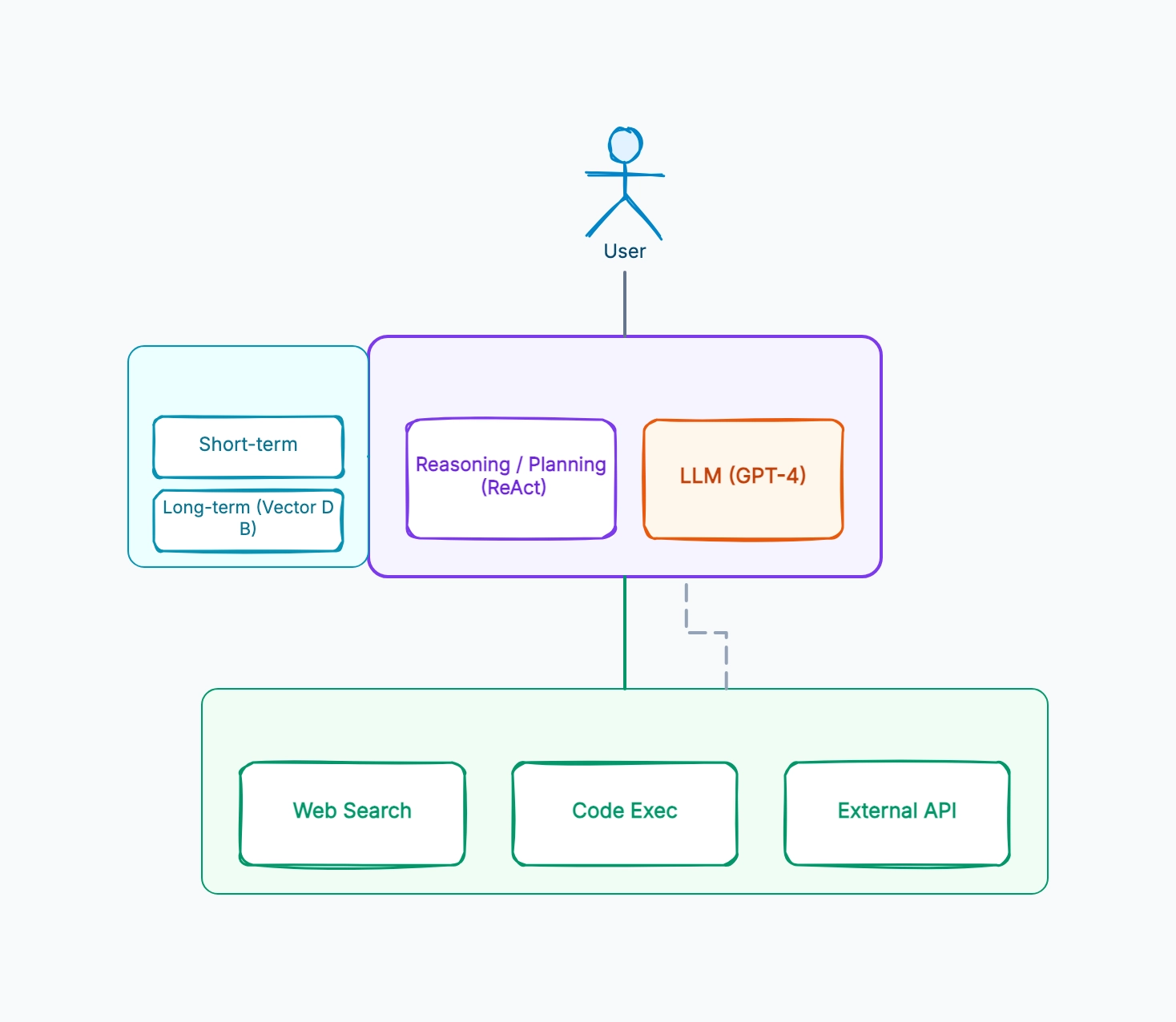
These AI agent examples show how the same building blocks — reasoning loop, LLM, memory, and tools — are arranged for different agent patterns, from a simple tool-caller to a planning agent that breaks work into steps.

AI Agent Architecture Diagram Examples

Real examples

ReAct agent (reason + act)

Who uses it: Developer building a first tool-using agent

Loop: thought → action → observation → repeat until answer
LLM decides at each step whether to call a tool or finish
Tools: search, calculator, a single external API
Memory: a scratchpad holding the reasoning trace for this task
Stops when the LLM emits a final answer instead of an action

Why this works: ReAct is the default starting pattern — the agent interleaves reasoning and tool calls in one loop, so you can read its scratchpad to see exactly why it chose each action when something goes wrong.

Plan-and-execute agent

Who uses it: Engineer whose tasks need many steps and get off track

Planner: LLM first writes a full step-by-step plan
Executor: a separate loop runs each step, calling tools
Re-planner: revises the plan if a step fails or returns surprises
Memory: the plan itself plus results of completed steps
Cheaper model for execution, stronger model for planning

Why this works: Plan-and-execute separates 'what to do' from 'doing it' — useful when tasks are long, because the agent commits to a plan up front instead of re-deciding the whole strategy at every single step.

Memory-augmented assistant

Who uses it: Team building an agent that remembers users across sessions

Short-term: current conversation window
Long-term: vector DB of past conversations and user preferences
Before each turn, the agent retrieves relevant long-term memories
After each turn, salient facts are written back to long-term memory
Tools: the usual set plus a 'recall' tool that queries memory

Why this works: Memory augmentation is what turns a stateless chatbot into an assistant that feels like it knows you — the retrieve-before, write-after pattern keeps the prompt small while still giving the agent access to everything it has learned.

Multi-tool research agent

Who uses it: Analyst automating data gathering across sources

Tools: web search, SQL database, PDF reader, code sandbox
Agent picks the right tool per sub-question
Code sandbox lets it compute on retrieved data, not just fetch it
Guardrail: tool calls are sandboxed and rate-limited
Final step: LLM synthesizes tool outputs into a report

Why this works: A multi-tool agent is most useful when no single source has the answer — the value is in the agent choosing which tool fits each sub-question and combining the results, which is exactly what the diagram should make legible.

Tips for better study mind maps

  • Draw the feedback loop explicitly — agent → tool → back to agent — because the loop is what makes it an agent rather than a pipeline.
  • Keep the reasoning block and the LLM as separate boxes; the reasoning policy (ReAct, plan-execute) is a design choice independent of which model runs it.
  • Split memory into short-term and long-term visually — they have different lifetimes and storage.
  • Put the tool layer in its own frame so it's clear which capabilities the agent is allowed to use.

Start editing online

Go back to the template, swap in your own topics, and keep the same structure if it fits your class or project.

Use this template: /editor/new?template=ai-agent-architecture

Edit this AI agent template