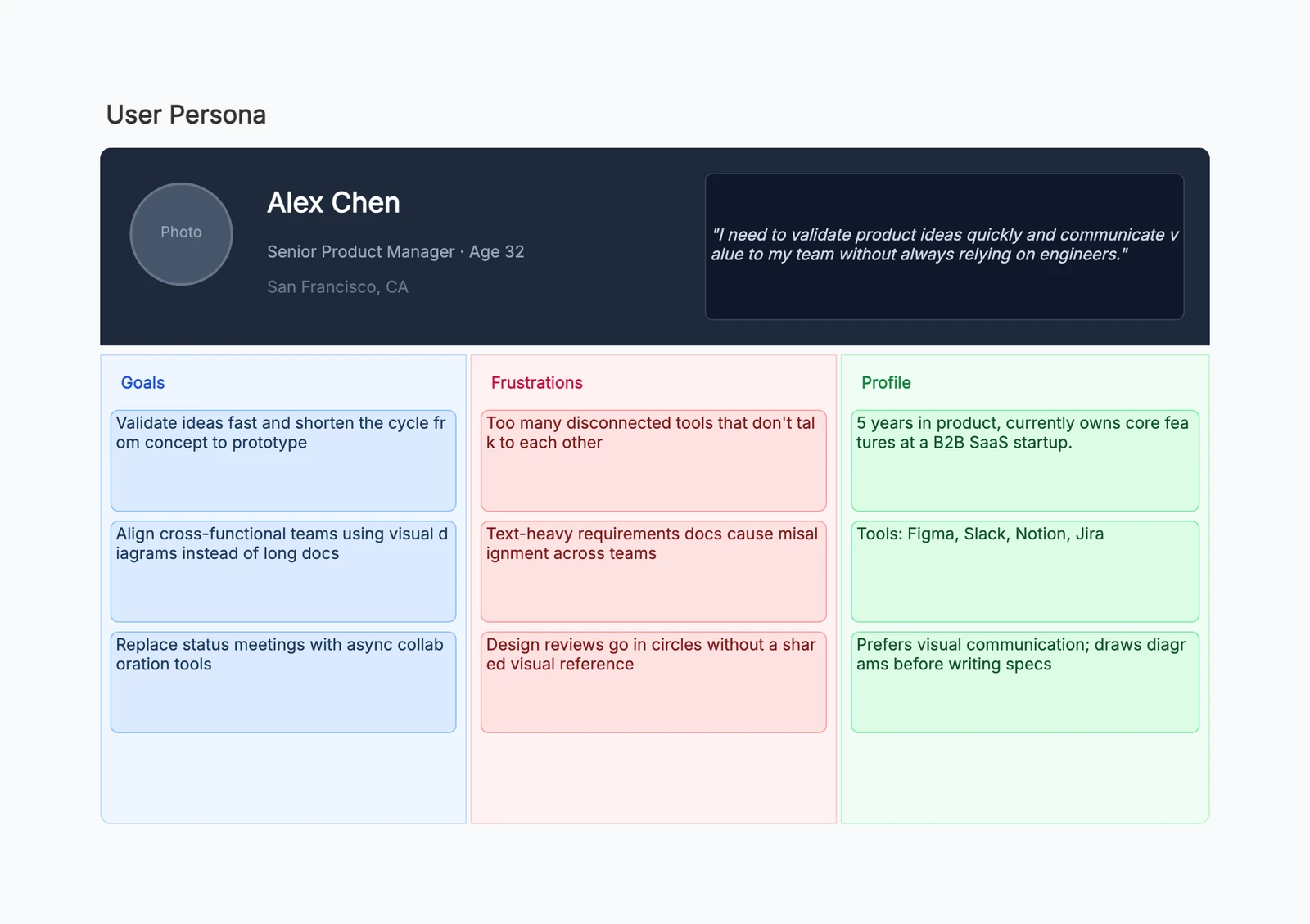
A user persona is a research-based representation of a target user. It describes a specific type of person you are designing, building, or marketing for: what they are trying to do, what gets in their way, how they behave, and what they need from your product.
The important word is research-based. A persona is not a fictional character card invented in a meeting because someone needed a slide. It should be grounded in interviews, analytics, support tickets, sales calls, surveys, product usage data, or direct observation. The names and photos are usually fictional, but the patterns behind them should be real.
Good personas help teams make better tradeoffs. Instead of debating for "the user" in the abstract, the team can ask: would this help Priya, the first-time mobile user who wants a fast setup? Would this confuse Mark, the operations buyer who cares about compliance and internal rollout?
Why User Personas Work
Teams often talk about users in vague categories: beginners, power users, admins, enterprise customers, creators, buyers, visitors. Those labels are useful, but they are too broad to guide day-to-day product decisions.
A persona turns an abstract user need into a concrete decision object. When a feature, message, onboarding flow, or pricing page is being discussed, the team has a shared reference point. The conversation moves from "I think users will like this" to "This persona is trying to finish setup in ten minutes; does this extra step help or slow them down?"
Personas also reduce internal bias. Product teams naturally design for themselves, for the loudest customer, or for the most recent sales call. A well-researched persona reminds everyone which patterns are common, which needs matter most, and which requests are edge cases.
They are especially useful when several teams need to coordinate. Product, design, marketing, sales, support, and leadership may all have different views of the customer. A persona gives them a shared language without forcing every decision into a spreadsheet.
What a Persona Includes
A useful persona is short enough to read quickly but specific enough to guide decisions. Most personas include these parts:
Background. Role, company type, experience level, context, and relevant constraints. This is not a biography; it is only the background that affects product behavior.
Goals. What the person is trying to accomplish. Goals should be outcome-oriented, not just task lists. "Reduce time spent preparing weekly reports" is more useful than "uses the dashboard."
Pain points. The frustrations, risks, blockers, or anxieties that make the current experience hard. Good pain points are specific: "Needs approval from finance before buying" is stronger than "has a limited budget."
Behaviors. How the user currently works, shops, decides, collaborates, learns, or solves problems. Behavior is often more reliable than stated preference.
Scenarios. The situations where the user interacts with your product or category. A persona for a mobile banking app should describe moments like checking a balance in a store, not just demographic facts.
Quote or motivation. A short line that captures what drives the persona. It does not need to be a literal interview quote, but it should sound like something a real person would say.
Product needs. The product implications: what must be easy, what must be trustworthy, what information must be visible, what objections must be addressed.
Demographics can be included when they matter, but they should not dominate the persona. Age, income, location, and job title are helpful only if they explain behavior or decision-making.
Real-World User Persona Examples
B2B SaaS Buyer
Persona: Operations leader at a mid-sized company evaluating workflow software.
This person is not just looking for a nice interface. They need to know whether the tool will fit an existing process, whether the team can adopt it without heavy training, and whether procurement will approve it. They may not be the daily user, but they influence the purchase.
Their goals might include reducing manual status updates, improving visibility across teams, and avoiding another tool that employees ignore after two weeks. Their pain points include change management, security review, integration questions, and unclear pricing.
For this persona, the product needs strong proof: case studies, implementation details, admin controls, pricing transparency, and clear explanations of how onboarding works.
Mobile App New User
Persona: Someone downloading a fitness, finance, travel, or productivity app for the first time.
This user has low commitment. They may be curious, but they have not yet decided the app deserves space on their phone. If onboarding is long, permissions feel intrusive, or the first value moment is delayed, they may leave before creating an account.
Their goal is simple: understand what the app does and get a useful result quickly. Their pain points include too many setup questions, unclear navigation, forced sign-up too early, and language that assumes prior knowledge.
For this persona, the product should make the first action obvious, ask only for necessary information, explain permissions in plain language, and show value before demanding too much effort.
Price-Sensitive E-Commerce Customer
Persona: A shopper comparing similar products across several stores before buying.
This user is not necessarily cheap. They may be careful, budget-conscious, or simply unwilling to overpay when alternatives are easy to compare. They look at price, shipping cost, return policy, reviews, discounts, and delivery timing together.
Their goals include finding a fair deal, avoiding hidden fees, and feeling confident that the product will match expectations. Pain points include surprise shipping costs, vague return policies, fake-looking reviews, and unclear product details.
For this persona, the product experience should surface total cost early, make comparisons easy, show trustworthy reviews, and reduce uncertainty around returns and delivery.
How to Create a User Persona
Step 1: Collect data. Start with real inputs: interviews, customer calls, onboarding notes, analytics, support conversations, sales objections, survey responses, search behavior, and product usage patterns. You do not need months of research, but you do need more than internal opinions.
Step 2: Look for patterns. Group repeated behaviors, goals, objections, and contexts. Do several users struggle at the same point? Do buyers and daily users care about different things? Do certain users choose the product for speed while others choose it for control?
Step 3: Segment by meaningful differences. A persona should represent a difference that changes product, marketing, or service decisions. Segmenting by age or industry is weak unless those differences lead to different needs or behaviors.
Step 4: Write the persona. Give the persona a name, role, context, goals, pain points, behaviors, scenarios, quote, and product needs. Keep it concise. A one-page persona that teams actually use is better than a beautiful five-page profile nobody reads.
Step 5: Use it in decisions. Bring the persona into roadmap planning, UX reviews, messaging, onboarding design, sales enablement, and support content. A persona has value only when it changes decisions.
Step 6: Update it regularly. Personas age. Markets shift, products mature, and your customer base changes. Revisit personas when you enter a new segment, launch a major feature, see conversion patterns change, or hear repeated feedback that no longer matches the old profile.
Common Mistakes
Making personas up from scratch. A persona based only on internal guesses can feel convincing while being completely wrong. If you do not have enough data yet, call it a hypothesis and validate it.
Overloading them with irrelevant demographics. A persona does not become more useful because it says someone is 34, owns a dog, likes coffee, and lives in a certain neighborhood. Include personal details only when they explain behavior.
Creating personas and never using them. Many teams make personas during a workshop, export them as PDFs, and never mention them again. If personas do not appear in product reviews, campaign planning, or roadmap conversations, they are decoration.
Creating too many personas. If every user variation becomes a persona, the team loses focus. Most products need a small set of primary personas, plus secondary notes for edge cases or specialized roles.
Confusing buyers and users. In B2B products especially, the person who buys the product may not be the person who uses it every day. Both can matter, but they should not be collapsed into one profile.
User Persona vs. Related UX and Marketing Tools
| Tool | What It Describes | Best Used For |
|---|---|---|
| User persona | A representative user type, based on research | Product, UX, messaging, prioritization |
| Customer segment | A group defined by market, behavior, revenue, or account traits | Targeting, analytics, pricing, go-to-market planning |
| User journey map | The steps and emotions across an experience over time | Finding friction, improving end-to-end flows |
| Empathy map | What a user says, thinks, does, and feels in a specific context | Synthesizing research and building team empathy |
| Ideal customer profile (ICP) | The type of company or account that is the best fit | B2B sales, marketing, qualification, account targeting |
A persona answers "who are we designing for?" A customer segment answers "which group are we targeting or measuring?" A journey map answers "what happens across the experience?" An empathy map answers "what is this person thinking and feeling in this moment?" An ICP answers "which accounts are most valuable and most likely to succeed?"
These tools work well together, but they should not be treated as interchangeable. For example, an ICP might say your best-fit customer is a 200-1,000 employee SaaS company. A user persona describes the product manager, finance approver, or team lead inside that company.
Frequently Asked Questions
How many user personas should a product have? Most products should start with one to three primary personas. Add more only when the differences lead to different product, marketing, or support decisions.
Do personas need photos and names? Names can make personas easier to discuss, and photos can make them feel more concrete. But they are optional. The research-backed goals, behaviors, and needs matter much more than the visual polish.
What is the difference between a user persona and a buyer persona? A user persona represents the person who uses the product. A buyer persona represents the person who evaluates or purchases it. In consumer products they may be the same person. In B2B, they are often different.
Can a startup create personas without a large user base? Yes, but early personas should be treated as assumptions. Use founder interviews, sales conversations, competitor reviews, community discussions, and early customer calls, then revise the personas as real usage data comes in.
When should personas be updated? Update personas when your target market changes, a new customer type becomes important, conversion or retention patterns shift, or research reveals repeated behavior that your current personas do not explain.
What tools can I use to create a user persona? You can create personas in documents, slides, or diagramming tools. If you need a visual persona card, try CodePic's user persona template — it includes sections for goals, pain points, behaviors, and a quote.