If you write documentation in Markdown and need diagrams that live in version control, you've probably evaluated both tools. The practical answer is clear: use Mermaid for lightweight diagrams in Markdown and GitHub; use PlantUML for detailed UML and complex architecture where control matters more than setup.
The full Mermaid vs PlantUML decision comes down to where diagrams live, which diagram types you maintain, and how much rendering infrastructure your team accepts. Here is how to choose without relying on a generic feature count.
At a Glance
| Mermaid | PlantUML | |
|---|---|---|
| Syntax style | Markdown-like, minimal | Domain-specific, verbose but powerful |
| Rendering | JavaScript, CLI, or platform integration | Local CLI, server, CI, or browser options |
| GitHub support | Native | Requires plugin or image generation |
| Diagram focus | Common software, data, planning, and documentation diagrams | Broad UML suite plus specialist technical diagrams |
| Styling | Themes, simple CSS-like directives | Skinparams, highly customizable |
| Learning curve | Low — 5 minutes to first diagram | Medium — days to fluency |
| Community | Larger, growing with Markdown ecosystem | Established, UML-focused |
Where Mermaid Wins
GitHub renders it natively. This is the single biggest practical difference. Write a Mermaid code block in a GitHub Markdown file, issue, or PR comment, and it renders as a diagram. No plugins. No build step. No generated images. If your team's documentation lives in GitHub, Mermaid is the path of least resistance.
Syntax you can read without knowing the tool. A Mermaid flowchart looks like an outline with arrows. Even someone who's never seen Mermaid before can edit it:
graph TD
    A[User clicks Login] --> B{Valid credentials?}
    B -->|Yes| C[Show Dashboard]
    B -->|No| D[Show Error]
PlantUML's equivalent requires understanding @startuml, if/else
syntax, and the note convention. It's more expressive, but it's also
more to learn.
It fits the Markdown publishing path. GitHub and many documentation platforms can render Mermaid. The exact Mermaid version and syntax still depend on the host, so test newer diagram types on the destination platform before making them part of a critical documentation workflow.
Where PlantUML Wins
Broader UML and specialist coverage. PlantUML supports the UML suite: class diagrams, sequence diagrams, use case diagrams, activity diagrams, component diagrams, state diagrams, deployment diagrams, and object diagrams. Plus Gantt charts, mind maps, wireframes, network diagrams, and timing diagrams, plus multiple non-UML formats. Mermaid has also expanded far beyond basic flowcharts, so compare the exact syntax you need instead of relying on an old diagram-count comparison.
Complex sequence diagrams offer more control. PlantUML supports detailed participants, lifelines, activation bars, grouped messages, notes, and rich styling. Mermaid handles many ordinary interaction flows well, but teams with dense protocols should prototype their hardest diagram in both tools before standardizing.
Styling control. PlantUML's skinparams system lets you control colors, fonts, spacing, line styles, and shadows at a granular level. You can match your company's brand guidelines. Mermaid's theming is simpler — a handful of built-in themes and basic CSS-like customization.
The Practical Decision
Go Mermaid if your documentation lives in GitHub or GitLab, you need diagrams that anyone on the team can edit without learning a new syntax, and you're drawing flowcharts, basic sequence diagrams, ER diagrams, or Gantt charts.
Go PlantUML if you need UML compliance, complex sequence diagrams with many participants, or diagram types Mermaid doesn't support; and your team is comfortable setting up a rendering pipeline.
Or skip code altogether if you just need to draw a diagram once and share it. Tools like CodePic let you sketch directly on a whiteboard — no syntax to learn, no rendering to configure. Diagram-as-code is great for version-controlled documentation. For everything else, sometimes a canvas and a marker is faster.
Test the Decision with One Sequence Diagram
Use the same service interaction to test both approaches before standardizing. Open the sequence diagram template below, replace the participants with your own services, then compare that visual draft with Mermaid and PlantUML versions.
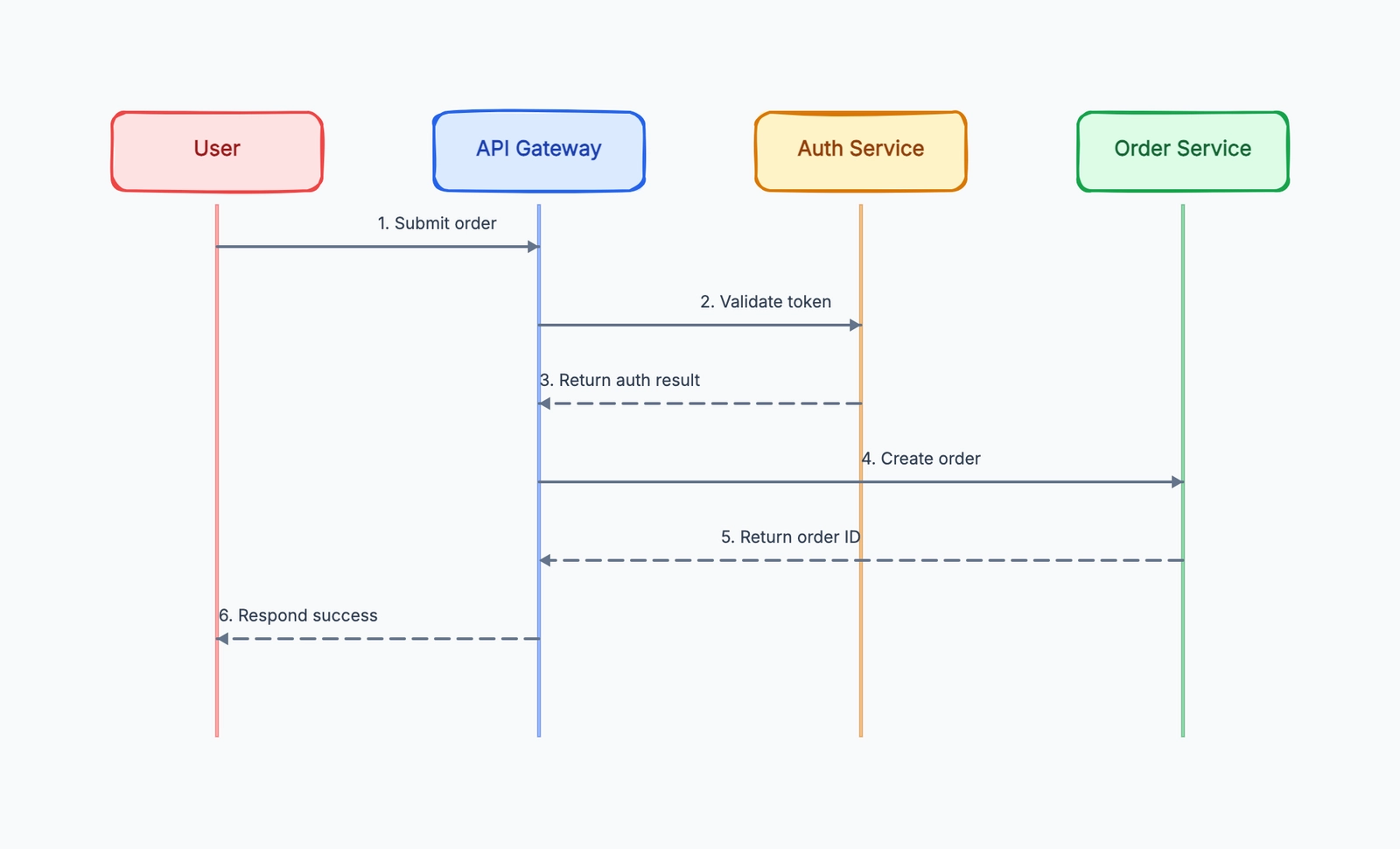
Sequence diagram
Try this templateThis exposes the real trade-off quickly: source-level review and repeatable rendering versus manual placement, annotation, and stakeholder editing.
How Teams Choose in Practice
In most teams I've worked with, the decision follows a predictable pattern. Someone starts with Mermaid because it renders on GitHub and takes five minutes to learn. The team builds a library of flowcharts and basic sequence diagrams. Everything works until someone needs a deployment diagram, or a sequence diagram with eight participants and branching logic, or wants to match the company's exact brand colors.
That's when PlantUML enters the conversation — not as a replacement for every diagram, but as a specialist tool for the diagrams Mermaid can't handle well. Teams that try to use one tool for everything either live with Mermaid's limitations on complex diagrams, or carry PlantUML's extra setup into simple ones. Teams that accept both tools use Mermaid for 80% of diagrams and PlantUML for the 20% that need the extra power.
Neither tool is going anywhere. Mermaid's GitHub-native rendering gives it a distribution advantage that PlantUML can't match. PlantUML's depth gives it a capability advantage that Mermaid isn't trying to match — Mermaid's roadmap explicitly prioritizes simplicity over completeness. Choose accordingly.
The Rendering Difference in Practice
The biggest day-to-day difference between the two isn't syntax — it's rendering. With Mermaid, you write a code block and it renders. That's it. The JavaScript parser runs in your browser (or in GitHub's backend) and produces an SVG. No server, no build step, no generated image files to commit.
PlantUML source needs a compatible renderer. Common choices include a local command, a private server, an editor integration, or a CI step that generates PNG or SVG files. A public server is optional, not a requirement. This adds a deployment decision, but it also lets a team pin the renderer version and keep private diagram source inside its own environment.
This rendering gap explains most of Mermaid's adoption advantage. When a developer writes documentation in a Markdown file and pushes to GitHub, the diagram either renders automatically (Mermaid) or requires additional infrastructure (PlantUML). For solo developers and small teams, that's often the deciding factor.
A concrete PlantUML sequence diagram example for a payment flow — this is where PlantUML shines over Mermaid:
@startuml
actor Customer
participant "Web App" as Web
participant "Payment API" as API
database "Bank" as Bank

Customer -> Web: Click "Pay"
Web -> API: POST /charge
API -> Bank: Authorize
Bank --> API: Approved
API --> Web: 200 OK
Web --> Customer: Success page

alt Card Declined
  Bank --> API: Declined
  API --> Web: 402
  Web --> Customer: "Card declined — try another?"
end
@enduml
Mermaid can draw this, but PlantUML handles the alt block, participant
ordering, and activation bars with more visual polish out of the box. For
complex sequence diagrams with many participants and branching logic,
PlantUML's output is often what teams present to stakeholders.
Choose by Diagram Type, Not by Tool Reputation
A single winner is less useful than a diagram-by-diagram rule:
| Your main job | Better starting point | Why |
|---|---|---|
| README flowchart or decision tree | Mermaid | GitHub renders fenced Mermaid blocks directly |
| Basic sequence diagram in product docs | Mermaid | Short source and low review friction |
| Detailed UML class or component model | PlantUML | More UML-specific notation and styling control |
| Complex protocol sequence | PlantUML | Better fit for detailed participants, grouping, and presentation rules |
| ER diagram maintained beside a schema | Mermaid first | Easy Markdown workflow; test the required cardinality and layout |
| Timeline inside Markdown documentation | Mermaid first | Concise timeline syntax; verify that the host supports the required Mermaid version |
| Deployment specification with specialized notation | PlantUML first | Deeper architecture and UML vocabulary |
| One-off brainstorming diagram | Visual editor | Code syntax adds maintenance cost without much benefit |
The word first matters. Automatic layout behaves differently as a diagram grows. Build the most difficult representative example—not the easiest flowchart—and review readability at the size where it will actually appear.
If the team needs manual positioning, freeform annotation, or stakeholder editing, compare Mermaid vs draw.io. If the decision is between code and a managed collaborative platform, see Mermaid vs Lucidchart.
CI, Privacy, and Renderer Security
Diagram-as-code is executable documentation: source enters a parser and a renderer produces SVG, PNG, or HTML. Treat that pipeline like any other build dependency.
For Mermaid, pin or deliberately update the package or CLI version used in CI.
GitHub may run a different Mermaid version, so syntax that works locally can
still fail on the hosted page. When embedding Mermaid in an application, use
an appropriate securityLevel; the default strict mode encodes HTML in labels
and disables click behavior, while sandbox mode isolates rendering in an
iframe. Do not loosen those controls merely to make an untrusted diagram work.
For PlantUML, decide whether rendering happens locally, in CI, or on a private server. PlantUML provides security profiles that control access to local files and URLs. A server that accepts user-supplied diagram text should use a restricted profile such as allowlist or sandbox and should not expose an unrestricted renderer to the internet.
A maintainable CI workflow normally does four things:
- validates every changed diagram source;
- pins the renderer or records its version;
- fails on syntax errors instead of publishing a broken placeholder;
- generates artifacts only when the publishing platform cannot render the source format itself.
Keep the source file as the canonical asset. Generated images are outputs, not the editable original. This makes changes reviewable and avoids the common failure mode where a diagram image is updated but its source is lost.
A Practical Mixed-Tool Policy
Using both tools is reasonable, but only with a rule. Without one, contributors choose formats randomly and reviewers need multiple local setups. A simple policy could be:
- use Mermaid for diagrams embedded directly in Markdown;
- use PlantUML when a required UML construct or complex sequence cannot be expressed clearly in Mermaid;
- keep source beside the document or code it describes;
- provide one repository command that validates and renders every format;
- record the exception in the document when a diagram uses PlantUML.
Do not migrate a library merely because one tool added a new feature. Migration changes line wrapping, node order, spacing, and review history. Convert only when the current format blocks maintenance or publishing. For broader choices beyond diagram-as-code, review the best diagramming tools for developers.
Bottom Line
Mermaid is the default for most teams in 2026 — it's simpler, it renders everywhere, and it handles the 80% of diagrams that most projects need.
PlantUML is the specialist — when you need the extra 20%, nothing else matches its depth.
The right question isn't "which one is better." It's "does Mermaid cover the diagram types my team actually uses?" If yes, stop there — Mermaid's simpler syntax, zero-config rendering, and native GitHub support will save your team more time than PlantUML's extra diagram types will ever be worth.
If no — if you need full UML compliance, complex sequence diagrams, or diagram types that Mermaid hasn't implemented yet — PlantUML fills the gaps that Mermaid intentionally leaves open. The two tools complement each other more than they compete, and many mature projects use both: Mermaid for the common diagrams in README files and docs, PlantUML for the detailed UML specs in the architecture wiki.
Related Guides
- Mermaid vs PlantUML vs D2 — Add D2 to the decision when automatic layout and architecture maps matter.
- Mermaid Timeline Syntax: 8 Copy-Paste Examples — A practical guide to Timeline syntax, sections, direction, themes, and Markdown embedding.
- Mermaid alternatives — Compare D2, Graphviz, PlantUML, and visual editors when Mermaid is not the right fit.
- Mermaid vs draw.io — Choose between text source and direct visual editing.